# Iblai Vibe Agent Billing
> Add the agent Billing tab (LLM spend limits for the agent and per user, with usage bars, block/alert enforcement, and near-limit alert thresholds) to your Next.js app
- Skill: `iblai/iblai-vibe-agent-billing` (Agent Skill, multi-file: 6 files)
- Install (CLI): `npx skillmds@latest add iblai/iblai-vibe-agent-billing`
- Raw SKILL.md: https://api.skillmd.com/api/skills/iblai/iblai-vibe-agent-billing/raw
- Safety review: pending
- Works with: Claude Code, Claude.ai, OpenAI Codex
- Category: Web & Frontend
- Author: iblai (https://skillmd.com/u/iblai)
- Updated: 2026-09-17
- Page: https://skillmd.com/skills/iblai/iblai-vibe-agent-billing
---
# /iblai-vibe-agent-billing
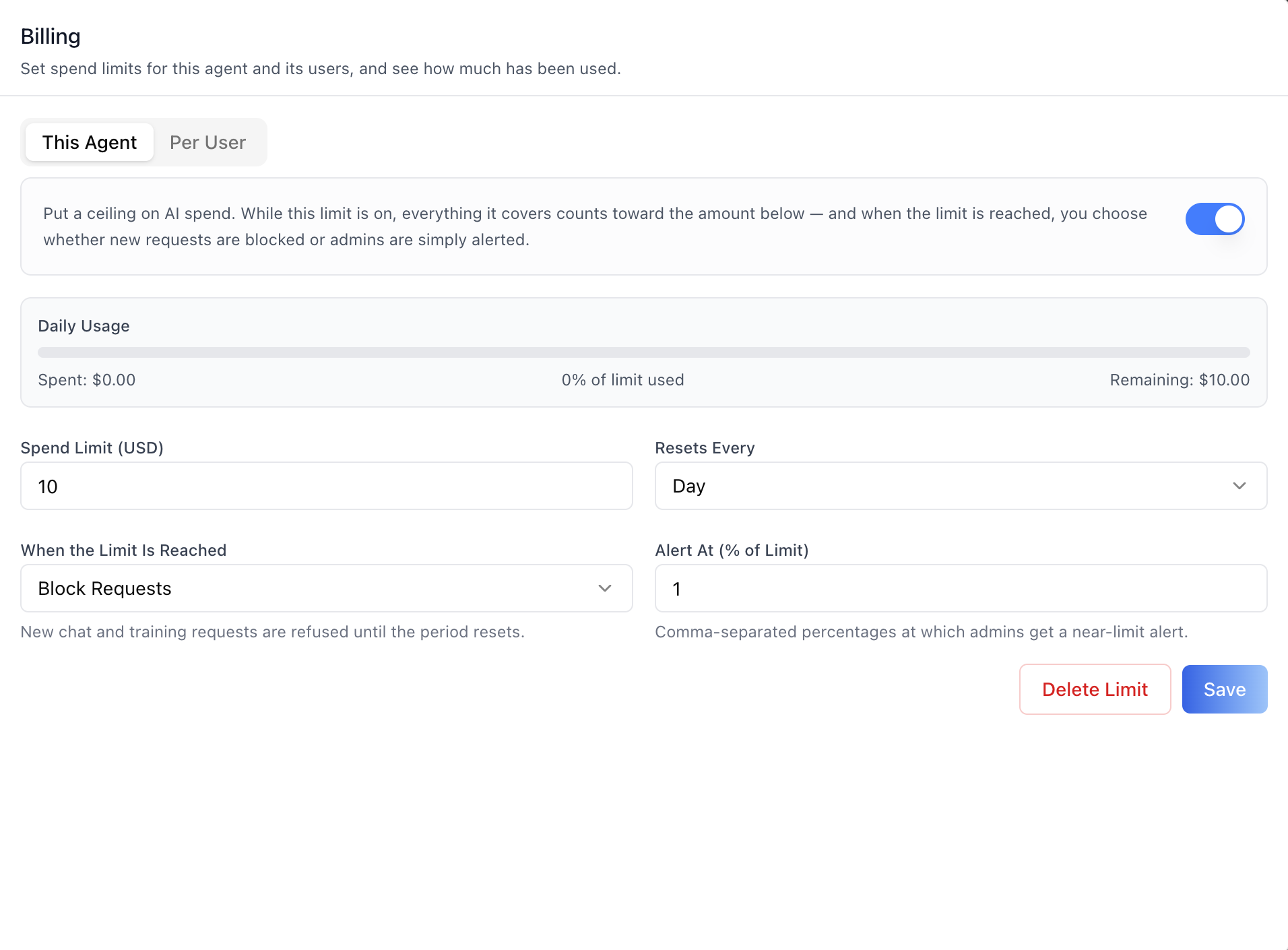
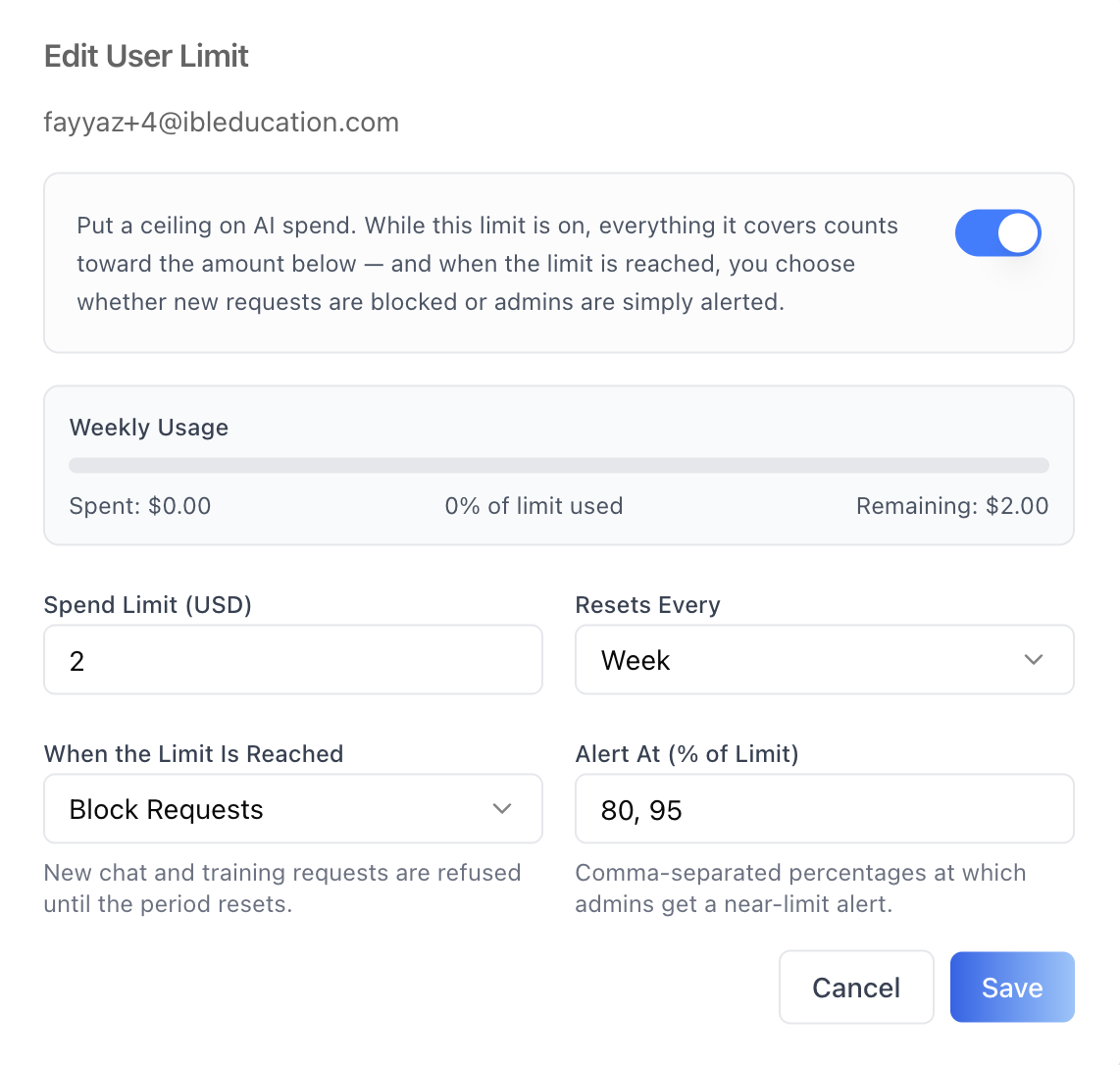
Add the agent **Billing tab** -- set LLM spend limits for this agent
and its users, and see how much has been used. Two sub-tabs match the
backend's agent-level scopes: **This Agent** (the agent's own spend
cap) and **Per User** (explicit per-user limits on this agent, with
the user picked through a platform-user search). Each limit has an
enable toggle, a usage bar (spent / % used / remaining), a spend
amount with a reset interval (day/week/month/year), an enforcement
mode (**Block Requests** or **Alert Only**), and comma-separated
alert thresholds at which admins get a near-limit alert. Enforcement
is server-side — a blocked request is refused with a `429` /
`spend_cap_exceeded` error until the period resets. This is one tab
in the wider agent-settings family. All tabs share the same
`AgentSettingsProvider` wrapper.
> **Common setup (brand, conventions, env files, verification):** see [docs/skill-setup.md](https://raw.githubusercontent.com/iblai/vibe/refs/heads/main/docs/skill-setup.md).
## Prerequisites
- Auth must be set up first (`/iblai-vibe-auth`)
- MCP server + skills configured (`@iblai/mcp` in `.mcp.json`)
- `AgentSettingsProvider` must wrap the route (see `/iblai-vibe-agent-setting`
Step 2 if not already set up)
- Ask the user for a real `mentorId` (agent UUID). Do NOT invent one.
- The spend-cap endpoints are RBAC-gated admin endpoints — a user
without access sees a friendly "no access" panel per sub-tab (403).
## Step 1: Check Environment
Before proceeding, check for an `iblai.env` in the project root. Look for
`PLATFORM`, `DOMAIN`, and `TOKEN` variables. If the file does not exist or
is missing these variables, tell the user:
"You need an `iblai.env` with your platform configuration. Download the
template and fill in your values:
`curl -o iblai.env https://raw.githubusercontent.com/iblai/vibe/refs/heads/main/iblai.env`"
## Step 2: Mount `AgentSpendCapsTab`
```tsx
// app/(app)/agents/[mentorId]/billing/page.tsx
"use client";
import { AgentSpendCapsTab } from "@iblai/iblai-js/web-containers/next";
export default function AgentBillingPage() {
return (
);
}
```
`AgentSpendCapsTab` reads `tenantKey` and `mentorId` from
`AgentSettingsProvider`. No props are required for the standard mount.
## Step 3: Customize Labels (Optional)
```tsx
import { AgentSpendCapsTab } from "@iblai/iblai-js/web-containers/next";
;
```
## Step 4: Use MCP Tools for Customization
```
get_component_info("AgentSpendCapsTab")
get_component_info("SpendCapUsage")
get_component_info("AgentSettingsProvider")
```
## `` Props
Import from `@iblai/iblai-js/web-containers/next`.
| Prop | Type | Required | Description |
|------|------|----------|-------------|
| `labels` | `DeepPartial` | No | Override user-visible strings |
| `tenantKey` | `string` | No | Identity override; defaults to `AgentSettingsProvider` |
| `mentorId` | `string` | No | Identity override; defaults to `AgentSettingsProvider` |
| `headerClassName` | `string` | No | Extra classes on the tab header (wide-dialog hosts widen padding) |
| `bodyClassName` | `string` | No | Extra classes on the scrollable body |
## What the tab renders
- **Header** — "Billing" title and "Set spend limits for this agent
and its users, and see how much has been used."
- **This Agent / Per User sub-tabs** — the two agent-level scopes. The
tab ratchets its height so switching sub-tabs never shrinks the
dialog it is hosted in.
- **No-access state** — when the current user lacks permission for a
scope's endpoints (403), that sub-tab's content is replaced by a
"no access" notice.
### Shared spend-cap editor (both scopes)
Both sub-tabs edit a cap through the same `SpendCapForm`:
- **Enable toggle** — "Put a ceiling on AI spend…" capability gate.
While on, everything the limit covers counts toward the amount;
fields collapse when toggled off. The flag rides along on save.
- **Usage strip** (saved caps only) — "Daily/Weekly/Monthly/Yearly
Usage" with a progress bar (blue, amber at ≥80%, red when
exceeded) and Spent / % of limit used / Remaining figures, plus
Disabled / Alert only / Exceeded badges as applicable.
- **Spend Limit (USD)** — positive decimal; sent as a 2-decimal
string.
- **Resets Every** — Day / Week / Month / Year.
- **When the Limit Is Reached** — `Block Requests` (new chat and
training requests are refused until the period resets) or
`Alert Only` (requests continue; admins are alerted).
- **Alert At (% of Limit)** — comma-separated percentages (default
`80, 95`) at which admins get a near-limit alert.
- **Delete Limit** (saved caps only) — confirmation dialog before
removal. **Save** creates the cap on first save and updates it
after (the PUT is an upsert).
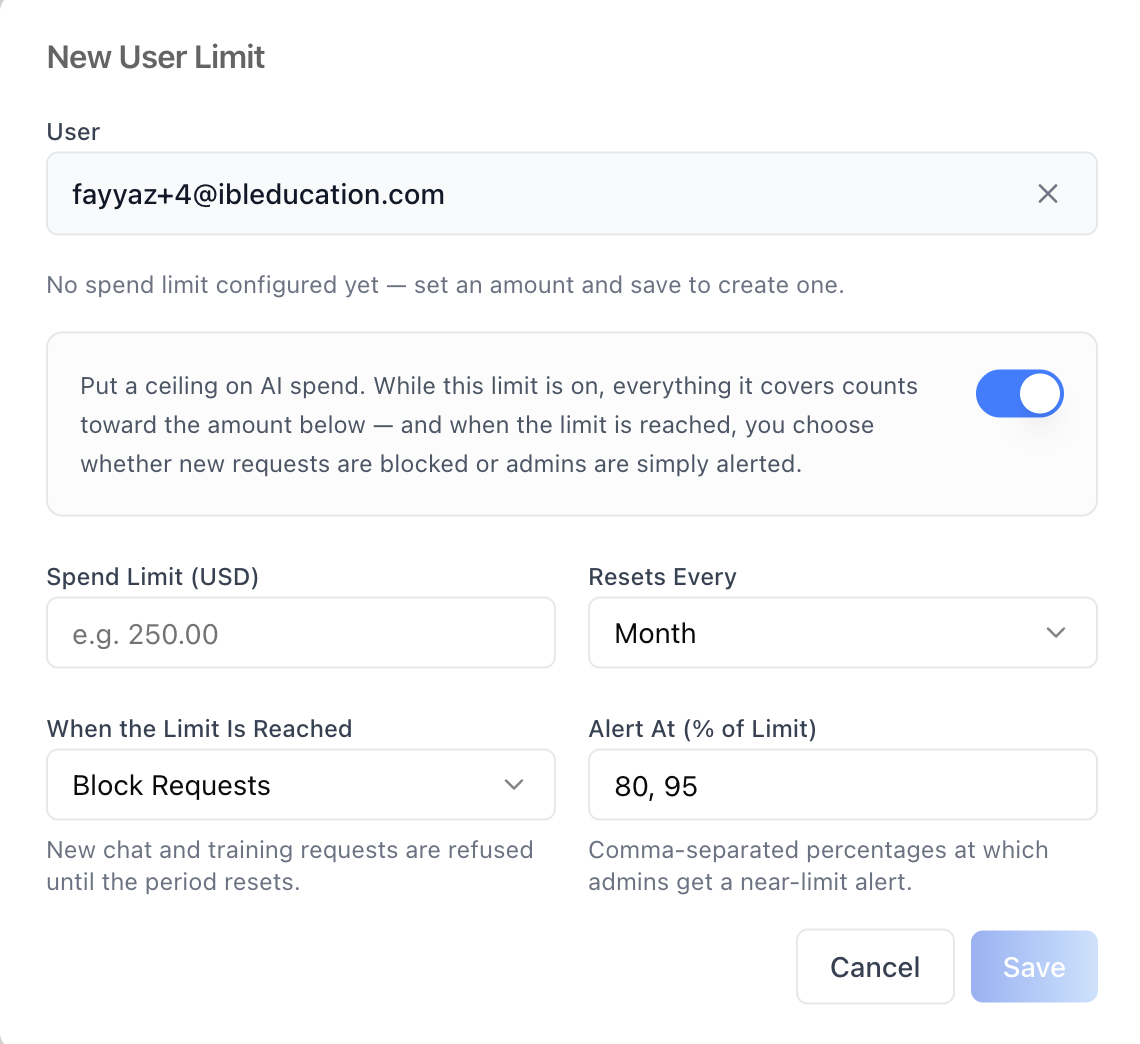
- Until a cap exists the form shows "No spend limit configured yet —
set an amount and save to create one."
### This Agent sub-tab
The agent's own singleton spend cap — everything spent on this agent
by anyone counts toward it.
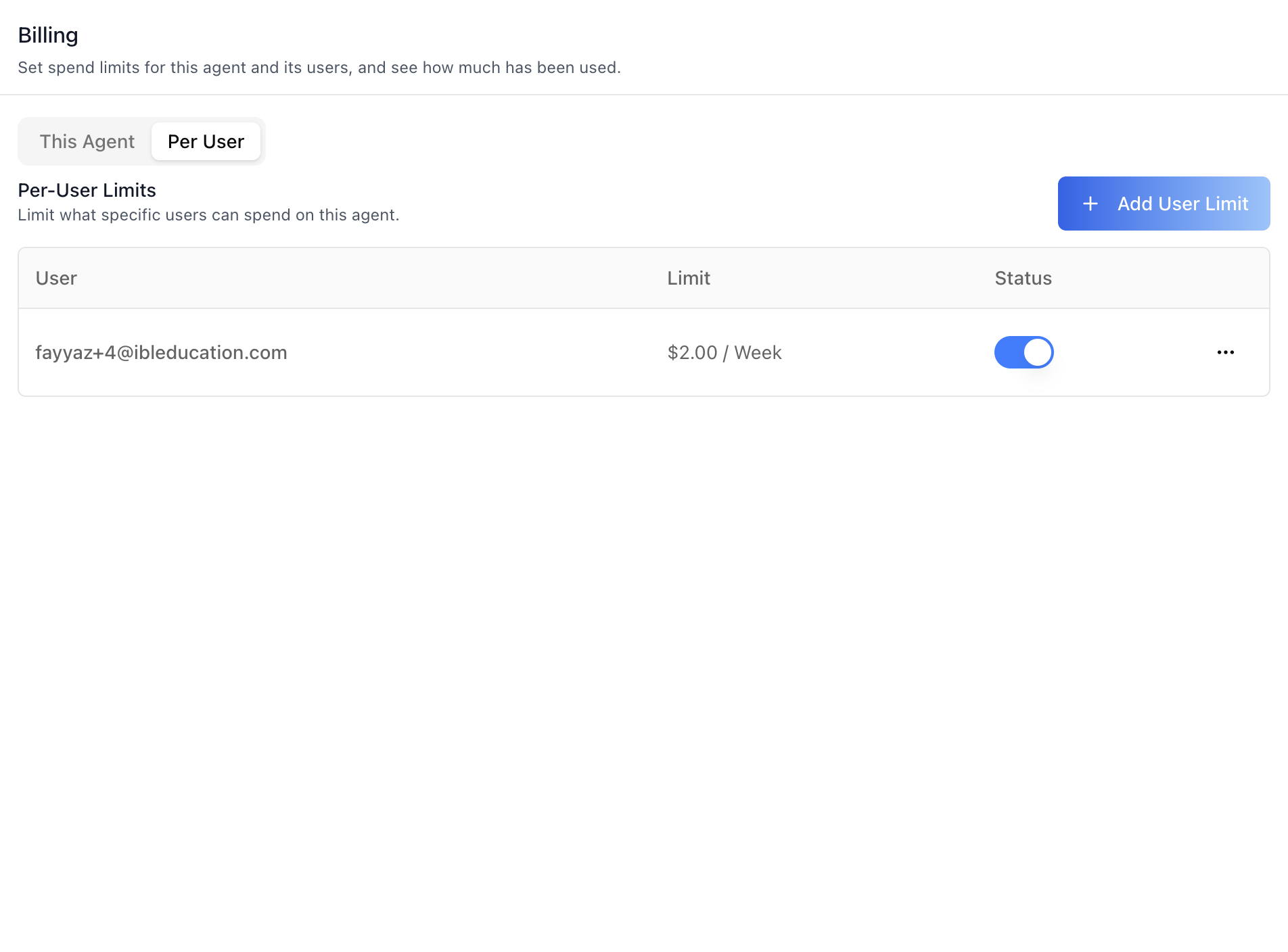
### Per User sub-tab
Explicit (user, agent) limits — "Limit what specific users can spend
on this agent."
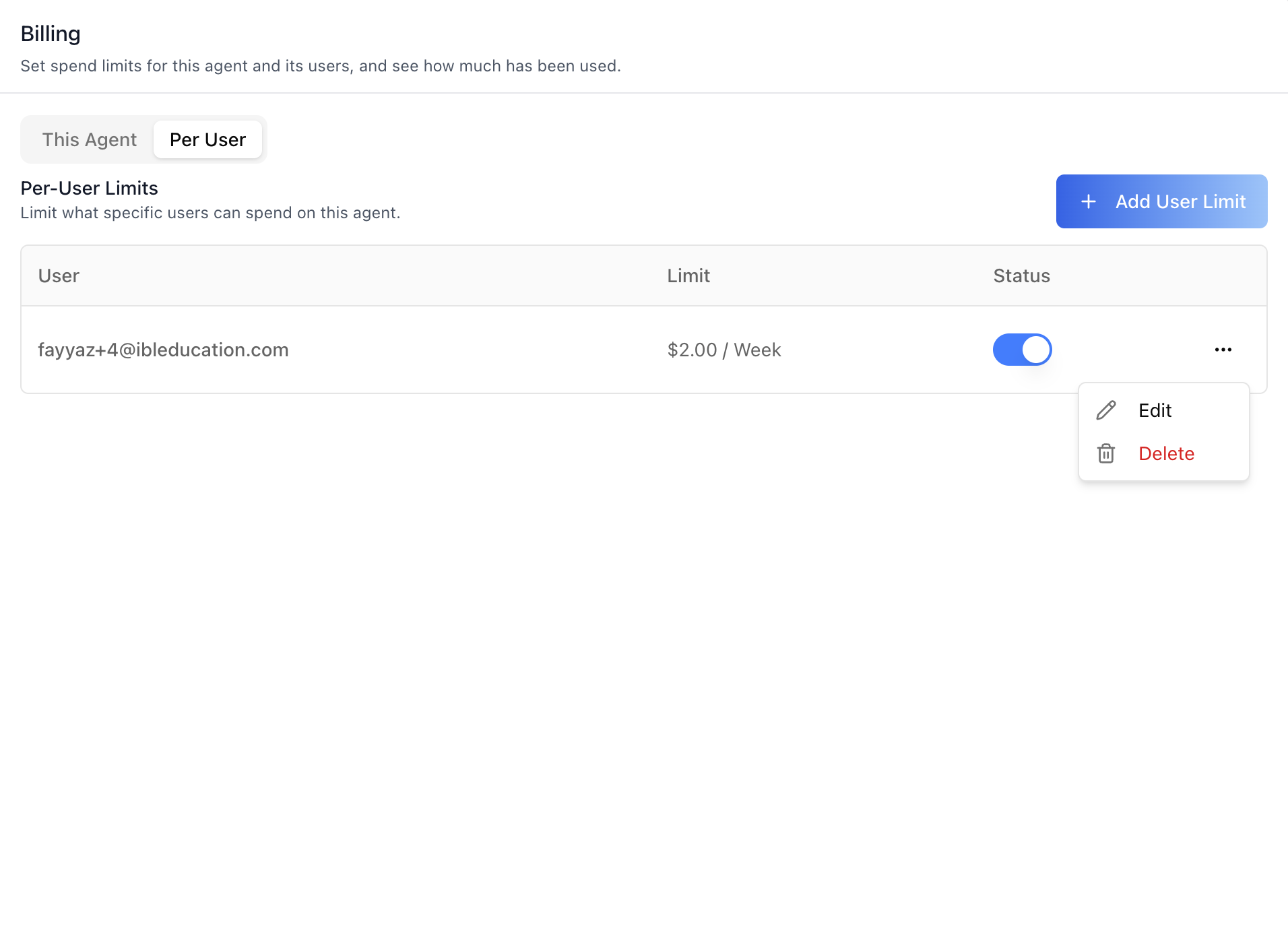
- **Table** — User (email-first, linked to the same profile viewer as
the Management tab; clicking the row opens it too), Limit
(`$2.00 / Week`), Status (direct enable toggle that saves
immediately, plus Exceeded / Alert-only badges), and a per-row
actions menu (**Edit** / **Delete**).
- **Add User Limit** — opens the New User Limit modal: pick the user
through a debounced platform-user search (min 2 characters,
email-only options — no free-text usernames), then fill the same
spend-cap form. Edit mode skips the picker and goes straight to
the form for the cap's user.
- **Delete** — confirmation dialog showing the user's email.
## Related Exports
From `@iblai/iblai-js/web-containers/next`:
- `AGENT_SPEND_CAPS_TAB_LABELS` -- the default label bundle.
- `SpendCapsTabLabels` -- type for the full label bundle.
- `AgentSpendCapsTabProps` -- props type for the tab.
- `SPEND_CAPS_SUB_TABS` -- the sub-tab keys (`agent`, `users`).
- `useSpendCaps` -- the tab's data hook (caps + save/delete per
scope), for custom UI on the same endpoints.
- `SpendCapUsage`, `SpendCapUsageProps` -- **learner-safe** usage
indicator for chat surfaces: renders progress zones and percentages
only (never dollar amounts), a warning banner near a limit, and a
blocked banner once a hard-block cap is exceeded. Renders nothing
while everything is in the "ok" zone unless `showWhenOk` is set.
From `@iblai/iblai-js/data-layer` -- the RTK Query hooks and types the
tab uses, for custom UI built on the same endpoints:
- Agent cap: `useGetAgentSpendCapQuery`,
`useUpsertAgentSpendCapMutation`, `useDeleteAgentSpendCapMutation`
- Per-user caps: `useListAgentUserSpendCapsQuery`,
`useGetUserSpendCapQuery`, `useUpsertUserSpendCapMutation`,
`useDeleteUserSpendCapMutation`
- Organization cap (workspace-wide singleton):
`useGetTenantSpendCapQuery`, `useUpsertTenantSpendCapMutation`,
`useDeleteTenantSpendCapMutation`
- Organization-wide agent-cap list: `useListAgentSpendCapsQuery`
(optional `mentor` filter)
- User-safe status: `useGetSpendCapStatusQuery`
- Types: `SpendCap`, `SpendCapUpsertRequest`, `SpendCapIntervalType`,
`SpendCapEnforcement`, `SpendCapScope`, `SpendCapStatusSummary`,
`SpendCapStatusItem`, `SpendCapStatusZone`,
`SpendCapExceededErrorBody`
- `SPEND_CAP_EXCEEDED_ERROR_CODE` -- the `spend_cap_exceeded` error
code carried by blocked requests (HTTP 429 body / WebSocket frame),
distinguishing a spend-cap block from a genuine provider rate limit.
## Step 5: Verify
Run `/iblai-vibe-ops-test` before telling the user the work is ready:
1. `pnpm build` -- must pass with zero errors
2. `pnpm test` -- vitest must pass
3. Start dev server and touch test:
```bash
pnpm dev &
npx playwright screenshot http://localhost:3000/agents//billing /tmp/agent-billing.png
```
## Important Notes
- **Redux store**: Must include `mentorReducer` and `mentorMiddleware`
- **`initializeDataLayer()`**: 5 args (v1.2+)
- **`@reduxjs/toolkit`**: Deduplicated via webpack aliases in `next.config.ts`
- **Peer deps**: `sonner` and `@iblai/iblai-web-mentor` must be installed
(`pnpm add sonner @iblai/iblai-web-mentor`)
- **Shared provider**: `AgentSettingsProvider` must wrap the route at a
layout level. See `/iblai-vibe-agent-setting` Step 2 for the full snippet.
- **First-run 404 is normal**: the singleton GETs 404 until a cap is
first saved — that is the documented "no cap configured" state, not
an error. The first Save creates the row.
- **Counters are read-only**: `current_spend_usd`, `remaining_usd`,
and `is_exceeded` are reconciled server-side and only rendered —
never submitted. Admins write `interval_type`, `max_cost_usd`
(decimal **string**), `enforcement`, `alert_thresholds`, `enabled`.
- **PUT is an upsert**: the status toggles in the tables save
immediately by re-submitting the cap's current fields with the
flipped `enabled` flag.
- **Username key, email display**: per-user caps are keyed by
`username` in the API; the UI deliberately shows the email
everywhere. The user is picked via search — no free-text usernames.
- **Enforcement is server-side**: with `block`, an exceeded cap makes
chat/training requests fail with HTTP 429 (or a WebSocket error
frame) whose body carries `error_code: "spend_cap_exceeded"`.
Handle it in custom chat UI, or mount `SpendCapUsage` to warn users
before they hit it.
- **Three scopes**: organization (workspace-wide), agent, and per-user-per-
agent — the tightest applicable cap governs. This tab manages the
two agent-level scopes; the workspace-wide limit belongs to the
organization settings Billing surface (`/iblai-vibe-billing`, which also
lists every agent's cap in one place).
- **RBAC**: each scope's endpoints are gated separately; a 403 renders
the denied panel for that sub-tab only.
- **Brand guidelines**: [BRAND.md](https://raw.githubusercontent.com/iblai/vibe/refs/heads/main/BRAND.md)
## Spend Caps REST API
For custom UI beyond the tab. All endpoints are prefixed with
`${dmUrl}/api/ai-mentor/orgs/{org}/` where `dmUrl` is
`NEXT_PUBLIC_API_BASE_URL`. Auth: `Authorization: Token `.
Use the canonical `agents/` spelling — `mentors/` is a deprecated
alias.
### Agent spend cap (singleton per agent)
| Method | Path | Purpose |
|---|---|---|
| GET | `agents/{mentor_unique_id}/spend-cap/` | Read (404 = no cap configured) |
| PUT | `agents/{mentor_unique_id}/spend-cap/` | Upsert — create or update |
| DELETE | `agents/{mentor_unique_id}/spend-cap/` | Remove the cap |
**Upsert body:**
```json
{
"interval_type": "day",
"max_cost_usd": "10.00",
"enforcement": "block",
"alert_thresholds": [80, 95],
"enabled": true
}
```
`interval_type`: `day` | `week` | `month` | `year`.
`enforcement`: `block` | `alert_only`. `max_cost_usd` is a decimal
string. Responses add the read-only counters (`current_spend_usd`,
`remaining_usd`, `is_exceeded`, `period_started_at`,
`last_reconciled_at`).
### Per-user limits on an agent
| Method | Path | Purpose |
|---|---|---|
| GET | `agents/{mentor_unique_id}/spend-caps/users/` | List this agent's user caps |
| GET | `agents/{mentor_unique_id}/spend-caps/users/{username}/` | Read one (404 = none) |
| PUT | `agents/{mentor_unique_id}/spend-caps/users/{username}/` | Upsert (same body as above) |
| DELETE | `agents/{mentor_unique_id}/spend-caps/users/{username}/` | Remove |
The list may come back as a bare array or a DRF limit/offset
envelope depending on deployment — the SDK slice normalizes both.
### Organization scope + organization-wide listing
| Method | Path | Purpose |
|---|---|---|
| GET/PUT/DELETE | `spend-caps/tenant/` | Workspace-wide singleton cap |
| GET | `spend-caps/agents/` | Every configured agent cap in the organization (`?mentor=` filter) |
### User-safe status
| Method | Path | Purpose |
|---|---|---|
| GET | `spend-caps/status/{user_id}/` | Zones + fill percentages for the caps covering this user (`?mentor=` to include an agent's caps) — never dollar amounts. Non-admins may only read their own |
### Enforcement error
A hard-block cap that is exceeded makes chat/training requests fail
with HTTP 429 (or a WebSocket error frame):
```json
{
"error_code": "spend_cap_exceeded",
"error": "...",
"message": "...",
"details": { "scope": "agent", "interval_type": "day", "mentor_unique_id": "..." }
}
```
Match on `error_code === "spend_cap_exceeded"`
(`SPEND_CAP_EXCEEDED_ERROR_CODE`) — a genuine provider rate limit
also uses status 429.