# Iblai Vibe Agent Embed
> Add the agent Embed tab (embed code, custom styling, shareable links) to your Next.js app
- Skill: `iblai/iblai-vibe-agent-embed` (Agent Skill, multi-file: 2 files)
- Install (CLI): `npx skillmds@latest add iblai/iblai-vibe-agent-embed`
- Raw SKILL.md: https://api.skillmd.com/api/skills/iblai/iblai-vibe-agent-embed/raw
- Safety review: pending
- Works with: Claude Code, Claude.ai, OpenAI Codex
- Category: Web & Frontend
- Author: iblai (https://skillmd.com/u/iblai)
- Updated: 2026-09-17
- Page: https://skillmd.com/skills/iblai/iblai-vibe-agent-embed
---
# /iblai-vibe-agent-embed
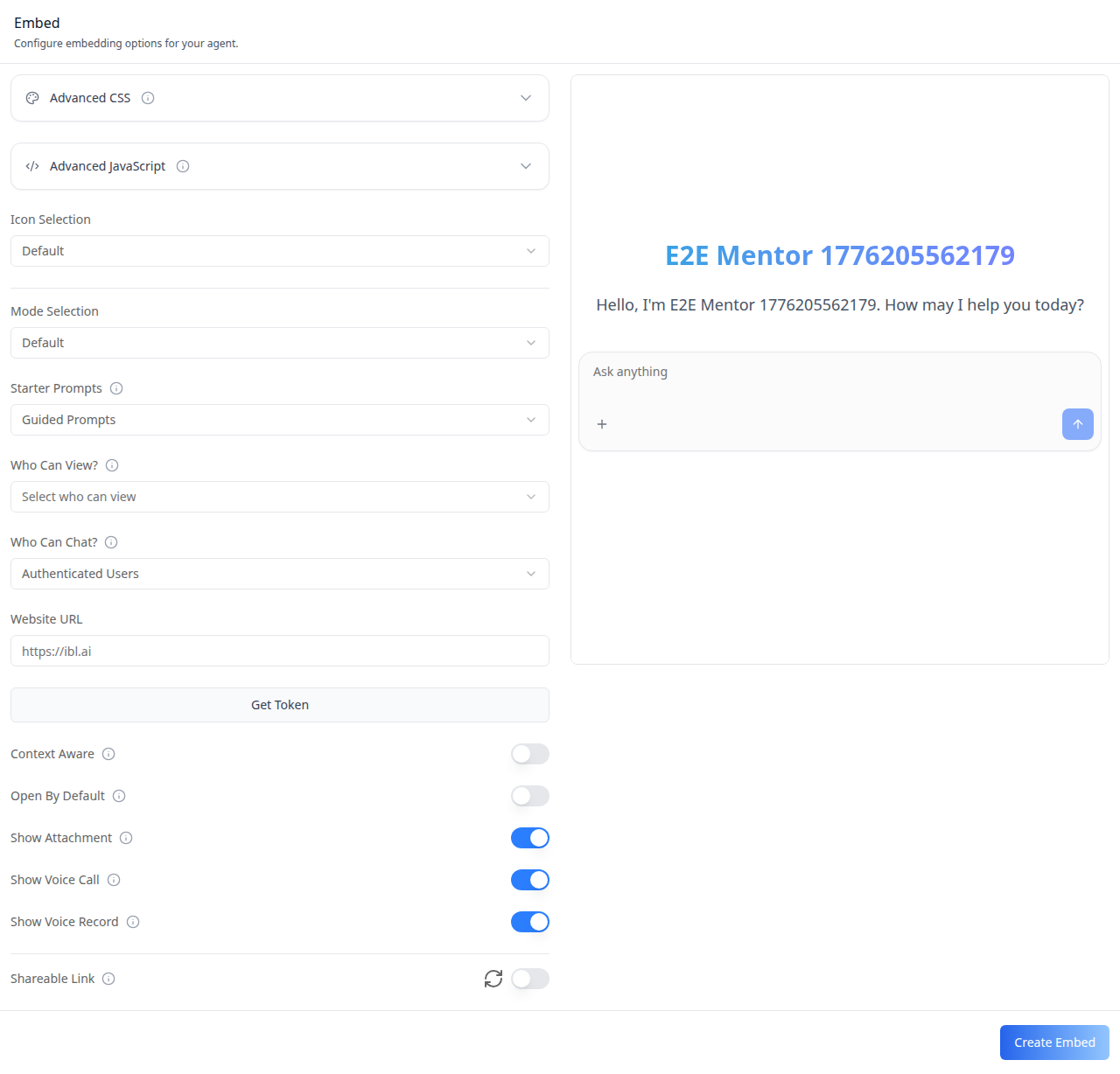
Add the agent **Embed tab** -- a comprehensive embed configuration
interface with CSS/JS editors, custom floating bubble styling, visibility
controls, shareable links, and an embedded agent preview iframe. This is
one tab in the wider agent-settings family. All tabs share the same
`AgentSettingsProvider` wrapper.
> **Common setup (brand, conventions, env files, verification):** see [docs/skill-setup.md](https://raw.githubusercontent.com/iblai/vibe/refs/heads/main/docs/skill-setup.md).
## Prerequisites
- Auth must be set up first (`/iblai-vibe-auth`)
- MCP server + skills configured (`@iblai/mcp` in `.mcp.json`)
- `AgentSettingsProvider` must wrap the route (see `/iblai-vibe-agent-setting`
Step 2 if not already set up)
- Ask the user for a real `mentorId` (agent UUID). Do NOT invent one.
## Step 1: Check Environment
Before proceeding, check for an `iblai.env` in the project root. Look for
`PLATFORM`, `DOMAIN`, and `TOKEN` variables. If the file does not exist or
is missing these variables, tell the user:
"You need an `iblai.env` with your platform configuration. Download the
template and fill in your values:
`curl -o iblai.env https://raw.githubusercontent.com/iblai/vibe/refs/heads/main/iblai.env`"
## Step 2: Mount `AgentEmbedTab`
`AgentEmbedTab` has three required props: `urls`, `CopyCodeBlock`, and
`visibilityOptions`. These are host-provided because they depend on
the deployment environment and the host app's UI library.
```tsx
// app/(app)/agents/[mentorId]/embed/page.tsx
"use client";
import {
AgentEmbedTab,
type EmbedUrlConfig,
type VisibilityOption,
} from "@iblai/iblai-js/web-containers/next";
const urls: EmbedUrlConfig = {
dmUrl: process.env.NEXT_PUBLIC_API_BASE_URL ?? "",
axdUrl: process.env.NEXT_PUBLIC_API_BASE_URL ?? "",
mentorIframeUrl: typeof window !== "undefined" ? window.location.origin : "",
authUrl: process.env.NEXT_PUBLIC_AUTH_URL ?? "",
};
const visibilityOptions: VisibilityOption[] = [
{ label: "Public", value: "public" },
{ label: "Private", value: "private" },
{ label: "Unlisted", value: "unlisted" },
];
function CopyCodeBlock({ code }: { code: string }) {
return (
{code}
);
}
export default function AgentEmbedPage() {
return (
);
}
```
## Step 3: Customize Labels (Optional)
```tsx
import { AgentEmbedTab } from "@iblai/iblai-js/web-containers/next";
;
```
## Step 4: Use MCP Tools for Customization
```
get_component_info("AgentEmbedTab")
get_component_info("AgentSettingsProvider")
```
## `` Props
Import from `@iblai/iblai-js/web-containers/next`.
| Prop | Type | Required | Description |
|------|------|----------|-------------|
| `urls` | `EmbedUrlConfig` | Yes | URL config: `{ dmUrl, axdUrl, mentorIframeUrl, authUrl }` |
| `CopyCodeBlock` | `ComponentType<{ code: string }>` | Yes | Renders code snippets with copy support |
| `visibilityOptions` | `VisibilityOption[]` | Yes | Options for the visibility dropdown |
| `labels` | `DeepPartial` | No | Override user-visible strings |
| `ssoProviders` | `SsoProvider[]` | No | SSO provider list for embed auth config |
| `isSsoProvidersError` | `boolean` | No | Whether SSO providers failed to load (defaults to `true`) |
| `supportEmail` | `string` | No | Support email shown in SSO error states |
## Related Exports
From `@iblai/iblai-js/web-containers/next`:
- `AGENT_EMBED_TAB_LABELS` -- the default agent-facing label bundle.
- `EmbedTabLabels` -- type for the full label bundle.
- `EmbedUrlConfig` -- type for the `urls` prop.
- `VisibilityOption` -- type for visibility dropdown entries.
- `SsoProvider` -- type for SSO provider entries.
## Step 5: Verify
Run `/iblai-vibe-ops-test` before telling the user the work is ready:
1. `pnpm build` -- must pass with zero errors
2. `pnpm test` -- vitest must pass
3. Start dev server and touch test:
```bash
pnpm dev &
npx playwright screenshot http://localhost:3000/agents//embed /tmp/agent-embed.png
```
## Important Notes
- **Redux store**: Must include `mentorReducer` and `mentorMiddleware`
- **`initializeDataLayer()`**: 5 args (v1.2+)
- **`@reduxjs/toolkit`**: Deduplicated via webpack aliases in `next.config.ts`
- **Peer deps**: `sonner` and `@iblai/iblai-web-mentor` must be installed
(`pnpm add sonner @iblai/iblai-web-mentor`)
- **Shared provider**: `AgentSettingsProvider` must wrap the route at a
layout level. See `/iblai-vibe-agent-setting` Step 2 for the full snippet.
- **Required props**: Unlike most tabs, `AgentEmbedTab` requires three props
(`urls`, `CopyCodeBlock`, `visibilityOptions`) because they are
host-specific.
- **Brand guidelines**: [BRAND.md](https://raw.githubusercontent.com/iblai/vibe/refs/heads/main/BRAND.md)