# Iblai Vibe Agent Lti
> Add the agent LTI tab (LTI 1.3 launch toggle with agent links, signing keys, tools, and platform endpoints) to your Next.js app
- Skill: `iblai/iblai-vibe-agent-lti` (Agent Skill, multi-file: 7 files)
- Install (CLI): `npx skillmds@latest add iblai/iblai-vibe-agent-lti`
- Raw SKILL.md: https://api.skillmd.com/api/skills/iblai/iblai-vibe-agent-lti/raw
- Safety review: pending
- Works with: Claude Code, Claude.ai, OpenAI Codex
- Category: Web & Frontend
- Author: iblai (https://skillmd.com/u/iblai)
- Updated: 2026-09-17
- Page: https://skillmd.com/skills/iblai/iblai-vibe-agent-lti
---
# /iblai-vibe-agent-lti
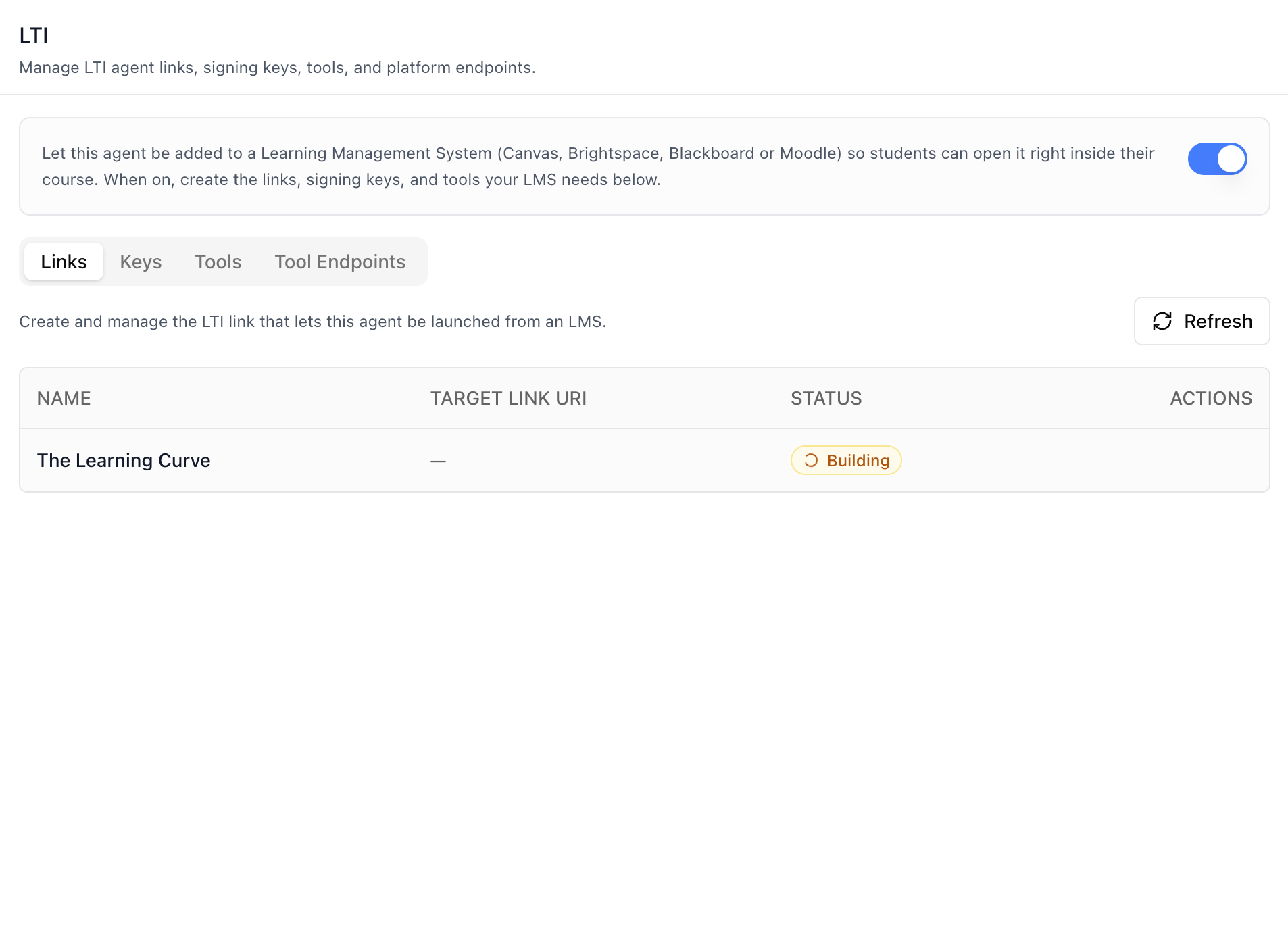
Add the agent **LTI tab** -- let the agent be added to a Learning
Management System (Canvas, Brightspace, Blackboard or Moodle) so students
can open it right inside their course. A master "LTI launches" toggle
gates four sub-tabs: **Links** (the LTI link that launches this agent),
**Keys** (platform-wide RSA signing keys), **Tools** (integrations with
external LTI platforms), and **Tool Endpoints** (the fixed URLs to share
with the LMS). This is one tab in the wider agent-settings family. All
tabs share the same `AgentSettingsProvider` wrapper.
> **Common setup (brand, conventions, env files, verification):** see [docs/skill-setup.md](https://raw.githubusercontent.com/iblai/vibe/refs/heads/main/docs/skill-setup.md).
## Prerequisites
- Auth must be set up first (`/iblai-vibe-auth`)
- MCP server + skills configured (`@iblai/mcp` in `.mcp.json`)
- `AgentSettingsProvider` must wrap the route (see `/iblai-vibe-agent-setting`
Step 2 if not already set up)
- Ask the user for a real `mentorId` (agent UUID). Do NOT invent one.
- Ask the user for their **LMS domain** (e.g. `https://learn.example.org`)
for the `lmsDomain` prop — it is deployment-specific and the Tool
Endpoints sub-tab builds its fixed URLs from it. Do NOT invent one.
## Step 1: Check Environment
Before proceeding, check for an `iblai.env` in the project root. Look for
`PLATFORM`, `DOMAIN`, and `TOKEN` variables. If the file does not exist or
is missing these variables, tell the user:
"You need an `iblai.env` with your platform configuration. Download the
template and fill in your values:
`curl -o iblai.env https://raw.githubusercontent.com/iblai/vibe/refs/heads/main/iblai.env`"
## Step 2: Mount `AgentLtiTab`
```tsx
// app/(app)/agents/[mentorId]/lti/page.tsx
"use client";
import { AgentLtiTab } from "@iblai/iblai-js/web-containers/next";
export default function AgentLtiPage() {
return (
);
}
```
`AgentLtiTab` reads `tenantKey`, `mentorId`, `username`, and `enableRBAC`
from `AgentSettingsProvider`. Only `lmsDomain` needs to be supplied by
the host since it is deployment-specific.
## Step 3: Customize Labels (Optional)
```tsx
import { AgentLtiTab } from "@iblai/iblai-js/web-containers/next";
;
```
## Step 4: Use MCP Tools for Customization
```
get_component_info("AgentLtiTab")
get_component_info("AgentSettingsProvider")
```
## `` Props
Import from `@iblai/iblai-js/web-containers/next`.
| Prop | Type | Required | Description |
|------|------|----------|-------------|
| `labels` | `DeepPartial` | No | Override user-visible strings |
| `lmsDomain` | `string` | Recommended | LMS domain used to build the fixed Tool Endpoints URLs (e.g. `https://learn.example.org`). Deployment-specific — supplied by the host. |
| `orgShortName` | `string` | No | Org short name for the JWKS endpoint. Defaults to the org resolved from the platform info query, falling back to the organization key. |
| `tenantKey` | `string` | No | Identity override; defaults to `AgentSettingsProvider` |
| `mentorId` | `string` | No | Identity override; defaults to `AgentSettingsProvider` |
| `username` | `string` | No | Identity override; defaults to `AgentSettingsProvider` |
| `enableRBAC` | `boolean` | No | Identity override; defaults to `AgentSettingsProvider` |
## What the tab renders
- **Header** — "LTI" title and description.
- **"LTI launches" capability toggle** — the agent's `is_lti_accessible`
setting. Off hides the sub-tabs and shows a hint; on reveals the four
sub-tabs below. The switch updates optimistically and rolls back with
an error toast on failure.
### Links sub-tab
The LTI link that lets this agent be launched from an LMS. Table shows
**Name**, **Target Link URI** (with copy button), **Status**, and a
per-row action. Create/Edit modal collects a single required **Name**,
displayed when selecting this agent during deep linking content
selection. The link is created with the agent's stable id
(`mentor_config.mentor`) and the organization's `platform_key`. Creating a
link while the LTI toggle is off enables `is_lti_accessible`
automatically.
**Creation is asynchronous.** The synchronous build provisions an edX
course and regularly outlives the 20s proxy timeout, so the data layer
sends `async_create: true` on the POST — the backend answers `202`
immediately with `{ id, status: "pending" }` and builds the link in
the background:
- **Status badge** — `Pending` / `Building` (amber, with a spinner),
`Ready` (green), `Failed` (red, with a hint tooltip). The Target
Link URI shows `—` until the build completes.
- **Refresh button** — shown while any link is still
pending/building; re-fetches the list to pick up the latest status.
- **Retry** — a failed row swaps its edit action for a **Retry**
button, which deletes the failed entity and re-posts the original
payload as a fresh async create.
- **Edit is gated** — a link is only editable once it is `Ready`;
in-progress and failed rows can't be renamed.
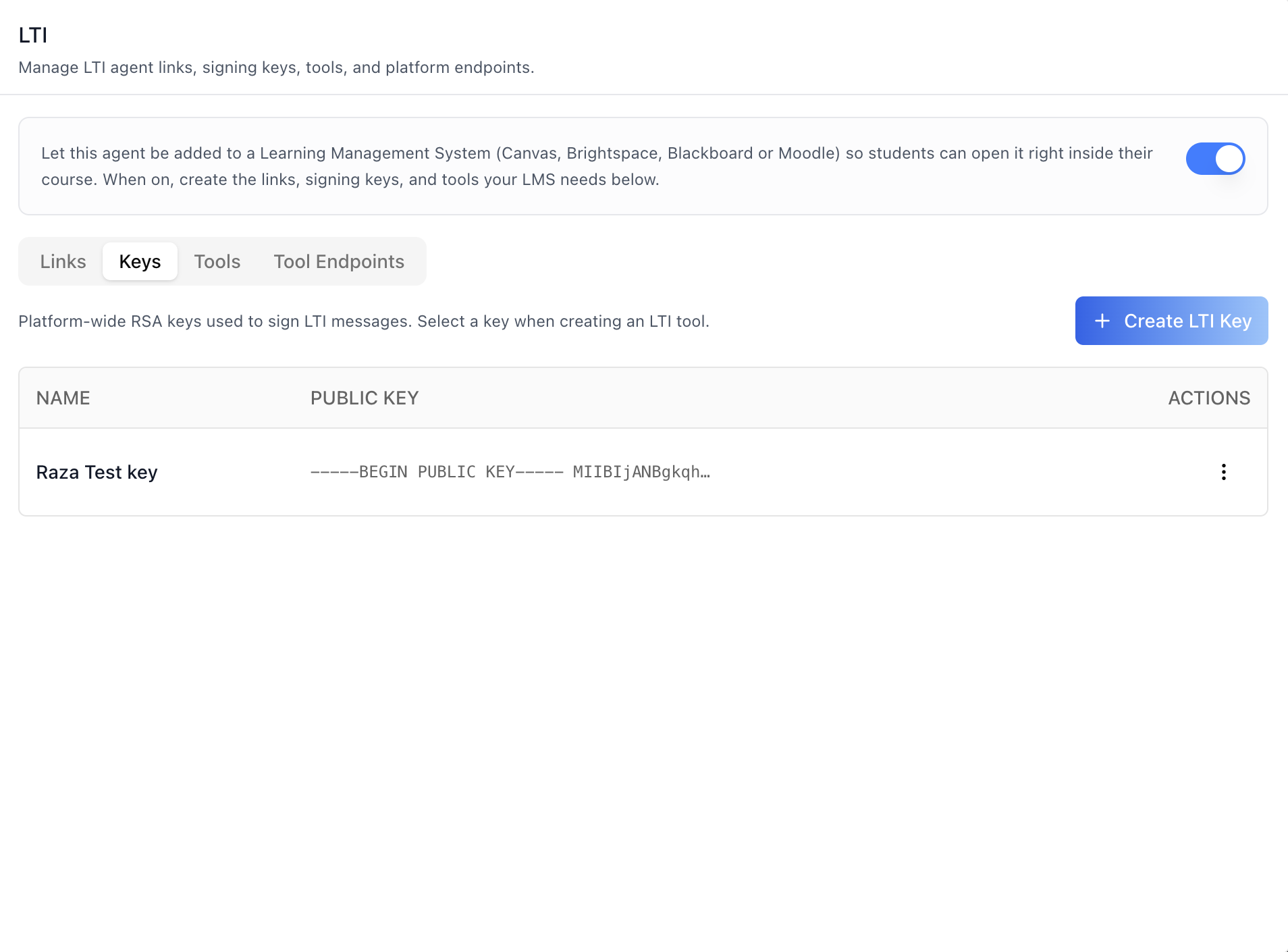
### Keys sub-tab
Platform-wide RSA keys used to sign LTI messages. Table shows **Name**
and a truncated **Public Key**, with a per-row actions menu (**Edit** /
**Delete**):
- **Create LTI Key** — name only; the RSA key pair is generated
automatically server-side.
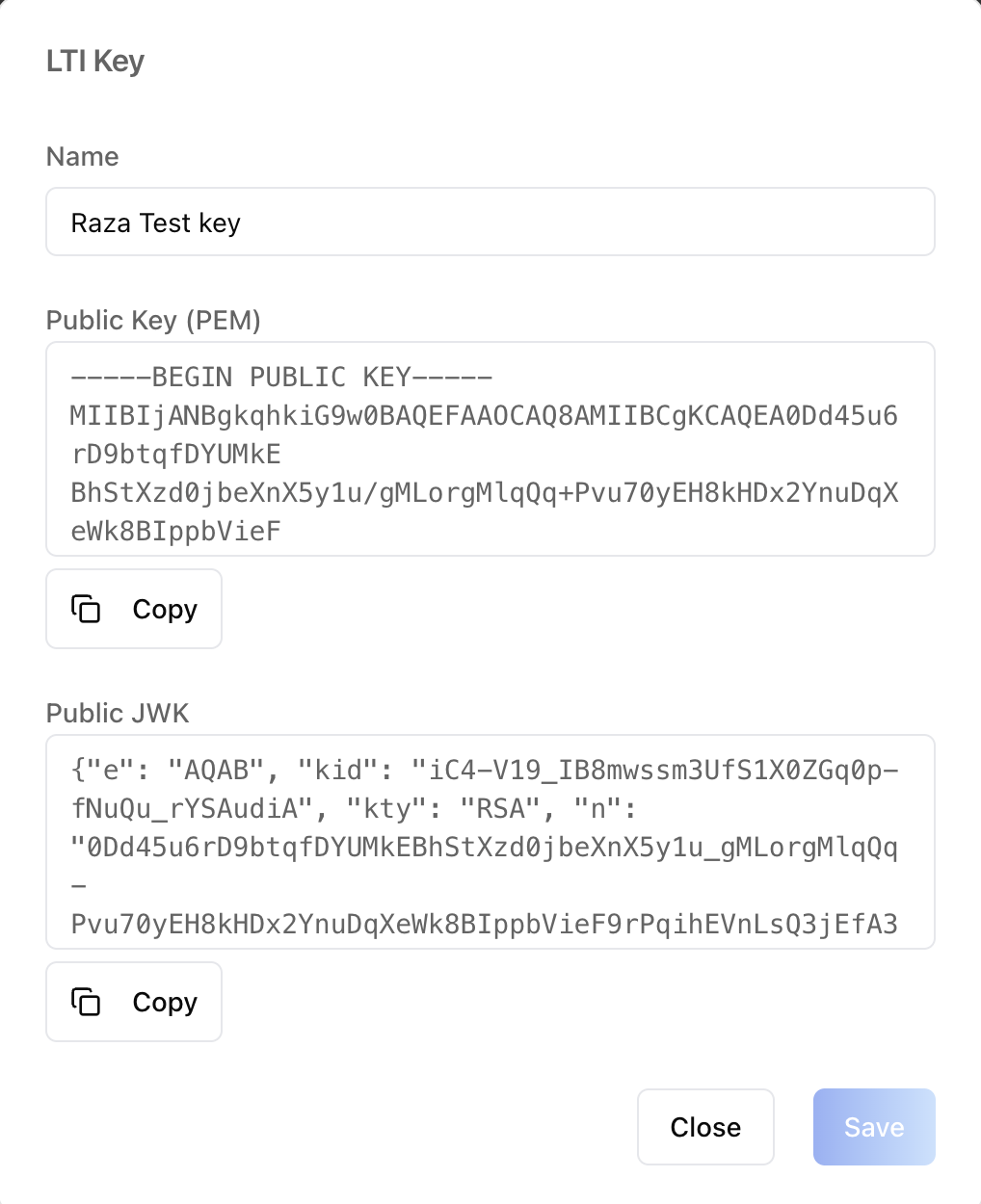
- **Key detail modal** — rename the key and view/copy the **Public Key
(PEM)** and **Public JWK**.
- **Delete** — confirmation modal. A key can only be deleted while it is
not associated with any LTI tool; the backend error detail is surfaced
when deletion is blocked.
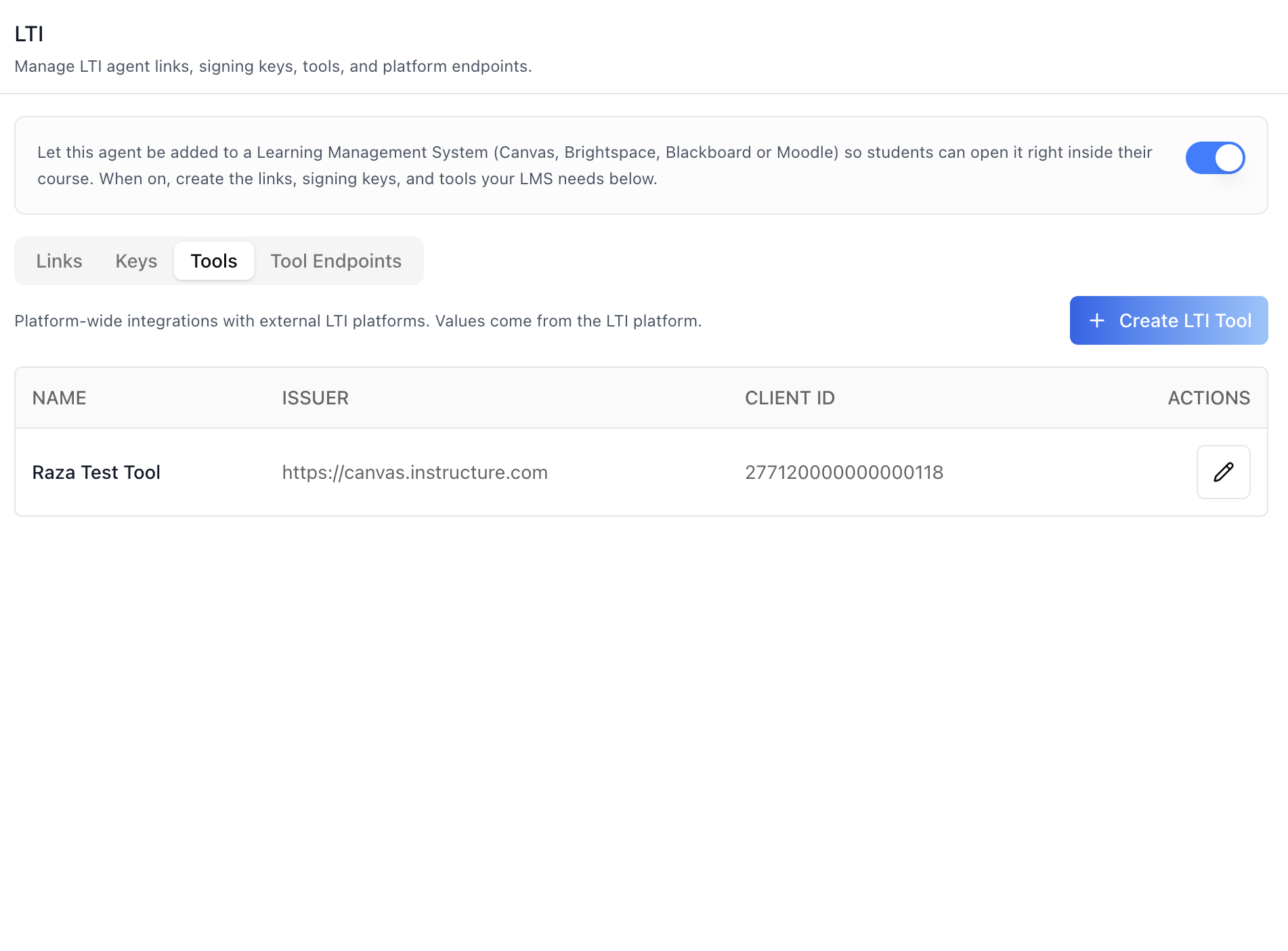
### Tools sub-tab
Platform-wide integrations with external LTI platforms (values come from
the LTI platform). Table shows **Name**, **Issuer**, and **Client ID**
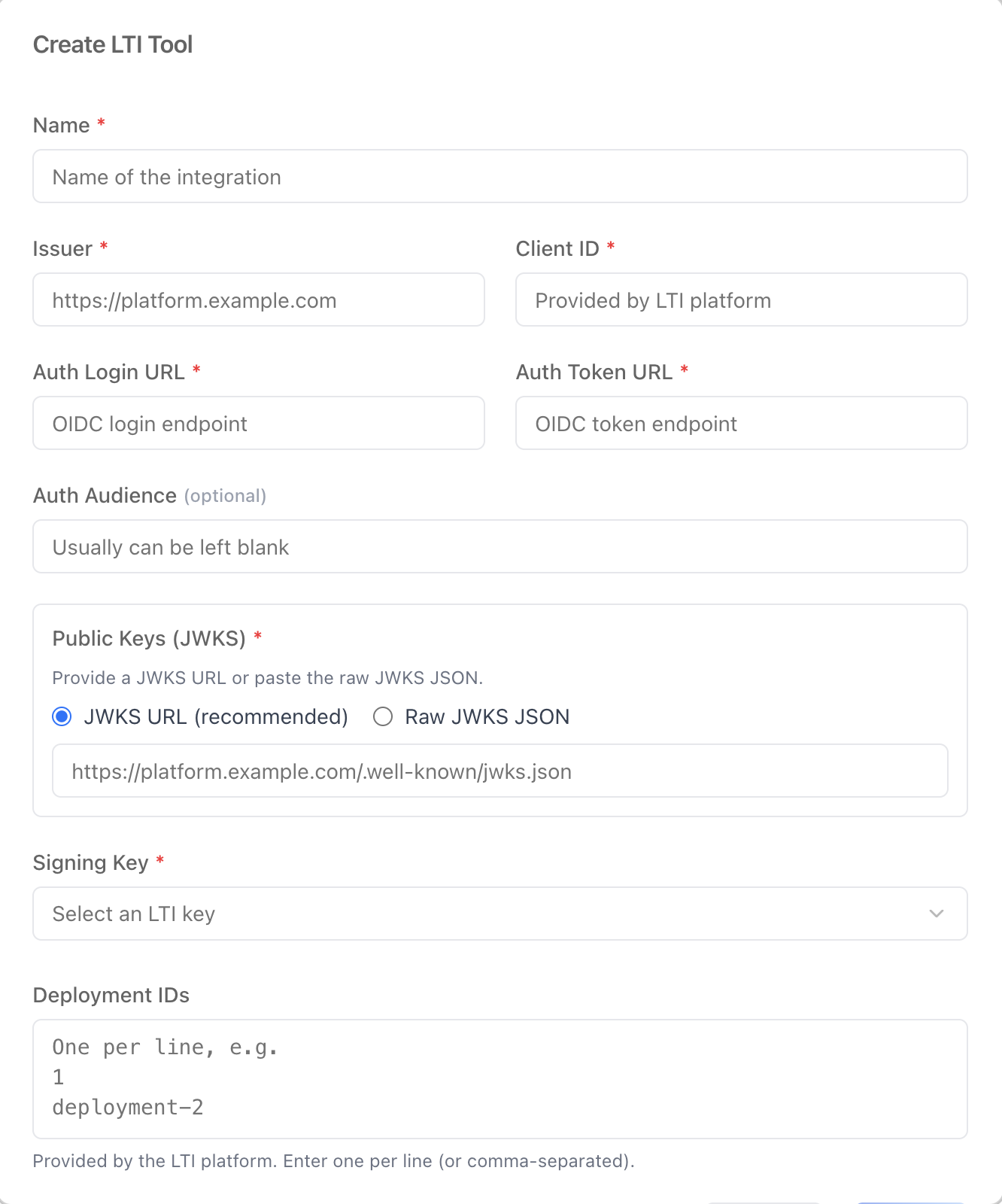
with an edit action. Create/Edit modal collects:
| Field | Notes |
|---|---|
| Name | Required. Name of the integration. |
| Issuer | Required. e.g. `https://platform.example.com` |
| Client ID | Required. Provided by the LTI platform. |
| Auth Login URL | Required. OIDC login endpoint. |
| Auth Token URL | Required. OIDC token endpoint. |
| Auth Audience | Optional. Usually can be left blank. |
| Public Keys (JWKS) | Required. **JWKS URL** (recommended) or **Raw JWKS JSON**. |
| Signing Key | Required. Select an LTI key (create one in the Keys sub-tab first). |
| Deployment IDs | Provided by the LTI platform. One per line (or comma-separated). |
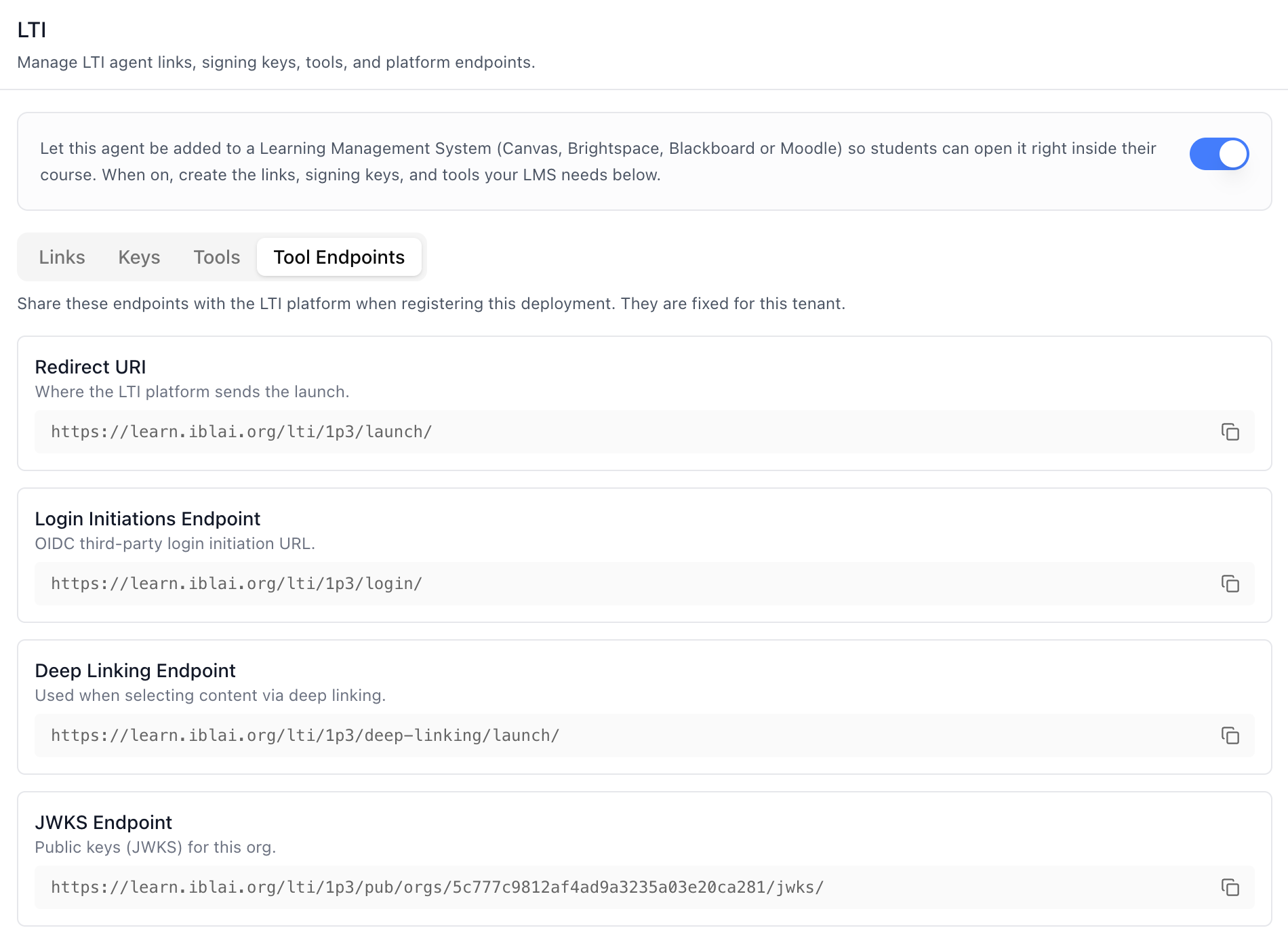
### Tool Endpoints sub-tab
Read-only endpoints to share with the LTI platform when registering the
deployment. They are fixed for the organization and built from `lmsDomain`:
| Endpoint | URL |
|---|---|
| Redirect URI | `{lmsDomain}/lti/1p3/launch/` |
| Login Initiations Endpoint | `{lmsDomain}/lti/1p3/login/` |
| Deep Linking Endpoint | `{lmsDomain}/lti/1p3/deep-linking/launch/` |
| JWKS Endpoint | `{lmsDomain}/lti/1p3/pub/orgs/{orgShortName}/jwks/` |
Each row has a copy button. All list sub-tabs paginate at 10 rows per
page.
## Related Exports
From `@iblai/iblai-js/web-containers/next`:
- `AGENT_LTI_TAB_LABELS` -- the default agent-facing label bundle.
- `LtiTabLabels` -- type for the full label bundle.
- `AgentLtiTabProps` -- props type for the tab.
From `@iblai/iblai-js/data-layer` -- the RTK Query hooks the tab uses, for custom
UI built on the same endpoints:
- Links: `useGetLtiMentorsQuery`, `useCreateLtiMentorMutation`
(sends `async_create: true`), `useUpdateLtiMentorMutation`,
`useDeleteLtiMentorMutation`, `useGetLtiMentorDetailQuery` (poll a
single link by id until its `status` is `ready` or `failed`), plus
the `LtiAgentLink` / `LtiAgentLinkStatus` types
- Keys: `useGetLtiKeysQuery`, `useCreateLtiKeyMutation`,
`useUpdateLtiKeyMutation`, `useDeleteLtiKeyMutation`
- Tools: `useGetLtiToolsQuery`, `useCreateLtiToolMutation`,
`useUpdateLtiToolMutation`
- Toggle + endpoints: `useGetMentorSettingsQuery`,
`useEditMentorMutation`, `useGetPlatformInfoQuery`
## Step 5: Verify
Run `/iblai-vibe-ops-test` before telling the user the work is ready:
1. `pnpm build` -- must pass with zero errors
2. `pnpm test` -- vitest must pass
3. Start dev server and touch test:
```bash
pnpm dev &
npx playwright screenshot http://localhost:3000/agents//lti /tmp/agent-lti.png
```
## Important Notes
- **Redux store**: Must include `mentorReducer` and `mentorMiddleware`
- **`initializeDataLayer()`**: 5 args (v1.2+)
- **`@reduxjs/toolkit`**: Deduplicated via webpack aliases in `next.config.ts`
- **Peer deps**: `sonner` and `@iblai/iblai-web-mentor` must be installed
(`pnpm add sonner @iblai/iblai-web-mentor`)
- **Shared provider**: `AgentSettingsProvider` must wrap the route at a
layout level. See `/iblai-vibe-agent-setting` Step 2 for the full snippet.
- **`lmsDomain` is host-supplied**: Without it the Tool Endpoints
sub-tab cannot build its URLs. Ask the user for their LMS domain.
- **Keys and Tools are platform-wide**: They are shared across the whole
organization, not scoped to this agent. Only the Links sub-tab is
agent-specific.
- **Delete order**: A key associated with an LTI tool cannot be deleted
-- remove or re-key the tool first.
- **Async link creation**: `POST lti-mentors/` is sent with
`async_create: true` and returns `202` with
`{ id, status: "pending" }` — the course build finishes out of band.
Custom UI should poll `useGetLtiMentorDetailQuery` (or re-fetch the
list) until `status` is `ready`/`failed` instead of awaiting the
POST; the SDK tab offers a manual **Refresh** button while a build
is in progress and a **Retry** (delete + re-create) on failure.
- **Brand guidelines**: [BRAND.md](https://raw.githubusercontent.com/iblai/vibe/refs/heads/main/BRAND.md)