# Iblai Vibe Agent MCP
> Add the agent MCP tab (Model Context Protocol connector management with featured connectors, custom connectors, OAuth, and add/edit dialogs) to your Next.js app
- Skill: `iblai/iblai-vibe-agent-mcp` (Agent Skill, multi-file: 5 files)
- Install (CLI): `npx skillmds@latest add iblai/iblai-vibe-agent-mcp`
- Raw SKILL.md: https://api.skillmd.com/api/skills/iblai/iblai-vibe-agent-mcp/raw
- Safety review: pending
- Works with: Claude Code, Claude.ai, OpenAI Codex
- Category: Web & Frontend
- Author: iblai (https://skillmd.com/u/iblai)
- Updated: 2026-09-17
- Page: https://skillmd.com/skills/iblai/iblai-vibe-agent-mcp
---
# /iblai-vibe-agent-mcp
Add the agent **MCP tab** -- Model Context Protocol connector management
with a Featured Connectors gallery, a custom Connectors section with
add/edit/delete, OAuth connection flow, token-based auth, per-connector
scope (organization or this-agent), transport selection (SSE / WebSocket /
Streamable HTTP), and search/date/transport filters. This is one tab in
the wider agent-settings family. All tabs share the same
`AgentSettingsProvider` wrapper.
> **Common setup (brand, conventions, env files, verification):** see [docs/skill-setup.md](https://raw.githubusercontent.com/iblai/vibe/refs/heads/main/docs/skill-setup.md).
## Prerequisites
- Auth must be set up first (`/iblai-vibe-auth`)
- MCP server + skills configured (`@iblai/mcp` in `.mcp.json`)
- `AgentSettingsProvider` must wrap the route (see `/iblai-vibe-agent-setting`
Step 2 if not already set up)
- Ask the user for a real `mentorId` (agent UUID). Do NOT invent one.
## Step 1: Check Environment
Before proceeding, check for an `iblai.env` in the project root. Look for
`PLATFORM`, `DOMAIN`, and `TOKEN` variables. If the file does not exist or
is missing these variables, tell the user:
"You need an `iblai.env` with your platform configuration. Download the
template and fill in your values:
`curl -o iblai.env https://raw.githubusercontent.com/iblai/vibe/refs/heads/main/iblai.env`"
## Step 2: Mount `McpTab`
```tsx
// app/(app)/agents/[mentorId]/mcp/page.tsx
"use client";
import { McpTab } from "@iblai/iblai-js/web-containers/next";
export default function AgentMCPPage() {
return (
);
}
```
`McpTab` reads `tenantKey`, `mentorId`, `username`, and `rbacPermissions`
from `AgentSettingsProvider`. No props are required for the standard
mount.
### With a select handler (e.g. picker mode)
When the tab is used inside a picker (e.g. "choose a connector for this
workflow") rather than as a standalone page, pass `onSelect`. The handler
fires after the chosen connector is auto-activated.
```tsx
import { McpTab } from "@iblai/iblai-js/web-containers/next";
{
console.log("connector selected", server);
}}
/>;
```
## Step 3: Use MCP Tools for Customization
```
get_component_info("McpTab")
get_component_info("AgentSettingsProvider")
```
## `` Props
Import from `@iblai/iblai-js/web-containers/next`.
| Prop | Type | Required | Description |
|------|------|----------|-------------|
| `onSelect` | `(server: MCPServer) => void` | No | Called with the chosen connector when the user clicks **Select**. Without it the Select button is hidden and the tab behaves as a manager-only view. |
## What the tab renders
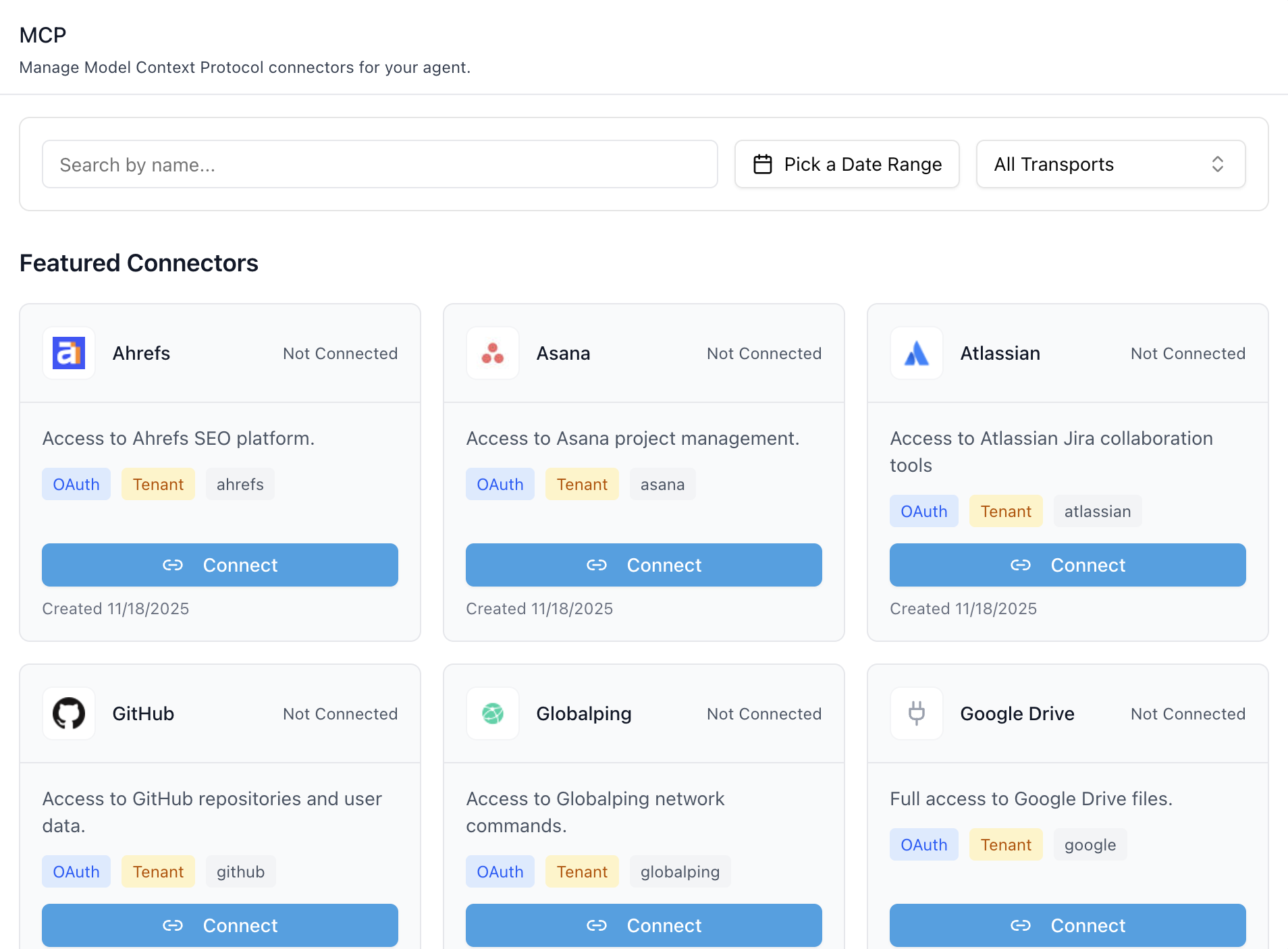
- **Header** — "MCP" title and description.
- **Filters bar** — search by name, date-range picker, transport
multiselect (SSE / WebSocket / Streamable HTTP / All).
- **Featured Connectors** — global, platform-curated MCP servers
(Ahrefs, Asana, Atlassian, GitHub, Google Drive, …). Each card shows
the logo, name, connection state, auth-type chip (`OAuth` / `Token`),
scope chip (`User` / `Mentor` / `Tenant`), provider tag, and a
**Connect** / **Disconnect** button.
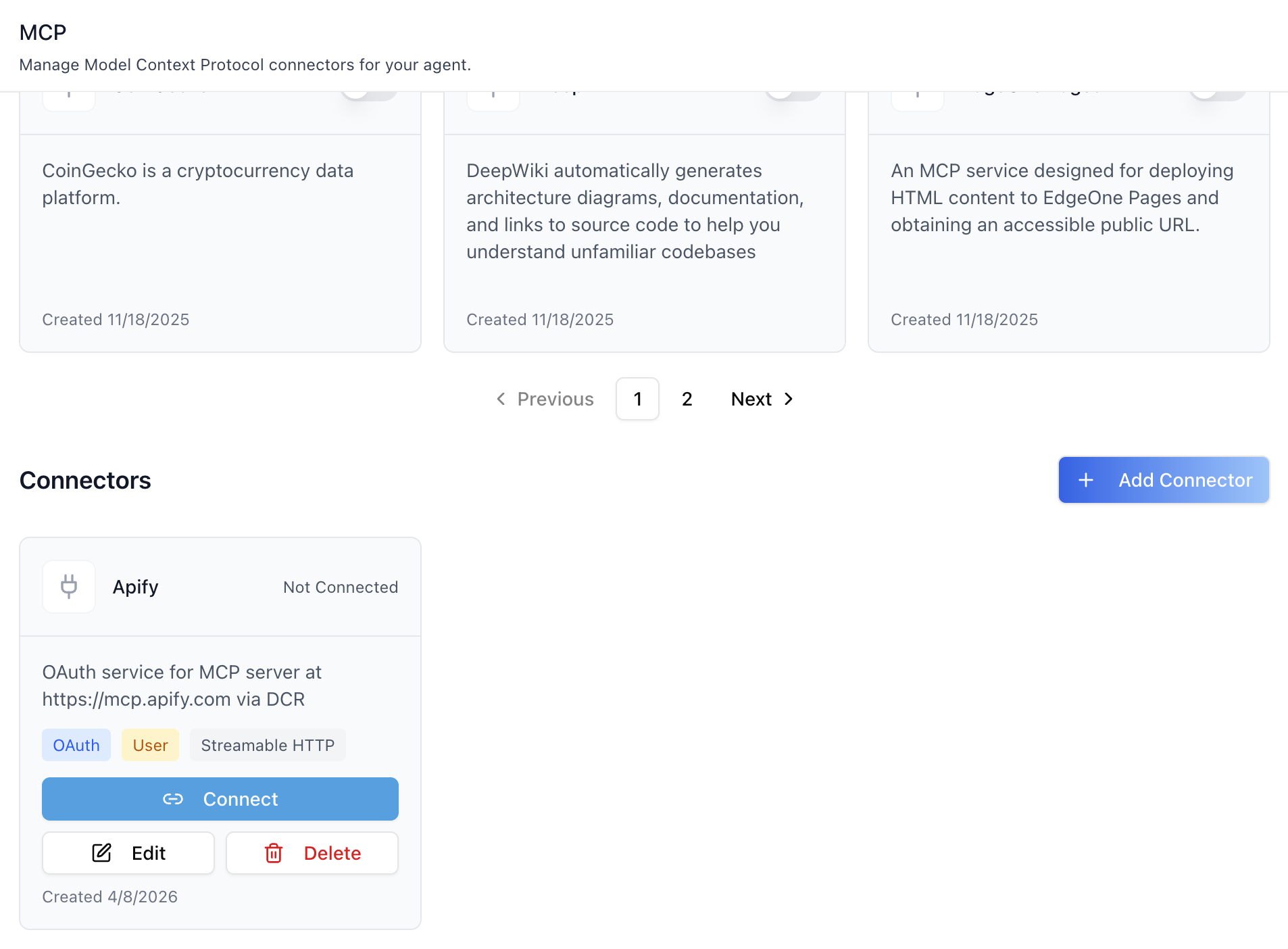
- **Connectors** — custom servers registered by the organization. Each card
has a Connect/Disconnect button (when OAuth) plus **Edit** and
**Delete**. The **Add Connector** button opens the add dialog.
- **Pagination** — separate pagers for Featured and Connectors when
results overflow the page size (12).
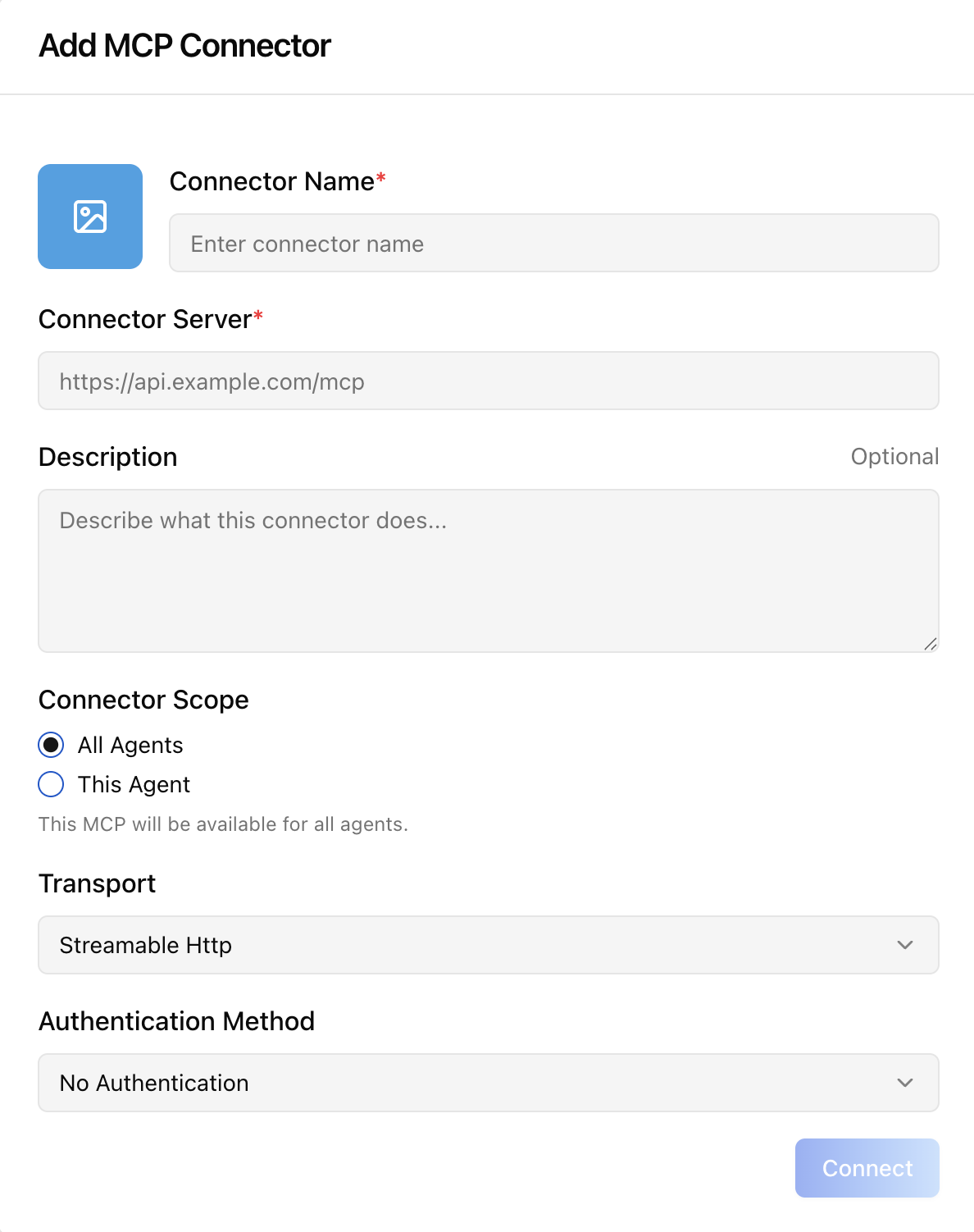
### Add MCP Connector dialog
Opened from the **Add Connector** button. Collects:
| Field | Notes |
|---|---|
| Connector image | Optional file upload (max 2 MB, image/*). |
| Connector Name | Required. |
| Connector Server | Required. Must be a valid URL. |
| Description | Optional. |
| Connector Scope | `All Agents` (organization) or `This Agent` (agent-bound). |
| Transport | `SSE` / `WebSocket` / `Streamable Http` (default). |
| Authentication Method | `No Authentication` / `API Key` / `OAuth`. |
| Authentication Scope | OAuth-only: `Tenant` / `Mentor` / `User`. |
| Token Type + Token | API-Key only: `Bearer` / `Basic` / `API-Key` / `API-Token` / `Token` / `Other` (custom alphanumeric+hyphen, ≤50 chars). |
For OAuth, submitting the form opens the provider's consent screen in a
new tab and the dialog tracks completion via `storage`, `message`, and
`focus` events plus a 5 s polling fallback.
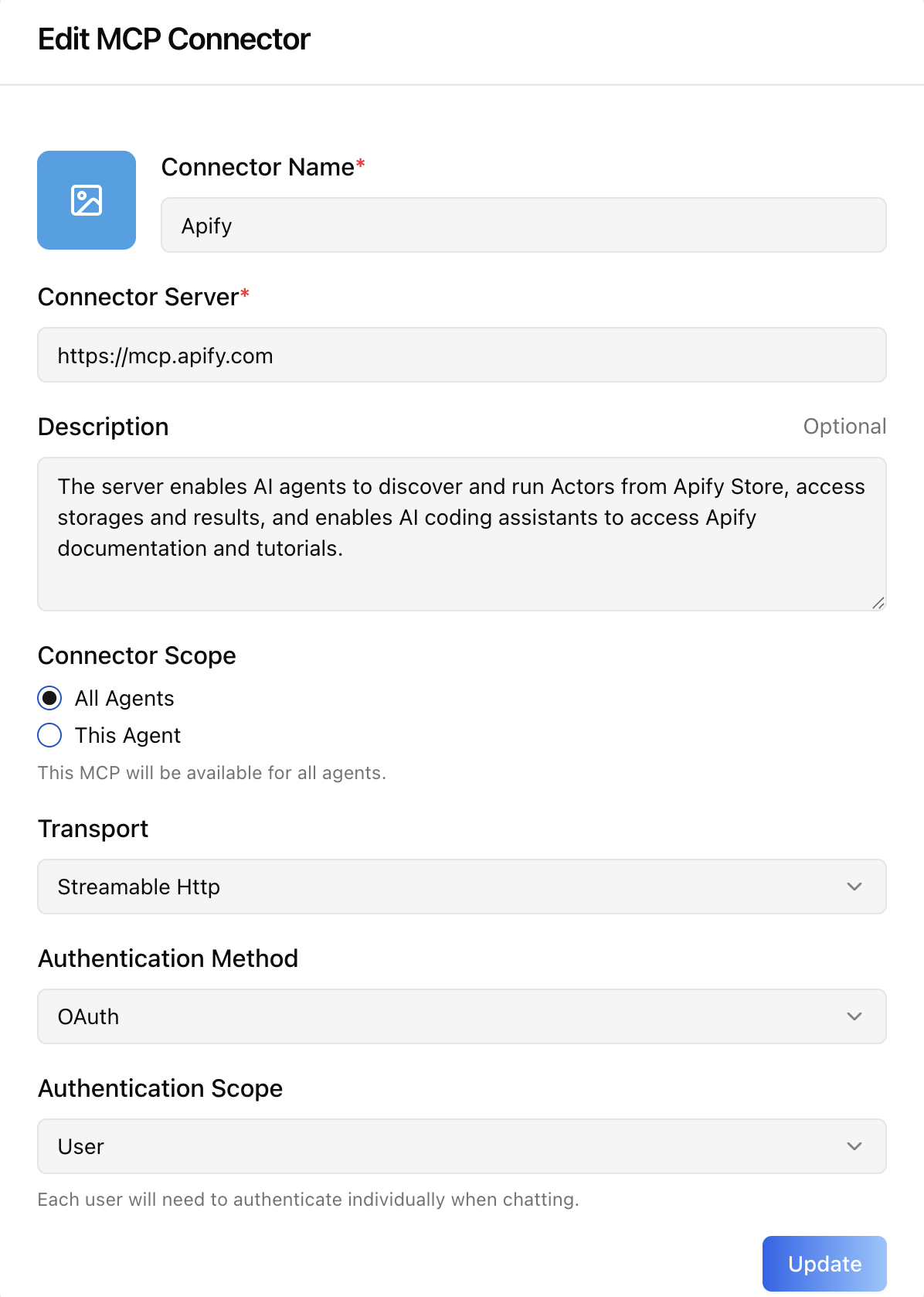
### Edit MCP Connector dialog
Same shape as Add. The token field is masked
(`••••••••••••••••••••`) — leave it untouched to keep the existing
secret, or type a new value to rotate. Changing the OAuth `Connector
Server` URL restarts the OAuth handshake.
## How the OAuth flow works
1. User clicks **Connect** on an OAuth card.
2. UI calls `POST .../oauth-flow/start` and opens the returned
`auth_url` in a new tab.
3. After the user grants consent, the provider redirects back to the
app's `/google-oauth-callback/` page (or equivalent), which posts a
`GOOGLE_AUTH_SUCCESS` `message` and writes
`oauth_connection_complete` to `localStorage`.
4. The MCP tab observes either signal and creates a
`MCPServerConnection` record bound to the configured scope (`user`,
`mentor`, or `tenant`).
5. Refetches Featured / Custom / ConnectedServices /
MCPServerConnections / agent settings — the card flips to
**Disconnect**.
A 5-minute safety timeout cleans up listeners if the user abandons the
flow. Closing the popup early triggers a 10 s grace cleanup so a
late-arriving callback can still complete.
## Related Exports
From `@iblai/iblai-js/web-containers/next`:
- `McpTabProps` — type for the `onSelect` handler.
From `@iblai/data-layer`:
- `MCPServer`, `MCPServerConnection`, `ConnectedService` — payload
types for custom UI built on top of the same RTK Query hooks the tab
uses (`useGetMCPServersQuery`,
`useGetMCPServerConnectionsQuery`,
`useCreateMCPServerConnectionMutation`,
`useDisconnectServiceMutation`, `useLazyStartOAuthFlowQuery`).
## Step 4: Verify
Run `/iblai-vibe-ops-test` before telling the user the work is ready:
1. `pnpm build` -- must pass with zero errors
2. `pnpm test` -- vitest must pass
3. Start dev server and touch test:
```bash
pnpm dev &
npx playwright screenshot http://localhost:3000/agents//mcp /tmp/agent-mcp.png
```
## Important Notes
- **Redux store**: Must include `mentorReducer` and `mentorMiddleware`
- **`initializeDataLayer()`**: 5 args (v1.2+)
- **`@reduxjs/toolkit`**: Deduplicated via webpack aliases in `next.config.ts`
- **Peer deps**: `sonner` and `@iblai/iblai-web-mentor` must be installed
(`pnpm add sonner @iblai/iblai-web-mentor`)
- **Shared provider**: `AgentSettingsProvider` must wrap the route at a
layout level. See `/iblai-vibe-agent-setting` Step 2 for the full snippet.
- **OAuth callback page**: For OAuth-backed connectors, the consuming
app must host a callback route (e.g.
`app/google-oauth-callback/page.tsx`) that posts
`GOOGLE_AUTH_SUCCESS` via `window.opener.postMessage` and writes
`oauth_connection_complete` to `localStorage` so the parent window
can resolve the flow.
- **Tools toggle**: Activating a connector for the first time
auto-adds `mcp` to the agent's `tool_slugs` and sets
`can_use_tools=true`. Deactivating the last connector removes `mcp`
from `tool_slugs` again — see `/iblai-vibe-agent-tool` for the broader
tools tab.
- **Brand guidelines**: [BRAND.md](https://raw.githubusercontent.com/iblai/vibe/refs/heads/main/BRAND.md)
## MCP Servers REST API
For custom UI beyond `` — register external MCP servers and bind
them to agents. All endpoints are prefixed with
`${dmUrl}/api/ai-mentor/orgs/{org}/users/{user_id}/` where `dmUrl` is
`NEXT_PUBLIC_API_BASE_URL`. Organization admins only.
### Workflow
1. **Enable the MCP tool on the agent** (so the runtime will use MCP servers).
2. **Register an MCP server** record (URL, transport, auth_type).
3. **Create a connection** binding credentials to a scope (`tenant`,
`user`, or `mentor`).
4. **Assign servers to the agent** via the agent settings endpoint.
### 1. Enable MCP tool on the agent
| Method | Path | Body |
|---|---|---|
| PUT | `mentors/{mentor_id}/settings/` | `{ "tool_slugs": ["mcp", ...], "can_use_tools": true }` |
### 2. MCP Servers
| Method | Path | Purpose |
|---|---|---|
| GET | `mcp-servers/` | List organization + featured servers (filters: `is_featured`, `transport`, `search`, `mentor_unique_id`, `include_global`) |
| POST | `mcp-servers/` | Register a new server (multipart for image upload) |
| PATCH/PUT | `mcp-servers/{id}/` | Update |
| DELETE | `mcp-servers/{id}/` | Delete |
| GET | `mcp-servers/oauth-find/` | Resolve OAuth provider/service for a server URL |
**Create body:**
```json
{
"name": "Google Drive MCP",
"description": "Search and index Drive documents",
"url": "https://drive-mcp.example.com/mcp",
"transport": "streamable_http",
"auth_type": "oauth2",
"auth_scope": "user",
"mentor": null
}
```
- `transport`: `sse` | `websocket` | `streamable_http`
- `auth_type`: `none` | `token` | `oauth2`
- `auth_scope` (oauth only): `tenant` | `mentor` | `user`
- `mentor`: `null` for organization-wide, agent UUID for agent-bound
- For `auth_type=token`, set `credentials` to the full header value
(e.g. `"Bearer abc123"`).
### 3. MCP Server Connections
| Method | Path | Purpose |
|---|---|---|
| GET | `mcp-server-connections/` | List connections |
| POST | `mcp-server-connections/` | Create a connection |
| PATCH/PUT | `mcp-server-connections/{id}/` | Update / toggle `is_active` / change scope |
| DELETE | `mcp-server-connections/{id}/` | Delete |
**OAuth (user scope)** — requires an existing `ConnectedService`:
```json
{
"server": 9,
"scope": "user",
"auth_type": "oauth2",
"user": "alice",
"connected_service": 77
}
```
**Agent scope** — bind credentials to a single agent while keeping
the server reusable:
```json
{
"server": 9,
"scope": "mentor",
"auth_type": "oauth2",
"mentor": "mentor-uuid",
"connected_service": 77
}
```
Returned credentials are **masked**; only send a new value when the
user intentionally rotates the secret.
### 4. Assign servers to an agent
| Method | Path | Body |
|---|---|---|
| PUT | `mentors/{mentor}/settings/` | `{ "mcp_servers": [1, 2] }` |
The `mcp_servers` array replaces the agent's current list.
### Connection resolution at runtime
1. User-scoped connection (matching invoking user)
2. Agent-scoped connection (matching active agent)
3. Organization-scoped connection
4. Featured server fallback (`is_featured=true` global)
## OAuth Connectors REST API
For OAuth-backed MCP servers, each user must grant permission once per
provider/service before a `MCPServerConnection` can reference a
`ConnectedService`. All endpoints are under `${dmUrl}/api/accounts/`.
| Method | Path | Purpose |
|---|---|---|
| GET | `orgs/{org}/oauth-services/` | List enabled services across providers |
| GET | `connected-services/orgs/{org}/users/{user_id}/{provider}/{service}/` | Start flow — returns `{ auth_url }` |
| GET | `connected-services/callback/?code=...&state=...` | Handle vendor redirect |
| GET | `connected-services/orgs/{org}/users/{user_id}/` | List the user's connected services |
| DELETE | `connected-services/orgs/{org}/users/{user_id}/{id}/` | Revoke a connection |
### Common errors
- `400 "No credentials found"` — admin must configure `auth_{provider}`
in the credential store.
- `400 OAuth2 connections require a connected service.` — finish the
OAuth handshake first and pass `connected_service` when creating the
`MCPServerConnection`.
- `400 Selected MCP server is not available to the current tenant.` —
the server belongs to another organization and is not `is_featured=true`.