# Iblai Vibe Agent Voice
> Add the agent Voice tab (pick the agent's voice and configure voice calls) to your Next.js app
- Skill: `iblai/iblai-vibe-agent-voice` (Agent Skill, multi-file: 7 files)
- Install (CLI): `npx skillmds@latest add iblai/iblai-vibe-agent-voice`
- Raw SKILL.md: https://api.skillmd.com/api/skills/iblai/iblai-vibe-agent-voice/raw
- Safety review: pending
- Works with: Claude Code, Claude.ai, OpenAI Codex
- Category: Web & Frontend
- Author: iblai (https://skillmd.com/u/iblai)
- Updated: 2026-09-17
- Page: https://skillmd.com/skills/iblai/iblai-vibe-agent-voice
---
# /iblai-vibe-agent-voice
Add the agent **Voice tab** -- pick the voice your agent uses to read out
chat replies, and configure how live voice calls work. The tab has two
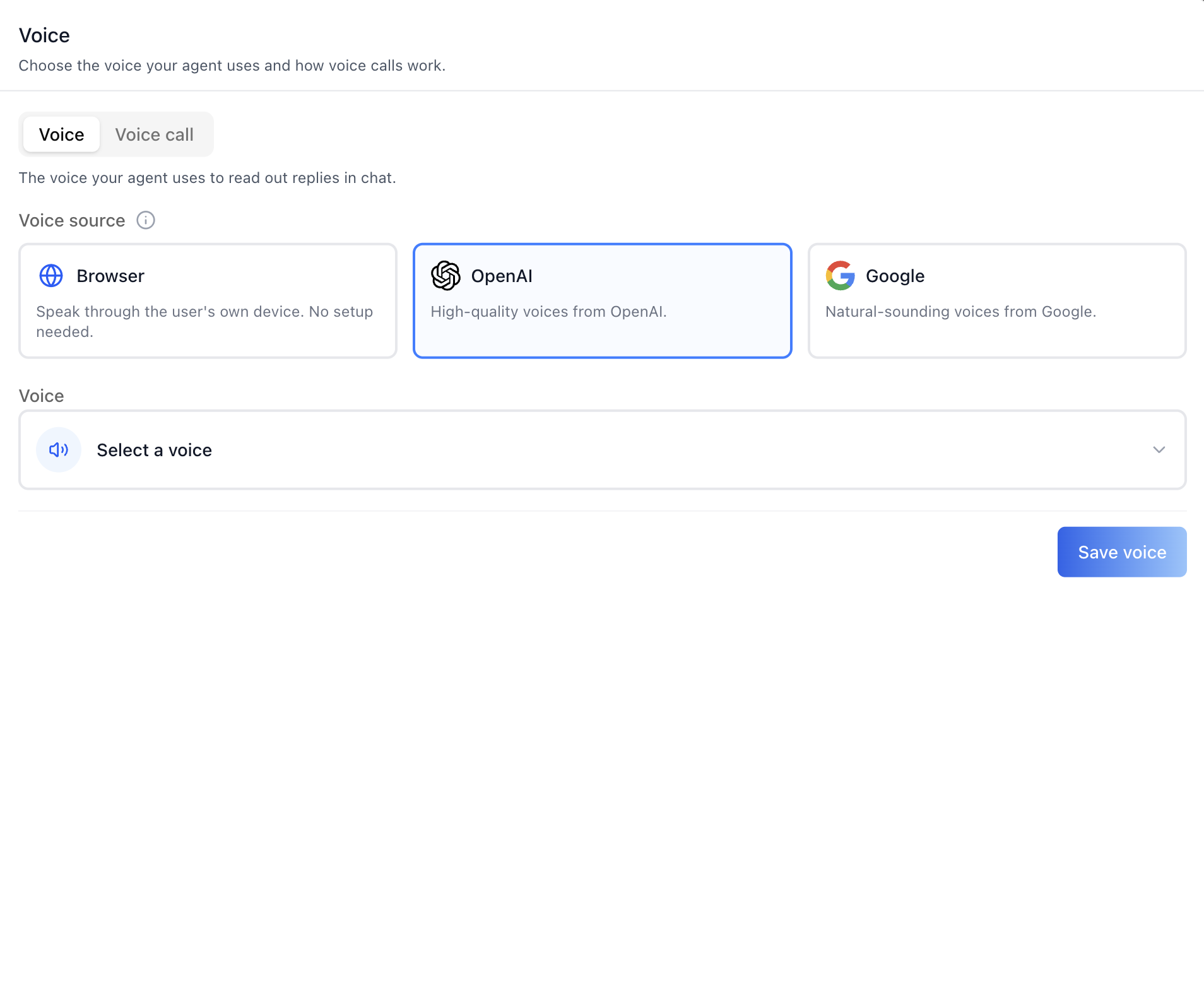
sub-tabs: **Voice** (choose a voice source -- Browser, OpenAI, or Google --
then pick a specific voice from a searchable, previewable picker, and
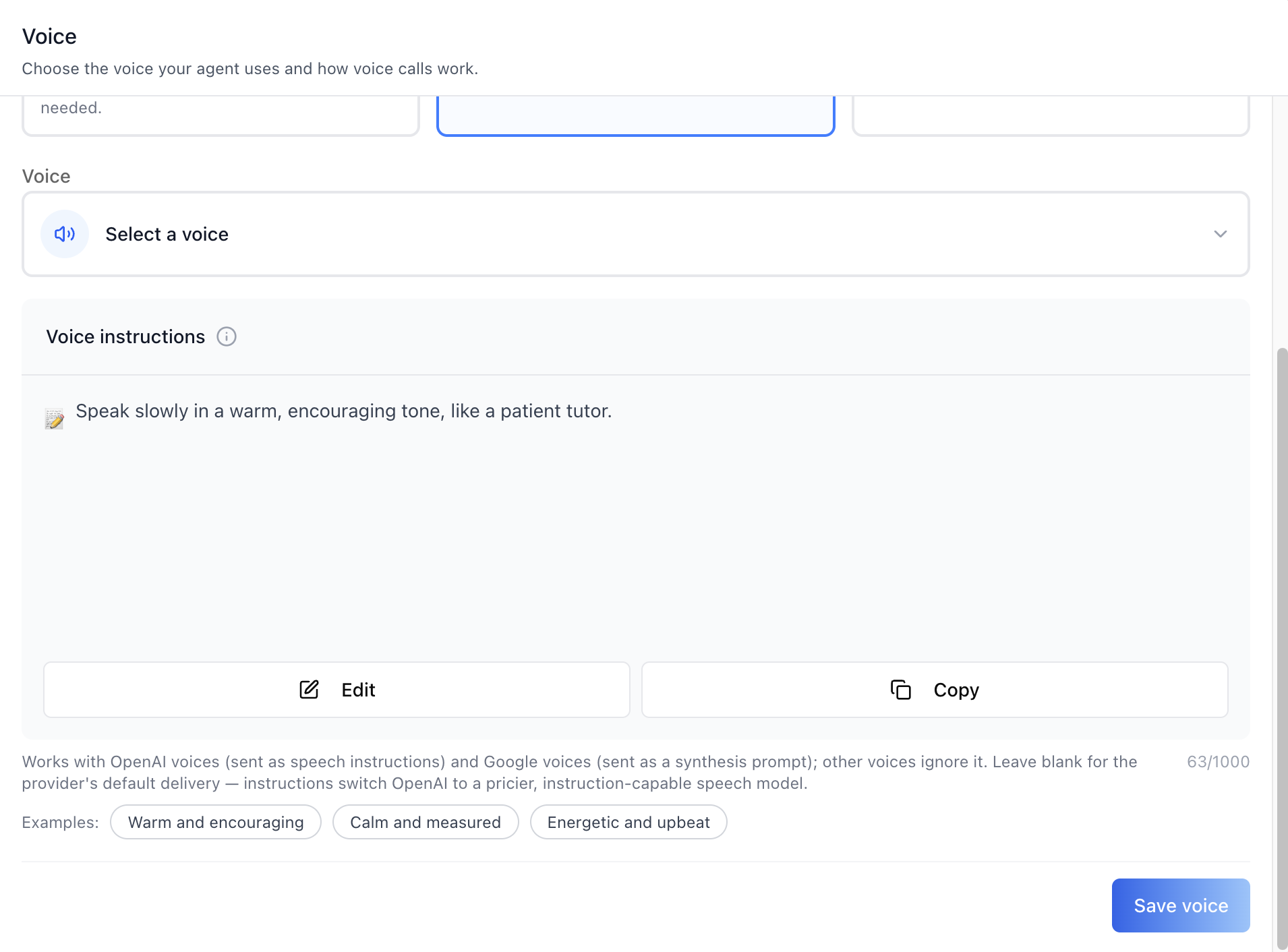
optionally write **Voice instructions**, a style prompt for how the voice
should deliver replies) and **Voice call** (call style, spoken language,
AI provider, and the voice used on calls). This is one tab in the wider agent-settings family (`access`,
`api`, `datasets`, `disclaimers`, `embed`, `history`, `llm`, `memory`,
`prompts`, `safety`, `settings`, `tools`, `voice`). Each tab is a separate
skill. All tabs share the same `AgentSettingsProvider` wrapper -- set it up
once and mount as many tabs as you need.
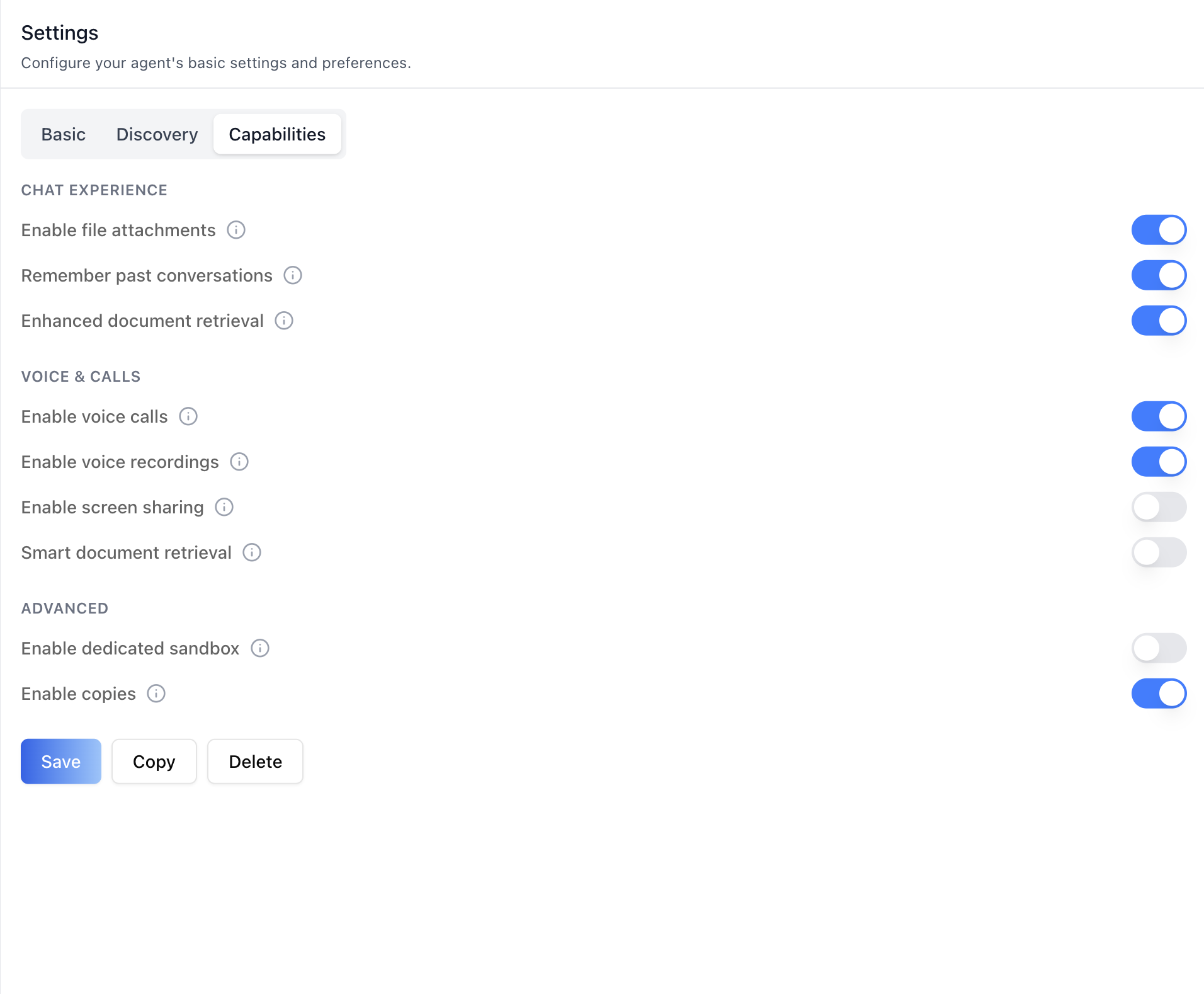
> **Enable voice calls first.** The call features only do something once
> voice calls are turned on for the agent. Toggle **Enable voice calls** in
> the agent's **Settings** tab -> **Capabilities** (under "Voice & calls")
> before configuring this tab. See `/iblai-agent-setting`.
You MUST run `/iblai-ops-test` before telling the user the work is ready.
> **Common setup (brand, conventions, env files, verification):** see [docs/skill-setup.md](https://raw.githubusercontent.com/iblai/vibe/refs/heads/main/docs/skill-setup.md).
## Prerequisites
- Auth must be set up first (`/iblai-auth`)
- MCP server + skills configured (`@iblai/mcp` in `.mcp.json`)
- `AgentSettingsProvider` must wrap the route (see `/iblai-agent-setting`
Step 2 if not already set up)
- **Enable voice calls** for the agent in the **Settings** tab ->
**Capabilities** (the Voice tab configures voice; the Settings tab turns
the capability on)
- Ask the user for a real `mentorId` (agent UUID). Do NOT invent one.
## Step 1: Check Environment
Before proceeding, check for an `iblai.env` in the project root. Look for
`PLATFORM`, `DOMAIN`, and `TOKEN` variables. If the file does not exist or
is missing these variables, tell the user:
"You need an `iblai.env` with your platform configuration. Download the
template and fill in your values:
`curl -o iblai.env https://raw.githubusercontent.com/iblai/vibe/refs/heads/main/iblai.env`"
## Step 2: Mount `AgentVoiceTab`
```tsx
// app/(app)/agents/[mentorId]/voice/page.tsx
"use client";
import { AgentVoiceTab } from "@iblai/iblai-js/web-containers/next";
export default function AgentVoicePage() {
return (
);
}
```
`AgentVoiceTab` reads `tenantKey`, `mentorId`, and `username` from
`AgentSettingsProvider` (via `useAgentSettings()`) and handles its own
fetching and saving. No props are required.
### Deep-link to a sub-tab
The tab opens on **Voice** by default. To land on the **Voice call**
sub-tab (e.g. from a host URL scheme), pass `defaultSubTab`:
```tsx
;
```
### With Markdown rendering for the screen-sharing prompt
The Voice call sub-tab can show a screen-sharing prompt. Render it as rich
text by passing `renderPromptContent` (mirrors `AgentPromptsTab` so one
renderer can serve every prompt card in the modal):
```tsx
import ReactMarkdown from "react-markdown";
{content}}
/>;
```
## Step 3: Customize Labels (Optional)
`AgentVoiceTab` renders with the default agent-facing copy
(`AGENT_VOICE_TAB_LABELS`). Override any string via the `labels` prop. Pass
a full `VoiceTabLabels` bundle (for a full agent re-skin) or a partial
object (for one-off edits).
```tsx
import {
AgentVoiceTab,
type VoiceTabLabels,
AGENT_VOICE_TAB_LABELS,
} from "@iblai/iblai-js/web-containers/next";
;
```
The label bundle is grouped by surface: `header`, `subTabs`, `mentorVoice`
(the voice-source / picker copy), `callConfig` (the Voice call form), and
`toasts`. Override only the keys you need.
## Step 4: Use MCP Tools for Customization
```
get_component_info("AgentVoiceTab")
get_component_info("AgentSettingsProvider")
```
## Tab surfaces
`AgentVoiceTab` is a single mounted component that renders two sub-tabs plus
a voice picker. The corresponding web-containers source (under
`web-containers/.../edit-mentor-modal/tabs/voice-tab`) is listed for
reference -- these pieces are internal to `AgentVoiceTab` and are not
mounted separately.
| Surface | Screenshot | Source component | What it shows |
|---------|-----------|------------------|---------------|
| **Voice sub-tab** | [voice](https://raw.githubusercontent.com/iblai/vibe/refs/heads/main/skills/agents/iblai-vibe-agent-voice/iblai-vibe-agent-voice-2-voice.png) | `voice-tab` (Voice sub-tab) | Voice source cards -- **Browser** (the listener's own device, no setup), **OpenAI**, and **Google** -- plus a "Select a voice" trigger when OpenAI or Google is chosen, and a **Save voice** button |
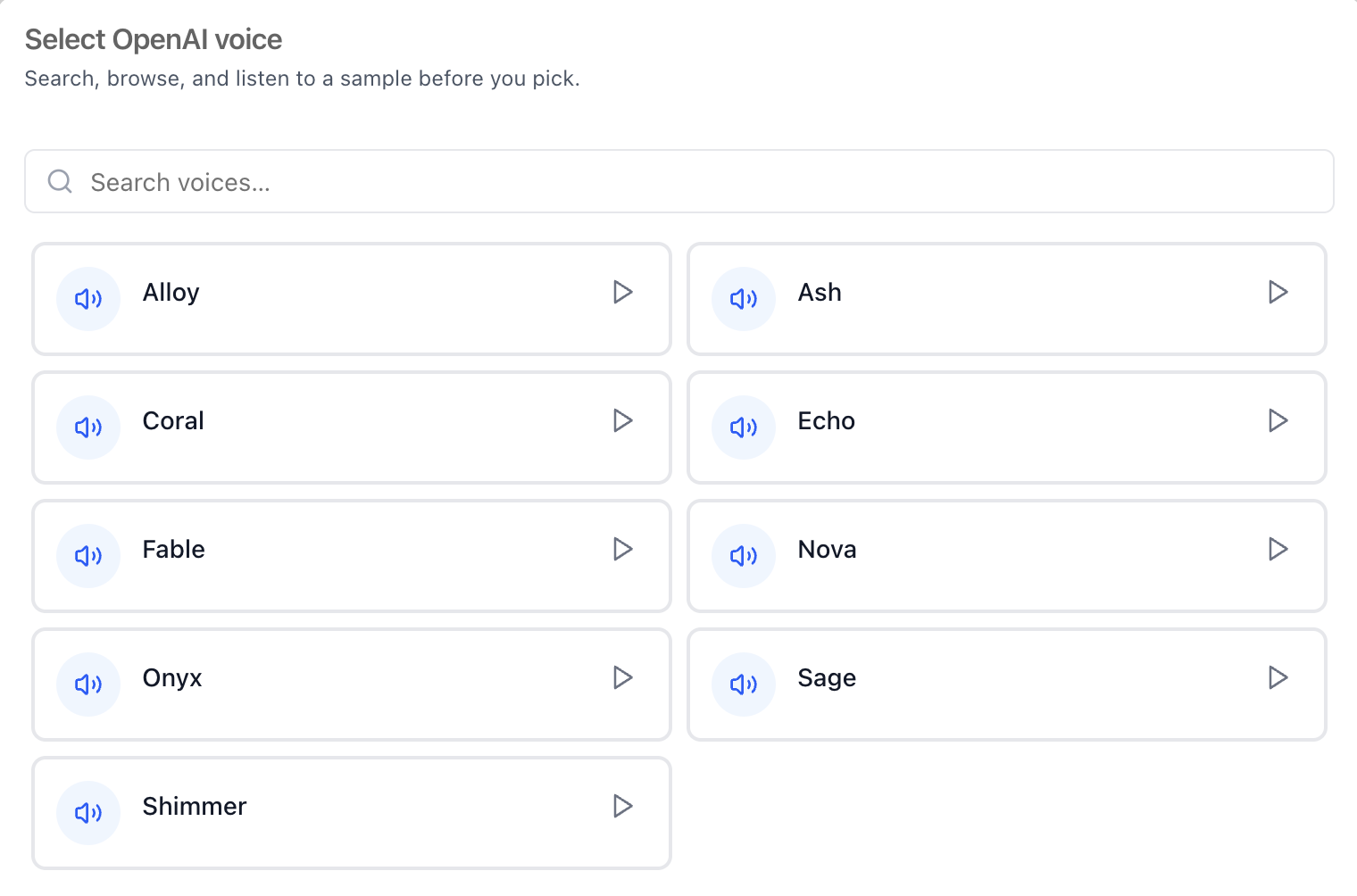
| **Voice picker** | [picker](https://raw.githubusercontent.com/iblai/vibe/refs/heads/main/skills/agents/iblai-vibe-agent-voice/iblai-vibe-agent-voice-3-voice-picker.png) | `voice-picker-modal` / `voice-picker` | A searchable list of the provider's voices (e.g. OpenAI: Alloy, Ash, Coral, Echo, Fable, Nova, Onyx, Sage, Shimmer) with a play button to preview a sample before picking |
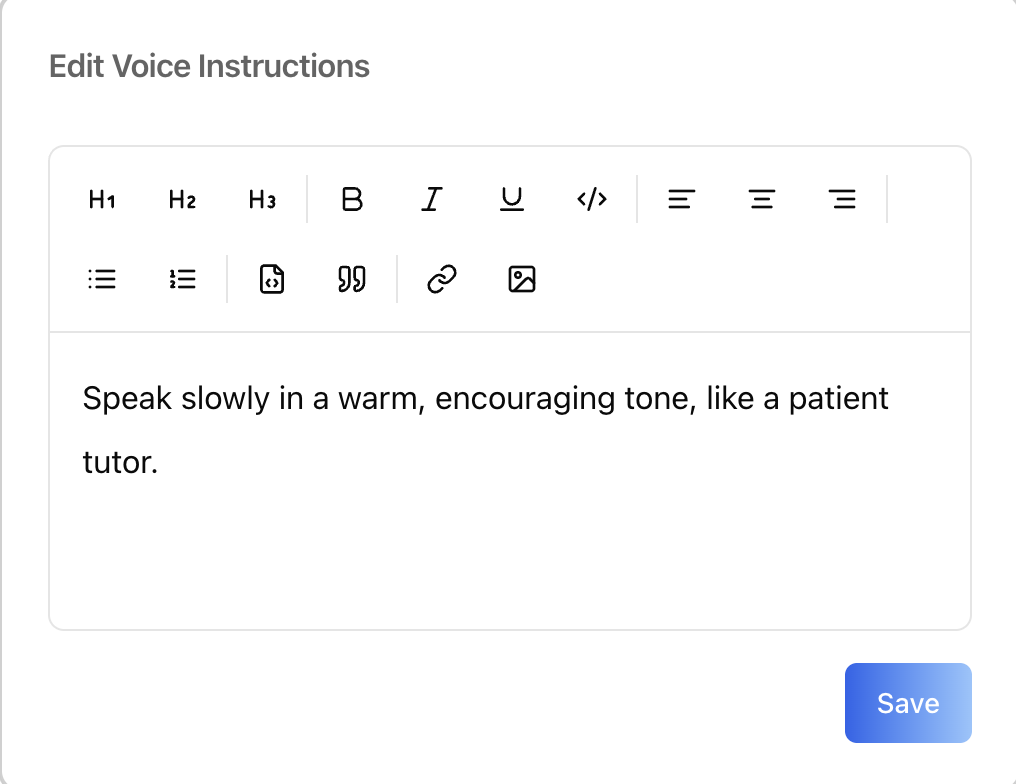
| **Voice instructions** | [instructions](https://raw.githubusercontent.com/iblai/vibe/refs/heads/main/skills/agents/iblai-vibe-agent-voice/iblai-vibe-agent-voice-5-instructions.png) / [edit modal](https://raw.githubusercontent.com/iblai/vibe/refs/heads/main/skills/agents/iblai-vibe-agent-voice/iblai-vibe-agent-voice-6-instructions-edit.png) | `voice-tab` (Voice sub-tab) | A free-form style prompt for how the voice delivers replies (e.g. "Speak slowly in a warm, encouraging tone, like a patient tutor."): a prompt card with **Edit** (rich-text modal) and **Copy**, an info tooltip, a `0/1000` character counter, and one-click example presets (Warm and encouraging / Calm and measured / Energetic and upbeat) |
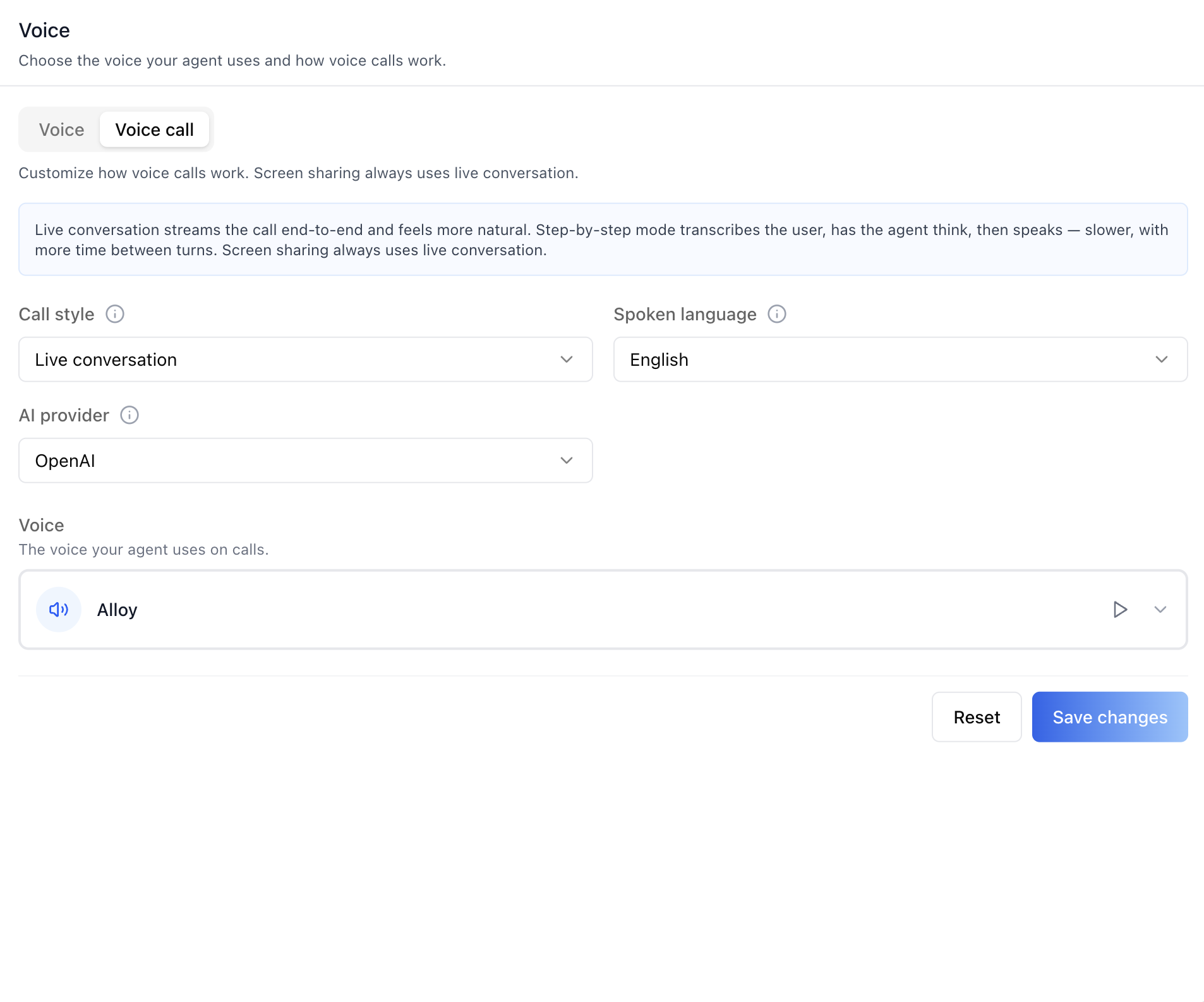
| **Voice call sub-tab** | [voice call](https://raw.githubusercontent.com/iblai/vibe/refs/heads/main/skills/agents/iblai-vibe-agent-voice/iblai-vibe-agent-voice-4-voice-call.png) | `call-config-section` | Call style (Live conversation / Step-by-step), spoken language, AI provider, and the voice used on calls, with **Reset** and **Save changes** |
The **Browser** source speaks through the user's own device (no API voice).
**OpenAI** and **Google** use a custom voice you pick from the voice picker.
A voice is only sent to the backend on save when the user picks one this
session -- leaving it untouched preserves the existing server-side value.
The same "absent = keep" contract applies to **Voice instructions**: the
field is only included in the save payload when it changed, and clearing
it sends an empty string (`""`) — an absent field means "no change" on
the backend.
## `` Props
Import from `@iblai/iblai-js/web-containers/next`.
| Prop | Type | Required | Description |
|------|------|----------|-------------|
| `labels` | `DeepPartial` | No | Override user-visible strings |
| `defaultSubTab` | `'voice' \| 'callConfig'` | No | Which sub-tab to open on. Defaults to `'voice'` |
| `renderPromptContent` | `(content: string) => ReactNode` | No | Render the screen-sharing prompt as rich text. Defaults to plain text |
| `tenantKey` | `string` | No | Identity override. Falls back to `AgentSettingsProvider` |
| `mentorId` | `string` | No | Identity override (agent UUID). Falls back to `AgentSettingsProvider` |
| `username` | `string` | No | Identity override. Falls back to `AgentSettingsProvider` |
| `enableRBAC` | `boolean` | No | Toggle field-level gated-action prompts. Falls back to `AgentSettingsProvider` |
## Related Exports
From `@iblai/iblai-js/web-containers/next`:
- `AGENT_VOICE_TAB_LABELS` -- the default agent-facing label bundle.
- `VoiceTabLabels` -- type for the full label bundle.
## Step 5: Verify
Run `/iblai-ops-test` before telling the user the work is ready:
1. `pnpm build` -- must pass with zero errors
2. `pnpm test` -- vitest must pass
3. Start dev server and touch test:
```bash
pnpm dev &
npx playwright screenshot http://localhost:3000/agents//voice /tmp/agent-voice.png
```
## Important Notes
- **Enable voice calls**: The Voice tab configures voice; the capability is
turned on in the **Settings** tab -> **Capabilities** -> "Enable voice
calls". Without it, the call features have no effect.
- **Voice sources**: **Browser** uses the listener's own device (no API
voice and no picker). **OpenAI** and **Google** require picking a voice.
- **Voice instructions** (`voice_instructions` on the agent's settings):
a style prompt forwarded to the TTS provider on every synthesis —
OpenAI voices receive it as speech `instructions`, Google voices as a
synthesis `prompt`; other sources (including Browser) ignore it. Leave
it blank for the provider's default delivery. Setting instructions
switches OpenAI synthesis to a pricier, instruction-capable speech
model — that trade-off is deliberate and surfaced in the help text.
The 1000-character cap is a UI guardrail (the backend column is
unbounded); the Save button blocks while over it.
- **Redux store**: Must include `mentorReducer` and `mentorMiddleware`.
- **`initializeDataLayer()`**: 5 args (v1.2+)
- **`@reduxjs/toolkit`**: Deduplicated via webpack aliases in `next.config.ts`
- **Peer deps**: `sonner` and `@iblai/iblai-web-mentor` must be installed
(`pnpm add sonner @iblai/iblai-web-mentor`)
- **Shared provider**: `AgentSettingsProvider` must wrap the route at a
layout level. See `/iblai-agent-setting` Step 2 for the full snippet.
- **Brand guidelines**: [BRAND.md](https://raw.githubusercontent.com/iblai/vibe/refs/heads/main/BRAND.md)