# 1037 API Reference 2725a136

> Siliconflow - Api Reference

- Skill: `tools-only/1037-api-reference-2725a136` (Agent Skill, multi-file: 3 files)
- Install (CLI): `npx skillmds@latest add tools-only/1037-api-reference-2725a136`
- Raw SKILL.md: https://api.skillmd.com/api/skills/tools-only/1037-api-reference-2725a136/raw
- Safety review: pending (external: skill-scanner PASS, skillspector PASS)
- Works with: Claude Code, Claude.ai, OpenAI Codex
- Category: Integrations & APIs
- Author: tools-only (https://skillmd.com/u/tools-only)
- Updated: 2026-09-22
- Page: https://skillmd.com/skills/tools-only/1037-api-reference-2725a136

---

# Siliconflow - Api Reference

**Pages:** 45

---

## 创建语音转文本请求

**URL:** llms-txt#创建语音转文本请求

Source: https://docs.siliconflow.cn/cn/api-reference/audio/create-audio-transcriptions

post /audio/transcriptions
Creates an audio transcription.

---

## 创建文本转语音请求

**URL:** llms-txt#创建文本转语音请求

Source: https://docs.siliconflow.cn/cn/api-reference/audio/create-speech

post /audio/speech
Generate audio from input text. The data generated by the interface is the binary data of the audio, which requires the user to handle it themselves. Reference:https://docs.siliconflow.cn/capabilities/text-to-speech#5

---

## 删除参考音频

**URL:** llms-txt#删除参考音频

Source: https://docs.siliconflow.cn/cn/api-reference/audio/delete-voice

post /audio/voice/deletions
Delete user-defined voice style

---

## 上传参考音频

**URL:** llms-txt#上传参考音频

Source: https://docs.siliconflow.cn/cn/api-reference/audio/upload-voice

post /uploads/audio/voice
Upload user-provided voice style, which can be in base64 encoding or file format. Refer to (https://docs.siliconflow.cn/capabilities/text-to-speech#2-2)

---

## 参考音频列表获取

**URL:** llms-txt#参考音频列表获取

Source: https://docs.siliconflow.cn/cn/api-reference/audio/voice-list

get /audio/voice/list
Get list of user-defined voice styles

---

## 取消batch任务

**URL:** llms-txt#取消batch任务

Source: https://docs.siliconflow.cn/cn/api-reference/batch/cancel-batch

post /batches/{batch_id}/cancel
This endpoint cancels a batch identified by its unique ID.

---

## 创建batch任务

**URL:** llms-txt#创建batch任务

Source: https://docs.siliconflow.cn/cn/api-reference/batch/create-batch

post /batches
Upload files

---

## 获取batch任务详情

**URL:** llms-txt#获取batch任务详情

Source: https://docs.siliconflow.cn/cn/api-reference/batch/get-batch

get /batches/{batch_id}
Retrieves a batch.

---

## 获取batch任务列表

**URL:** llms-txt#获取batch任务列表

Source: https://docs.siliconflow.cn/cn/api-reference/batch/get-batch-list

get /batches
List your organization's batches.

---

## 获取文件列表

**URL:** llms-txt#获取文件列表

Source: https://docs.siliconflow.cn/cn/api-reference/batch/get-file-list

get /files
Returns a list of files.

---

## 上传文件

**URL:** llms-txt#上传文件

Source: https://docs.siliconflow.cn/cn/api-reference/batch/upload-file

post /files
Upload files

---

## 创建对话请求（OpenAI）

**URL:** llms-txt#创建对话请求（openai）

Source: https://docs.siliconflow.cn/cn/api-reference/chat-completions/chat-completions

post /chat/completions
Creates a model response for the given chat conversation.

---

## 创建对话请求（Anthropic）

**URL:** llms-txt#创建对话请求（anthropic）

Source: https://docs.siliconflow.cn/cn/api-reference/chat-completions/messages

post /messages
Creates a model response for the given chat conversation.

---

## 创建嵌入请求

**URL:** llms-txt#创建嵌入请求

Source: https://docs.siliconflow.cn/cn/api-reference/embeddings/create-embeddings

post /embeddings
Creates an embedding vector representing the input text.

---

## 创建图片生成请求

**URL:** llms-txt#创建图片生成请求

Source: https://docs.siliconflow.cn/cn/api-reference/images/images-generations

post /images/generations
Creates an image response for the given prompt. The URL for the generated image is valid for one hour. Please make sure to download and store it promptly to avoid any issues due to URL expiration.

---

## 获取用户模型列表

**URL:** llms-txt#获取用户模型列表

Source: https://docs.siliconflow.cn/cn/api-reference/models/get-model-list

get /models
Retrieve models information.

---

## 创建重排序请求

**URL:** llms-txt#创建重排序请求

Source: https://docs.siliconflow.cn/cn/api-reference/rerank/create-rerank

post /rerank
Creates a rerank request.

---

## 获取用户账户信息

**URL:** llms-txt#获取用户账户信息

Source: https://docs.siliconflow.cn/cn/api-reference/userinfo/get-user-info

get /user/info
Get user information including balance and status

---

## 获取视频生成链接请求

**URL:** llms-txt#获取视频生成链接请求

Source: https://docs.siliconflow.cn/cn/api-reference/videos/get_videos_status

post /video/status
Get the user-generated video. The URL for the generated video is valid for one hour. Please make sure to download and store it promptly to avoid any issues due to URL expiration.

---

## 创建视频生成请求

**URL:** llms-txt#创建视频生成请求

Source: https://docs.siliconflow.cn/cn/api-reference/videos/videos_submit

post /video/submit
Generate a video through the input prompt. This API returns the user's current request ID. The user needs to poll the status interface to get the specific video link. The generated result is valid for 10 minutes, so please retrieve the video link promptly.

---

## 记得填写您在步骤2中获取的 API Key

**URL:** llms-txt#记得填写您在步骤2中获取的-api-key

RERANK_PROXY_SILICONFLOW_PROXY_API_KEY={your-siliconflow-api-key}

---

## AstrBot

**URL:** llms-txt#astrbot

**Contents:**
- 部署并配置 AstrBot
  - 通过 Docker 部署
  - 访问 AstrBot WebUI
  - 配置对话模型
  - 在线聊天测试（可选）
- 接入消息平台（以飞书为例）
  - 创建飞书机器人
  - 配置 AstrBot
  - 设置回调和权限
  - 创建版本

Source: https://docs.siliconflow.cn/cn/usercases/use-siliconcloud-in-astrbot

[AstrBot](https://astrbot.app/) 是一个开源的一站式 Agent 聊天机器人平台及开发框架。支持将大模型能力接入 QQ、飞书、钉钉、Slack、Telegram、Discord 等多种主流消息平台上，提供开箱即用的 RAG、Agent、MCP 等功能，并拥有丰富的 API 接口，以方便进行二次开发和集成。AstrBot 拥有强大的社区和丰富的插件生态。

请确保你的环境上已经安装了 Docker 和 Git。

> 如果您的网络环境在中国大陆境内，上述命令将无法正常拉取。您可能需要修改 compose.yml 文件，将其中的 `image: soulter/astrbot:latest` 替换为 `image: m.daocloud.io/docker.io/soulter/astrbot:latest`。

默认账户和密码均为 `astrbot`，登录后会提示修改默认密码。

在硅基流动 [API Keys](https://cloud.siliconflow.cn/me/account/ak) 页面创建一个新的 API Key，留存备用。

在硅基流动[模型页面](https://cloud.siliconflow.cn/me/models)选择需要使用的模型，留存模型名称备用。

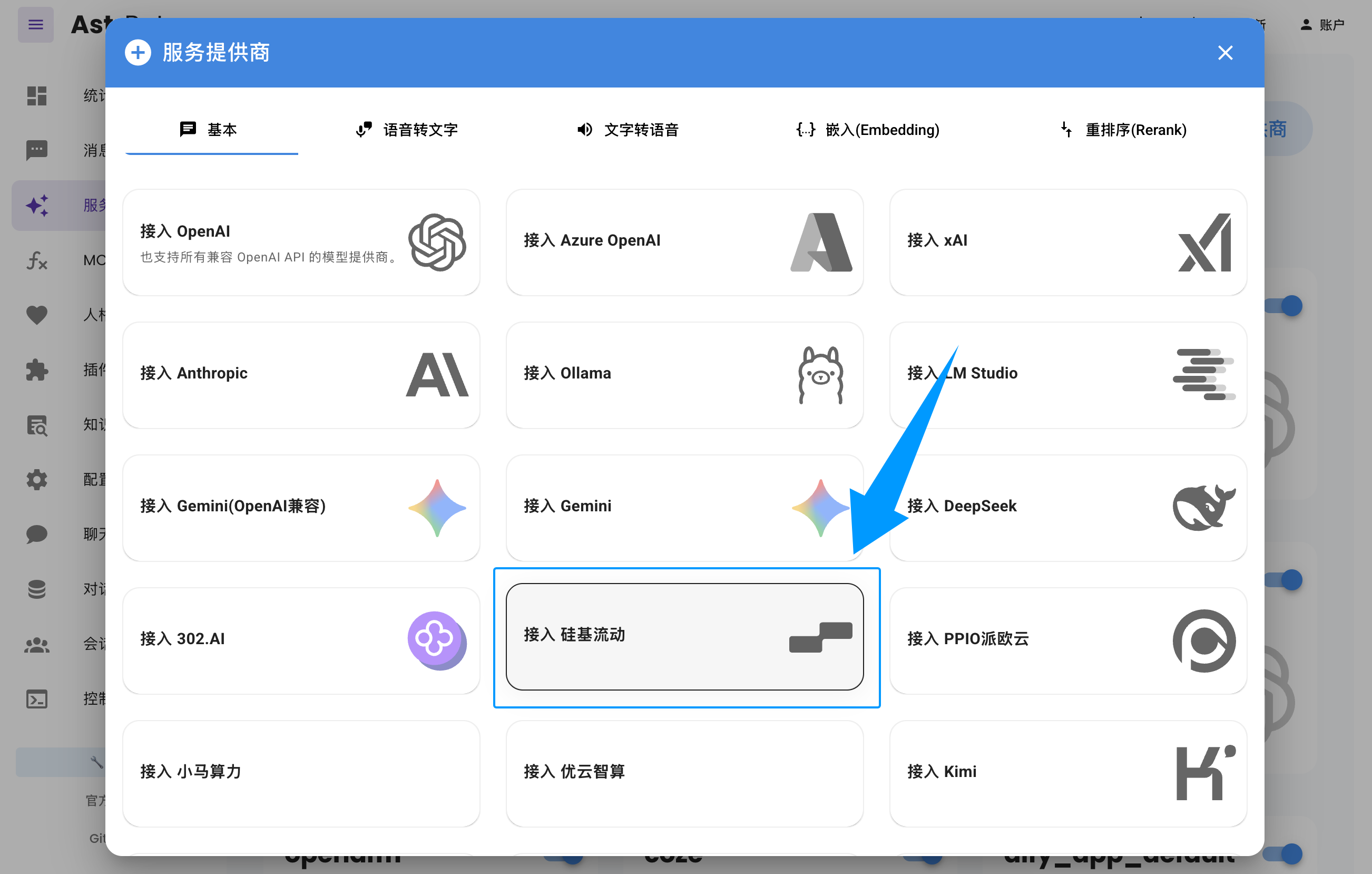
进入 AstrBot WebUI，点击左栏 `服务提供商` -> `新增提供商` -> 选择 `硅基流动`。

粘贴上面创建和选择的 `API Key` 和 `模型名称`，点击保存，完成创建。您可以点击下方 `服务提供商可用性` 的 `刷新` 按钮测试配置是否成功。
<Frame>
  <img src="https://mintcdn.com/siliconflow-37161621/c3_OkqqCATGrz6lr/images/usercases/AstrBot/1.png?fit=max&auto=format&n=c3_OkqqCATGrz6lr&q=85&s=5ac54713a1288c2c830a3f5f6e8e3eee" data-og-width="2604" width="2604" data-og-height="1658" height="1658" data-path="images/usercases/AstrBot/1.png" data-optimize="true" data-opv="3" srcset="https://mintcdn.com/siliconflow-37161621/c3_OkqqCATGrz6lr/images/usercases/AstrBot/1.png?w=280&fit=max&auto=format&n=c3_OkqqCATGrz6lr&q=85&s=83cbb80ca38bbe988b219741a00b8eae 280w, https://mintcdn.com/siliconflow-37161621/c3_OkqqCATGrz6lr/images/usercases/AstrBot/1.png?w=560&fit=max&auto=format&n=c3_OkqqCATGrz6lr&q=85&s=e60640e65d06d0551a05e8dcfe0aa742 560w, https://mintcdn.com/siliconflow-37161621/c3_OkqqCATGrz6lr/images/usercases/AstrBot/1.png?w=840&fit=max&auto=format&n=c3_OkqqCATGrz6lr&q=85&s=85ca9d848dcb3a2c7902bf6c66c9e010 840w, https://mintcdn.com/siliconflow-37161621/c3_OkqqCATGrz6lr/images/usercases/AstrBot/1.png?w=1100&fit=max&auto=format&n=c3_OkqqCATGrz6lr&q=85&s=9ca10946d080ba3aae615707bf240f32 1100w, https://mintcdn.com/siliconflow-37161621/c3_OkqqCATGrz6lr/images/usercases/AstrBot/1.png?w=1650&fit=max&auto=format&n=c3_OkqqCATGrz6lr&q=85&s=2e7e8e2acb0dd2015eba3f83e96acff1 1650w, https://mintcdn.com/siliconflow-37161621/c3_OkqqCATGrz6lr/images/usercases/AstrBot/1.png?w=2500&fit=max&auto=format&n=c3_OkqqCATGrz6lr&q=85&s=eb7b45927985394b778903fe1e4dc590 2500w" />
</Frame>

您可在 AstrBot WebUI 左栏 `聊天` 页面来测试您配置的模型。

此处以飞书为例。您可前往 [AstrBot 文档](https://docs.astrbot.app/) -> `部署` -> `部署消息平台` 查看其他消息平台的接入方式。

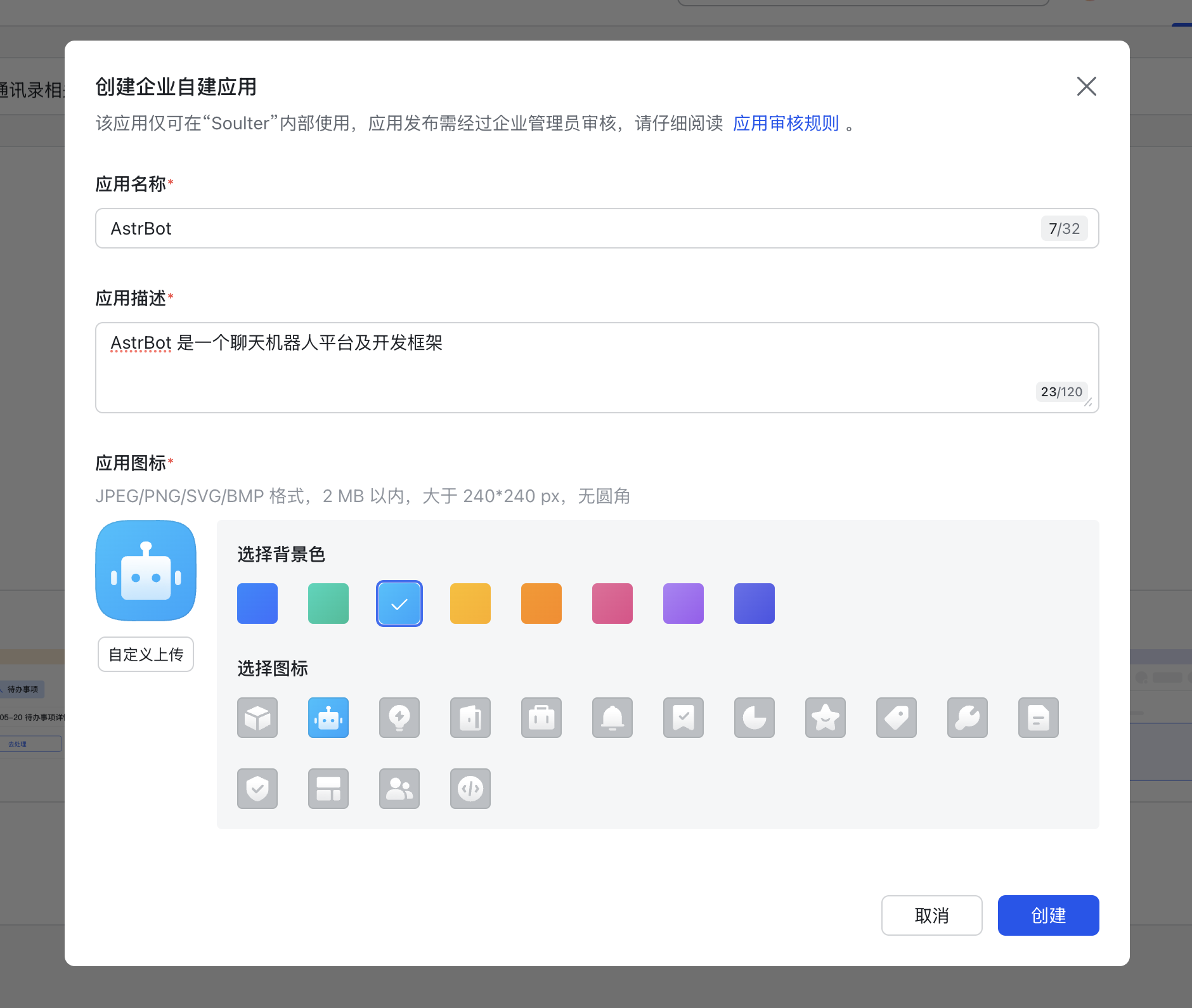
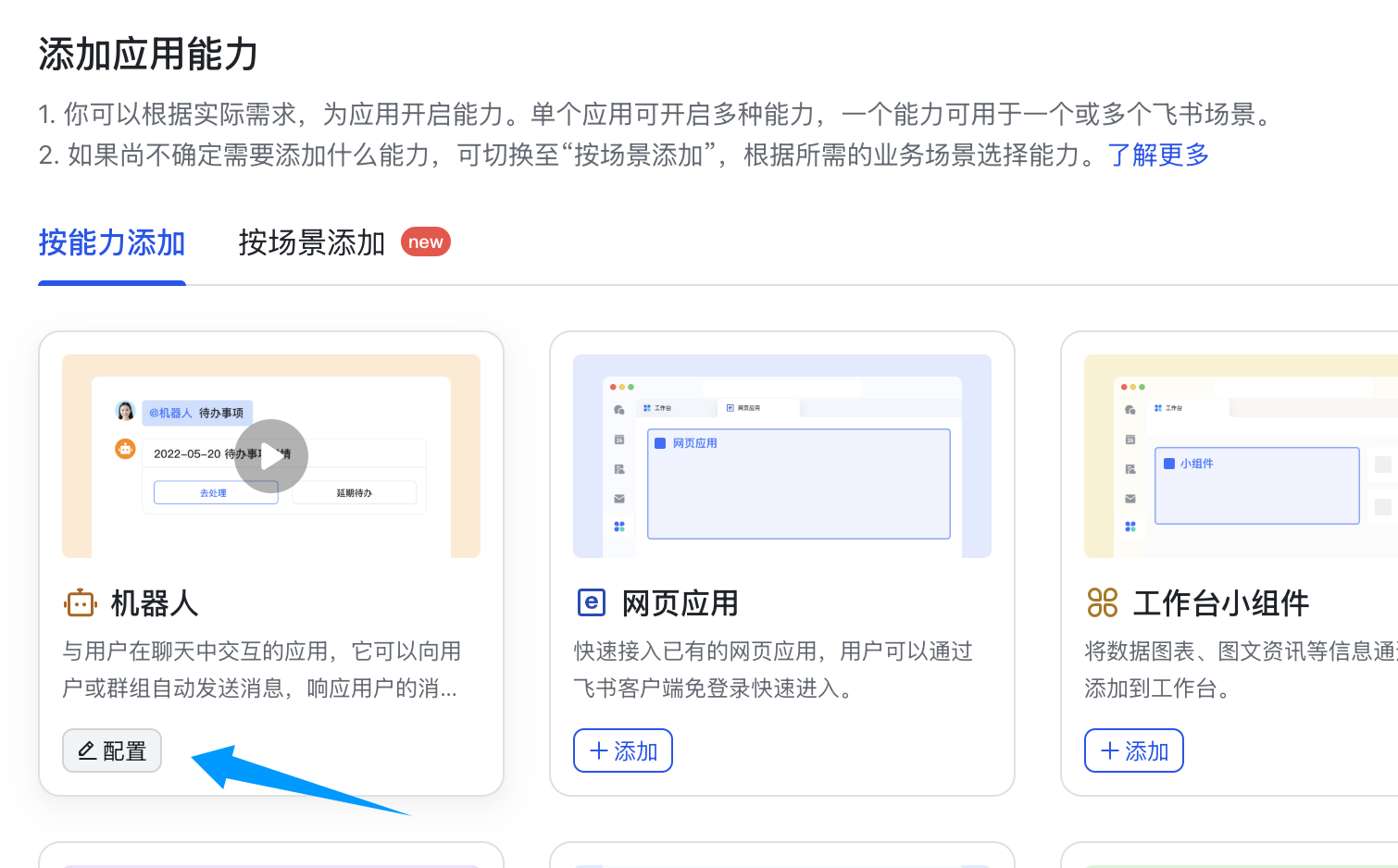
前往 [开发者后台](https://open.feishu.cn/app) ，创建企业自建应用。

<Frame>
  <img src="https://mintcdn.com/siliconflow-37161621/2dL2FkzVjBU52Ce2/images/usercases/AstrBot/2.png?fit=max&auto=format&n=2dL2FkzVjBU52Ce2&q=85&s=10112a5aa32670db5790ad9eddf720a4" data-og-width="1880" width="1880" data-og-height="1590" height="1590" data-path="images/usercases/AstrBot/2.png" data-optimize="true" data-opv="3" srcset="https://mintcdn.com/siliconflow-37161621/2dL2FkzVjBU52Ce2/images/usercases/AstrBot/2.png?w=280&fit=max&auto=format&n=2dL2FkzVjBU52Ce2&q=85&s=7d82fafdb4d7364abdac6b72340fe7ca 280w, https://mintcdn.com/siliconflow-37161621/2dL2FkzVjBU52Ce2/images/usercases/AstrBot/2.png?w=560&fit=max&auto=format&n=2dL2FkzVjBU52Ce2&q=85&s=7da73b62f11a15e52166b722a1e473be 560w, https://mintcdn.com/siliconflow-37161621/2dL2FkzVjBU52Ce2/images/usercases/AstrBot/2.png?w=840&fit=max&auto=format&n=2dL2FkzVjBU52Ce2&q=85&s=95022df887e8cf36a95ed0b9970038a2 840w, https://mintcdn.com/siliconflow-37161621/2dL2FkzVjBU52Ce2/images/usercases/AstrBot/2.png?w=1100&fit=max&auto=format&n=2dL2FkzVjBU52Ce2&q=85&s=ef46cafacfd7bdd5794d4bdaa903cef4 1100w, https://mintcdn.com/siliconflow-37161621/2dL2FkzVjBU52Ce2/images/usercases/AstrBot/2.png?w=1650&fit=max&auto=format&n=2dL2FkzVjBU52Ce2&q=85&s=c2c3288ba58c5f893c175e7728a6d8f0 1650w, https://mintcdn.com/siliconflow-37161621/2dL2FkzVjBU52Ce2/images/usercases/AstrBot/2.png?w=2500&fit=max&auto=format&n=2dL2FkzVjBU52Ce2&q=85&s=7558c116f7f6b98293a8606811107695 2500w" />
</Frame>

<Frame>
  <img src="https://mintcdn.com/siliconflow-37161621/2dL2FkzVjBU52Ce2/images/usercases/AstrBot/3.png?fit=max&auto=format&n=2dL2FkzVjBU52Ce2&q=85&s=02e3c237c5e65ca4ae58260a7ba1eac7" data-og-width="1510" width="1510" data-og-height="938" height="938" data-path="images/usercases/AstrBot/3.png" data-optimize="true" data-opv="3" srcset="https://mintcdn.com/siliconflow-37161621/2dL2FkzVjBU52Ce2/images/usercases/AstrBot/3.png?w=280&fit=max&auto=format&n=2dL2FkzVjBU52Ce2&q=85&s=a621df52c98ba0d2dddf5f759330d0f9 280w, https://mintcdn.com/siliconflow-37161621/2dL2FkzVjBU52Ce2/images/usercases/AstrBot/3.png?w=560&fit=max&auto=format&n=2dL2FkzVjBU52Ce2&q=85&s=012ea126718878f2f14a7a4bd0e2a866 560w, https://mintcdn.com/siliconflow-37161621/2dL2FkzVjBU52Ce2/images/usercases/AstrBot/3.png?w=840&fit=max&auto=format&n=2dL2FkzVjBU52Ce2&q=85&s=666e200b79933e2a1cf30af15a2137ce 840w, https://mintcdn.com/siliconflow-37161621/2dL2FkzVjBU52Ce2/images/usercases/AstrBot/3.png?w=1100&fit=max&auto=format&n=2dL2FkzVjBU52Ce2&q=85&s=9ab66e07ee05b2be2a50aab9c9945c47 1100w, https://mintcdn.com/siliconflow-37161621/2dL2FkzVjBU52Ce2/images/usercases/AstrBot/3.png?w=1650&fit=max&auto=format&n=2dL2FkzVjBU52Ce2&q=85&s=a8239f8ca87865c70b825a88044a8eda 1650w, https://mintcdn.com/siliconflow-37161621/2dL2FkzVjBU52Ce2/images/usercases/AstrBot/3.png?w=2500&fit=max&auto=format&n=2dL2FkzVjBU52Ce2&q=85&s=25792f697d173b82ff0970464d8f702e 2500w" />
</Frame>

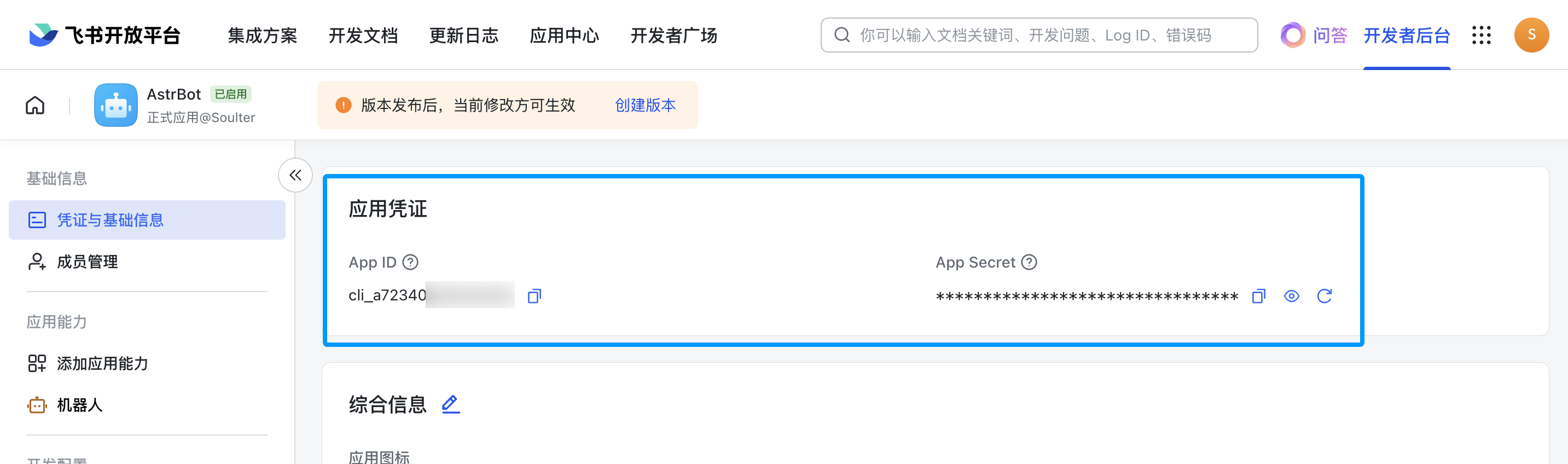
点击凭证与基础信息，获取 app\_id 和 app\_secret。

<Frame>
  <img src="https://mintcdn.com/siliconflow-37161621/2dL2FkzVjBU52Ce2/images/usercases/AstrBot/4.png?fit=max&auto=format&n=2dL2FkzVjBU52Ce2&q=85&s=24543719b83dc854e7f53d636c0e43ab" data-og-width="2866" width="2866" data-og-height="848" height="848" data-path="images/usercases/AstrBot/4.png" data-optimize="true" data-opv="3" srcset="https://mintcdn.com/siliconflow-37161621/2dL2FkzVjBU52Ce2/images/usercases/AstrBot/4.png?w=280&fit=max&auto=format&n=2dL2FkzVjBU52Ce2&q=85&s=4b06402a9bb370547c88db2d190e0474 280w, https://mintcdn.com/siliconflow-37161621/2dL2FkzVjBU52Ce2/images/usercases/AstrBot/4.png?w=560&fit=max&auto=format&n=2dL2FkzVjBU52Ce2&q=85&s=f35128f8369ca2f6a8afc7328f45418f 560w, https://mintcdn.com/siliconflow-37161621/2dL2FkzVjBU52Ce2/images/usercases/AstrBot/4.png?w=840&fit=max&auto=format&n=2dL2FkzVjBU52Ce2&q=85&s=20e26038e5b190380179b2e0f57a6d92 840w, https://mintcdn.com/siliconflow-37161621/2dL2FkzVjBU52Ce2/images/usercases/AstrBot/4.png?w=1100&fit=max&auto=format&n=2dL2FkzVjBU52Ce2&q=85&s=f21d5aad9036b4df42b1b88ecb1d212b 1100w, https://mintcdn.com/siliconflow-37161621/2dL2FkzVjBU52Ce2/images/usercases/AstrBot/4.png?w=1650&fit=max&auto=format&n=2dL2FkzVjBU52Ce2&q=85&s=aa35ddd24047e47a0b6ab1aaf23d3f6c 1650w, https://mintcdn.com/siliconflow-37161621/2dL2FkzVjBU52Ce2/images/usercases/AstrBot/4.png?w=2500&fit=max&auto=format&n=2dL2FkzVjBU52Ce2&q=85&s=c550a629c727d446f4159d9126a79ebb 2500w" />
</Frame>

1. 进入 AstrBot 的管理面板
2. 点击左边栏 `机器人`
3. 然后在右边的界面中，点击 `+ 创建机器人`
4. 选择 `lark(飞书)`

* ID: 随意填写，用于区分不同的消息平台实例。
* 启用: 勾选。
* app\_id: 获取的 app\_id
* app\_secret: 获取的 app\_secret
* 飞书机器人的名字

如果您正在用国际版飞书，请将 `domain` 设置为 `https://open.larksuite.com`。

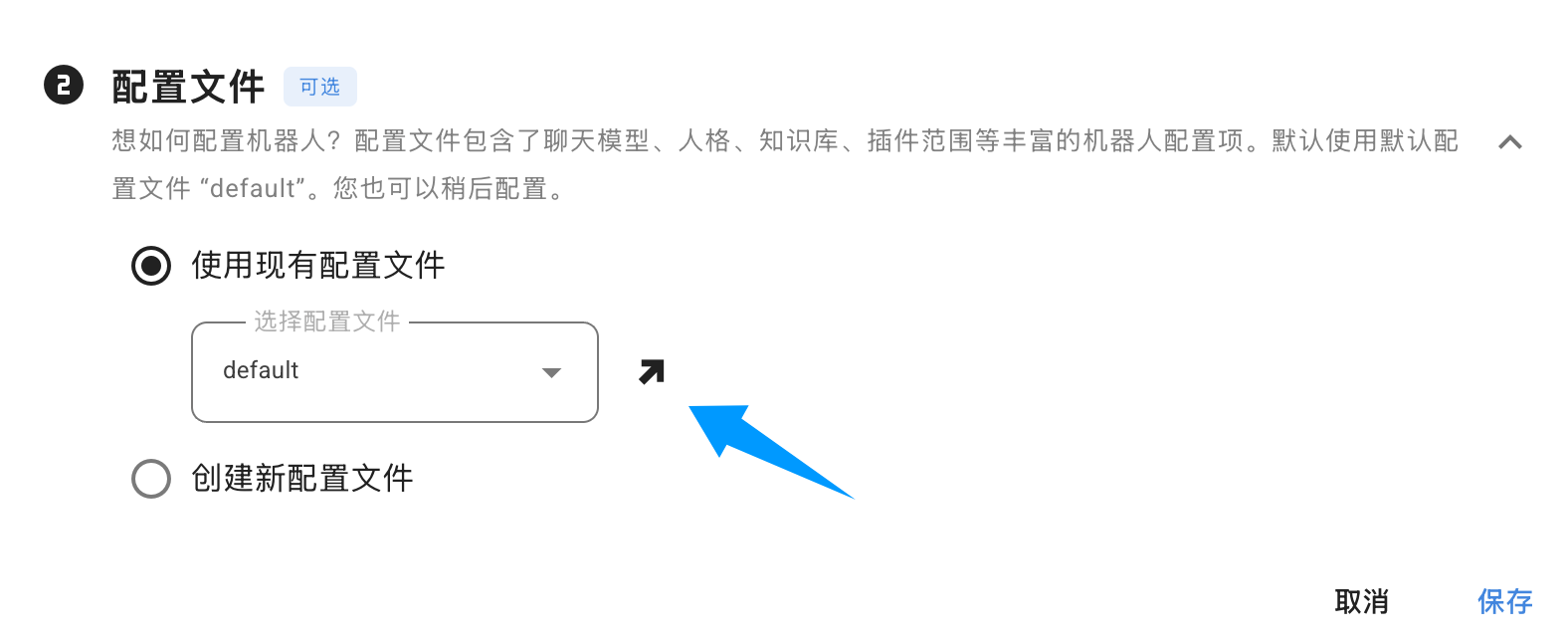
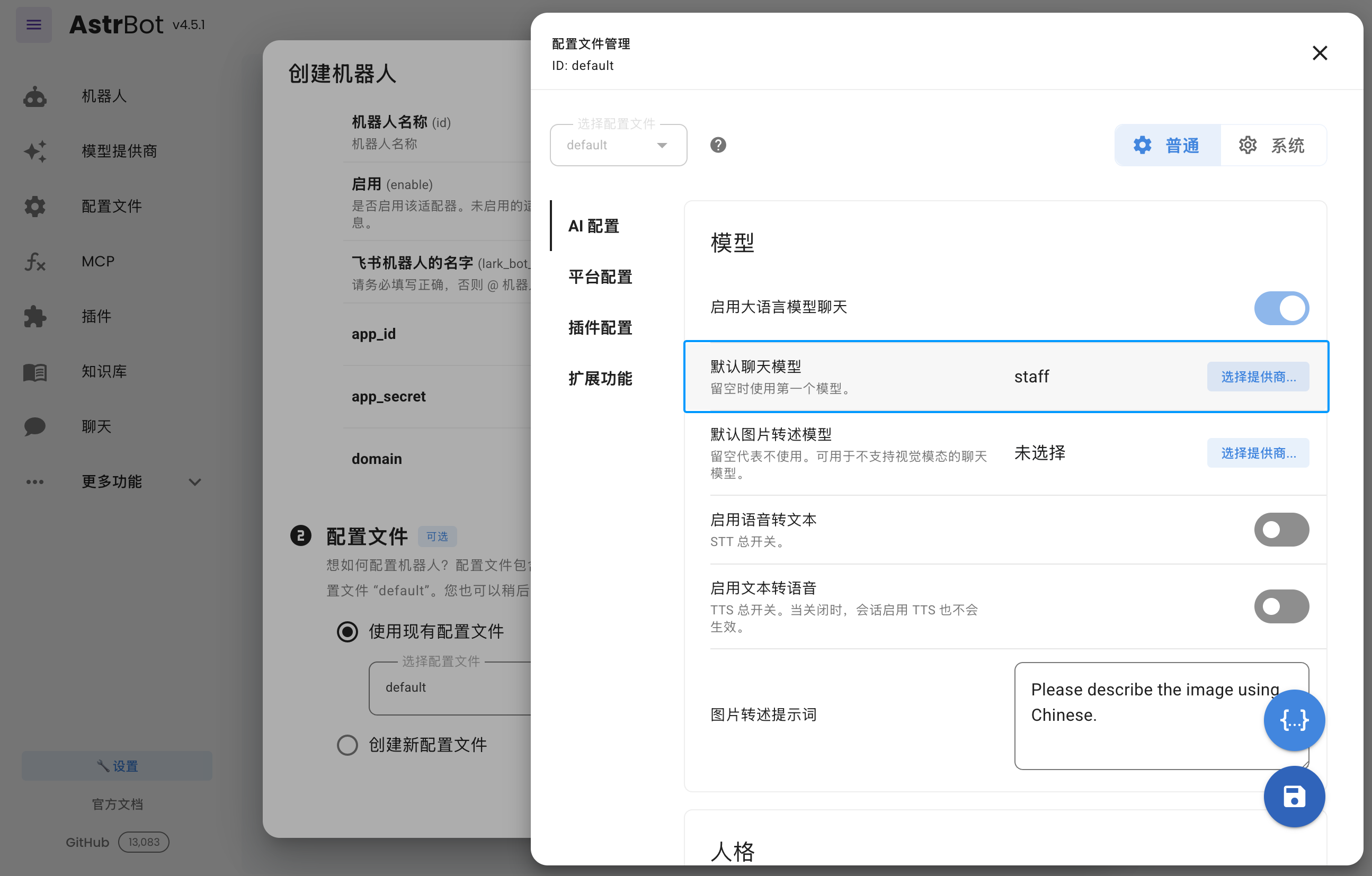
在下方的 `配置文件` 中，点击 `选择配置文件` 右边的 ↗️ 箭头按钮。

<Frame>
  <img src="https://mintcdn.com/siliconflow-37161621/2dL2FkzVjBU52Ce2/images/usercases/AstrBot/5.png?fit=max&auto=format&n=2dL2FkzVjBU52Ce2&q=85&s=52091141707622cb90fab4b9ef90e274" data-og-width="1576" width="1576" data-og-height="642" height="642" data-path="images/usercases/AstrBot/5.png" data-optimize="true" data-opv="3" srcset="https://mintcdn.com/siliconflow-37161621/2dL2FkzVjBU52Ce2/images/usercases/AstrBot/5.png?w=280&fit=max&auto=format&n=2dL2FkzVjBU52Ce2&q=85&s=104c3ec6561f39b88f8a315997ed4ad2 280w, https://mintcdn.com/siliconflow-37161621/2dL2FkzVjBU52Ce2/images/usercases/AstrBot/5.png?w=560&fit=max&auto=format&n=2dL2FkzVjBU52Ce2&q=85&s=de8aca4f8a7e4b7f824d7193d82c7a12 560w, https://mintcdn.com/siliconflow-37161621/2dL2FkzVjBU52Ce2/images/usercases/AstrBot/5.png?w=840&fit=max&auto=format&n=2dL2FkzVjBU52Ce2&q=85&s=2f31969dcca8350fed635048896b4e4d 840w, https://mintcdn.com/siliconflow-37161621/2dL2FkzVjBU52Ce2/images/usercases/AstrBot/5.png?w=1100&fit=max&auto=format&n=2dL2FkzVjBU52Ce2&q=85&s=6eb5f241fead38aaf08f8e3aec665490 1100w, https://mintcdn.com/siliconflow-37161621/2dL2FkzVjBU52Ce2/images/usercases/AstrBot/5.png?w=1650&fit=max&auto=format&n=2dL2FkzVjBU52Ce2&q=85&s=d19591b56a5e265bbd059df73ba7c600 1650w, https://mintcdn.com/siliconflow-37161621/2dL2FkzVjBU52Ce2/images/usercases/AstrBot/5.png?w=2500&fit=max&auto=format&n=2dL2FkzVjBU52Ce2&q=85&s=c1883754604973eecab153992eb59db5 2500w" />
</Frame>

在呼出的配置页面中，点击默认聊天模型右边的选择提供商按钮，选择刚刚创建的硅基流动的提供商，点击右下角的保存按钮。保存成功后关闭该页面。

<Frame>
  <img src="https://mintcdn.com/siliconflow-37161621/2dL2FkzVjBU52Ce2/images/usercases/AstrBot/6.png?fit=max&auto=format&n=2dL2FkzVjBU52Ce2&q=85&s=0154c0b36f03825fcaeebe925bf97281" data-og-width="2590" width="2590" data-og-height="1654" height="1654" data-path="images/usercases/AstrBot/6.png" data-optimize="true" data-opv="3" srcset="https://mintcdn.com/siliconflow-37161621/2dL2FkzVjBU52Ce2/images/usercases/AstrBot/6.png?w=280&fit=max&auto=format&n=2dL2FkzVjBU52Ce2&q=85&s=6ceb7aa556805ae669ed2f04f9168ce8 280w, https://mintcdn.com/siliconflow-37161621/2dL2FkzVjBU52Ce2/images/usercases/AstrBot/6.png?w=560&fit=max&auto=format&n=2dL2FkzVjBU52Ce2&q=85&s=82198eed259e5bd7e3bd7d892dd8c1c6 560w, https://mintcdn.com/siliconflow-37161621/2dL2FkzVjBU52Ce2/images/usercases/AstrBot/6.png?w=840&fit=max&auto=format&n=2dL2FkzVjBU52Ce2&q=85&s=c653424b505fb6d84291afec87571c56 840w, https://mintcdn.com/siliconflow-37161621/2dL2FkzVjBU52Ce2/images/usercases/AstrBot/6.png?w=1100&fit=max&auto=format&n=2dL2FkzVjBU52Ce2&q=85&s=b07ce4f80d9d146fc4c6276088daf43a 1100w, https://mintcdn.com/siliconflow-37161621/2dL2FkzVjBU52Ce2/images/usercases/AstrBot/6.png?w=1650&fit=max&auto=format&n=2dL2FkzVjBU52Ce2&q=85&s=47aa5f8b7b428430e5170a314f3e159b 1650w, https://mintcdn.com/siliconflow-37161621/2dL2FkzVjBU52Ce2/images/usercases/AstrBot/6.png?w=2500&fit=max&auto=format&n=2dL2FkzVjBU52Ce2&q=85&s=6f34a25c74b9dad798fe318d5cf39105 2500w" />
</Frame>

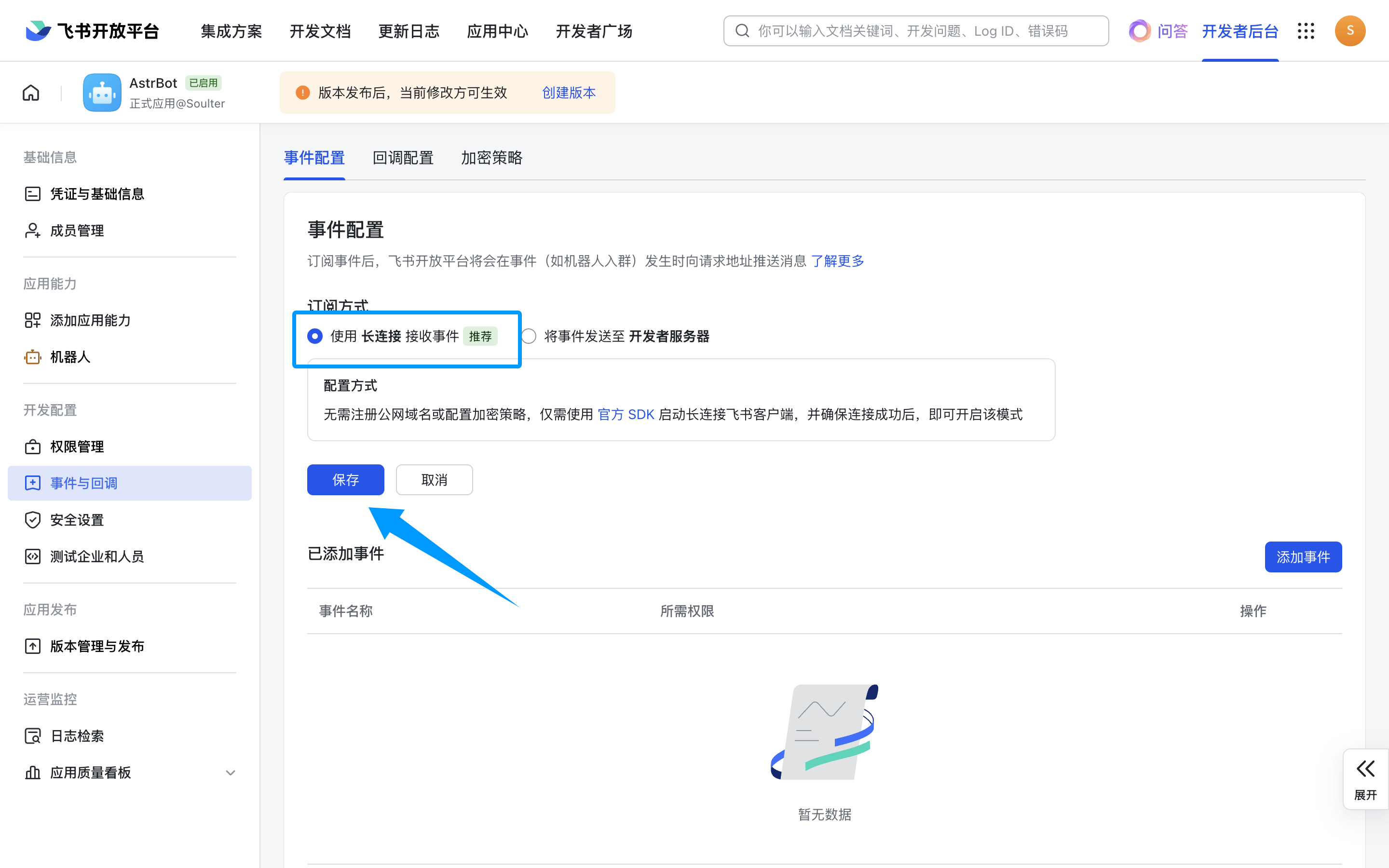
接下来，点击事件与回调，使用长连接接收事件，点击保存。**如果上一步没有成功启动，那么这里将无法保存。**

<Frame>
  <img src="https://mintcdn.com/siliconflow-37161621/2dL2FkzVjBU52Ce2/images/usercases/AstrBot/7.png?fit=max&auto=format&n=2dL2FkzVjBU52Ce2&q=85&s=552e60b933ae2a7a2c21769ee7736689" data-og-width="2880" width="2880" data-og-height="1800" height="1800" data-path="images/usercases/AstrBot/7.png" data-optimize="true" data-opv="3" srcset="https://mintcdn.com/siliconflow-37161621/2dL2FkzVjBU52Ce2/images/usercases/AstrBot/7.png?w=280&fit=max&auto=format&n=2dL2FkzVjBU52Ce2&q=85&s=6f44dab9f1984881ca59392be19a92cb 280w, https://mintcdn.com/siliconflow-37161621/2dL2FkzVjBU52Ce2/images/usercases/AstrBot/7.png?w=560&fit=max&auto=format&n=2dL2FkzVjBU52Ce2&q=85&s=f3e0229964cf29fd61fac4c6f7b4e37c 560w, https://mintcdn.com/siliconflow-37161621/2dL2FkzVjBU52Ce2/images/usercases/AstrBot/7.png?w=840&fit=max&auto=format&n=2dL2FkzVjBU52Ce2&q=85&s=aade885f48ed0e2444084f83ed12e106 840w, https://mintcdn.com/siliconflow-37161621/2dL2FkzVjBU52Ce2/images/usercases/AstrBot/7.png?w=1100&fit=max&auto=format&n=2dL2FkzVjBU52Ce2&q=85&s=10acfe189814cd3f987d5157528873dd 1100w, https://mintcdn.com/siliconflow-37161621/2dL2FkzVjBU52Ce2/images/usercases/AstrBot/7.png?w=1650&fit=max&auto=format&n=2dL2FkzVjBU52Ce2&q=85&s=d78fc3ab4838abe13688aae8936eef23 1650w, https://mintcdn.com/siliconflow-37161621/2dL2FkzVjBU52Ce2/images/usercases/AstrBot/7.png?w=2500&fit=max&auto=format&n=2dL2FkzVjBU52Ce2&q=85&s=37b132e82c40a5909efa430c7b1976e2 2500w" />
</Frame>

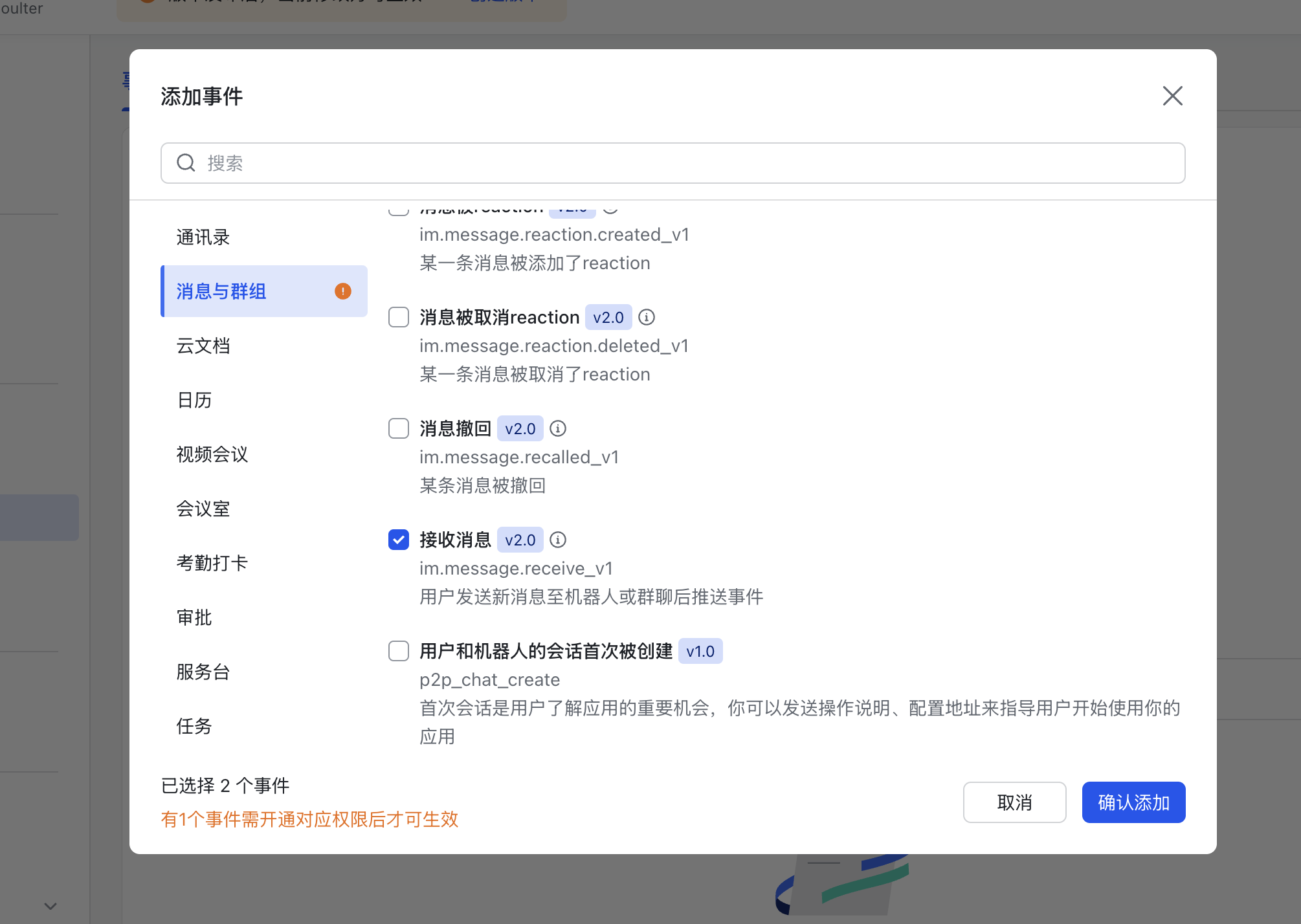
点击添加事件，消息与群组，下拉找到 `接收消息`，添加。

<Frame>
  <img src="https://mintcdn.com/siliconflow-37161621/2dL2FkzVjBU52Ce2/images/usercases/AstrBot/8.png?fit=max&auto=format&n=2dL2FkzVjBU52Ce2&q=85&s=33f1e7e8a64b6057d185c372edff4820" data-og-width="2010" width="2010" data-og-height="1428" height="1428" data-path="images/usercases/AstrBot/8.png" data-optimize="true" data-opv="3" srcset="https://mintcdn.com/siliconflow-37161621/2dL2FkzVjBU52Ce2/images/usercases/AstrBot/8.png?w=280&fit=max&auto=format&n=2dL2FkzVjBU52Ce2&q=85&s=7ff15286cbd43c5ec4ce4db4ad02a036 280w, https://mintcdn.com/siliconflow-37161621/2dL2FkzVjBU52Ce2/images/usercases/AstrBot/8.png?w=560&fit=max&auto=format&n=2dL2FkzVjBU52Ce2&q=85&s=d174a76daa8c4321a9372daf20e9bb75 560w, https://mintcdn.com/siliconflow-37161621/2dL2FkzVjBU52Ce2/images/usercases/AstrBot/8.png?w=840&fit=max&auto=format&n=2dL2FkzVjBU52Ce2&q=85&s=e3f7f1616416e56eabb1f578fb258be2 840w, https://mintcdn.com/siliconflow-37161621/2dL2FkzVjBU52Ce2/images/usercases/AstrBot/8.png?w=1100&fit=max&auto=format&n=2dL2FkzVjBU52Ce2&q=85&s=dd123b432c264748b417d06674319ea6 1100w, https://mintcdn.com/siliconflow-37161621/2dL2FkzVjBU52Ce2/images/usercases/AstrBot/8.png?w=1650&fit=max&auto=format&n=2dL2FkzVjBU52Ce2&q=85&s=189e0e2c2f15365e03fccce018dc85d6 1650w, https://mintcdn.com/siliconflow-37161621/2dL2FkzVjBU52Ce2/images/usercases/AstrBot/8.png?w=2500&fit=max&auto=format&n=2dL2FkzVjBU52Ce2&q=85&s=dd9123c5eee0b8d0dc8a4f583b4fccfd 2500w" />
</Frame>

<Frame>
  <img src="https://mintcdn.com/siliconflow-37161621/2dL2FkzVjBU52Ce2/images/usercases/AstrBot/9.png?fit=max&auto=format&n=2dL2FkzVjBU52Ce2&q=85&s=5b9e6ea94353ccf4b9675db972166442" data-og-width="2242" width="2242" data-og-height="774" height="774" data-path="images/usercases/AstrBot/9.png" data-optimize="true" data-opv="3" srcset="https://mintcdn.com/siliconflow-37161621/2dL2FkzVjBU52Ce2/images/usercases/AstrBot/9.png?w=280&fit=max&auto=format&n=2dL2FkzVjBU52Ce2&q=85&s=bbfb689a9d96c4fbd4765a065ed2b7fc 280w, https://mintcdn.com/siliconflow-37161621/2dL2FkzVjBU52Ce2/images/usercases/AstrBot/9.png?w=560&fit=max&auto=format&n=2dL2FkzVjBU52Ce2&q=85&s=0f8efbc59b5942cae010942914c405ec 560w, https://mintcdn.com/siliconflow-37161621/2dL2FkzVjBU52Ce2/images/usercases/AstrBot/9.png?w=840&fit=max&auto=format&n=2dL2FkzVjBU52Ce2&q=85&s=4c305ac0fdf78fe073be6aa72ec55e62 840w, https://mintcdn.com/siliconflow-37161621/2dL2FkzVjBU52Ce2/images/usercases/AstrBot/9.png?w=1100&fit=max&auto=format&n=2dL2FkzVjBU52Ce2&q=85&s=21c58010537cac55af44cde66a6306b5 1100w, https://mintcdn.com/siliconflow-37161621/2dL2FkzVjBU52Ce2/images/usercases/AstrBot/9.png?w=1650&fit=max&auto=format&n=2dL2FkzVjBU52Ce2&q=85&s=35befe9082376285e94c9457219b9ca7 1650w, https://mintcdn.com/siliconflow-37161621/2dL2FkzVjBU52Ce2/images/usercases/AstrBot/9.png?w=2500&fit=max&auto=format&n=2dL2FkzVjBU52Ce2&q=85&s=be1eae6eba0669f66729707a8b62b331 2500w" />
</Frame>

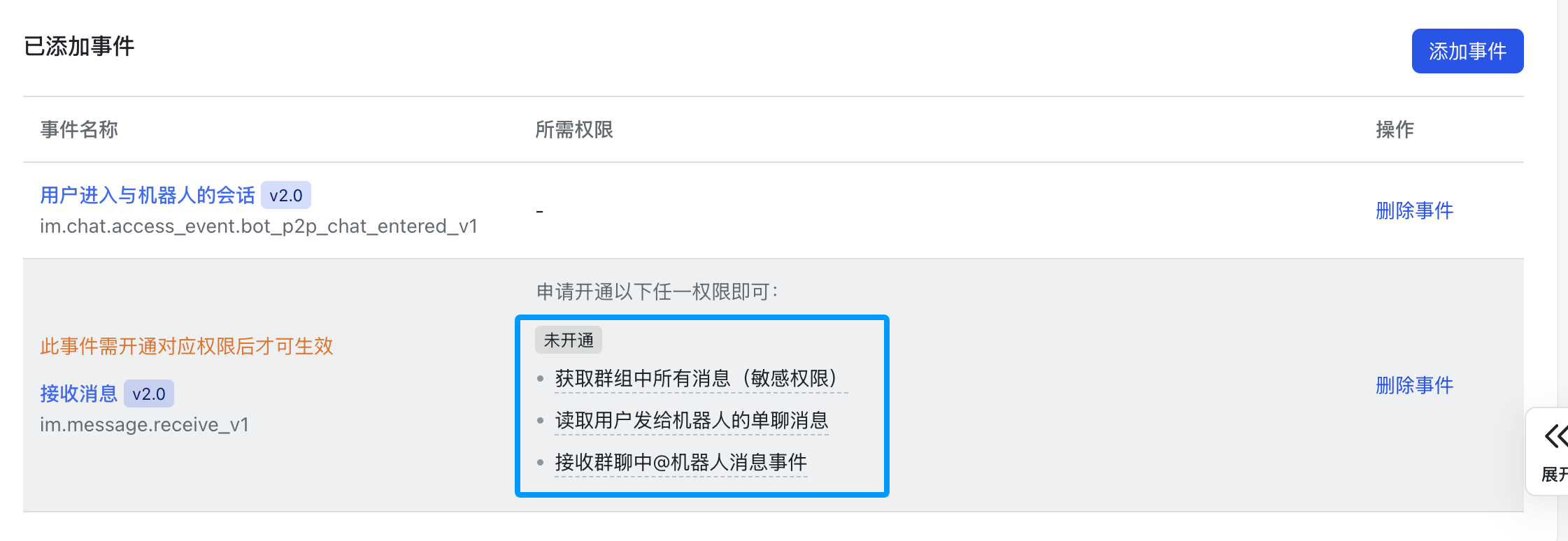
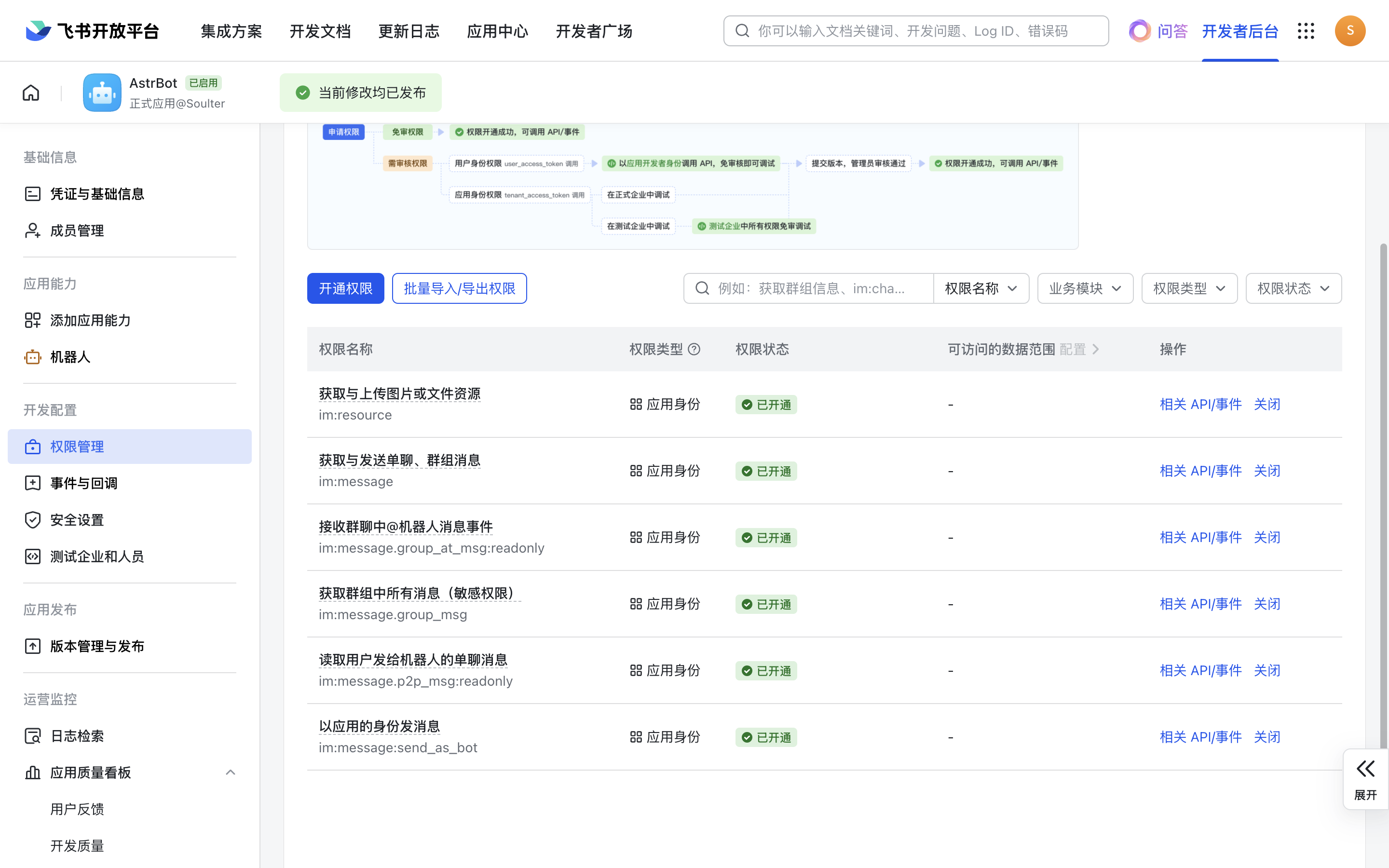
接下来，点击权限管理，点击开通权限，输入 `im:message:send,im:message,im:message:send_as_bot`。添加筛选到的权限。

再次输入 `im:resource:upload,im:resource` 开通上传图片相关的权限。
<Frame>
  <img src="https://mintcdn.com/siliconflow-37161621/c3_OkqqCATGrz6lr/images/usercases/AstrBot/10.png?fit=max&auto=format&n=c3_OkqqCATGrz6lr&q=85&s=c400c1a7fc5ec882553a441d91e60f51" data-og-width="2880" width="2880" data-og-height="1800" height="1800" data-path="images/usercases/AstrBot/10.png" data-optimize="true" data-opv="3" srcset="https://mintcdn.com/siliconflow-37161621/c3_OkqqCATGrz6lr/images/usercases/AstrBot/10.png?w=280&fit=max&auto=format&n=c3_OkqqCATGrz6lr&q=85&s=f0e2b2c02605e19c35444838d883881a 280w, https://mintcdn.com/siliconflow-37161621/c3_OkqqCATGrz6lr/images/usercases/AstrBot/10.png?w=560&fit=max&auto=format&n=c3_OkqqCATGrz6lr&q=85&s=c88110dfad2913e8fca12c56bf122ed9 560w, https://mintcdn.com/siliconflow-37161621/c3_OkqqCATGrz6lr/images/usercases/AstrBot/10.png?w=840&fit=max&auto=format&n=c3_OkqqCATGrz6lr&q=85&s=db620c87f6d6bd3bdb4b8a1992c4bbff 840w, https://mintcdn.com/siliconflow-37161621/c3_OkqqCATGrz6lr/images/usercases/AstrBot/10.png?w=1100&fit=max&auto=format&n=c3_OkqqCATGrz6lr&q=85&s=fc5044ae4311761652a784924f2b30da 1100w, https://mintcdn.com/siliconflow-37161621/c3_OkqqCATGrz6lr/images/usercases/AstrBot/10.png?w=1650&fit=max&auto=format&n=c3_OkqqCATGrz6lr&q=85&s=c25d122d7f4aaf66953e06890295d103 1650w, https://mintcdn.com/siliconflow-37161621/c3_OkqqCATGrz6lr/images/usercases/AstrBot/10.png?w=2500&fit=max&auto=format&n=c3_OkqqCATGrz6lr&q=85&s=8dee14cb5cc9bf7088e7a22ee92afec7 2500w" />
</Frame>

<Frame>
  <img src="https://mintcdn.com/siliconflow-37161621/c3_OkqqCATGrz6lr/images/usercases/AstrBot/11.png?fit=max&auto=format&n=c3_OkqqCATGrz6lr&q=85&s=b610eb6232ede4bdf7716402f8a43c65" data-og-width="2528" width="2528" data-og-height="804" height="804" data-path="images/usercases/AstrBot/11.png" data-optimize="true" data-opv="3" srcset="https://mintcdn.com/siliconflow-37161621/c3_OkqqCATGrz6lr/images/usercases/AstrBot/11.png?w=280&fit=max&auto=format&n=c3_OkqqCATGrz6lr&q=85&s=e2b00c5654d9481f2c31588186e300c7 280w, https://mintcdn.com/siliconflow-37161621/c3_OkqqCATGrz6lr/images/usercases/AstrBot/11.png?w=560&fit=max&auto=format&n=c3_OkqqCATGrz6lr&q=85&s=85a7cfe6ba7db92f11026a6f9e0d86c4 560w, https://mintcdn.com/siliconflow-37161621/c3_OkqqCATGrz6lr/images/usercases/AstrBot/11.png?w=840&fit=max&auto=format&n=c3_OkqqCATGrz6lr&q=85&s=9cda16d3d533440a4ab155df78c6f2d2 840w, https://mintcdn.com/siliconflow-37161621/c3_OkqqCATGrz6lr/images/usercases/AstrBot/11.png?w=1100&fit=max&auto=format&n=c3_OkqqCATGrz6lr&q=85&s=01a5d4f4bfea8fbfa59f4dd4e7563f44 1100w, https://mintcdn.com/siliconflow-37161621/c3_OkqqCATGrz6lr/images/usercases/AstrBot/11.png?w=1650&fit=max&auto=format&n=c3_OkqqCATGrz6lr&q=85&s=6dc51327139258dcd9bfb3703057845e 1650w, https://mintcdn.com/siliconflow-37161621/c3_OkqqCATGrz6lr/images/usercases/AstrBot/11.png?w=2500&fit=max&auto=format&n=c3_OkqqCATGrz6lr&q=85&s=828f0a7c4c9a219b9cd555b3482c8869 2500w" />
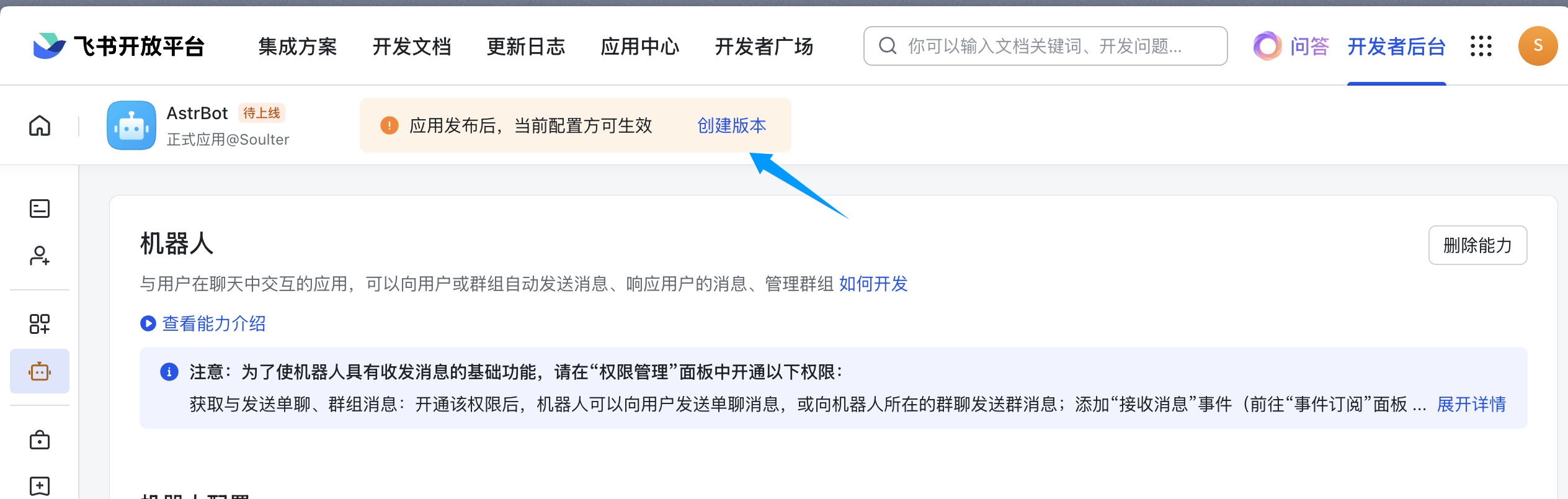
</Frame>

填写版本号，更新说明，可见范围后点击保存，确认发布。

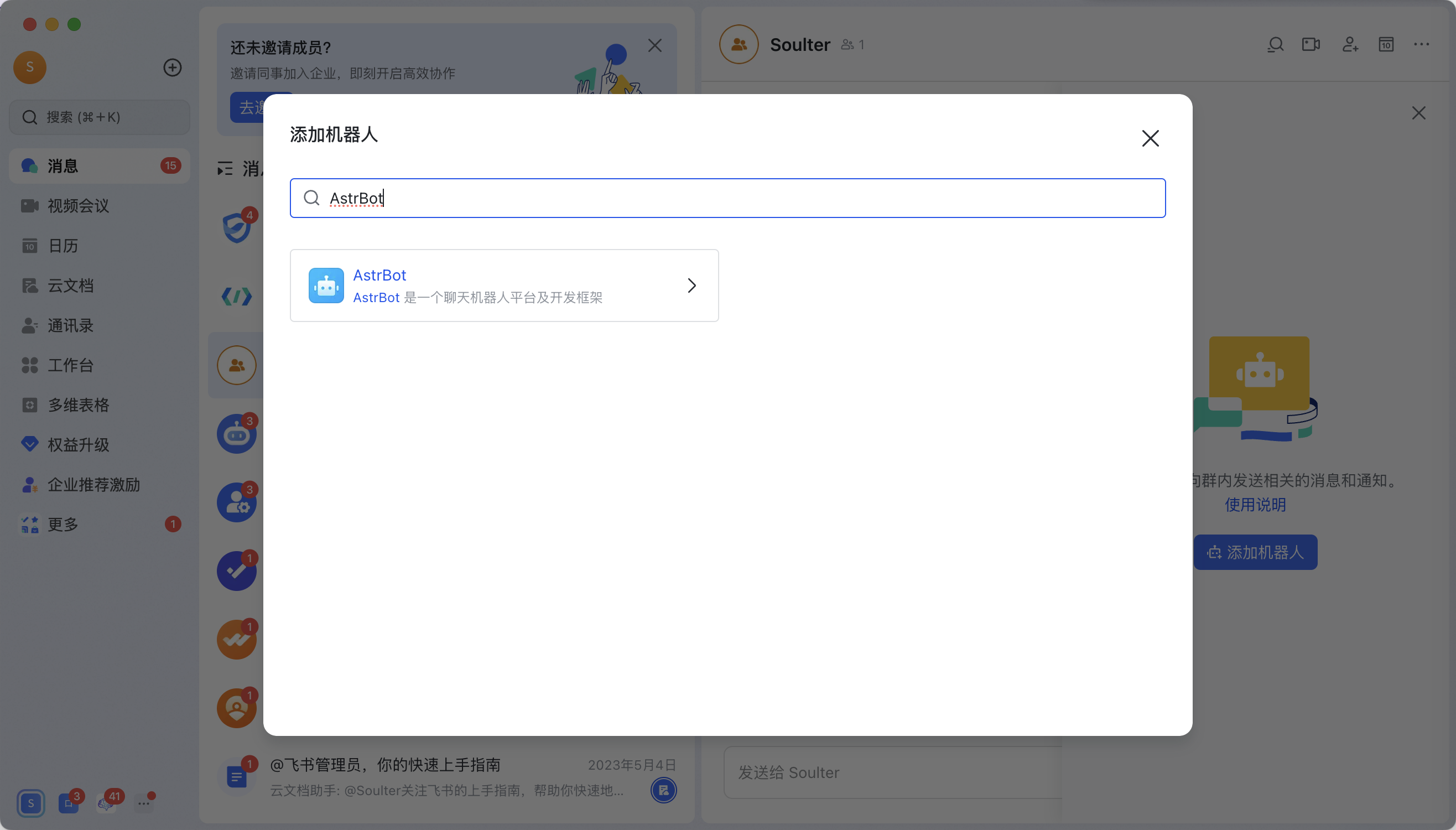
进入飞书 APP（网页版飞书无法添加机器人），点进群聊，点击右上角按钮->群机器人->添加机器人。

搜索刚刚创建的机器人的名字。比如教程创建了 `AstrBot` 机器人：

<Frame>
  <img src="https://mintcdn.com/siliconflow-37161621/2dL2FkzVjBU52Ce2/images/usercases/AstrBot/12.png?fit=max&auto=format&n=2dL2FkzVjBU52Ce2&q=85&s=47d4a292ecb0902701baa9a3a64669b5" data-og-width="2632" width="2632" data-og-height="1500" height="1500" data-path="images/usercases/AstrBot/12.png" data-optimize="true" data-opv="3" srcset="https://mintcdn.com/siliconflow-37161621/2dL2FkzVjBU52Ce2/images/usercases/AstrBot/12.png?w=280&fit=max&auto=format&n=2dL2FkzVjBU52Ce2&q=85&s=2b861eee1059ff3a9b99e7f2cc327411 280w, https://mintcdn.com/siliconflow-37161621/2dL2FkzVjBU52Ce2/images/usercases/AstrBot/12.png?w=560&fit=max&auto=format&n=2dL2FkzVjBU52Ce2&q=85&s=f8c331971a1cbc5521712ed79c441614 560w, https://mintcdn.com/siliconflow-37161621/2dL2FkzVjBU52Ce2/images/usercases/AstrBot/12.png?w=840&fit=max&auto=format&n=2dL2FkzVjBU52Ce2&q=85&s=0270a33c750db775e1053b78168cb951 840w, https://mintcdn.com/siliconflow-37161621/2dL2FkzVjBU52Ce2/images/usercases/AstrBot/12.png?w=1100&fit=max&auto=format&n=2dL2FkzVjBU52Ce2&q=85&s=ca1748881a86353587eb3891212e6f30 1100w, https://mintcdn.com/siliconflow-37161621/2dL2FkzVjBU52Ce2/images/usercases/AstrBot/12.png?w=1650&fit=max&auto=format&n=2dL2FkzVjBU52Ce2&q=85&s=041ec28a8e0c5e8e425b6fd0316e2377 1650w, https://mintcdn.com/siliconflow-37161621/2dL2FkzVjBU52Ce2/images/usercases/AstrBot/12.png?w=2500&fit=max&auto=format&n=2dL2FkzVjBU52Ce2&q=85&s=005620faa1987305390195474b2170aa 2500w" />
</Frame>

在群内发送测试消息 `hi`，机器人将做出响应。

您可以前往 [AstrBot 文档](https://docs.astrbot.app/) 查看更多功能和配置。

**Examples:**

Example 1 (unknown):
```unknown
> 如果您的网络环境在中国大陆境内，上述命令将无法正常拉取。您可能需要修改 compose.yml 文件，将其中的 `image: soulter/astrbot:latest` 替换为 `image: m.daocloud.io/docker.io/soulter/astrbot:latest`。

### 访问 AstrBot WebUI
```

---

## Chat2Graph

**URL:** llms-txt#chat2graph

**Contents:**
- 关于 Chat2Graph
- 获取 API Key
- 部署 Chat2Graph
  - 下载 Chat2Graph
  - 准备执行环境
  - 构建 Chat2Graph
  - 配置 SiliconFlow 模型
  - 启动 Chat2Graph
- 使用 Chat2Graph
  - 注册图数据库

Source: https://docs.siliconflow.cn/cn/usercases/use-siliconcloud-in-chat2graph

[Chat2Graph](https://github.com/TuGraph-family/chat2graph) 是一个图原生的智能体系统（Graph Native Agentic System），通过利用图数据结构在关系建模、可解释性等符号主义的天然优势，对智能体的推理、规划、记忆、知识、工具协作等关键能力进行增强，同时借助智能体技术推进图数据库智能化，降低用图门槛，加速内容生成，实现与图对话。做到图计算技术与人工智能技术的深度融合。

<Frame>
  <img src="https://mintcdn.com/siliconflow-37161621/dWzWFIJ4RDcgcXPP/images/usercases/chat2graph/head.png?fit=max&auto=format&n=dWzWFIJ4RDcgcXPP&q=85&s=b4edf470dabd717027290ec549a1bfa8" data-og-width="3602" width="3602" data-og-height="1329" height="1329" data-path="images/usercases/chat2graph/head.png" data-optimize="true" data-opv="3" srcset="https://mintcdn.com/siliconflow-37161621/dWzWFIJ4RDcgcXPP/images/usercases/chat2graph/head.png?w=280&fit=max&auto=format&n=dWzWFIJ4RDcgcXPP&q=85&s=24880ac8637c59fa43e7d9e7ca7dccb4 280w, https://mintcdn.com/siliconflow-37161621/dWzWFIJ4RDcgcXPP/images/usercases/chat2graph/head.png?w=560&fit=max&auto=format&n=dWzWFIJ4RDcgcXPP&q=85&s=24237af5b8493b3e744836370046c277 560w, https://mintcdn.com/siliconflow-37161621/dWzWFIJ4RDcgcXPP/images/usercases/chat2graph/head.png?w=840&fit=max&auto=format&n=dWzWFIJ4RDcgcXPP&q=85&s=526defecf6db8e172226586a6fe3ac92 840w, https://mintcdn.com/siliconflow-37161621/dWzWFIJ4RDcgcXPP/images/usercases/chat2graph/head.png?w=1100&fit=max&auto=format&n=dWzWFIJ4RDcgcXPP&q=85&s=389cb54560e5d3e54fb95a9faab858aa 1100w, https://mintcdn.com/siliconflow-37161621/dWzWFIJ4RDcgcXPP/images/usercases/chat2graph/head.png?w=1650&fit=max&auto=format&n=dWzWFIJ4RDcgcXPP&q=85&s=ed3288137670ed02aec90a65b2e14f4d 1650w, https://mintcdn.com/siliconflow-37161621/dWzWFIJ4RDcgcXPP/images/usercases/chat2graph/head.png?w=2500&fit=max&auto=format&n=dWzWFIJ4RDcgcXPP&q=85&s=72b20956685542cfc472bf2401637df6 2500w" />
</Frame>

1. 打开 [SiliconFlow](https://cloud.siliconflow.cn/) 官网 并注册账号（如果注册过，直接登录即可）。
2. 完成注册后，打开 [API密钥](https://cloud.siliconflow.cn/account/ak) ，创建新的 API Key，点击密钥进行复制，以备后续使用。

准备符合要求的 Python 和 NodeJS 版本。

* **Python**: 推荐[Python == 3.10](https://www.python.org/downloads)。
* **NodeJS**: 推荐[NodeJS >= v16](https://nodejs.org/en/download)。

您可以使用 `conda` 等工具来管理您的 Python 环境：

### 配置 SiliconFlow 模型

当看到如下日志时，表示 Chat2Graph 已成功启动：

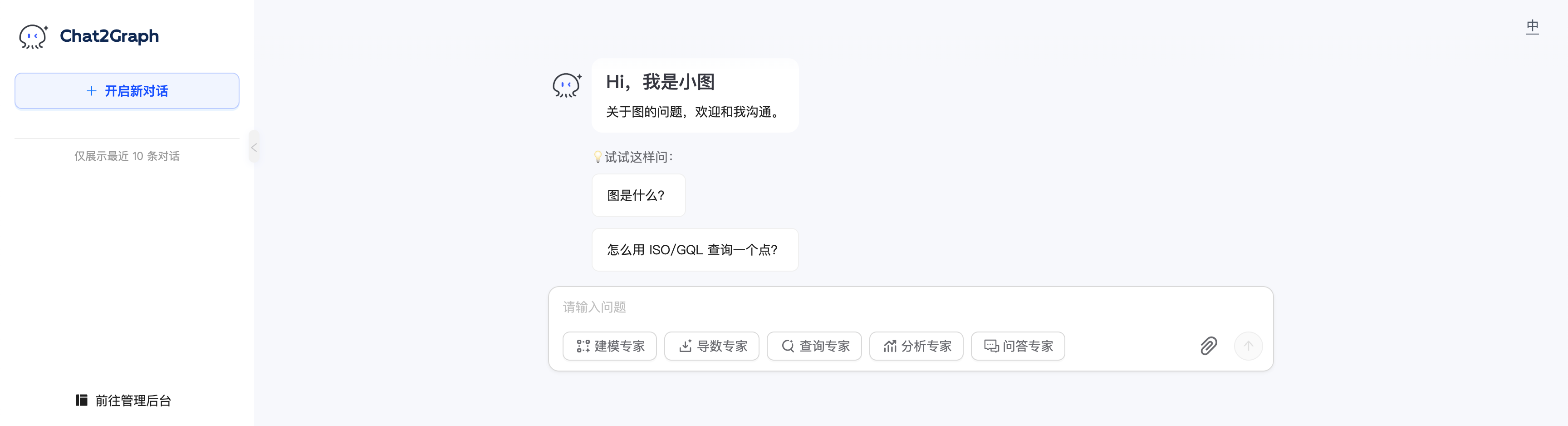
你可以在浏览器访问 [http://localhost:5010/](http://localhost:5010/) 使用 Chat2Graph。
<Frame>
  <img src="https://mintcdn.com/siliconflow-37161621/dWzWFIJ4RDcgcXPP/images/usercases/chat2graph/index.png?fit=max&auto=format&n=dWzWFIJ4RDcgcXPP&q=85&s=4a6abd9759e3729bf74637225a3b6f5e" data-og-width="3456" width="3456" data-og-height="938" height="938" data-path="images/usercases/chat2graph/index.png" data-optimize="true" data-opv="3" srcset="https://mintcdn.com/siliconflow-37161621/dWzWFIJ4RDcgcXPP/images/usercases/chat2graph/index.png?w=280&fit=max&auto=format&n=dWzWFIJ4RDcgcXPP&q=85&s=af6c3b5da462d30a03ec9e6ff0141155 280w, https://mintcdn.com/siliconflow-37161621/dWzWFIJ4RDcgcXPP/images/usercases/chat2graph/index.png?w=560&fit=max&auto=format&n=dWzWFIJ4RDcgcXPP&q=85&s=25f52f8bd4cef52daaf19450e5745832 560w, https://mintcdn.com/siliconflow-37161621/dWzWFIJ4RDcgcXPP/images/usercases/chat2graph/index.png?w=840&fit=max&auto=format&n=dWzWFIJ4RDcgcXPP&q=85&s=28ea8b5a5a5c26d5667229531871e819 840w, https://mintcdn.com/siliconflow-37161621/dWzWFIJ4RDcgcXPP/images/usercases/chat2graph/index.png?w=1100&fit=max&auto=format&n=dWzWFIJ4RDcgcXPP&q=85&s=d8d259aa987cd2e4cd2de7e22703e43e 1100w, https://mintcdn.com/siliconflow-37161621/dWzWFIJ4RDcgcXPP/images/usercases/chat2graph/index.png?w=1650&fit=max&auto=format&n=dWzWFIJ4RDcgcXPP&q=85&s=cd1553a0976a69e99889a7914637aadc 1650w, https://mintcdn.com/siliconflow-37161621/dWzWFIJ4RDcgcXPP/images/usercases/chat2graph/index.png?w=2500&fit=max&auto=format&n=dWzWFIJ4RDcgcXPP&q=85&s=3af990120e9c447210d13703bdd268b7 2500w" />
</Frame>

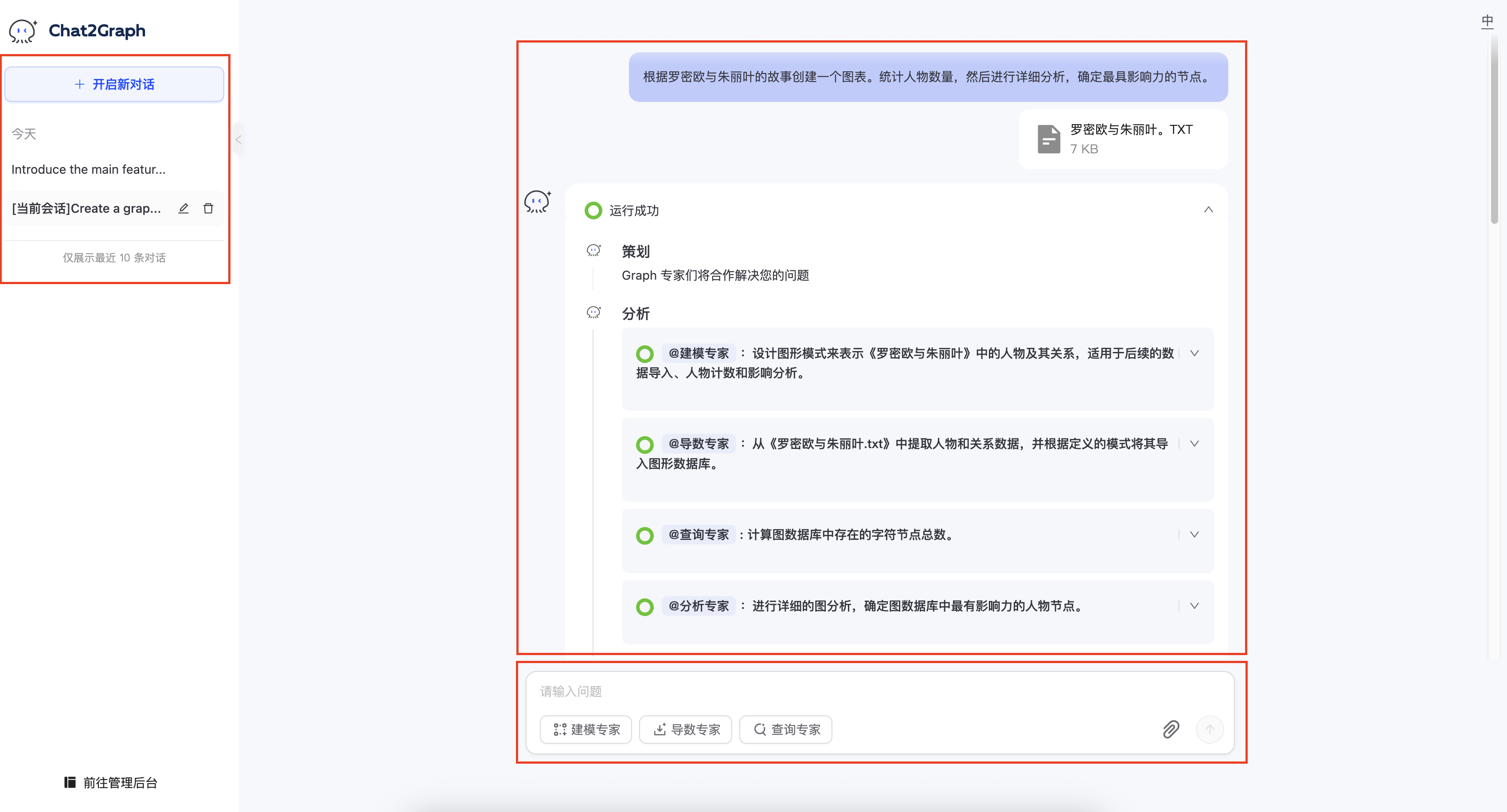
提前注册图数据库实例，可以体验完整的 Chat2Graph 的「与图对话」功能。当前支持 [Neo4j](https://neo4j.com/) 和 [TuGraph](https://tugraph.tech/) 图数据库。

<Frame>
  <img src="https://mintcdn.com/siliconflow-37161621/dWzWFIJ4RDcgcXPP/images/usercases/chat2graph/gdb-mng.png?fit=max&auto=format&n=dWzWFIJ4RDcgcXPP&q=85&s=57b23f26b2148da9026dc2a4d88f21fe" data-og-width="3456" width="3456" data-og-height="638" height="638" data-path="images/usercases/chat2graph/gdb-mng.png" data-optimize="true" data-opv="3" srcset="https://mintcdn.com/siliconflow-37161621/dWzWFIJ4RDcgcXPP/images/usercases/chat2graph/gdb-mng.png?w=280&fit=max&auto=format&n=dWzWFIJ4RDcgcXPP&q=85&s=3fd414a8f216d5b0e345b5e4412f8a36 280w, https://mintcdn.com/siliconflow-37161621/dWzWFIJ4RDcgcXPP/images/usercases/chat2graph/gdb-mng.png?w=560&fit=max&auto=format&n=dWzWFIJ4RDcgcXPP&q=85&s=365f43b1fe2ab153c61204805291a8ca 560w, https://mintcdn.com/siliconflow-37161621/dWzWFIJ4RDcgcXPP/images/usercases/chat2graph/gdb-mng.png?w=840&fit=max&auto=format&n=dWzWFIJ4RDcgcXPP&q=85&s=0927b4cc7bb3a0e69176bfcbffd7c190 840w, https://mintcdn.com/siliconflow-37161621/dWzWFIJ4RDcgcXPP/images/usercases/chat2graph/gdb-mng.png?w=1100&fit=max&auto=format&n=dWzWFIJ4RDcgcXPP&q=85&s=d4497f389e9752aad60ed1d598e5341e 1100w, https://mintcdn.com/siliconflow-37161621/dWzWFIJ4RDcgcXPP/images/usercases/chat2graph/gdb-mng.png?w=1650&fit=max&auto=format&n=dWzWFIJ4RDcgcXPP&q=85&s=9c637dbc737ec8abe72b14a4718b3dd8 1650w, https://mintcdn.com/siliconflow-37161621/dWzWFIJ4RDcgcXPP/images/usercases/chat2graph/gdb-mng.png?w=2500&fit=max&auto=format&n=dWzWFIJ4RDcgcXPP&q=85&s=f645fa88f2898c81f0aa1785ad558ac3 2500w" />
</Frame>

<Frame>
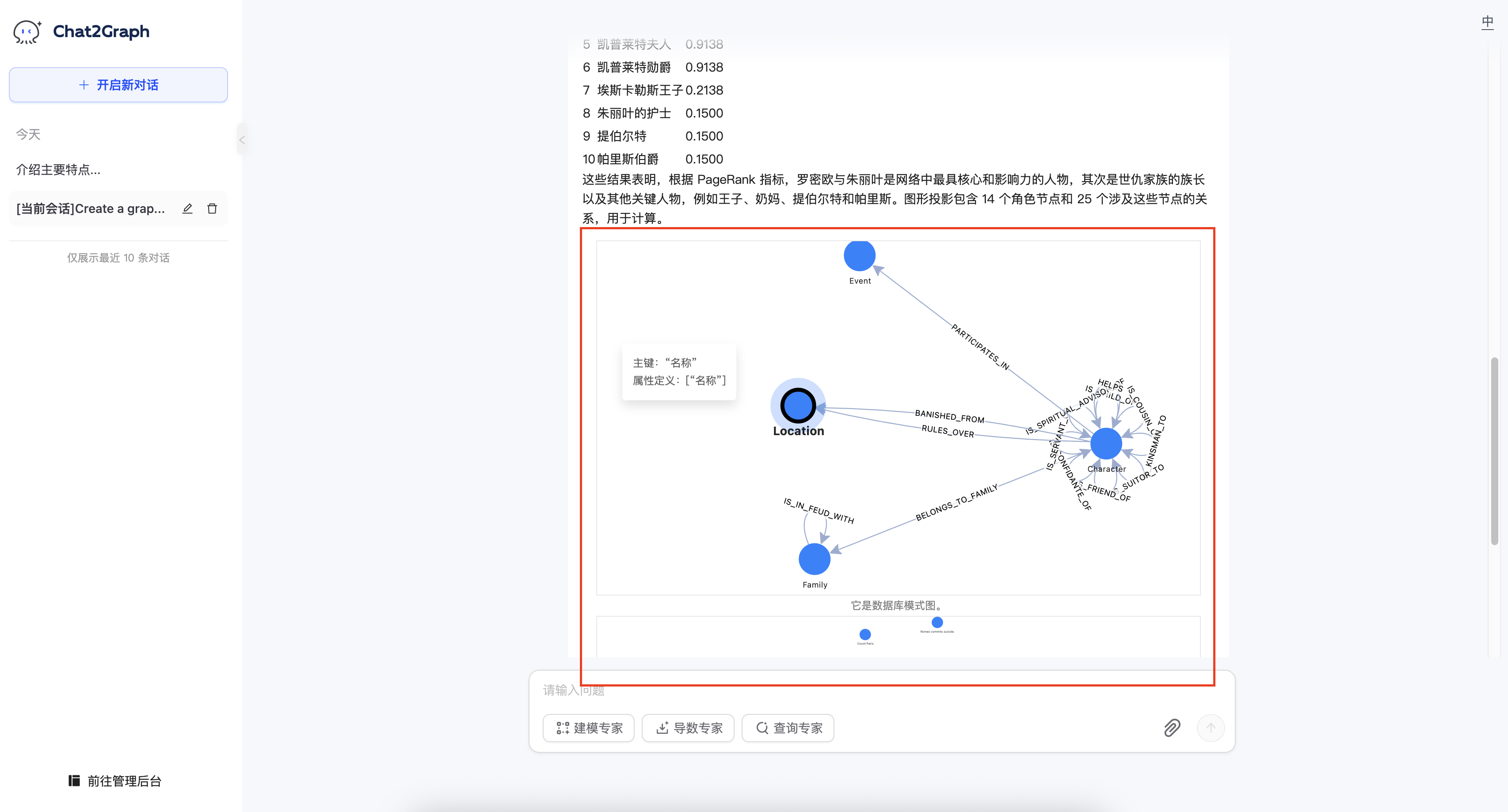
  <img src="https://mintcdn.com/siliconflow-37161621/dWzWFIJ4RDcgcXPP/images/usercases/chat2graph/chat-layout-2.png?fit=max&auto=format&n=dWzWFIJ4RDcgcXPP&q=85&s=0728436e48c79bcc462d6f89f77e1f67" data-og-width="3400" width="3400" data-og-height="1832" height="1832" data-path="images/usercases/chat2graph/chat-layout-2.png" data-optimize="true" data-opv="3" srcset="https://mintcdn.com/siliconflow-37161621/dWzWFIJ4RDcgcXPP/images/usercases/chat2graph/chat-layout-2.png?w=280&fit=max&auto=format&n=dWzWFIJ4RDcgcXPP&q=85&s=a5ea30531de53a8839769681c56406e3 280w, https://mintcdn.com/siliconflow-37161621/dWzWFIJ4RDcgcXPP/images/usercases/chat2graph/chat-layout-2.png?w=560&fit=max&auto=format&n=dWzWFIJ4RDcgcXPP&q=85&s=6ff0cbd00177f019c0f88f2adcdc263a 560w, https://mintcdn.com/siliconflow-37161621/dWzWFIJ4RDcgcXPP/images/usercases/chat2graph/chat-layout-2.png?w=840&fit=max&auto=format&n=dWzWFIJ4RDcgcXPP&q=85&s=273c18806066de83d970161a8c014729 840w, https://mintcdn.com/siliconflow-37161621/dWzWFIJ4RDcgcXPP/images/usercases/chat2graph/chat-layout-2.png?w=1100&fit=max&auto=format&n=dWzWFIJ4RDcgcXPP&q=85&s=7ecb0608c0521b2d527a424711c80ee1 1100w, https://mintcdn.com/siliconflow-37161621/dWzWFIJ4RDcgcXPP/images/usercases/chat2graph/chat-layout-2.png?w=1650&fit=max&auto=format&n=dWzWFIJ4RDcgcXPP&q=85&s=646cbc96db4ca19dd2d24a880248ace5 1650w, https://mintcdn.com/siliconflow-37161621/dWzWFIJ4RDcgcXPP/images/usercases/chat2graph/chat-layout-2.png?w=2500&fit=max&auto=format&n=dWzWFIJ4RDcgcXPP&q=85&s=bc80b46f82f2267cbbd8b9f13998efec 2500w" />
</Frame>

<Frame>
  <img src="https://mintcdn.com/siliconflow-37161621/dWzWFIJ4RDcgcXPP/images/usercases/chat2graph/chat-layout-3.png?fit=max&auto=format&n=dWzWFIJ4RDcgcXPP&q=85&s=a473d0c4f579c13b882c90846ceb9bd5" data-og-width="3412" width="3412" data-og-height="1838" height="1838" data-path="images/usercases/chat2graph/chat-layout-3.png" data-optimize="true" data-opv="3" srcset="https://mintcdn.com/siliconflow-37161621/dWzWFIJ4RDcgcXPP/images/usercases/chat2graph/chat-layout-3.png?w=280&fit=max&auto=format&n=dWzWFIJ4RDcgcXPP&q=85&s=cbe0794d0ce2ce20dd0fcc0db98f99ce 280w, https://mintcdn.com/siliconflow-37161621/dWzWFIJ4RDcgcXPP/images/usercases/chat2graph/chat-layout-3.png?w=560&fit=max&auto=format&n=dWzWFIJ4RDcgcXPP&q=85&s=97debd6f6217a4145002c4b53ea70bdc 560w, https://mintcdn.com/siliconflow-37161621/dWzWFIJ4RDcgcXPP/images/usercases/chat2graph/chat-layout-3.png?w=840&fit=max&auto=format&n=dWzWFIJ4RDcgcXPP&q=85&s=56aed90bf6aca7c73fbb6fb9bf8f4ab4 840w, https://mintcdn.com/siliconflow-37161621/dWzWFIJ4RDcgcXPP/images/usercases/chat2graph/chat-layout-3.png?w=1100&fit=max&auto=format&n=dWzWFIJ4RDcgcXPP&q=85&s=6c336b04c87451ccf22053e191390ecd 1100w, https://mintcdn.com/siliconflow-37161621/dWzWFIJ4RDcgcXPP/images/usercases/chat2graph/chat-layout-3.png?w=1650&fit=max&auto=format&n=dWzWFIJ4RDcgcXPP&q=85&s=c7de2be8f610638ad3f4f4de2377e11c 1650w, https://mintcdn.com/siliconflow-37161621/dWzWFIJ4RDcgcXPP/images/usercases/chat2graph/chat-layout-3.png?w=2500&fit=max&auto=format&n=dWzWFIJ4RDcgcXPP&q=85&s=1abc807286e76a54536f402463cbeb38 2500w" />
</Frame>

Chat2Graph 提供了清晰简洁的 SDK API，让你轻松定制智能体系统。

仿写 `chat2graph.yml` 文件，一键初始化智能体：

**Examples:**

Example 1 (unknown):
```unknown
### 准备执行环境

准备符合要求的 Python 和 NodeJS 版本。

* **Python**: 推荐[Python == 3.10](https://www.python.org/downloads)。
* **NodeJS**: 推荐[NodeJS >= v16](https://nodejs.org/en/download)。

您可以使用 `conda` 等工具来管理您的 Python 环境：
```

Example 2 (unknown):
```unknown
### 构建 Chat2Graph

一键构建 Chat2Graph：
```

Example 3 (unknown):
```unknown
### 配置 SiliconFlow 模型

准备 `.env` 配置文件：
```

Example 4 (unknown):
```unknown
填写 SiliconFlow 模型配置：
```

---

## Chatbox

**URL:** llms-txt#chatbox

**Contents:**
- 1 关于 Chatbox
- 2 安装使用 Chatbox
- 3 在 Chatbox 中使用硅基流动模型
  - 3.1 配置硅基流动 API 密钥
  - 3.2 在 Chatbox 中配置
  - 3.3 开始聊天
  - 3.4 使用技巧
- 4 参考资料

Source: https://docs.siliconflow.cn/cn/usercases/use-siliconcloud-in-chatbox

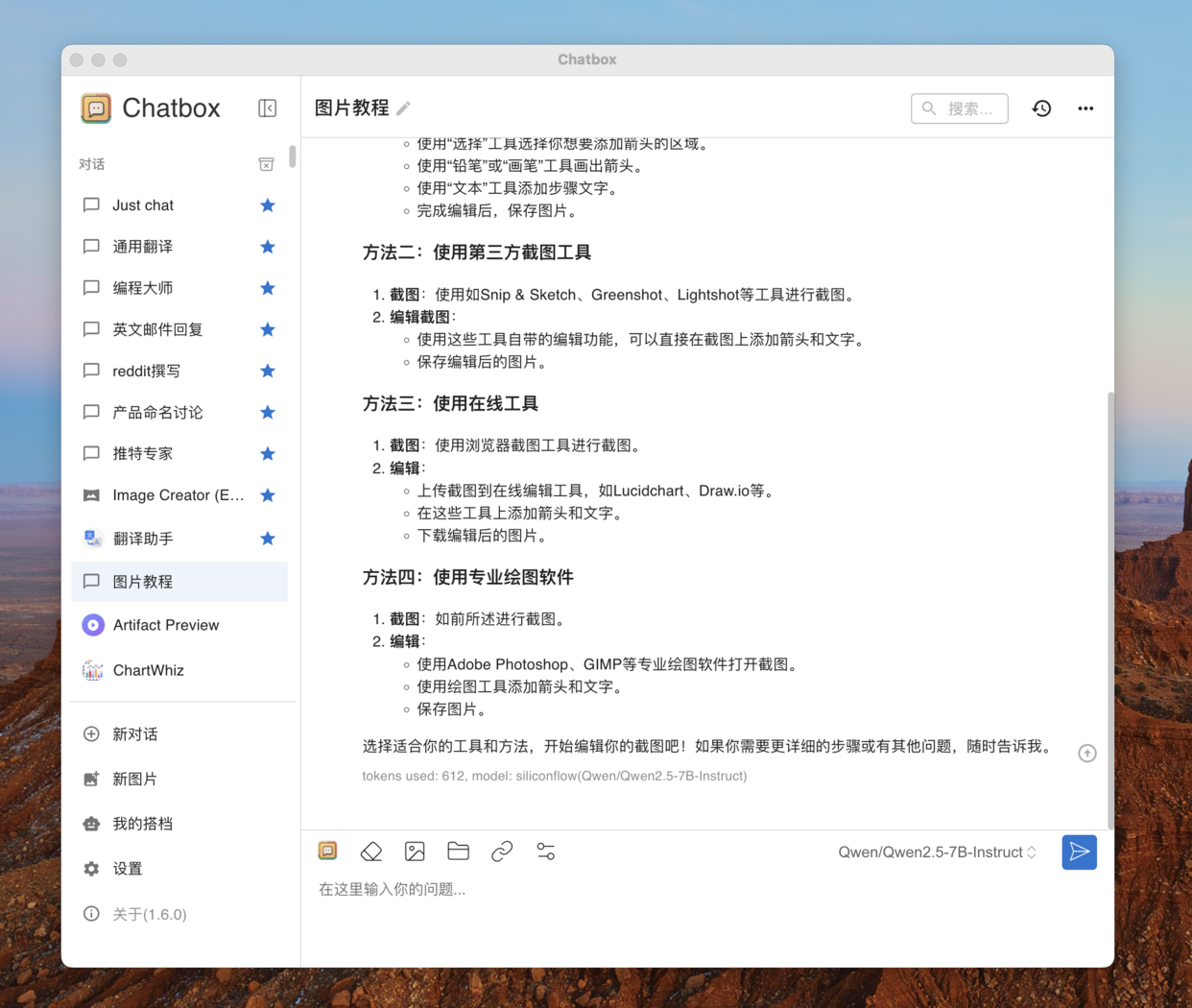
Chatbox 是一个流行的大语言模型的全平台聊天客户端，特点是功能强大、安装简单。你可以用它接入各种大语言模型，然后在任何设备（电脑、手机、网页）上和 AI 聊天。

Chatbox 不仅提供简单好用的 AI 聊天功能，还提供了一系列强大功能：

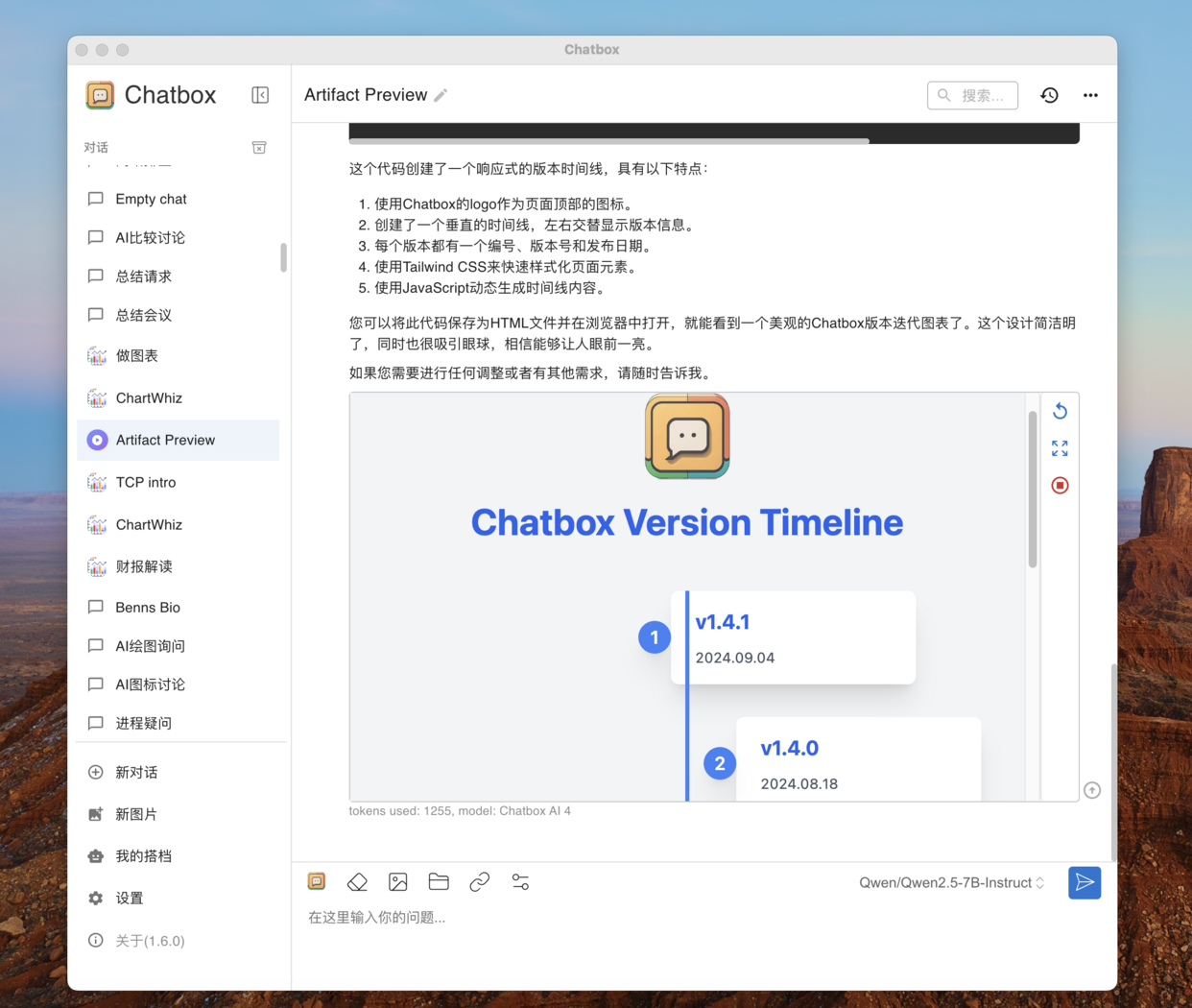
* Artifact 预览：在 Chatbox 中你可以预览 AI 生成代码的实际效果，比如让 AI 帮你做一个网页、贪吃蛇游戏，然后在 Chatbox 中直接运行。
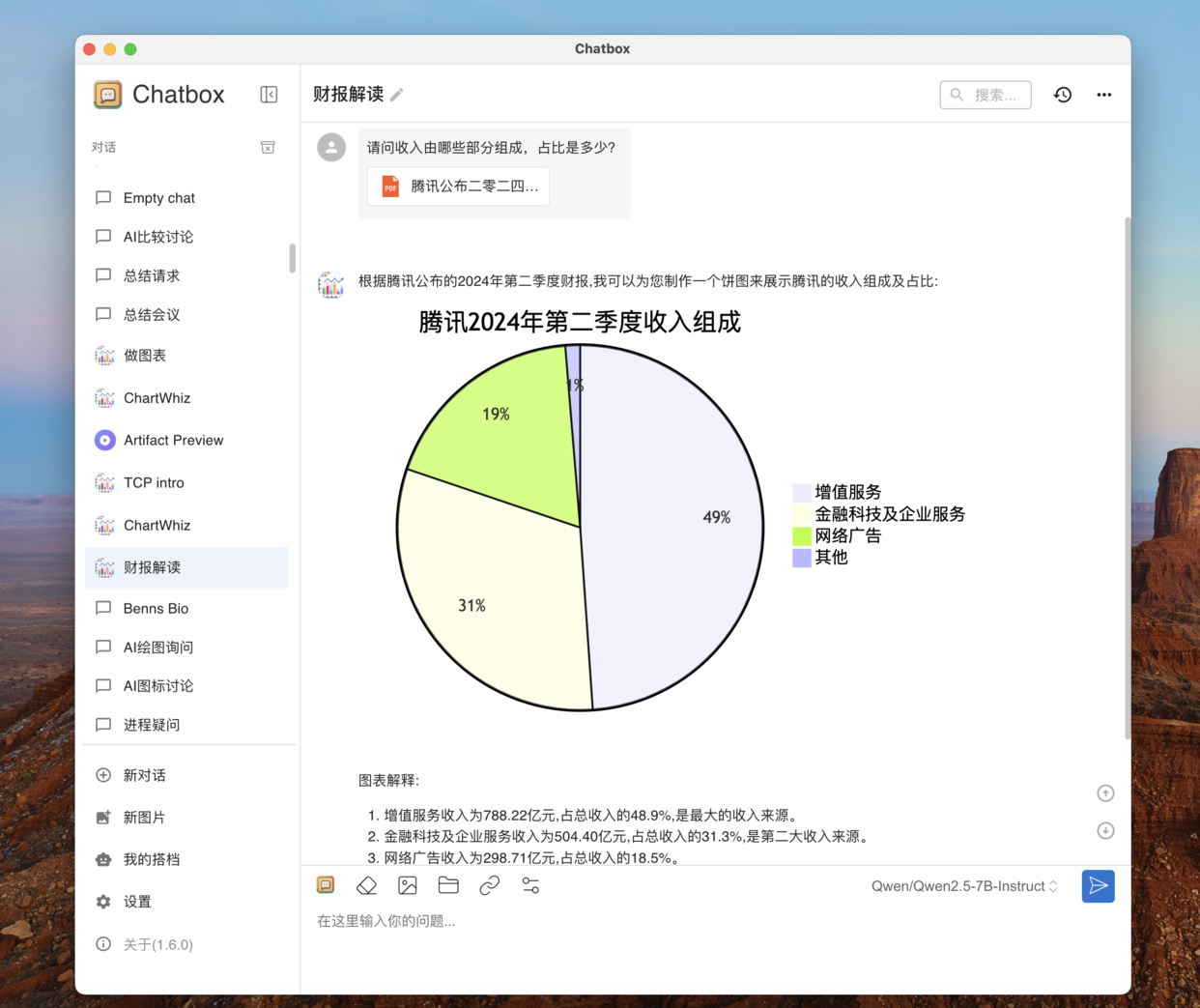
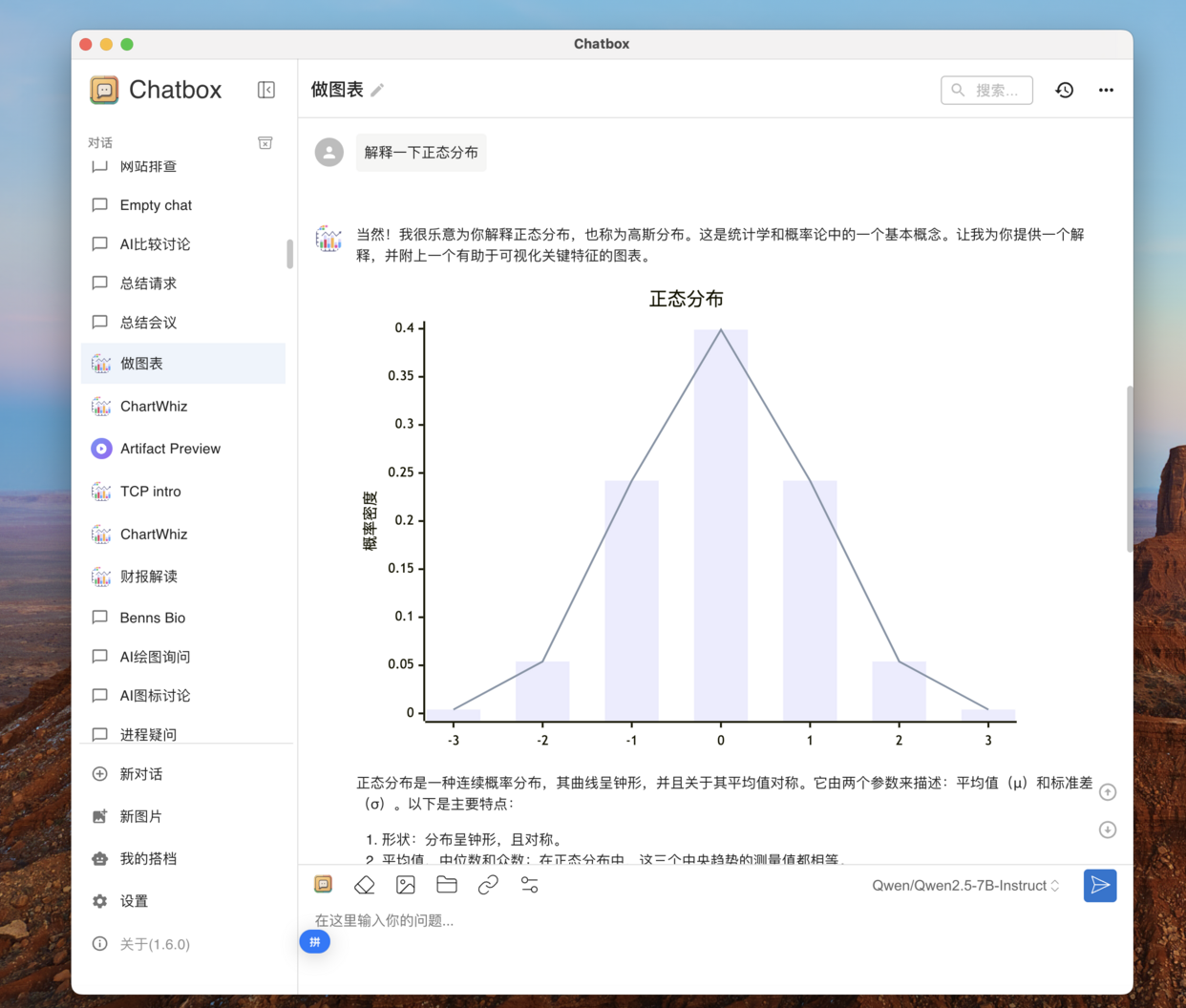
* 图表制作：让 AI 绘制思维导图、流程图、统计图表。
* 文档理解和图形视觉：可以向 AI 发送文档或者图片。
* 网页解析与识别：可以向 AI 发送链接，讨论网页内容等。

浏览器访问 [Chatbox 官网](https://chatboxai.app/)下载安装包。
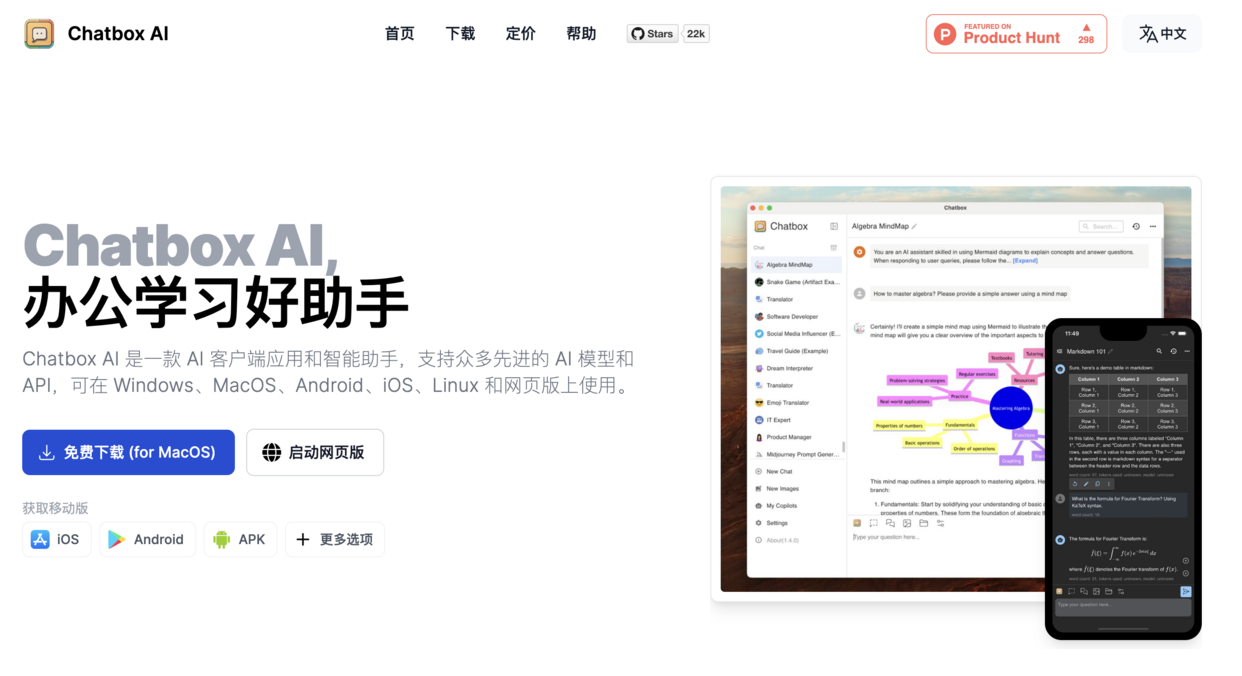
<Frame>
  <img src="https://bennhuang.com/chatbox-siliconcloud-integration-guide/chatbox-website.png" />
</Frame>

Chatbox 支持所有的主流操作系统，包括 Windows、MacOS 和 Linux，手机系统支持 iOS 和 Android。下载安装包后，在系统中直接安装即可。或者也可以访问和使用 Chatbox 的网页版本。

## 3 在 Chatbox 中使用硅基流动模型

### 3.1 配置硅基流动 API 密钥

访问 [API 密钥](https://cloud.siliconflow.cn/account/ak)新建或复制已有密钥。
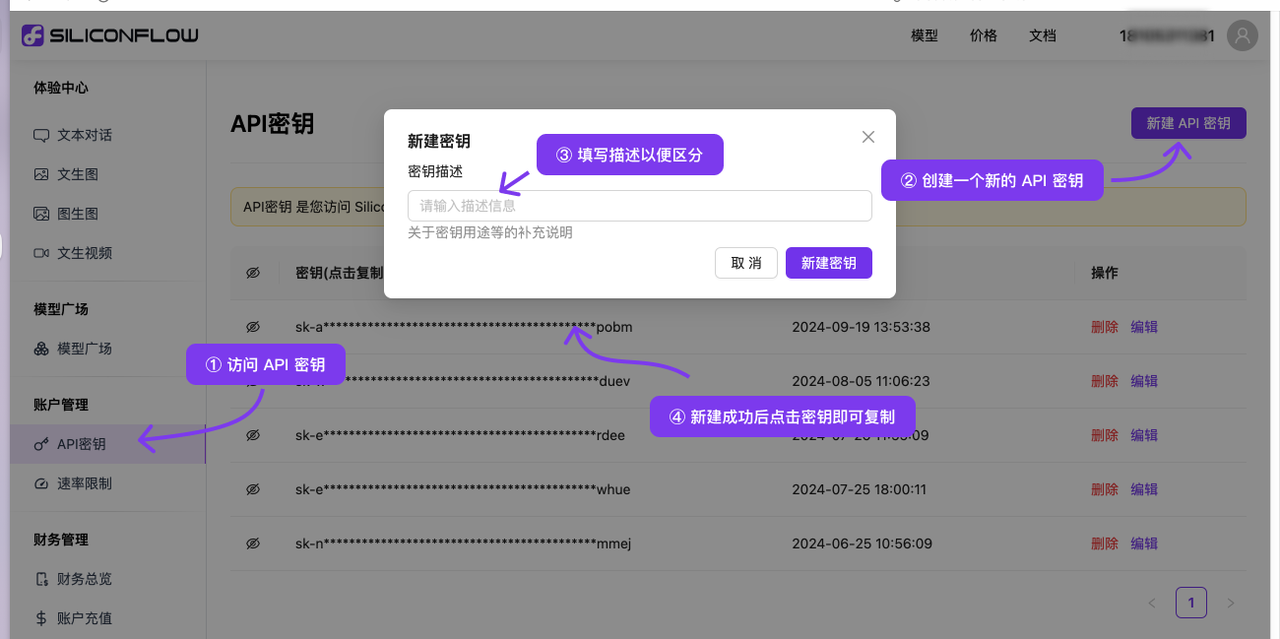
<Frame>
  <img src="https://bennhuang.com/chatbox-siliconcloud-integration-guide/siliconcloud.png" />
</Frame>

### 3.2 在 Chatbox 中配置

2. 在模型提供方界面选择 SiliconFlow。

3. 输入个人的 SiliconFlow API 密钥。
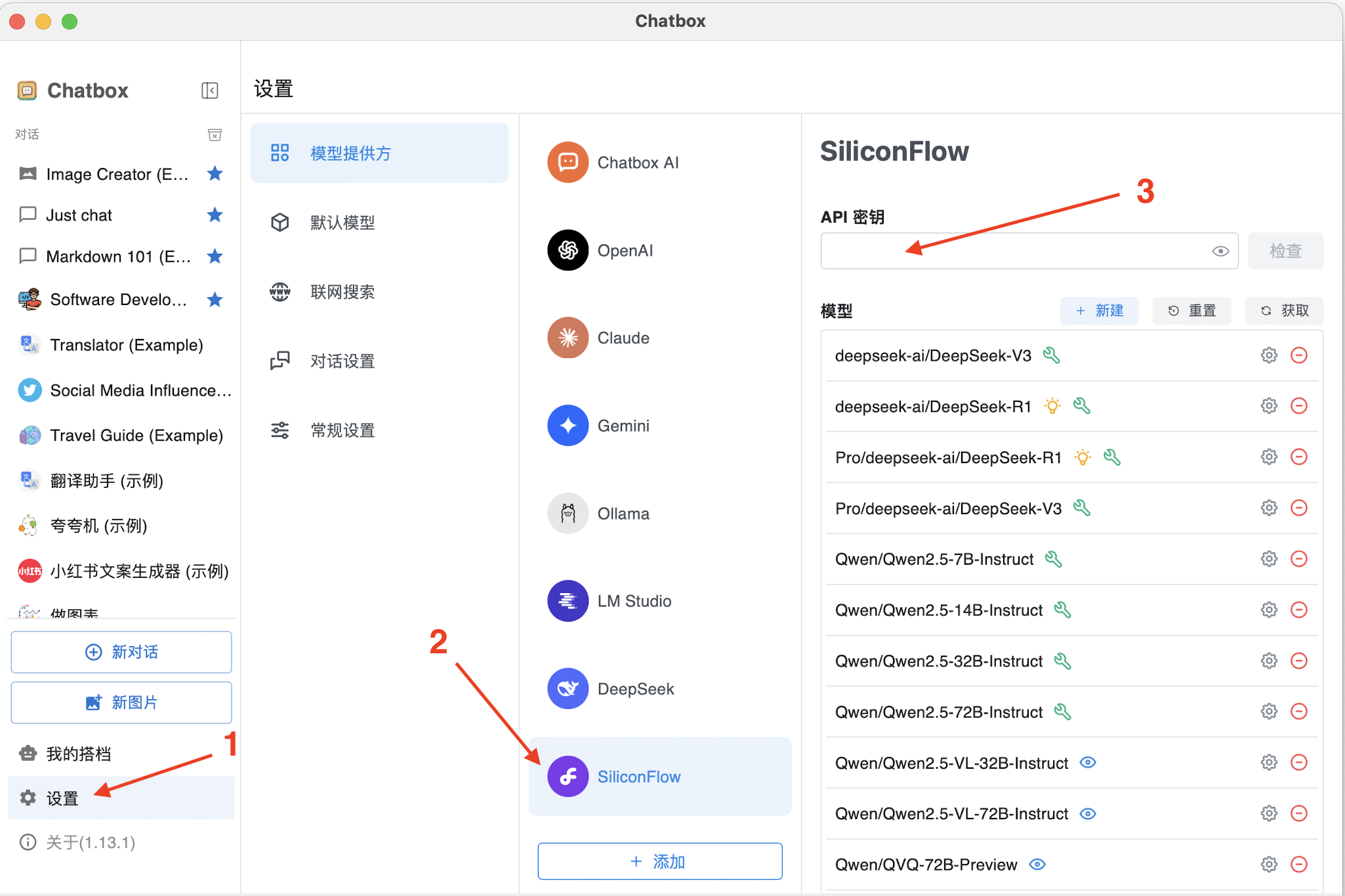
<Frame>
  <img src="https://mintcdn.com/siliconflow-37161621/dWzWFIJ4RDcgcXPP/images/usercases/chatbox/image_0.png?fit=max&auto=format&n=dWzWFIJ4RDcgcXPP&q=85&s=a83b0e8d37d57ff0b7260c3dfce1d4ba" data-og-width="2050" width="2050" data-og-height="1366" height="1366" data-path="images/usercases/chatbox/image_0.png" data-optimize="true" data-opv="3" srcset="https://mintcdn.com/siliconflow-37161621/dWzWFIJ4RDcgcXPP/images/usercases/chatbox/image_0.png?w=280&fit=max&auto=format&n=dWzWFIJ4RDcgcXPP&q=85&s=560bae9c31d8adf857ce6a3f51b7c704 280w, https://mintcdn.com/siliconflow-37161621/dWzWFIJ4RDcgcXPP/images/usercases/chatbox/image_0.png?w=560&fit=max&auto=format&n=dWzWFIJ4RDcgcXPP&q=85&s=98c7498f407744deb6fdcc5c9458dfd1 560w, https://mintcdn.com/siliconflow-37161621/dWzWFIJ4RDcgcXPP/images/usercases/chatbox/image_0.png?w=840&fit=max&auto=format&n=dWzWFIJ4RDcgcXPP&q=85&s=62952fabd17d66e5d04b922a11c9865b 840w, https://mintcdn.com/siliconflow-37161621/dWzWFIJ4RDcgcXPP/images/usercases/chatbox/image_0.png?w=1100&fit=max&auto=format&n=dWzWFIJ4RDcgcXPP&q=85&s=721a31479918119f6f90eb5842ce721d 1100w, https://mintcdn.com/siliconflow-37161621/dWzWFIJ4RDcgcXPP/images/usercases/chatbox/image_0.png?w=1650&fit=max&auto=format&n=dWzWFIJ4RDcgcXPP&q=85&s=98a75c3d372541e404ae1251081486a3 1650w, https://mintcdn.com/siliconflow-37161621/dWzWFIJ4RDcgcXPP/images/usercases/chatbox/image_0.png?w=2500&fit=max&auto=format&n=dWzWFIJ4RDcgcXPP&q=85&s=a94fbbd4e77279bec1eb9cd1fd7d22a5 2500w" />
</Frame>

按照上面步骤，基本上已经配置成功了，简单聊天测试一下。

<Frame>
  <img src="https://bennhuang.com/chatbox-siliconcloud-integration-guide/chatting.png" />
</Frame>

在结尾这里在顺带介绍一些 Chatbox 的使用技巧。

#### 3.4.1 利用 Chatbox 的图表能力，在聊天中生成可视化图表

Chatbox 的“做图表”助手会生成各种图表，在聊天中可以更方便地让你理解一些数据。

注意：为了更好的效果，需要选择更聪明更强大的模型。模型能力将直接决定图表的效果。

<Frame>
  <img src="https://bennhuang.com/chatbox-siliconcloud-integration-guide/chatbox-with-charts.png" />
</Frame>

<Frame>
  <img src="https://bennhuang.com/chatbox-siliconcloud-integration-guide/chatbox-with-charts2.png" />
</Frame>

#### 3.4.2 利用 Chatbox 的 Artifact 预览功能，查看 AI 生成代码的运行效果

Chatbox 的 Artifact 预览功能，则可以让你直接预览 AI 生成前端代码的实际运行效果。

注意：为了更好的效果，需要选择更聪明更强大的模型。模型能力将直接决定生成代码的效果。

<Frame>
  <img src="https://bennhuang.com/chatbox-siliconcloud-integration-guide/chatbox-with-artifact.png" />
</Frame>

除了这些技巧外，在 Chatbox 简单易用的外表下，还隐藏着非常多强大的功能，有很多值得探索的地方。

* [Chatbox 官网](https://chatboxai.app/)
* [如何在 Chatbox 中接入 SiliconFlow - 超简单完整教程](https://bennhuang.com/posts/chatbox-siliconcloud-integration-guide/)

---

## ChatHub

**URL:** llms-txt#chathub

**Contents:**
- 关于 ChatHub
- 安装 ChatHub
- 在ChatHub中使用SiliconFlow模型
- 在 ChatHub 中进行多模型对比

Source: https://docs.siliconflow.cn/cn/usercases/use-siliconcloud-in-chathub

[ChatHub](https://chathub.gg/zh) 是一个流行的大语言模型聚合插件，特点是可以同时和多个模型聊天，方便对比回答。ChatHub 在全球拥有数十万活跃用户。

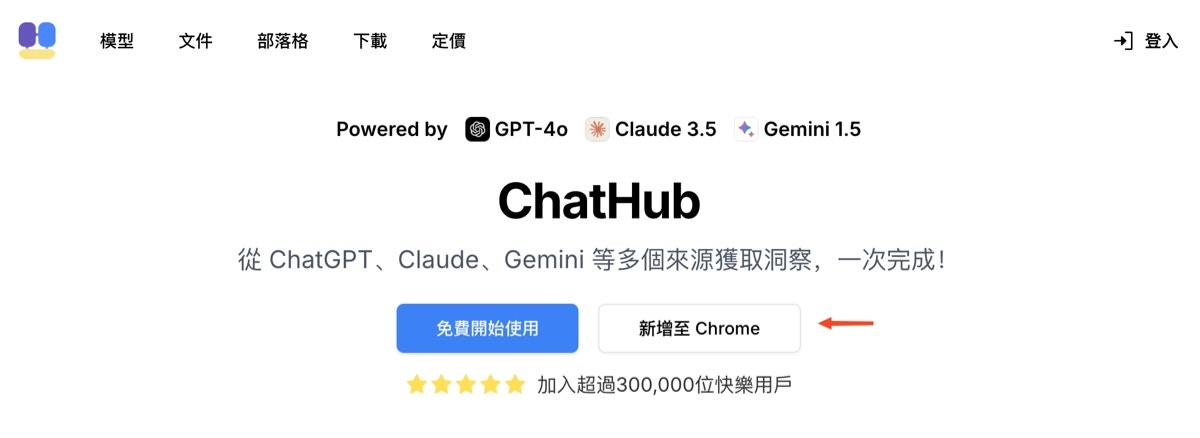
浏览器打开 [ChatHub 官网](https://chathub.gg/zh)，点击“新增至Chrome”按钮安装 ChatHub 浏览器插件：

<Frame>
  <img src="https://mintcdn.com/siliconflow-37161621/dWzWFIJ4RDcgcXPP/images/usercases/chathub/use-siliconcloud-in-chathub-1.jpg?fit=max&auto=format&n=dWzWFIJ4RDcgcXPP&q=85&s=07bd1f9df0e347d73d3b2cb9719dfdb5" data-og-width="1200" width="1200" data-og-height="438" height="438" data-path="images/usercases/chathub/use-siliconcloud-in-chathub-1.jpg" data-optimize="true" data-opv="3" srcset="https://mintcdn.com/siliconflow-37161621/dWzWFIJ4RDcgcXPP/images/usercases/chathub/use-siliconcloud-in-chathub-1.jpg?w=280&fit=max&auto=format&n=dWzWFIJ4RDcgcXPP&q=85&s=5da062e4a2c928e595f0c26ad956b35f 280w, https://mintcdn.com/siliconflow-37161621/dWzWFIJ4RDcgcXPP/images/usercases/chathub/use-siliconcloud-in-chathub-1.jpg?w=560&fit=max&auto=format&n=dWzWFIJ4RDcgcXPP&q=85&s=3cb64f2a26fdad90532ac6f9ec2b67f1 560w, https://mintcdn.com/siliconflow-37161621/dWzWFIJ4RDcgcXPP/images/usercases/chathub/use-siliconcloud-in-chathub-1.jpg?w=840&fit=max&auto=format&n=dWzWFIJ4RDcgcXPP&q=85&s=8b0b0bd9777ad089cea28524f75fb764 840w, https://mintcdn.com/siliconflow-37161621/dWzWFIJ4RDcgcXPP/images/usercases/chathub/use-siliconcloud-in-chathub-1.jpg?w=1100&fit=max&auto=format&n=dWzWFIJ4RDcgcXPP&q=85&s=dcdffe37c4c37da7752a6343d9b1c677 1100w, https://mintcdn.com/siliconflow-37161621/dWzWFIJ4RDcgcXPP/images/usercases/chathub/use-siliconcloud-in-chathub-1.jpg?w=1650&fit=max&auto=format&n=dWzWFIJ4RDcgcXPP&q=85&s=86507eb8245cccb45fd295cef349d84b 1650w, https://mintcdn.com/siliconflow-37161621/dWzWFIJ4RDcgcXPP/images/usercases/chathub/use-siliconcloud-in-chathub-1.jpg?w=2500&fit=max&auto=format&n=dWzWFIJ4RDcgcXPP&q=85&s=bff183f4232eb08e5840caff53558b65 2500w" />
</Frame>

安装后，将自动打开 ChatHub 设置页面.

## 在ChatHub中使用SiliconFlow模型

1、在 ChatHub 设置中找到“自定义机器人”模块，点击“添加”按钮

<Frame>
  <img src="https://mintcdn.com/siliconflow-37161621/dWzWFIJ4RDcgcXPP/images/usercases/chathub/use-siliconcloud-in-chathub-2.jpg?fit=max&auto=format&n=dWzWFIJ4RDcgcXPP&q=85&s=9d511f21fdac6c49cafbf223c7bdcf94" data-og-width="944" width="944" data-og-height="442" height="442" data-path="images/usercases/chathub/use-siliconcloud-in-chathub-2.jpg" data-optimize="true" data-opv="3" srcset="https://mintcdn.com/siliconflow-37161621/dWzWFIJ4RDcgcXPP/images/usercases/chathub/use-siliconcloud-in-chathub-2.jpg?w=280&fit=max&auto=format&n=dWzWFIJ4RDcgcXPP&q=85&s=d7a1a21c6dbd157176bdd8a777be4c7e 280w, https://mintcdn.com/siliconflow-37161621/dWzWFIJ4RDcgcXPP/images/usercases/chathub/use-siliconcloud-in-chathub-2.jpg?w=560&fit=max&auto=format&n=dWzWFIJ4

…(truncated)