# Siliconflow - Faqs
> 为了提升账户安全性,硅基流动中文站已于近期下线 Google / GitHub 的关联登录功能。 如您已绑定手机号,仍可通过手机登录;或使用“邮箱登录”功能,输入您的 Google / GitHub 邮箱地址接收验证码完成登录。
- Skill: `tools-only/siliconflow-faqs` (Agent Skill, multi-file: 3 files)
- Install (CLI): `npx skillmds@latest add tools-only/siliconflow-faqs`
- Raw SKILL.md: https://api.skillmd.com/api/skills/tools-only/siliconflow-faqs/raw
- Safety review: pending (external: skill-scanner PASS, skillspector PASS)
- Works with: Claude Code, Claude.ai, OpenAI Codex
- Category: Coding & Dev Tools
- Author: tools-only (https://skillmd.com/u/tools-only)
- Updated: 2026-09-29
- Page: https://skillmd.com/skills/tools-only/siliconflow-faqs
---
# Siliconflow - Faqs
**Pages:** 8
---
## 实名认证
**URL:** llms-txt#实名认证
**Contents:**
- 1. 为什么要进行实名认证?
- 2. 如果不进行实名认证,会对账号产生什么影响?
- 3. 个人实名和企业实名认证有哪些区别?
- 4. 如何进行个人认证?
- 4.1 个人认证支持证件类型
- 4.2 个人认证流程
- 5. 如何进行企业认证?
Source: https://docs.siliconflow.cn/cn/faqs/authentication
《中华人民共和国网络安全法》 等法律法规要求:网络运营者为用户办理网络接入,在与用户签订协议或者确认提供服务时,应当要求用户提供真实身份信息。用户不提供真实身份信息的,网络运营者不得为其提供相关服务。
## 2. 如果不进行实名认证,会对账号产生什么影响?
如果不进行实名认证,账号将无法进行以下操作:
* 无法进行“账户充值”
* 无法申请“开具发票”
## 3. 个人实名和企业实名认证有哪些区别?
账号实名认证分为**个人实名认证**和**企业实名认证**两类:
* 个人实名认证:认证类型为个人,支持个人人脸识别认证。
* 企业实名认证:认证类型为企业(含普通企业、政府、事业单位、社会团体组织、个体工商户等),支持法人人脸识别认证、企业对公打款认证两种认证方式。
* 完成企业实名认证的账号**归属为企业**。
* 完成个人实名认证的账号**归属于个人**。
* 企业认证**可以开具企业抬头的增值税专用发票、增值税普通发票**。
* 个人认证**只能开具个人抬头的增值税普通发票**。
* 实名认证信息对您的账号和资金安全等很重要,请**按实际情况**进行实名认证。
* 为了您的账号安全,企业用户不要进行个人实名认证。
* 当前账号只允许绑定一个认证主体,账号主体变更成功后原主体信息将与账号解绑。
* 身份证
* 港澳往来大陆通行证(回乡证)
* 台湾往来大陆通行证(台胞证)
* 港澳居民居住证
* 台湾居民居住证
* 外国人永久居留证
不具有以上证件的用户,暂时不支持线上个人认证,可以通过提交[表单](https://siliconflow.feishu.cn/share/base/form/shrcnDiK9EIkGN3sK0PepqN1Ppb?hide_subject_id=1\&hide_passport_id=1\&hide_phone=1\&hide_email=1)的形式跟工作人员沟通。
1. 登录 SiliconFlow 平台,点击[用户中心-实名认证](https://cloud.siliconflow.cn/account/authentication)。
2. 在实名认证页面,选择认证类型为"个人实名认证",然后填写个人信息。
3. 使用手机支付宝 App 扫描二维码,扫描后按照手机上的提示完成人脸识别认证,认证成功后,在网页端的弹窗上点击“已完成刷脸认证”。
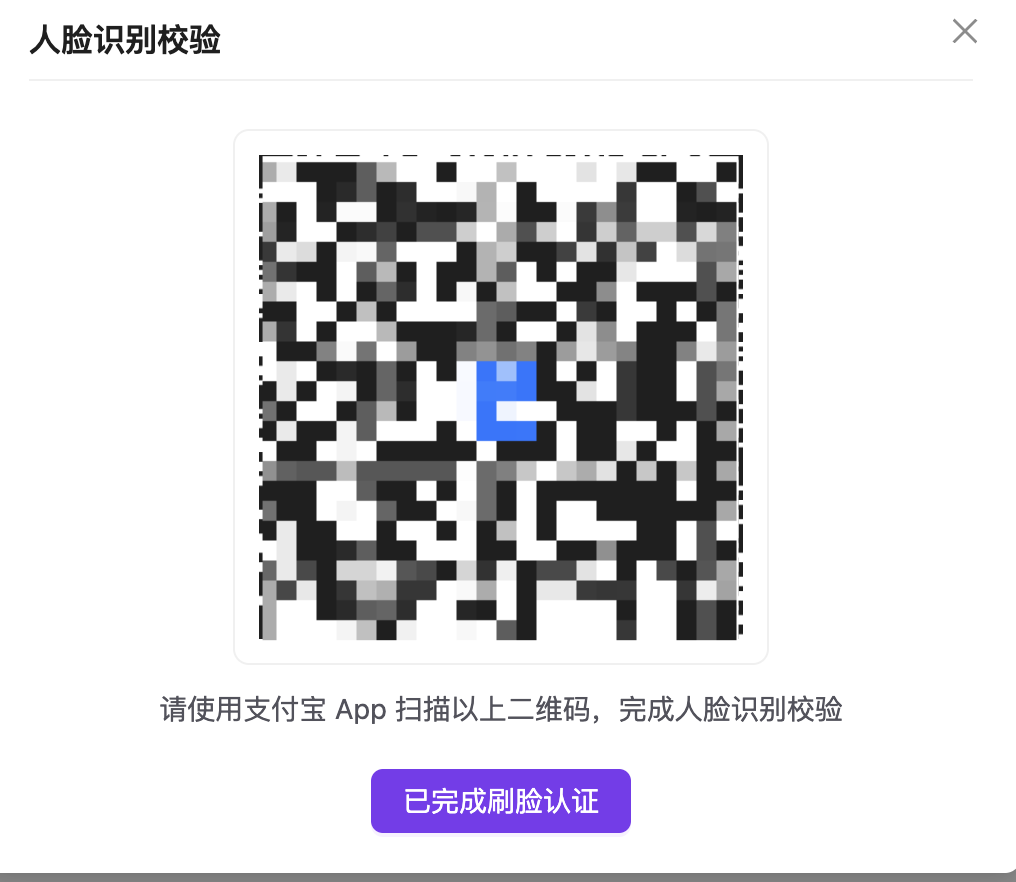 4. 认证成功后您可以**修改认证信息**或者**变更为企业用户**,30 天内只可以完成一次变更或修改。
* 实名认证直接影响账号的归属。如果是企业用户,请您进行企业实名认证,以免人员变动等因素引起的不必要纠纷。更多信息请参见个人实名认证和企业实名认证的区别。
* 根据相关法律法规,我们不对未满 14 周岁的个人提供在线实名认证服务。
1. 登录 SiliconFlow 平台,点击“用户中心-实名认证”。
2. 在实名认证页面,选择认证类型为“企业实名认证”,然后选择认证方式。认证方式有以下两种:
* 选择法人人脸识别认证
1. 填写企业名称、统一社会信用代码、法人姓名和法人身份证号,勾选同意协议。
2. 法人使用手机支付宝 App 扫描二维码,扫描后按照手机上的提示完成人脸认证,验证成功即可完成认证。
* 选择企业对公打款认证
1. 填写企业名称、统一社会信用代码和法人姓名,勾选同意协议。
2. 填写企业对公银行卡号,填写对公银行(精确到支行)名称,选择具体的开户行,确认无误后点击获取验证金额。
3. 等待随机打款金额到账,通常在 10 分钟以内。
4. 打款成功后,请跟财务核实收到的 1 元以下随机金额,将该金额回填到该页面,核实无误后即可认证成功。
认证成功后您可以**修改认证信息**,30 天内只可进行一次修改。
---
## 错误处理
**URL:** llms-txt#错误处理
Source: https://docs.siliconflow.cn/cn/faqs/error-code
**1. 尝试获取 HTTP 错误代码,初步定位问题**
a. 在代码中,尽量把错误码和报错信息(message)打印出来,利用这些信息,可以定位大部分问题。
* 常见错误代码及原因:
* **400**:参数不正确,请参考报错信息(message)修正不合法的请求参数;
* **401**:API Key 没有正确设置;
* **403**:账户余额不足或者权限不够,权限不够最常见的原因是该模型需要实名认证,其他情况参考报错信息(message);
* **429**:触发了 rate limits;参考报错信息(message)判断触发的是 `RPM /RPD / TPM / TPD / IPM / IPD` 中的具体哪一种,可以参考 [Rate Limits](https://docs.siliconflow.cn/rate-limits/rate-limit-and-upgradation) 了解具体的限流策略
* **504 / 503**:
* 一般是服务系统负载比较高,可以稍后尝试;
* 对于对话和文本转语音请求,可以尝试使用流式输出("stream" : true),参考 [流式输出](https://docs.siliconflow.cn/faqs/stream-mode);
* **500**:服务发生了未知的错误,可以联系相关人员进行排查
4. 认证成功后您可以**修改认证信息**或者**变更为企业用户**,30 天内只可以完成一次变更或修改。
* 实名认证直接影响账号的归属。如果是企业用户,请您进行企业实名认证,以免人员变动等因素引起的不必要纠纷。更多信息请参见个人实名认证和企业实名认证的区别。
* 根据相关法律法规,我们不对未满 14 周岁的个人提供在线实名认证服务。
1. 登录 SiliconFlow 平台,点击“用户中心-实名认证”。
2. 在实名认证页面,选择认证类型为“企业实名认证”,然后选择认证方式。认证方式有以下两种:
* 选择法人人脸识别认证
1. 填写企业名称、统一社会信用代码、法人姓名和法人身份证号,勾选同意协议。
2. 法人使用手机支付宝 App 扫描二维码,扫描后按照手机上的提示完成人脸认证,验证成功即可完成认证。
* 选择企业对公打款认证
1. 填写企业名称、统一社会信用代码和法人姓名,勾选同意协议。
2. 填写企业对公银行卡号,填写对公银行(精确到支行)名称,选择具体的开户行,确认无误后点击获取验证金额。
3. 等待随机打款金额到账,通常在 10 分钟以内。
4. 打款成功后,请跟财务核实收到的 1 元以下随机金额,将该金额回填到该页面,核实无误后即可认证成功。
认证成功后您可以**修改认证信息**,30 天内只可进行一次修改。
---
## 错误处理
**URL:** llms-txt#错误处理
Source: https://docs.siliconflow.cn/cn/faqs/error-code
**1. 尝试获取 HTTP 错误代码,初步定位问题**
a. 在代码中,尽量把错误码和报错信息(message)打印出来,利用这些信息,可以定位大部分问题。
* 常见错误代码及原因:
* **400**:参数不正确,请参考报错信息(message)修正不合法的请求参数;
* **401**:API Key 没有正确设置;
* **403**:账户余额不足或者权限不够,权限不够最常见的原因是该模型需要实名认证,其他情况参考报错信息(message);
* **429**:触发了 rate limits;参考报错信息(message)判断触发的是 `RPM /RPD / TPM / TPD / IPM / IPD` 中的具体哪一种,可以参考 [Rate Limits](https://docs.siliconflow.cn/rate-limits/rate-limit-and-upgradation) 了解具体的限流策略
* **504 / 503**:
* 一般是服务系统负载比较高,可以稍后尝试;
* 对于对话和文本转语音请求,可以尝试使用流式输出("stream" : true),参考 [流式输出](https://docs.siliconflow.cn/faqs/stream-mode);
* **500**:服务发生了未知的错误,可以联系相关人员进行排查
 b. 如果客户端没有输出相应的信息,可以考虑在命令行下运行 curl 命令 (以 LLM 模型为例):
**2. 可以尝试换一个模型,看看问题是否依旧**
**3. 如果开了代理,可以考虑将代理关闭后再尝试访问**
如遇其他问题,请点击[硅基流动MaaS线上需求收集表](https://siliconflow.feishu.cn/share/base/form/shrcnDiK9EIkGN3sK0PepqN1Ppb?hide_subject_id=1\&hide_passport_id=1\&hide_phone=1\&hide_email=1)反馈。
**Examples:**
Example 1 (unknown):
```unknown
* 常见错误代码及原因:
* **400**:参数不正确,请参考报错信息(message)修正不合法的请求参数;
* **401**:API Key 没有正确设置;
* **403**:账户余额不足或者权限不够,权限不够最常见的原因是该模型需要实名认证,其他情况参考报错信息(message);
* **429**:触发了 rate limits;参考报错信息(message)判断触发的是 `RPM /RPD / TPM / TPD / IPM / IPD` 中的具体哪一种,可以参考 [Rate Limits](https://docs.siliconflow.cn/rate-limits/rate-limit-and-upgradation) 了解具体的限流策略
* **504 / 503**:
* 一般是服务系统负载比较高,可以稍后尝试;
* 对于对话和文本转语音请求,可以尝试使用流式输出("stream" : true),参考 [流式输出](https://docs.siliconflow.cn/faqs/stream-mode);
* **500**:服务发生了未知的错误,可以联系相关人员进行排查
b. 如果客户端没有输出相应的信息,可以考虑在命令行下运行 curl 命令 (以 LLM 模型为例):
```
---
## 开具发票
**URL:** llms-txt#开具发票
**Contents:**
- 1. 开票主体信息
- 2. 开票时效性
- 3. 开票金额
- 4. 发票类型
- 5. 开票流程
- 5.1 用户自助开票
- 5.2 用户登记后,平台开票
Source: https://docs.siliconflow.cn/cn/faqs/invoice
开票主体:北京硅基流动科技有限公司
b. 如果客户端没有输出相应的信息,可以考虑在命令行下运行 curl 命令 (以 LLM 模型为例):
**2. 可以尝试换一个模型,看看问题是否依旧**
**3. 如果开了代理,可以考虑将代理关闭后再尝试访问**
如遇其他问题,请点击[硅基流动MaaS线上需求收集表](https://siliconflow.feishu.cn/share/base/form/shrcnDiK9EIkGN3sK0PepqN1Ppb?hide_subject_id=1\&hide_passport_id=1\&hide_phone=1\&hide_email=1)反馈。
**Examples:**
Example 1 (unknown):
```unknown
* 常见错误代码及原因:
* **400**:参数不正确,请参考报错信息(message)修正不合法的请求参数;
* **401**:API Key 没有正确设置;
* **403**:账户余额不足或者权限不够,权限不够最常见的原因是该模型需要实名认证,其他情况参考报错信息(message);
* **429**:触发了 rate limits;参考报错信息(message)判断触发的是 `RPM /RPD / TPM / TPD / IPM / IPD` 中的具体哪一种,可以参考 [Rate Limits](https://docs.siliconflow.cn/rate-limits/rate-limit-and-upgradation) 了解具体的限流策略
* **504 / 503**:
* 一般是服务系统负载比较高,可以稍后尝试;
* 对于对话和文本转语音请求,可以尝试使用流式输出("stream" : true),参考 [流式输出](https://docs.siliconflow.cn/faqs/stream-mode);
* **500**:服务发生了未知的错误,可以联系相关人员进行排查
b. 如果客户端没有输出相应的信息,可以考虑在命令行下运行 curl 命令 (以 LLM 模型为例):
```
---
## 开具发票
**URL:** llms-txt#开具发票
**Contents:**
- 1. 开票主体信息
- 2. 开票时效性
- 3. 开票金额
- 4. 发票类型
- 5. 开票流程
- 5.1 用户自助开票
- 5.2 用户登记后,平台开票
Source: https://docs.siliconflow.cn/cn/faqs/invoice
开票主体:北京硅基流动科技有限公司
通常发票会在您申请开票后2个工作日内开具完成
仅`已消费金额`可以申请开具发票,充值未消费的充值余额不可开具发票,您可酌情申请退款;已开票金额不可重复开票。
企业认证用户可以开具企业抬头的增值税专用发票/增值税普通发票;
* 登陆 [SiliconFlow](https://cloud.siliconflow.cn/),进入到 [开具发票](https://cloud.siliconflow.cn/invoice) 页面
* 点击`申请开票`按钮,
* 在页面中填入`申请开票金额`
* 选择`费用名称`
* 选择`抬头名称和税号`
* 选择`发票类型`
* 勾选`发票接收方式`
* 点击`申请发票`按钮
* 已申请开具的发票会在发票记录中显示,开具成功后`下载`即可
根据我国税收相关政策要求,发票抬头需与实名认证主体名称一致,个人账号无法开具机构抬头发票;如有需要,您可以[变更认证主体](https://cloud.siliconflow.cn/account/authentication);若完成认证确有困难,请通过[开具发票](https://cloud.siliconflow.cn/invoice)页面中的登记页进行登记。
 ---
## 上架指南
**URL:** llms-txt#上架指南
Source: https://docs.siliconflow.cn/cn/faqs/listing_guide
---
## 模型问题
**URL:** llms-txt#模型问题
**Contents:**
- 1. 模型输出乱码
- 2. 关于`max_tokens`说明
- 3. 关于`context_length`说明
- 4. Pro 和非 Pro 模型有什么区别
- 5. 语音模型中,对用户自定义音色有时间音质要求么
- 6. 模型输出截断问题
- 7. 模型使用过程中返回429错误排查
- 8. 已充值成功,仍然提示账户余额不足
- 9. 已实名认证,还是无法访问部分模型
- 10. fnlp/MOSS-TTSD-v0.5 使用问题
Source: https://docs.siliconflow.cn/cn/faqs/misc
目前看到部分模型在不设置参数的情况下,容易出现乱码,遇到上述情况,可以尝试设置`temperature`,`top_k`,`top_p`,`frequency_penalty`这些参数。
对应的 payload 修改为如下形式,不同语言酌情调整
## 2. 关于`max_tokens`说明
max\_tokens 与`上下文长度`相等,由于部分模型推理服务尚在更新中,请不要在请求时将 max\_tokens 设置为最大值(上下文长度),建议留出 10k 左右作为输入内容的空间。
## 3. 关于`context_length`说明
不同的LLM模型,`context_length`是有差别的,具体可以在[模型广场](https://cloud.siliconflow.cn/models)上搜索对应的模型,查看模型具体信息。
## 4. Pro 和非 Pro 模型有什么区别
1. 对于部分模型,平台同时提供免费版和收费版。免费版按原名称命名;收费版在名称前加上“Pro/”以示区分。免费版的 Rate Limits 固定,收费版的 Rate Limits 可变,具体规则请参考:[Rate Limits](https://docs.siliconflow.cn/cn/userguide/rate-limits/rate-limit-and-upgradation)。
2. 对于 `DeepSeek R1` 和 `DeepSeek V3` 模型,平台根据`支付方式`的不同要求区分命名。`Pro 版`仅支持`充值余额`支付,`非 Pro 版`支持`赠费余额`和`充值余额`支付。
## 5. 语音模型中,对用户自定义音色有时间音质要求么
* cosyvoice2 上传音色必须小于30s
* 通过API请求时候,输出截断问题排查:
* max\_tokens设置:max\_token设置到合适值,输出大于max\_token的情况下,会被截断。
* 设置流式输出请求:非流式请求时候,输出内容比较长的情况下,容易出现504超时。
* 设置客户端超时时间:把客户端超时时间设置大一些,防止未输出完成,达到客户端超时时间被截断。
* 通过第三方客户端请求,输出截断问题排查:
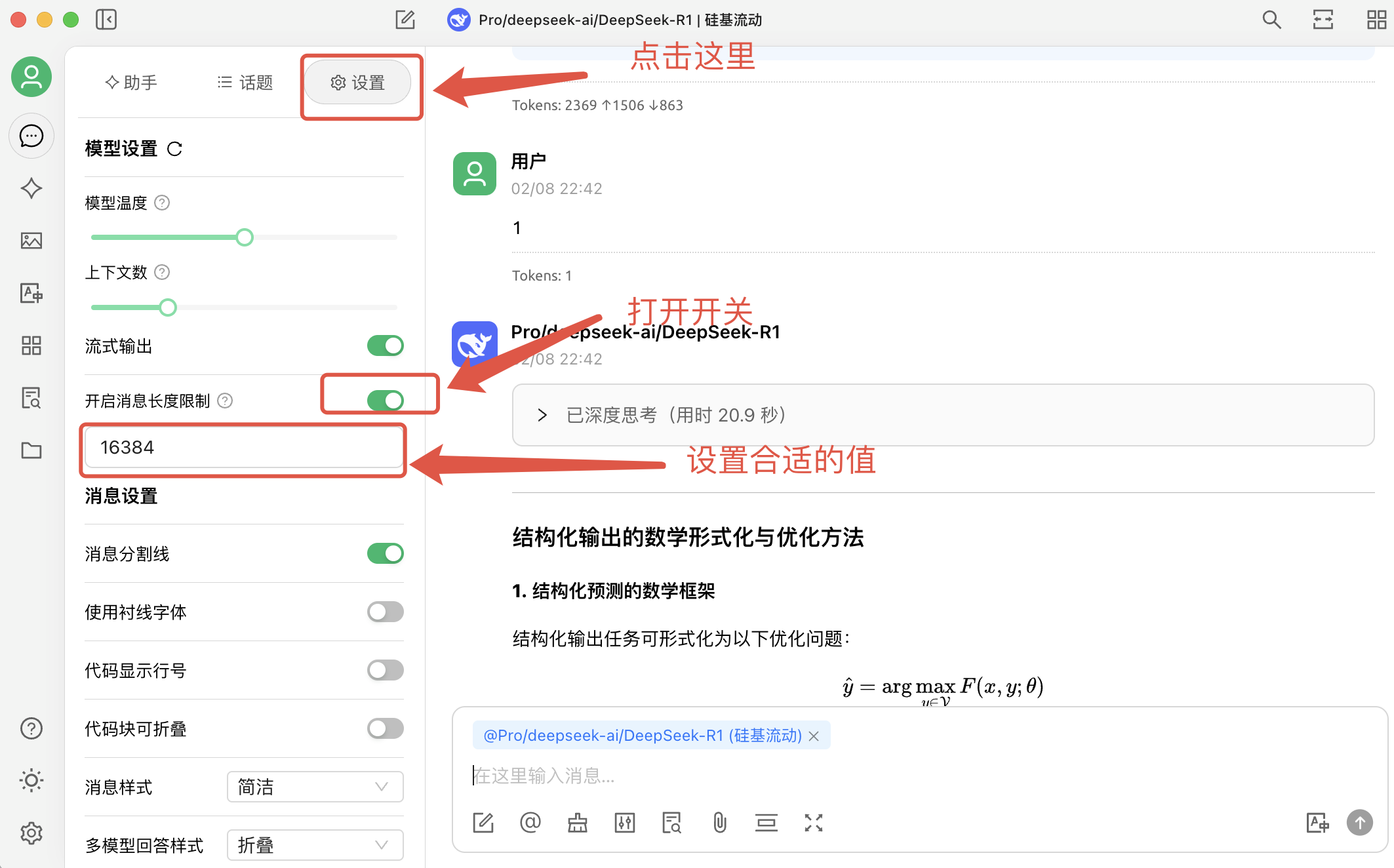
* CherryStdio 默认的 max\_tokens 是 4096,用户可以通过设置,打开“开启消息长度限制”的开关,将max\_token设置到合适值
---
## 上架指南
**URL:** llms-txt#上架指南
Source: https://docs.siliconflow.cn/cn/faqs/listing_guide
---
## 模型问题
**URL:** llms-txt#模型问题
**Contents:**
- 1. 模型输出乱码
- 2. 关于`max_tokens`说明
- 3. 关于`context_length`说明
- 4. Pro 和非 Pro 模型有什么区别
- 5. 语音模型中,对用户自定义音色有时间音质要求么
- 6. 模型输出截断问题
- 7. 模型使用过程中返回429错误排查
- 8. 已充值成功,仍然提示账户余额不足
- 9. 已实名认证,还是无法访问部分模型
- 10. fnlp/MOSS-TTSD-v0.5 使用问题
Source: https://docs.siliconflow.cn/cn/faqs/misc
目前看到部分模型在不设置参数的情况下,容易出现乱码,遇到上述情况,可以尝试设置`temperature`,`top_k`,`top_p`,`frequency_penalty`这些参数。
对应的 payload 修改为如下形式,不同语言酌情调整
## 2. 关于`max_tokens`说明
max\_tokens 与`上下文长度`相等,由于部分模型推理服务尚在更新中,请不要在请求时将 max\_tokens 设置为最大值(上下文长度),建议留出 10k 左右作为输入内容的空间。
## 3. 关于`context_length`说明
不同的LLM模型,`context_length`是有差别的,具体可以在[模型广场](https://cloud.siliconflow.cn/models)上搜索对应的模型,查看模型具体信息。
## 4. Pro 和非 Pro 模型有什么区别
1. 对于部分模型,平台同时提供免费版和收费版。免费版按原名称命名;收费版在名称前加上“Pro/”以示区分。免费版的 Rate Limits 固定,收费版的 Rate Limits 可变,具体规则请参考:[Rate Limits](https://docs.siliconflow.cn/cn/userguide/rate-limits/rate-limit-and-upgradation)。
2. 对于 `DeepSeek R1` 和 `DeepSeek V3` 模型,平台根据`支付方式`的不同要求区分命名。`Pro 版`仅支持`充值余额`支付,`非 Pro 版`支持`赠费余额`和`充值余额`支付。
## 5. 语音模型中,对用户自定义音色有时间音质要求么
* cosyvoice2 上传音色必须小于30s
* 通过API请求时候,输出截断问题排查:
* max\_tokens设置:max\_token设置到合适值,输出大于max\_token的情况下,会被截断。
* 设置流式输出请求:非流式请求时候,输出内容比较长的情况下,容易出现504超时。
* 设置客户端超时时间:把客户端超时时间设置大一些,防止未输出完成,达到客户端超时时间被截断。
* 通过第三方客户端请求,输出截断问题排查:
* CherryStdio 默认的 max\_tokens 是 4096,用户可以通过设置,打开“开启消息长度限制”的开关,将max\_token设置到合适值
 ## 7. 模型使用过程中返回429错误排查
* 普通用户:检查用户等级及模型对应的 Rate Limits(速率限制)。如果请求超出 Rate Limits,建议稍后再尝试请求。
* 专属实例用户:专属实例通常没有 Rate Limits 限制。如果出现 429 错误,首先确认是否调用了专属实例的正确模型名称,并检查使用的 api\_key 是否与专属实例匹配。
## 8. 已充值成功,仍然提示账户余额不足
* 确认使用的 api\_key 是否与刚刚充值的账户匹配。
* 如果 api\_key 无误,可能是充值过程中存在网络延迟,建议等待几分钟后再重试。
## 9. 已实名认证,还是无法访问部分模型
* 确认使用的 api\_key 是否与刚刚完成实名认证的账户匹配。
* 如果 api\_key 无误,可以进入[实名认证](https://cloud.siliconflow.cn/account/authentication)页面,检查认证状态。如果状态显示为“认证中”,可以尝试取消并重新进行认证。
## 10. fnlp/MOSS-TTSD-v0.5 使用问题
* 该模型输入的文字过短时候,容易出现错误
* 使用该模型进行对话合成时,输入文案格式如下:
* \[S1]发言人1说话内容。\[S2]发言人2说话内容。
如遇其他问题,请点击[硅基流动MaaS线上需求收集表](https://siliconflow.feishu.cn/share/base/form/shrcnDiK9EIkGN3sK0PepqN1Ppb?hide_subject_id=1\&hide_passport_id=1\&hide_phone=1\&hide_email=1)反馈。
---
## 财务问题
**URL:** llms-txt#财务问题
**Contents:**
- 1. 如何充值
- 2. 如何查询使用账单
- 3. 模型微调的计费规则
Source: https://docs.siliconflow.cn/cn/faqs/misc_finance
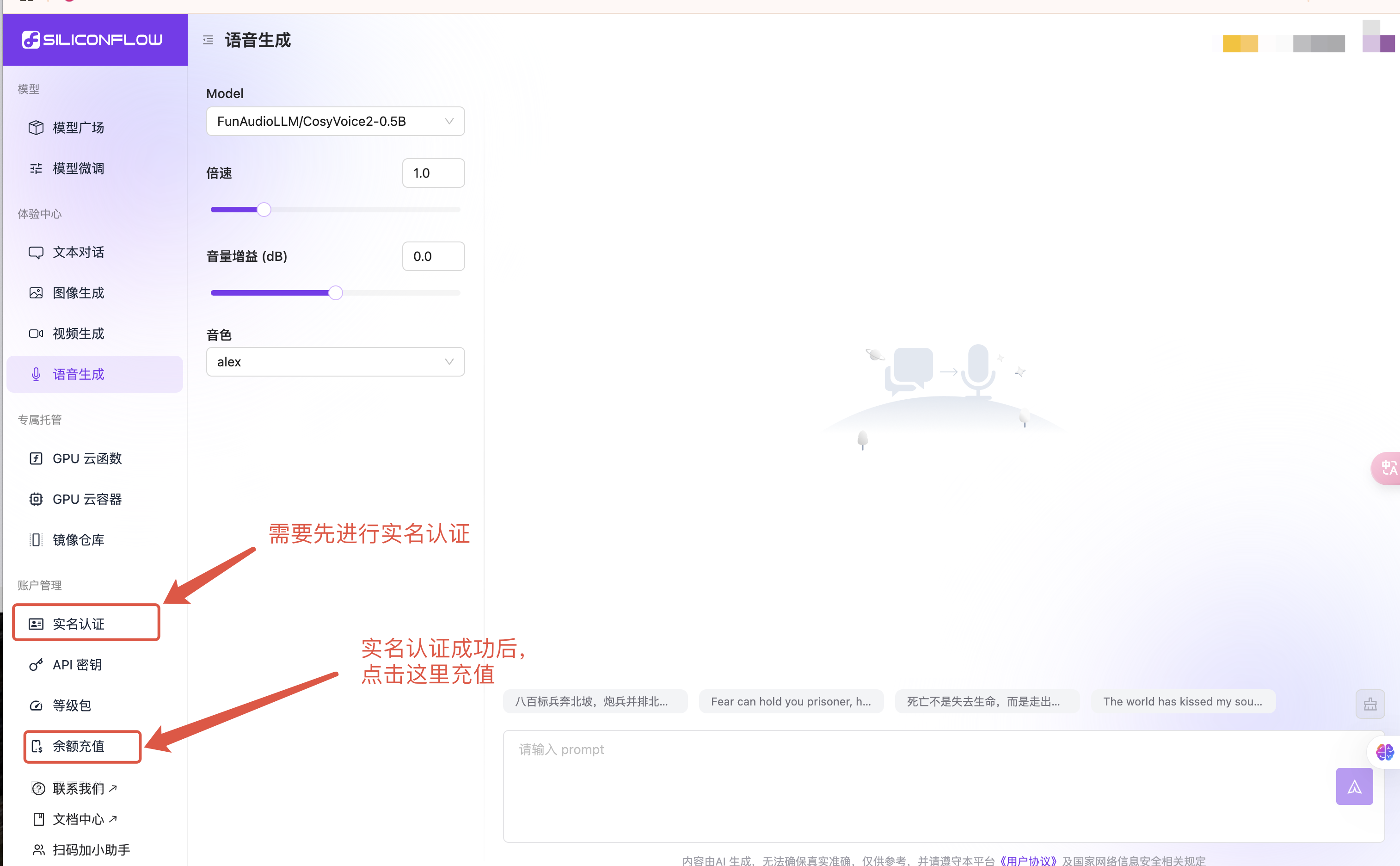
1. 电脑端登录 [SiliconFlow](https://cloud.siliconflow.cn/) 官网。
2. 点击左侧边栏 “[实名认证](https://cloud.siliconflow.cn/account/authentication)” 进行认证。
3. 点击左侧边栏 “[余额充值](https://cloud.siliconflow.cn/expensebill)” 进行充值。
## 7. 模型使用过程中返回429错误排查
* 普通用户:检查用户等级及模型对应的 Rate Limits(速率限制)。如果请求超出 Rate Limits,建议稍后再尝试请求。
* 专属实例用户:专属实例通常没有 Rate Limits 限制。如果出现 429 错误,首先确认是否调用了专属实例的正确模型名称,并检查使用的 api\_key 是否与专属实例匹配。
## 8. 已充值成功,仍然提示账户余额不足
* 确认使用的 api\_key 是否与刚刚充值的账户匹配。
* 如果 api\_key 无误,可能是充值过程中存在网络延迟,建议等待几分钟后再重试。
## 9. 已实名认证,还是无法访问部分模型
* 确认使用的 api\_key 是否与刚刚完成实名认证的账户匹配。
* 如果 api\_key 无误,可以进入[实名认证](https://cloud.siliconflow.cn/account/authentication)页面,检查认证状态。如果状态显示为“认证中”,可以尝试取消并重新进行认证。
## 10. fnlp/MOSS-TTSD-v0.5 使用问题
* 该模型输入的文字过短时候,容易出现错误
* 使用该模型进行对话合成时,输入文案格式如下:
* \[S1]发言人1说话内容。\[S2]发言人2说话内容。
如遇其他问题,请点击[硅基流动MaaS线上需求收集表](https://siliconflow.feishu.cn/share/base/form/shrcnDiK9EIkGN3sK0PepqN1Ppb?hide_subject_id=1\&hide_passport_id=1\&hide_phone=1\&hide_email=1)反馈。
---
## 财务问题
**URL:** llms-txt#财务问题
**Contents:**
- 1. 如何充值
- 2. 如何查询使用账单
- 3. 模型微调的计费规则
Source: https://docs.siliconflow.cn/cn/faqs/misc_finance
1. 电脑端登录 [SiliconFlow](https://cloud.siliconflow.cn/) 官网。
2. 点击左侧边栏 “[实名认证](https://cloud.siliconflow.cn/account/authentication)” 进行认证。
3. 点击左侧边栏 “[余额充值](https://cloud.siliconflow.cn/expensebill)” 进行充值。
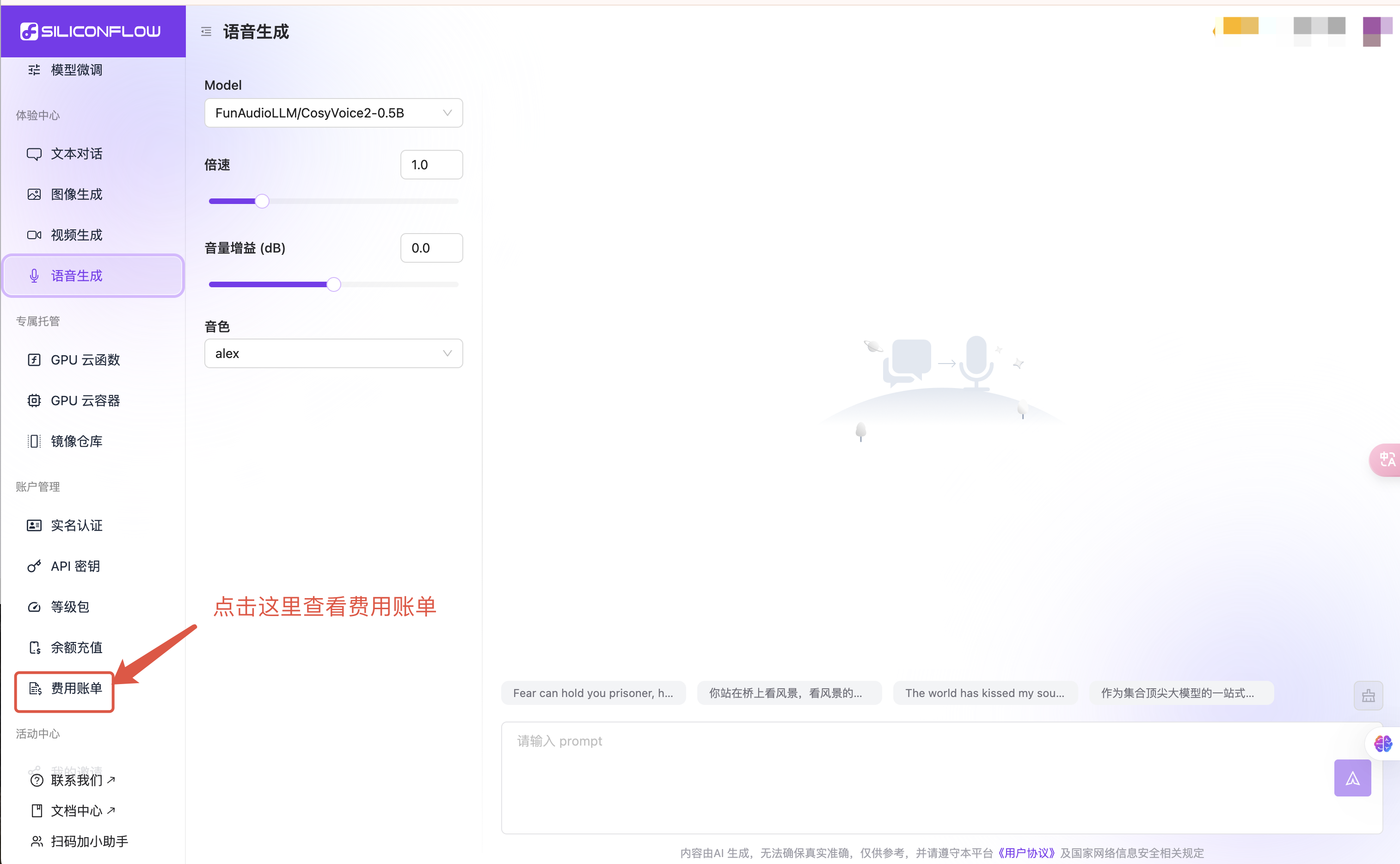
 1. 电脑端登录 [SiliconFlow](https://cloud.siliconflow.cn/) 官网。
2. 点击左侧边栏 “[费用账单](https://cloud.siliconflow.cn/bills)” 了解。
1. 电脑端登录 [SiliconFlow](https://cloud.siliconflow.cn/) 官网。
2. 点击左侧边栏 “[费用账单](https://cloud.siliconflow.cn/bills)” 了解。
如您需要开发票,请根据 [开具发票](https://docs.siliconflow.cn/faqs/invoice) 发邮件,我们会根据您的实际消耗费用开发票。
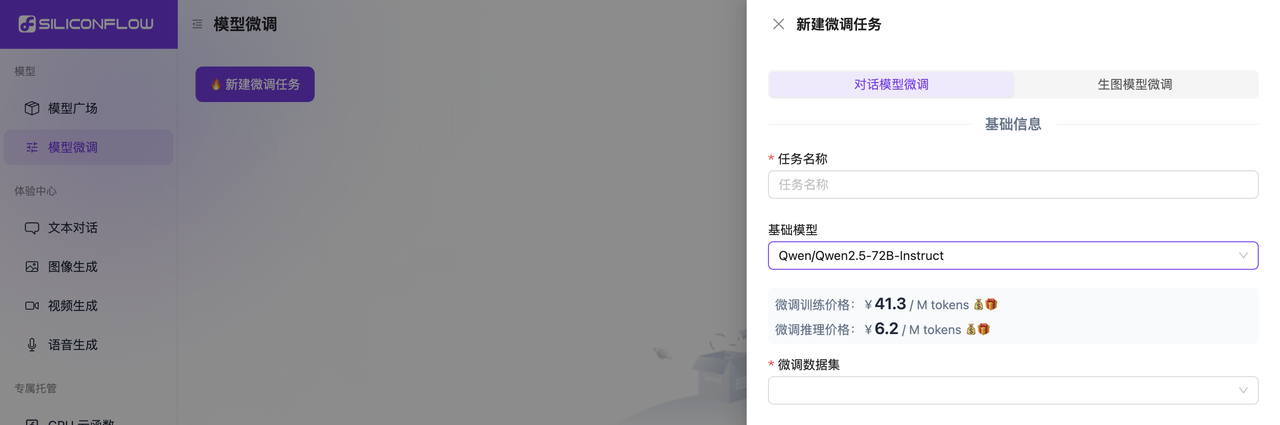
 模型微调功能会按照训练和推理两个不同场景独立计费。
费用查看路径:[模型微调](https://cloud.siliconflow.cn/fine-tune) - 新建微调任务,选择所需的“基础模型”后,页面会显示对应的“微调训练价格”和“微调推理价格”。
模型微调功能会按照训练和推理两个不同场景独立计费。
费用查看路径:[模型微调](https://cloud.siliconflow.cn/fine-tune) - 新建微调任务,选择所需的“基础模型”后,页面会显示对应的“微调训练价格”和“微调推理价格”。
 如遇其他问题,请点击[硅基流动MaaS线上需求收集表](https://siliconflow.feishu.cn/share/base/form/shrcnxIMbsUUDf7xjrRIjenRYoh?hide_user_id=1)反馈。
---
## Rate Limits 问题
**URL:** llms-txt#rate-limits-问题
**Contents:**
- 1. 免费模型如何提升 Rate Limits
Source: https://docs.siliconflow.cn/cn/faqs/misc_rate
## 1. 免费模型如何提升 Rate Limits
* 所有免费模型的 Rate Limits 是固定的。
如遇其他问题,请点击[硅基流动MaaS线上需求收集表](https://siliconflow.feishu.cn/share/base/form/shrcnxIMbsUUDf7xjrRIjenRYoh?hide_user_id=1)反馈。
---
## Rate Limits 问题
**URL:** llms-txt#rate-limits-问题
**Contents:**
- 1. 免费模型如何提升 Rate Limits
Source: https://docs.siliconflow.cn/cn/faqs/misc_rate
## 1. 免费模型如何提升 Rate Limits
* 所有免费模型的 Rate Limits 是固定的。
* 对于部分模型,平台同时提供免费版和收费版。免费版按照原名称命名;收费版会在名称前加上“Pro/”以示区分。
* 收费版模型支持通过月消费金额解锁更宽松的 Rate Limits。
* 对于 `DeepSeek R1` 、 `DeepSeek V3`及`DeepSeek-V3.1-Terminus` 模型,Rate Limits 是固定的。
如遇其他问题,请点击[硅基流动MaaS线上需求收集表](https://siliconflow.feishu.cn/share/base/form/shrcnxIMbsUUDf7xjrRIjenRYoh?hide_user_id=1\&prefill_user_id=sfd17aubjk20jc73ada8ng)反馈。
---
## 使用问题
**URL:** llms-txt#使用问题
**Contents:**
- 1. 如何注销账号
- 2. 如何邀请
- 3. 为什么我的手机号无法注册或绑定?
- 4. 为什么无法进行 Google / GitHub 关联登录了?
Source: https://docs.siliconflow.cn/cn/faqs/misc_use
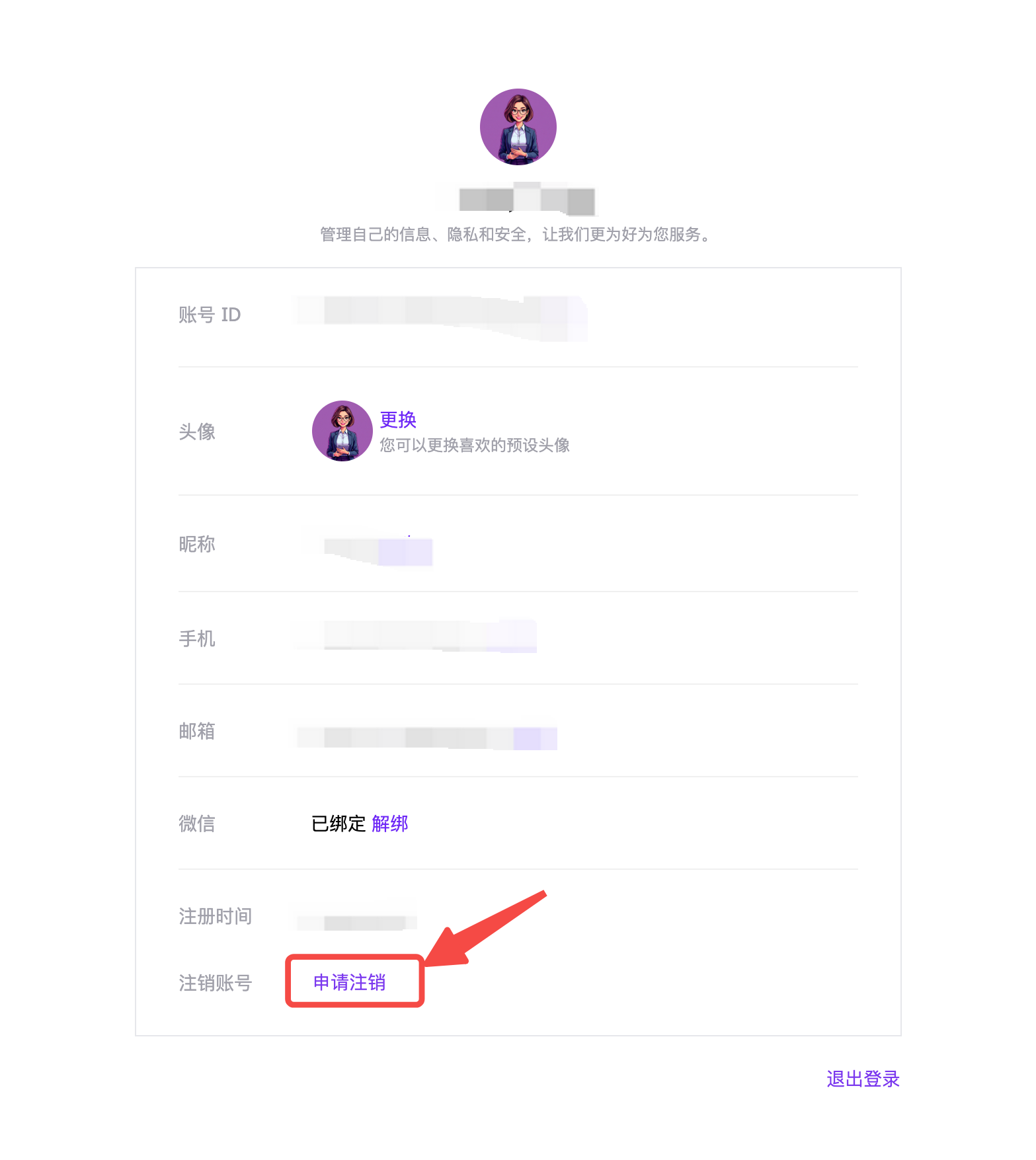
请进入[个人中心](https://account.siliconflow.cn/zh/user/settings)页面,点击“申请注销”,填写注销账号申请。核实后将在 15 个工作日内处理。
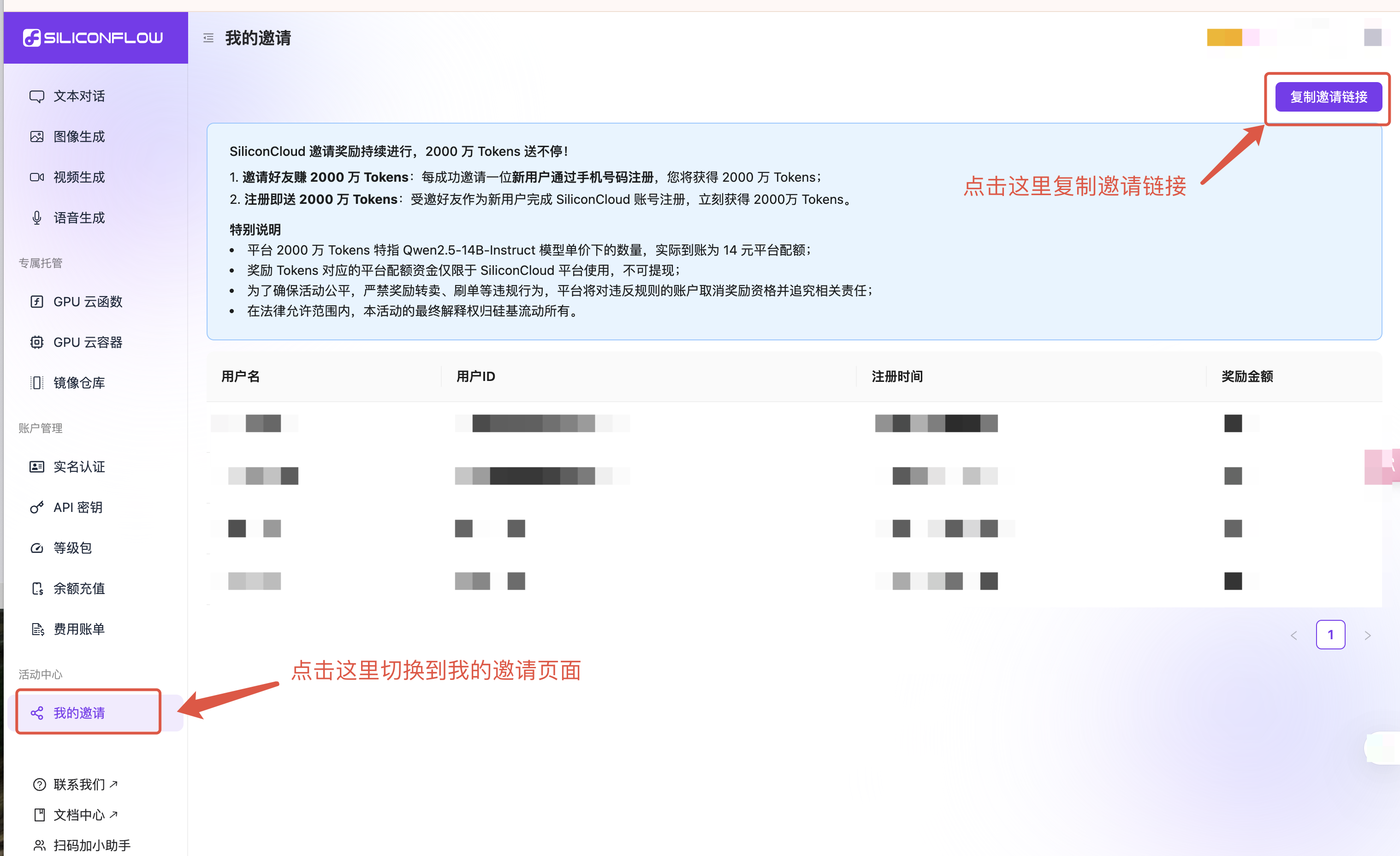
 1. 电脑端登录 [SiliconFlow](https://cloud.siliconflow.cn/) 官网。
2. 点击左侧边栏 “[我的邀请](https://cloud.siliconflow.cn/invitation)” — “复制邀请链接”。
3. 分享邀请信息。
4. 邀请成功的具体信息会显示在 “[我的邀请](https://cloud.siliconflow.cn/invitation)”页面。
有三种邀请方式供选择:二维码、邀请码和邀请链接。
1. 电脑端登录 [SiliconFlow](https://cloud.siliconflow.cn/) 官网。
2. 点击左侧边栏 “[我的邀请](https://cloud.siliconflow.cn/invitation)” — “复制邀请链接”。
3. 分享邀请信息。
4. 邀请成功的具体信息会显示在 “[我的邀请](https://cloud.siliconflow.cn/invitation)”页面。
有三种邀请方式供选择:二维码、邀请码和邀请链接。
 ## 3. 为什么我的手机号无法注册或绑定?
为保障平台用户的账户安全与服务体验,平台对部分可能存在安全风险的手机号号段(如部分虚拟运营商号段)做了注册与绑定限制。此举旨在为您提供更加安全、稳定的服务环境,降低因恶意行为对正常使用可能带来的干扰和影响。
建议您使用中国大陆常见运营商(如中国移动、中国联通、中国电信)所提供的常规手机号进行注册或绑定操作。
如您使用的是正规手机号但仍出现提示,可添加小助手微信,我们将及时协助您解决。
## 3. 为什么我的手机号无法注册或绑定?
为保障平台用户的账户安全与服务体验,平台对部分可能存在安全风险的手机号号段(如部分虚拟运营商号段)做了注册与绑定限制。此举旨在为您提供更加安全、稳定的服务环境,降低因恶意行为对正常使用可能带来的干扰和影响。
建议您使用中国大陆常见运营商(如中国移动、中国联通、中国电信)所提供的常规手机号进行注册或绑定操作。
如您使用的是正规手机号但仍出现提示,可添加小助手微信,我们将及时协助您解决。
 ## 4. 为什么无法进行 Google / GitHub 关联登录了?
为了提升账户安全性,硅基流动中文站已于近期下线 Google / GitHub 的关联登录功能。
如您已绑定手机号,仍可通过手机登录;或使用“邮箱登录”功能,输入您的 Google / GitHub 邮箱地址接收验证码完成登录。
如遇其他问题,请点击[硅基流动工单系统](https://siliconflow.feishu.cn/share/base/form/shrcnDiK9EIkGN3sK0PepqN1Ppb?hide_subject_id=1\&hide_passport_id=1\&hide_phone=1\&hide_email=1)反馈。
---
## 4. 为什么无法进行 Google / GitHub 关联登录了?
为了提升账户安全性,硅基流动中文站已于近期下线 Google / GitHub 的关联登录功能。
如您已绑定手机号,仍可通过手机登录;或使用“邮箱登录”功能,输入您的 Google / GitHub 邮箱地址接收验证码完成登录。
如遇其他问题,请点击[硅基流动工单系统](https://siliconflow.feishu.cn/share/base/form/shrcnDiK9EIkGN3sK0PepqN1Ppb?hide_subject_id=1\&hide_passport_id=1\&hide_phone=1\&hide_email=1)反馈。
---