
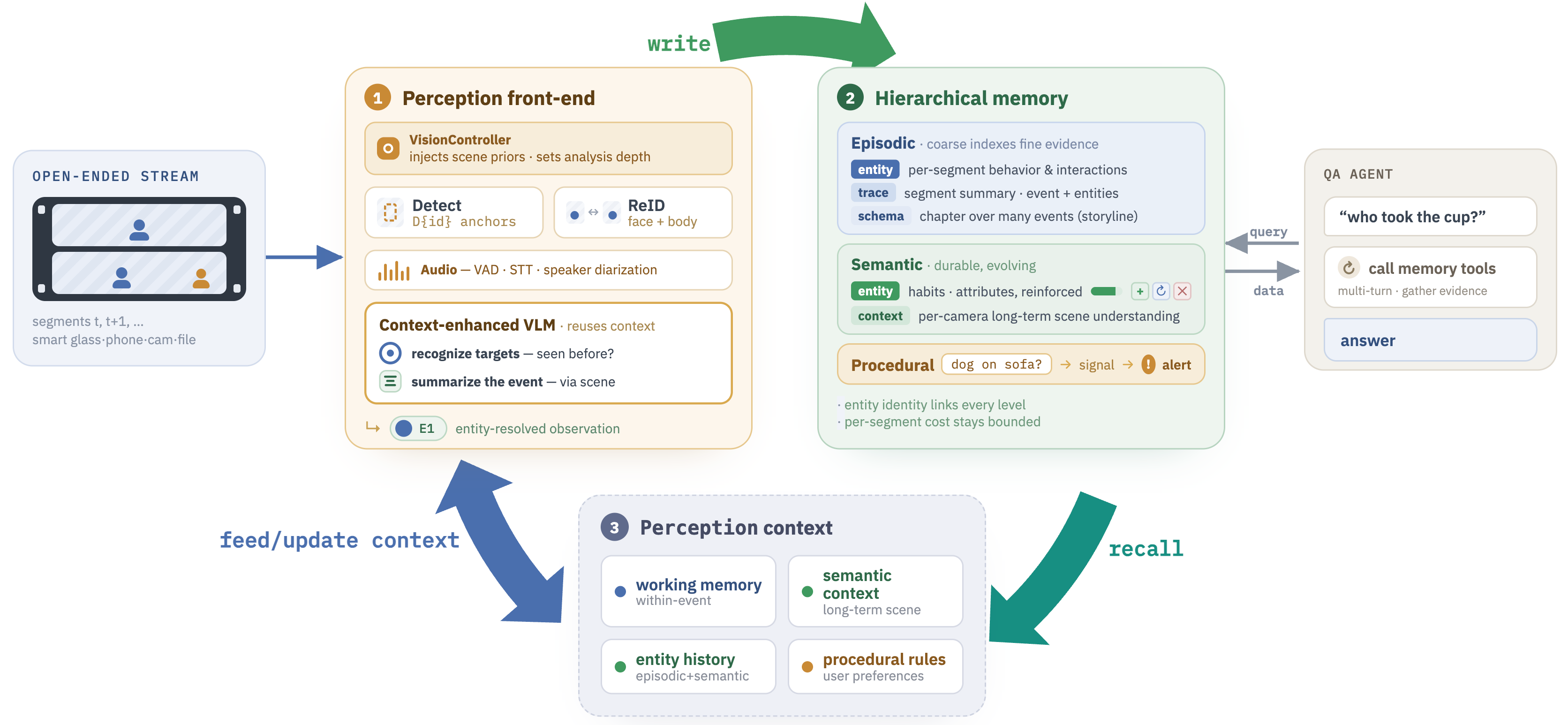
reflectworld_memory
Search and manage ReflectWorld video memories from ReflectWorld cameras.
When to use
Use reflectworld_memory when the user asks about:
- What happened in front of a camera ("who came to the door today?")
- Identifying recurring patterns ("does this person visit often?")
- Retrieving event history for a camera or entity
- Adding structured notes about observations
- Setting persistent rules/preferences that the VLM should follow
Actions
search
Semantic search across video memories. Searches episodic (raw events), semantic (behavioral patterns), and procedural (agent rules) collections.
{
  "action": "search",
  "query": "person carrying package at front door",
  "camera_id": "cam-front-door",
  "mode": "event",
  "memory_type": "episodic",
  "limit": 10,
  "threshold": 0.7
}
Parameters:
| Parameter | Type | Required | Description |
|---|---|---|---|
| query | string | yes | Natural language search query |
| camera_id | string | no | Filter to specific camera |
| mode | "snapshot" | "event" | "stream" | no | Filter by capture mode |
| memory_type | "episodic" | "semantic" | "procedural" | "all" | no | Collection to search (default: "all") |
| limit | integer | no | Max results (default: 20, max: 200) |
| threshold | number 0-1 | no | Minimum similarity score |
add_note
Store a manual observation or user-defined rule. Use memory_type="procedural" for notification rules/preferences — these are automatically injected into the VLM prompt on every analysis cycle.
{
  "action": "add_note",
  "note": "Alert user when animals or pets appear in the camera feed.",
  "camera_id": "global",
  "memory_type": "procedural"
}
Parameters:
| Parameter | Type | Required | Description |
|---|---|---|---|
| note | string | yes | Note content to store |
| camera_id | string | no | Associated camera. Use "global" for rules applying to all cameras |
| memory_type | "episodic" | "procedural" | no | Collection to store in. Use "procedural" for user rules/preferences (default: episodic) |
| user_id | string | no | Associated user |
| agent_id | string | no | Agent making the note |
| mode | "snapshot" | "event" | "stream" | no | Context mode |
get_history
Retrieve episodic memory timeline for a camera, optionally filtered by entity.
{
  "action": "get_history",
  "camera_id": "cam-backyard",
  "entity_id": "person-007",
  "limit": 50
}
Parameters:
| Parameter | Type | Required | Description |
|---|---|---|---|
| camera_id | string | yes | Camera to retrieve history for |
| entity_id | string | no | Filter to specific tracked entity |
| limit | integer | no | Max records (default: 20, max: 500) |
Procedural Rules Examples
Procedural rules are the key mechanism for persistent agent behavior. They are stored in ReflectWorld and automatically injected into the VLM prompt during every perception cycle.
| User request | add_note call |
|---|---|
| "Alert me when animals appear" | note: "Alert user immediately when any animal (dog, cat, raccoon, etc.) is detected in the camera feed." camera_id: "global", memory_type: "procedural" |
| "Notify me if someone picks up packages" | note: "Send notification when a person picks up or removes a package from the porch." camera_id: "cam-front-door", memory_type: "procedural" |
| "I'm allergic to peanuts" (cooking scenario) | note: "User is allergic to peanuts. Flag any recipe step or ingredient that contains or may contain peanuts." camera_id: "global", memory_type: "procedural" |
| "Track when the kids get home from school" | note: "Note the time when children arrive home (typically 3-4pm). Send notification on arrival." camera_id: "cam-front-door", memory_type: "procedural" |
Key point: Procedural rules persist across sessions and are always active. Use camera_id="global" for rules that should apply to all cameras, or a specific camera ID for location-specific rules.
Response format
All actions return a results array of memory items:
{
  "results": [
    {
      "id": "mem-uuid",
      "memory": "Person in red jacket arrived at front door at 14:32",
      "score": 0.91,
      "memory_type": "episodic",
      "created_at": "2026-01-15T14:32:11+00:00",
      "camera_id": "cam-front-door",
      "entity_ids": ["person-007"]
    }
  ]
}
Configuration
Configure via plugin options at registration time:
openclaw.register(memoryPlugin, {
  baseUrl: "http://reflectworld:8219",   // ReflectWorld service URL
  timeoutMs: 10000,                   // Request timeout (ms)
  defaultCameraId: "cam-front-door",  // Applied when camera_id not specified
  defaultSearchMemoryType: "all",     // Default collection to search
  defaultSearchLimit: 20,             // Default result count
});
Error handling
The tool throws ReflectWorldClientError with .statusCode on HTTP failures. The agent should handle:
404: Memory or entity not found400: Invalid parameters (check camera_id, collection names)500: ReflectWorld service error -- check service health withGET /health
Related tools
reflectworld_cam-- capture video from camerasreflectworld_perception-- analyze video to generate memories