Documentation
Use these patterns when writing documentation, creating runbooks, or documenting system architecture.
MCP Servers & Plugins
| Resource |
When to Use |
deploy-on-aws diagram skill |
Generate architecture diagrams for system documentation and runbooks |
deploy-on-aws:awsknowledge |
Reference AWS service docs when writing architecture docs or runbooks — use read_documentation, search_documentation, and recommend to link to official docs rather than paraphrasing |
aws-serverless plugin |
Use get_lambda_guidance and get_serverless_templates to document serverless patterns, Lambda configurations, and SAM deployment steps |
databases-on-aws plugin |
Use dsql_search_documentation and dsql_recommend to document DSQL schema design, query patterns, and migration procedures |
context7 MCP |
Look up library/framework docs to verify technical accuracy in README examples |
pr-review-toolkit:comment-analyzer plugin |
After writing any documentation — verifies accuracy, staleness risk, and maintainability |
gh CLI |
Link to issues, PRs, and discussions from documentation; create issues for documentation gaps (gh issue create) |
README Structure
# Project Name

One-line description of what this does.

## Quick Start

\`\`\`bash
npm install
npm start
\`\`\`

## Configuration

| Variable | Description | Default |
|----------|-------------|---------|
| PORT | Server port | 3000 |

## Usage

[Examples of common operations]

## Development

[How to set up dev environment, run tests]

## License

MIT
API Documentation
Use OpenAPI/Swagger. Minimum per endpoint:
- HTTP method and path
- Request parameters (path, query, body)
- Response codes and schemas
- Authentication requirements
- Example request/response
Runbook Template
# [Service Name] Runbook

## Overview
What this service does, who owns it.

## Architecture
[Use `deploy-on-aws` diagram skill to generate architecture diagram]

## Health Checks
- Endpoint: `GET /health`
- Expected: 200 OK

## Common Issues

### Issue: High latency
**Symptoms**: Response times > 500ms
**Diagnosis**: Check DB connections, cache hit rate
**Resolution**: Scale horizontally, clear cache

## Escalation
- L1: On-call engineer
- L2: Service owner
- L3: Platform team
Architecture Decision Record (ADR)
# ADR-001: Use PostgreSQL for user data

## Status
Accepted

## Context
Need persistent storage for user accounts.

## Decision
Use PostgreSQL on RDS.

## Consequences
- Pro: ACID compliance, familiar tooling
- Con: Operational overhead vs DynamoDB
Spec Artifact Documentation
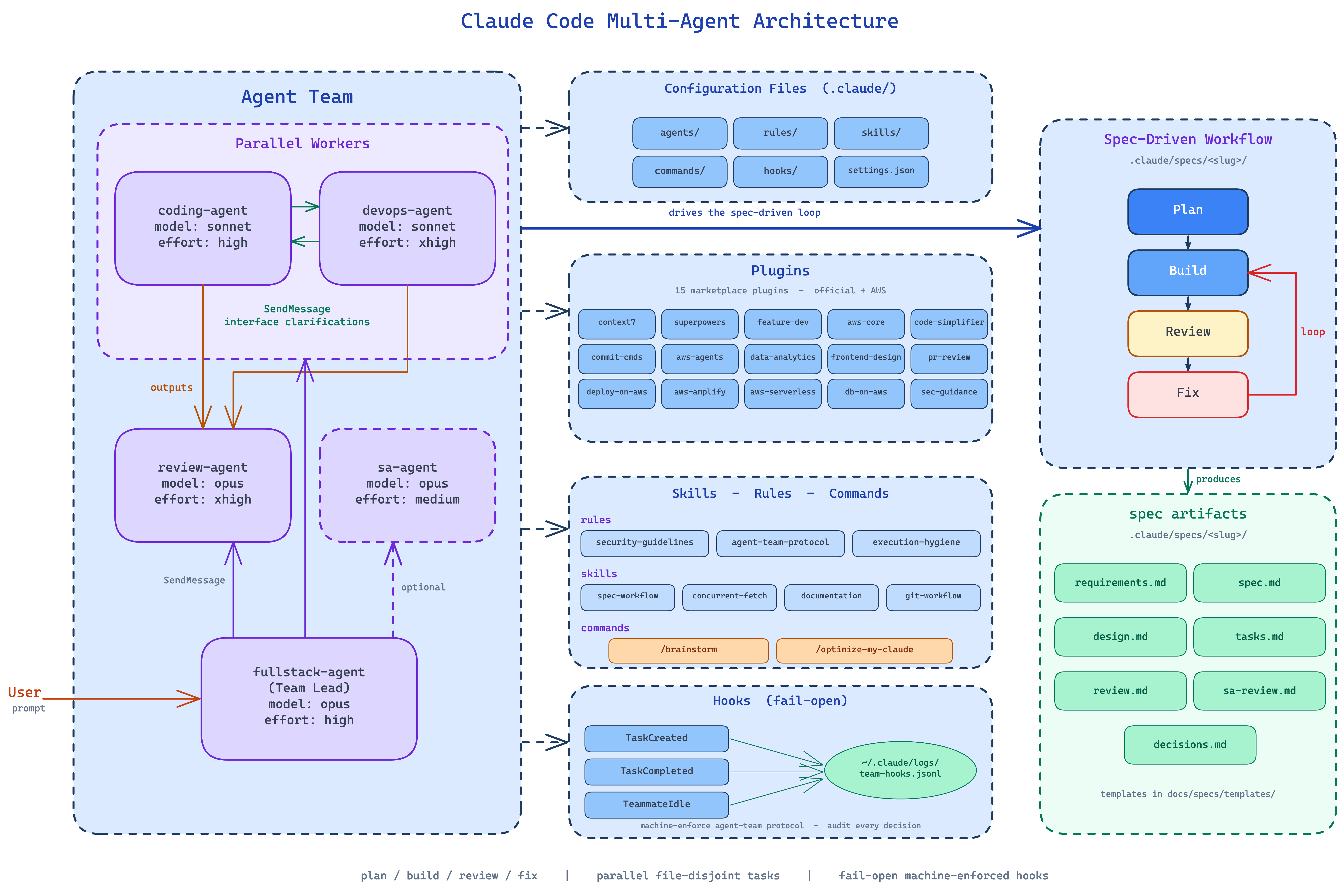
When documenting within the spec-driven workflow, these artifacts have defined formats (see spec-workflow skill):
| Artifact |
Owner |
Purpose |
spec.md |
fullstack-agent |
Design decisions, constraints, alternatives considered |
design.md |
fullstack-agent |
Architecture, repo structure, infrastructure design |
tasks.md |
fullstack-agent (authored), all teammates (updated) |
Parallelized task groups with completion notes |
review.md |
review-agent |
Severity-rated findings with PASS/FAIL verdict |
sa-review.md |
sa-agent |
Well-Architected findings by pillar, cost estimates |
decisions.md |
any agent via fullstack-agent |
Mid-flight decisions to prevent re-litigation |
When writing documentation for a project that uses the spec workflow, link to relevant specs rather than duplicating their content.
Agent Integration
devops-agent owns READMEs, runbooks, and architecture docs — keeps them next to the code they describecoding-agent writes inline documentation (function/class/module docs) during implementation- Both agents delegate to
pr-review-toolkit:comment-analyzer after writing docs to verify accuracy
sa-agent produces architecture review documentation in Well-Architected pillar format, claims and tracks tasks like other teammates- Use the
gh CLI (gh issue create) to create issues for documentation that needs future updates (e.g., after API changes)
Writing Tips
- Lead with the "what" and "why"
- Use concrete examples over abstract explanations
- Keep it scannable (headers, bullets, tables)
- Update docs when code changes (or automate it)
- Docs are concise and actionable — no filler
- Use the
deploy-on-aws diagram skill for architecture diagrams — don't describe what a diagram can show
- Use
WebFetch (or your platform's equivalent) to load external specs or references rather than copy-pasting content
1---2name: documentation3description: Technical writing patterns for READMEs, runbooks, and architecture docs, with accuracy verification. Use when writing documentation, creating runbooks, or documenting system architecture.4---56# Documentation78Use these patterns when writing documentation, creating runbooks, or documenting system architecture.910## MCP Servers & Plugins1112| Resource | When to Use |13|---|---|14| `deploy-on-aws` diagram skill | Generate architecture diagrams for system documentation and runbooks |15| `deploy-on-aws:awsknowledge` | Reference AWS service docs when writing architecture docs or runbooks — use `read_documentation`, `search_documentation`, and `recommend` to link to official docs rather than paraphrasing |16| `aws-serverless` plugin | Use `get_lambda_guidance` and `get_serverless_templates` to document serverless patterns, Lambda configurations, and SAM deployment steps |17| `databases-on-aws` plugin | Use `dsql_search_documentation` and `dsql_recommend` to document DSQL schema design, query patterns, and migration procedures |18| `context7` MCP | Look up library/framework docs to verify technical accuracy in README examples |19| `pr-review-toolkit:comment-analyzer` plugin | After writing any documentation — verifies accuracy, staleness risk, and maintainability |20| `gh` CLI | Link to issues, PRs, and discussions from documentation; create issues for documentation gaps (`gh issue create`) |2122## README Structure2324```markdown25# Project Name2627One-line description of what this does.2829## Quick Start3031\`\`\`bash32npm install33npm start34\`\`\`3536## Configuration3738| Variable | Description | Default |39|----------|-------------|---------|40| PORT | Server port | 3000 |4142## Usage4344[Examples of common operations]4546## Development4748[How to set up dev environment, run tests]4950## License5152MIT53```5455## API Documentation5657Use OpenAPI/Swagger. Minimum per endpoint:58- HTTP method and path59- Request parameters (path, query, body)60- Response codes and schemas61- Authentication requirements62- Example request/response6364## Runbook Template6566```markdown67# [Service Name] Runbook6869## Overview70What this service does, who owns it.7172## Architecture73[Use `deploy-on-aws` diagram skill to generate architecture diagram]7475## Health Checks76- Endpoint: `GET /health`77- Expected: 200 OK7879## Common Issues8081### Issue: High latency82**Symptoms**: Response times > 500ms83**Diagnosis**: Check DB connections, cache hit rate84**Resolution**: Scale horizontally, clear cache8586## Escalation87- L1: On-call engineer88- L2: Service owner89- L3: Platform team90```9192## Architecture Decision Record (ADR)9394```markdown95# ADR-001: Use PostgreSQL for user data9697## Status98Accepted99100## Context101Need persistent storage for user accounts.102103## Decision104Use PostgreSQL on RDS.105106## Consequences107- Pro: ACID compliance, familiar tooling108- Con: Operational overhead vs DynamoDB109```110111## Spec Artifact Documentation112113When documenting within the spec-driven workflow, these artifacts have defined formats (see `spec-workflow` skill):114115| Artifact | Owner | Purpose |116|----------|-------|---------|117| `spec.md` | fullstack-agent | Design decisions, constraints, alternatives considered |118| `design.md` | fullstack-agent | Architecture, repo structure, infrastructure design |119| `tasks.md` | fullstack-agent (authored), all teammates (updated) | Parallelized task groups with completion notes |120| `review.md` | review-agent | Severity-rated findings with PASS/FAIL verdict |121| `sa-review.md` | sa-agent | Well-Architected findings by pillar, cost estimates |122| `decisions.md` | any agent via fullstack-agent | Mid-flight decisions to prevent re-litigation |123124When writing documentation for a project that uses the spec workflow, link to relevant specs rather than duplicating their content.125126## Agent Integration127128- `devops-agent` owns READMEs, runbooks, and architecture docs — keeps them next to the code they describe129- `coding-agent` writes inline documentation (function/class/module docs) during implementation130- Both agents delegate to `pr-review-toolkit:comment-analyzer` after writing docs to verify accuracy131- `sa-agent` produces architecture review documentation in Well-Architected pillar format, claims and tracks tasks like other teammates132- Use the `gh` CLI (`gh issue create`) to create issues for documentation that needs future updates (e.g., after API changes)133134## Writing Tips135136- Lead with the "what" and "why"137- Use concrete examples over abstract explanations138- Keep it scannable (headers, bullets, tables)139- Update docs when code changes (or automate it)140- Docs are concise and actionable — no filler141- Use the `deploy-on-aws` diagram skill for architecture diagrams — don't describe what a diagram can show142- Use `WebFetch` (or your platform's equivalent) to load external specs or references rather than copy-pasting content
 aws-samples