Agent-Native Plans
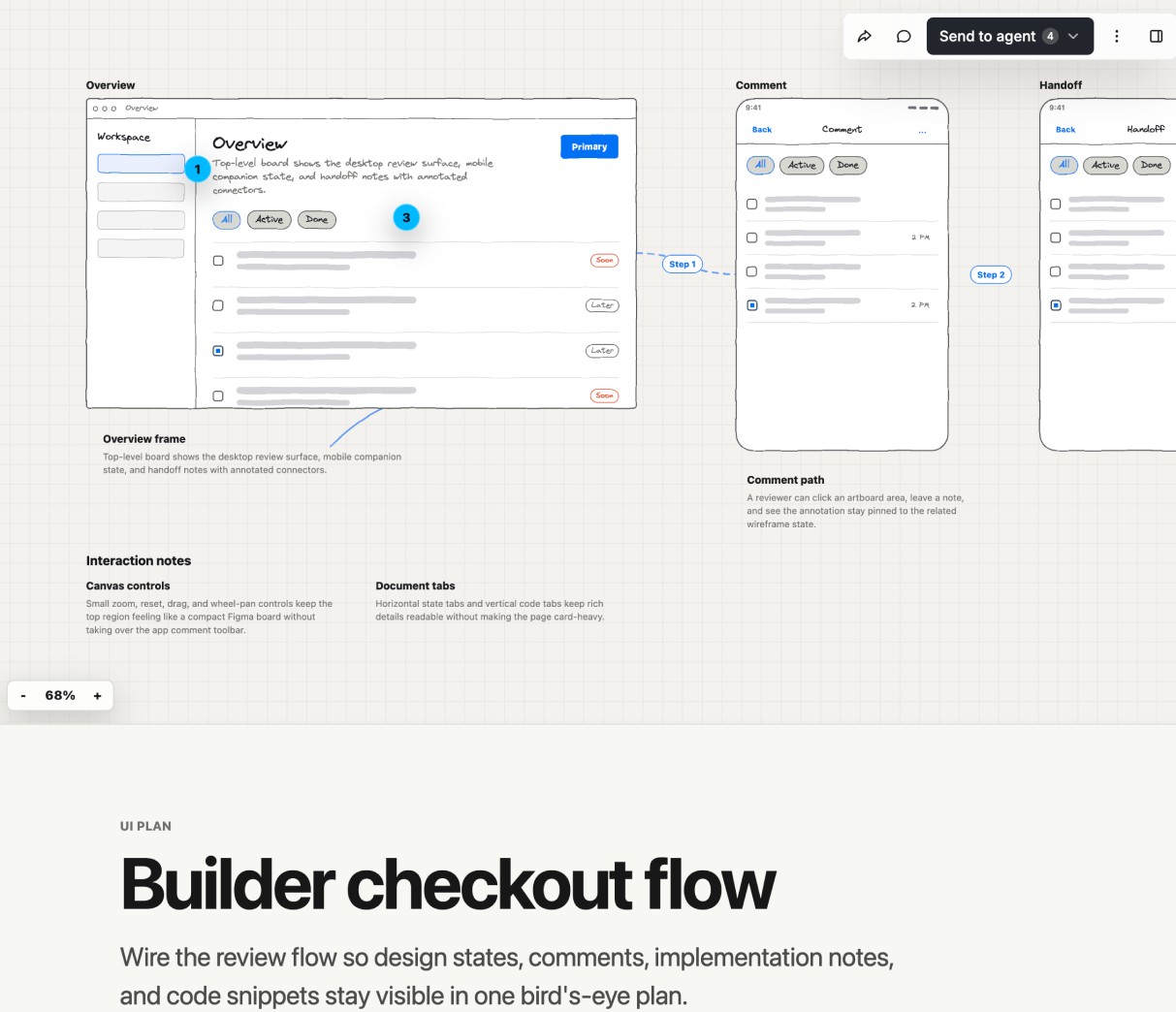
Agent-Native Plans is structured visual planning mode for coding agents. Build
the plan you would normally write in Markdown, but as a scannable document with
editable blocks mixed in: inline diagrams, code snippets,
open questions, and an optional top visual review area (wireframe canvas, live
prototype, or both in tabs). Architecture and backend plans stay document-only;
UI and product plans start with the top canvas/prototype (the Visual Surface
Choice section owns that rule).
/visual-plan is the packaged command and main entry point. Choose the review
mode from the task: UI-first when the work is primarily product UI and review
should start with screens, prototype-first when review should start with a
functional live prototype, design-first when review needs full-fidelity branded
screens, or visual-intake when the user explicitly wants a questionnaire before
planning. When a Codex, Claude Code, Markdown, or pasted plan already exists,
/visual-plan uses that source plan as the starting point and builds the review
surface from it instead of starting over.
When To Use
Create or adapt a visual plan whenever the plan would be better as a reviewable
artifact than a chat paragraph. This includes modest work such as a single UI
surface with states, a small workflow, a before/after product change, or a
component/API/data-shape decision that needs alignment, plus larger multi-file,
ambiguous, long-running, risky, or UI-heavy work. Use it when architecture /
data flow / UI direction / options / open questions would benefit from inline
diagrams or structured blocks, when the user needs to react to a direction
before you implement, or when an existing text plan needs a richer review
surface.
Plan Discipline
- Gate thoughtfully. A visual plan is a richer review surface, not only a
tool for giant projects. Use it when the user needs to see, compare, comment
on, or approve a direction before code, even for a modest UI/state/workflow
change. Skip it for truly trivial, unambiguous work — typos, one-line fixes, a
single well-specified function, anything whose diff you could describe in one
sentence — and just make the change. Never pad a plan with filler and never
ship a single-step plan.
- Research before you draft. Read the real files, actions, schema, and
patterns first; name actual files, symbols, and data shapes instead of
inventing them. Check existing
actions/ before proposing endpoints and prefer
named client helpers over raw fetch. Delegate wide exploration to a sub-agent.
Lead with reuse: for each step, name what it reuses — existing actions, schema,
components, helpers — before what it adds, so the plan explains the genuinely new
delta instead of redescribing what already exists.
- Decide the hard-to-reverse bets first. For non-trivial backend, data, or API
work, sketch where the feature is headed, then call out the decisions that are
expensive to undo once data or callers depend on them — wire format, public ids,
data-model shape, auth and ownership boundaries — and get those right in the plan
even if most of the feature ships later. Then scope to the smallest first cut that
proves the approach without foreclosing it, stating both what is in and what is
explicitly deferred.
- Keep examples at the right altitude. When the user's idea is a broad
framework, product, or operating-model change, do not collapse it into the
first concrete example, provider, or sync path they mention. Separate the core
abstraction from motivating examples and app/provider adapters. Use examples
to make the plan legible, but label them as examples unless they are the whole
requested scope.
- Publish standalone plans. If the user pasted, referenced, or already has a
Codex / Claude Code / Markdown plan, treat it as source material, but rewrite
the published plan as a clean standalone proposal. Preserve the source plan's
useful intent and codebase facts, label inferred visuals as inferred, and avoid
revision language such as "preserve the prior plan", "do not drop the old
idea", "unlike the previous version", or "this revision changes...". A reader
who never saw the chat or earlier drafts should understand the plan.
- Make the first read concrete. If the plan is meant to be shared with
someone outside the chat, or if the concept is abstract, lead near the top with
one concrete product example before mode tables, architecture, or roadmaps. For
UI-capable concepts, that usually means a top-canvas app state that shows the
real user workflow in product terms. Do not rely on phrases that only make
sense in conversation, and do not frame the plan as "not the old idea"; state
the positive model directly.
- Planning is read-only. Make no source edits while building or reviewing the
plan. Start editing only after the user approves the direction.
- Clarify vs. assume. Do not ask how to build it — explore and present the
approach and options in the plan. Ask a clarifying question only when an
ambiguity would change the design and you cannot resolve it from the code; use
the host agent's normal ask-user-question flow and batch 2-4 high-leverage
questions before finalizing. Do not call
create-visual-questions for
ordinary clarification or preflight; reserve it for the visual-intake mode when
the user explicitly asks for a visual intake questionnaire. Otherwise state the
assumption explicitly and proceed, and keep anything unresolved in the plan's
single bottom question-form Open Questions block. For complex plans, do a
final open-question pass before handoff: if a decision would affect
architecture, scope, UX, data shape, or rollout, either decide it in the plan
with rationale or put it in that bottom form with a recommended default.
- The plan is the approval gate. After surfacing it, ask the user to review
and approve before you write code, and name which files/areas the work touches.
Presenting the plan and requesting sign-off is the approval step — do not ask a
separate "does this look good?" question.
- The document is the source of truth, not the chat. When scope shifts,
update the plan with
update-visual-plan rather than only changing course in
chat, and make the updated document stand alone. Do not describe the update as
a correction to an earlier draft inside the plan itself. Re-read the approved
plan before major steps.
Create A Structured Agent-Native Plan — Never Inline
The deliverable is ALWAYS a structured Agent-Native Plan, not a chat-only plan.
The hosted Plan MCP connector (plan server, or legacy agent-native-plans) is
the default collaboration and commenting surface; it is not a reason to reject
the planning pattern as an external dependency or rented layer. Plans are
portable source artifacts (plan.mdx, optional canvas.mdx /
prototype.mdx, JSON, and HTML export), and ownership-sensitive workflows can
use local-files mode or a self-hosted/custom Plan app URL without abandoning the
skill's review discipline. Do not advise the user to skip /visual-plan because
the default surface is hosted; choose the right Plan mode for the user's
ownership, privacy, sharing, and branding needs.
By default, create the plan via the Plan MCP connector and NEVER hand it over as
inline chat content — no Markdown prose, ASCII sketch, table, or fenced
wireframe. If the plan (or legacy agent-native-plans) tools are not visible,
discover them through the host's tool_search first; if they are still missing,
STOP and give the user the client-specific reconnect step rather than improvising
an inline plan. Before publishing, or whenever a connector or auth error appears,
READ references/connection.md in this skill directory — it is the single source
of truth for the never-inline rule, connector discovery, and the per-client
reconnect steps. Local-files privacy mode (after Tool Guidance) is the exception.
Core Workflow
This section describes the default hosted Plan MCP workflow. If
AGENT_NATIVE_PLANS_MODE=local-files is set, or the user asks for fully local
files/no hosted Plan writes, use Local-Files Privacy Mode instead; carry
forward only the code-research and plan-composition guidance here.
- Follow the host agent's normal planning flow: inspect the codebase, delegate
wide exploration when useful, gather the info needed, and ask native
clarifying questions as needed before generating the plan. If a source plan
already exists, gather its exact text from the user's paste, a referenced
file, or recent visible agent context; do not invent source text.
- Call
get-plan-blocks for the authoritative block catalog — do not author
from memorized tags. Then call the mode-matched create tool:
create-visual-plan for document-first plans (architecture, backend, data,
refactor, API), create-ui-plan for UI-first plans, create-prototype-plan
for prototype-first plans, create-plan-design for design-first plans,
create-visual-questions only when the user explicitly asks for a visual
intake questionnaire. When a source plan already exists,
pass it as planText and preserve the original plan's useful intent while
producing a standalone plan document, not a revision memo.
- For UI/product plans, compose the top canvas first with the primary
wireframes and annotated states, then write the document with native blocks
(see
references/canvas.md and references/document-quality.md). For
broad product architecture plans with a user-facing implication, add a
concrete "what this looks like in the app" visual before the abstract
architecture or mode tables. Keep the document close to the standalone
Markdown plan the agent would normally output. If an existing plan was
provided, carry forward the right facts and decisions without referring to
the previous draft or explaining how this version differs. For non-visual
plans, skip the top visual surface (Visual Surface Choice below owns the rule)
and put diagram, data-model,
api-endpoint, diff, file-tree, code, and annotated-code blocks
directly next to the relevant prose.
Wide document layout is renderer-owned and intentionally allowlisted: only
literal code-review surfaces (diff, annotated-code) and tabs blocks
with vertical orientation or diff-like children break out wider than prose.
Keep api-endpoint, openapi-spec, data-model, json-explorer,
wireframe, question, and custom-html blocks in normal document flow unless
their own renderer says otherwise.
- Surface the returned Plans link or inline MCP App and ask the user to review.
Always include the actual URL in chat so the next step is a click in CLI or
other text-only hosts. When the host exposes an embedded browser/preview panel
and a tool can open arbitrary URLs there, open the returned plan URL
automatically for convenient review — a convenience and smoke test, never the
only handoff or the access
model. Plans should load out of the box for the local agent and local browser
session; if a signed-in embedded browser cannot read a local plan that an
anonymous/tool check can read, fix the app/action ownership or access path
rather than patching one plan by hand. For high-stakes plans (architecture,
backend, data, multi-file, or risky), also kick off the self-review pass in
Self-Review Before Handoff while the user reads, instead of blocking the
handoff on it.
- For hosted plans, call
get-plan-feedback before editing, after review,
after any long pause,
and before the final response. Treat anchorDetails, resolver intent, recent
review events, and any focused screenshots from browser handoff as the source
of truth for exactly what changed and exactly what each comment points at.
- For hosted plans, apply changes with
update-visual-plan, preferring
targeted contentPatches.
Treat the top-level content payload as a full replacement, not a merge; do
not send a partial content object to add a canvas or one block. If a full
replacement is unavoidable, first read the complete plan source/content, carry
forward every existing block and visual surface, and verify the source/export
afterward so the document body was not truncated. When the user wants
source-control friendly edits, use patch-visual-plan-source against the MDX
files instead of regenerating the plan.
- For hosted plans, export with
export-visual-plan only when the user wants a
shareable receipt or repo-check-in artifacts.
Self-Review Before Handoff
For high-stakes plans — architecture, backend, data-model, migration, multi-file,
or otherwise risky work — run one adversarial self-review pass before treating the
plan as final. Skip it for small, UI-only, or single-decision plans where the cost
outweighs the value. Keep the pass cheap and non-blocking:
- Surface the plan first, review concurrently. Post the link and let the user
start reading, then run the review in parallel — never make the user wait on it.
- Review the written plan; do not re-research. Critique the plan text and its
own blocks. The grounding was already done while drafting, so the review checks
the output instead of re-exploring the repo.
- Spawn one skeptical reviewer whose only job is to find what is weak, missing,
or wrong — not to praise. Point it at: hard-to-reverse decisions made implicitly
or not at all (wire format, public ids, data-model shape, auth, ownership); steps
not anchored in real files or symbols; a menu of options where the plan should
commit to one; obvious missing decisions ("what happens when X?", "why not Y?");
and padding or single-step filler.
- Fix vs. ask. Apply clear-cut fixes yourself with
update-visual-plan
contentPatches — vague non-goals, unanchored claims, an obvious missing
decision. Route genuine judgment calls back to the user instead: add them to the
bottom question-form Open Questions block or batch them into the normal
ask-user-question flow. Do not silently decide them.
- Do not surprise the user mid-read. On a large plan, apply the patches before
the editor loads; otherwise note briefly that a self-review is running so the
plan changing under them is expected. When you next respond, summarize what the
review changed and what it surfaced for the user to decide.
Visual Surface Choice
Choose the surface before creating the plan or after reading the source plan. Do
not add visual chrome by default:
For UI/product plans, the top canvas is usually the primary review surface. Put
the first meaningful wireframes there, not buried as document-body blocks. Use
multiple canvas artboards when states matter, such as the default view, an
overflow menu or popover, a side panel, loading, or error. Put short annotations
beside frames with targetId plus placement; keep implementation details,
tradeoffs, file maps, data contracts, risks, and verification in the document
body below the canvas.
When the user asks for a flow, storyboard, journey, wireframe, canvas, or "what
this looks like", treat that as a canvas-first request. Make one artboard per
user-visible state, connect only adjacent transitions, and use short canvas
annotations for the product notes. Do not substitute a document-body diagram
block for the requested storyboard just because HTML diagrams are faster to
write; diagrams belong below the canvas for backend mechanics, architecture, or
data-flow explanation.
Keep product wireframes and explanatory/meta diagrams separate. Start with pure
screens that look like the app state under discussion, without callout prose or
architecture notes embedded inside the UI. Put arrows, labels, contracts, data
flow, and mode explanations in separate annotations, separate canvas diagrams,
or the document body.
When the plan touches an existing app, inspect the current shell/components
before drawing. The first artboard should look like the real app at the same
density: existing sidebars, toolbar placement, overflow menus, app chrome, and
framework agent chrome stay in their real places. Model secondary surfaces as
separate states, such as a top-right overflow popover, sheet, panel, loading
state, or separate AgentSidebar, rather than inventing a permanent inspector or
folding framework chrome into the product UI.
- No visual surface for architecture-only, backend-only, data migration,
copy-only, or otherwise non-visual plans. Do not use the top canvas for
architecture diagrams, dependency maps, file plans, API contracts, or
data-flow-only reviews. Use a strong document with local inline diagrams
only when relationships need a visual explanation, usually one spatial diagram
per recommendation or decision. Prefer grouped regions, layers, quadrants,
matrices, or before/after panels over a single-axis chain unless the
relationship is truly sequential.
- Canvas only for one static screen, a before/after comparison, a component
state, a small popover, or a visual direction that does not require clicking.
Put those wireframes in
content.canvas and omit content.prototype.
- Canvas + prototype for multi-step UI flows, onboarding, wizards,
review/approval flows, navigation changes, or anything where the reviewer
needs to operate the behavior. Keep the static wireframes in
content.canvas, add the aligned functional prototype in
content.prototype, and rely on the top visual tabs to switch between them.
- Prototype-first when the user asks to operate the UI or when interaction is
the main question. Use
create-prototype-plan, which still preserves static
mocks where useful.
For mixed canvas + prototype plans, reuse the same real labels, app statuses,
and screen ids across both surfaces. The canvas is the inspectable static reference;
the prototype is the interactive version of that same flow, not a separate
design direction.
Wireframe quality — read references/wireframe.md
UI recap/plan wireframes must meet a strict quality bar — full-width chrome,
pinned bottom bars, real product content, before/after comparability, the right
surface preset, --wf-* tokens instead of hex, and no <html>/<style>/font
tags. Before authoring ANY wireframe / <Screen> / WireframeBlock, READ
references/wireframe.md in this skill directory — it is the single source of
truth for HTML wireframe quality, shared word for word with /visual-plan
and /visual-recap. Do not author wireframes from memory.
Canvas — read references/canvas.md
The canvas is the single source of truth for static UI mockups: the surface
locks each artboard's footprint, mixed surfaces lay out
in lanes, annotations are plain-text designer notes anchored by
targetId/placement, and edits are surgical contentPatches. Before
authoring or editing ANY canvas, artboard, or annotation, READ
references/canvas.md in this skill directory — it is the single source of truth
for canvas/artboard mechanics. Do not author canvas layouts from memory.
Canvas artboards use the same HTML wireframe path as document-body
WireframeBlock screens: author <Screen surface="..." html={...} /> with a
semantic HTML fragment. Do not author fresh kit-tree children such as
<FrameScreen>, <Card>, <Row>, or <Btn> inside canvas <Screen> tags;
those are legacy compatibility markup for old plans and produce brittle canvas
layouts.
Document quality — read references/document-quality.md
The document is a serious technical plan, not marketing: outcome-first,
prose-first, self-contained, built from the right native blocks, with open
questions in a single bottom question-form and a pre-handoff visual check.
Before authoring the plan document, READ references/document-quality.md in this
skill directory — it is the single source of truth for the document quality bar.
Do not write the document from memory.
Good vs. bad exemplar — read references/exemplar.md
For a worked example of the bar — a great UI-first plan and /visual-plan, plus
the anti-patterns to avoid — READ references/exemplar.md in this skill
directory before authoring a plan.
Tool Guidance
create-visual-plan: start one structured visual plan per agent task/run, or
import an existing text plan by passing planText; content may include no
visual surface, canvas only, or canvas + prototype.create-ui-plan: start a UI-first plan when the work is primarily product UI.create-prototype-plan: start a prototype-first plan with a functional top
review surface.create-plan-design: start a full-fidelity branded Design-tab plan with an
optional matching Prototype tab.convert-visual-plan-to-prototype: convert an existing HTML wireframe canvas
into a prototype plan.create-visual-questions: use only when the user explicitly asks for a visual
intake questionnaire, not as /visual-plan preflight.update-visual-plan: revise content, status, or comments with targeted
contentPatches (see Core Workflow step 6).read-visual-plan-source: read the normalized plan as plan.mdx,
optional canvas.mdx, optional .plan-state.json, and JSON.patch-visual-plan-source: apply granular MDX AST patches by stable block,
artboard, annotation, component, or wireframe-node id.import-visual-plan-source: create or replace a plan from an MDX folder.get-visual-plan: read the current structured plan, exported HTML, and
annotations; it also returns the MDX folder for source workflows.get-plan-feedback: read unconsumed human feedback. Use it frequently; it
returns grouped threads, exact anchor details, expected resolver, and recent
review-event payloads so agents can act only on the comments meant for them.get-plan-blocks: resolve block tags before authoring — do not memorize tags;
call this first to get the authoritative tag names, required fields, and prop
shapes from the live block registry.export-visual-plan: export HTML, Markdown fallback, structured JSON, and MDX
files for repo check-in.
When the user critiques a plan's look or structure, fix the renderer or this
skill — never hand-edit one stored plan. Turn feedback into better guidance.
Local-Files Privacy Mode — read references/local-files.md
When the user wants no hosted Plan database writes — no DB writes, no Plan MCP
publish, fully local/offline/private planning, repo-owned source-controlled
artifacts, or AGENT_NATIVE_PLANS_MODE=local-files — do not call any hosted Plan
tool except the schema-only get-plan-blocks catalog lookup. Author a local MDX
folder and
preview it with plan local check / plan local serve / plan local verify.
Before using local-files mode, READ references/local-files.md in this skill
directory — it is the single source of truth for the full contract (catalog
lookup, MDX folder layout, the local bridge commands, and the hosted tools you
must not call). Carry forward only the code-research and plan-composition
guidance from Core Workflow; everything hosted is replaced by the local bridge.
Interpreting comment anchors
This section applies to hosted plans with get-plan-feedback /
update-visual-plan. In local-files mode, do not call hosted feedback or update
tools; interpret file/chat feedback directly, edit the MDX files, rerun the
local bridge check/serve/verify command, and report the new local URL.
get-plan-feedback returns rich anchors — read them before acting on any comment.
- Coordinate frames.
targetX/targetY are percentages within the
element named by targetSelector/targetKind. Bare x/y are percentages
of the whole plan document. canvasX/canvasY are raw board-world pixels on
the design canvas (board size given when available).
- Wireframe pins. Anchors on wireframes include
targetNodeId and
targetNodePath (e.g. card > list > listItem "Acme Inc") identifying the
exact kit node. Use targetNodeId directly with wireframe node patch ops;
use data-design-id values from design artboards with
update-design-element-style. Prefer the node id/path over raw coordinates;
fall back to coordinates plus the focused screenshot (red ring marks the exact
point) only when no node id is present.
- Text quotes. Resolve
textQuote against current prose using
contextBefore/contextAfter for disambiguation. If ambiguous: true, ask
the user — do not guess which occurrence is meant.
- Detached comments.
get-plan-feedback flags threads whose quoted text no
longer exists as detached (in detachedThreads). Reconcile these against
rewritten content — never silently drop them.
- Routing.
resolutionTarget is the only routing signal: act on agent,
treat human as context only. @mentions are people to notify, never a
routing signal.
- Two-axis state. Mark every ingested comment as consumed
(
consumedCommentIds on update-visual-plan). Set status=resolved only on
agent-targeted comments you actually addressed; leave human-targeted comments
open.
Visibility & Sharing
Use set-resource-visibility to change who can see a plan (e.g. public, login,
or org-scoped). Use share-resource to grant specific users or roles access
by email or role. Gate visibility before sharing any plan that covers
unreleased or private work — default to the narrowest scope that meets the
review need.
Setup & Authentication
There are two ways into Plans.
Coding agent (CLI). Install once with the Agent-Native CLI. The command
installs the Plans skills, registers the hosted Plans MCP connector, and runs
auth/setup for the selected local client(s) in the same step (a one-time browser
sign-in at setup — this is intended), so the first tool call in that client does
not hit an OAuth wall:
npx @agent-native/core@latest skills add visual-plans
After that, /visual-plan and /visual-recap are the two installed slash
commands. If you only need one command, use skills add visual-plan or
skills add visual-recap instead. The other planning modes
(create-ui-plan, create-prototype-plan, create-plan-design,
create-visual-questions) are MCP tools reachable from /visual-plan, not
separate slash commands. Pass --no-connect to register the connector without
authenticating, then run
npx @agent-native/core@latest connect https://plan.agent-native.com --client all
whenever you are ready, or choose a narrower --client. Auth and MCP tool
loading are per client config/session.
Browser (people you share with). Open the Plans editor and create & edit
with no sign-up — you work as a guest. Sign in only when you want to save or
share; signing in claims the plans you made as a guest into your account.
Sharing and commenting require an account: public/shared plans are viewable by
anyone with the link, but commenting on them needs an agent-native account.
For fully offline, no-account use, run the Plans app locally and sync plans to
your repo as MDX. This local mode is a separate advanced path, not the default
hosted flow.
If a Plans tool returns needs auth, Unauthorized, or Session terminated, do
not keep retrying it — stop and give the user the per-client reconnect step from
references/connection.md, then continue once the connector is available.
Hosted default: connect https://plan.agent-native.com/_agent-native/mcp. Do
not put shared secrets in skill files.
1---2name: visual-plan3description: >-4 Turn ordinary text plans into rich interactive visual plans with diagrams,5 file maps, annotated code, open questions, and UI/prototype review when6 useful.7metadata:8 source: https://skillmd.com/skills/builderio/visual-plan9 visibility: exported10---1112# Agent-Native Plans1314Agent-Native Plans is structured visual planning mode for coding agents. Build15the plan you would normally write in Markdown, but as a scannable document with16editable blocks mixed in: inline diagrams, code snippets,17open questions, and an optional top visual review area (wireframe canvas, live18prototype, or both in tabs). Architecture and backend plans stay document-only;19UI and product plans start with the top canvas/prototype (the Visual Surface20Choice section owns that rule).2122`/visual-plan` is the packaged command and main entry point. Choose the review23mode from the task: UI-first when the work is primarily product UI and review24should start with screens, prototype-first when review should start with a25functional live prototype, design-first when review needs full-fidelity branded26screens, or visual-intake when the user explicitly wants a questionnaire before27planning. When a Codex, Claude Code, Markdown, or pasted plan already exists,28`/visual-plan` uses that source plan as the starting point and builds the review29surface from it instead of starting over.3031## When To Use3233Create or adapt a visual plan whenever the plan would be better as a reviewable34artifact than a chat paragraph. This includes modest work such as a single UI35surface with states, a small workflow, a before/after product change, or a36component/API/data-shape decision that needs alignment, plus larger multi-file,37ambiguous, long-running, risky, or UI-heavy work. Use it when architecture /38data flow / UI direction / options / open questions would benefit from inline39diagrams or structured blocks, when the user needs to react to a direction40before you implement, or when an existing text plan needs a richer review41surface.4243## Plan Discipline4445- **Gate thoughtfully.** A visual plan is a richer review surface, not only a46 tool for giant projects. Use it when the user needs to see, compare, comment47 on, or approve a direction before code, even for a modest UI/state/workflow48 change. Skip it for truly trivial, unambiguous work — typos, one-line fixes, a49 single well-specified function, anything whose diff you could describe in one50 sentence — and just make the change. Never pad a plan with filler and never51 ship a single-step plan.52- **Research before you draft.** Read the real files, actions, schema, and53 patterns first; name actual files, symbols, and data shapes instead of54 inventing them. Check existing `actions/` before proposing endpoints and prefer55 named client helpers over raw fetch. Delegate wide exploration to a sub-agent.56 Lead with reuse: for each step, name what it reuses — existing actions, schema,57 components, helpers — before what it adds, so the plan explains the genuinely new58 delta instead of redescribing what already exists.59- **Decide the hard-to-reverse bets first.** For non-trivial backend, data, or API60 work, sketch where the feature is headed, then call out the decisions that are61 expensive to undo once data or callers depend on them — wire format, public ids,62 data-model shape, auth and ownership boundaries — and get those right in the plan63 even if most of the feature ships later. Then scope to the smallest first cut that64 proves the approach without foreclosing it, stating both what is in and what is65 explicitly deferred.66- **Keep examples at the right altitude.** When the user's idea is a broad67 framework, product, or operating-model change, do not collapse it into the68 first concrete example, provider, or sync path they mention. Separate the core69 abstraction from motivating examples and app/provider adapters. Use examples70 to make the plan legible, but label them as examples unless they are the whole71 requested scope.72- **Publish standalone plans.** If the user pasted, referenced, or already has a73 Codex / Claude Code / Markdown plan, treat it as source material, but rewrite74 the published plan as a clean standalone proposal. Preserve the source plan's75 useful intent and codebase facts, label inferred visuals as inferred, and avoid76 revision language such as "preserve the prior plan", "do not drop the old77 idea", "unlike the previous version", or "this revision changes...". A reader78 who never saw the chat or earlier drafts should understand the plan.79- **Make the first read concrete.** If the plan is meant to be shared with80 someone outside the chat, or if the concept is abstract, lead near the top with81 one concrete product example before mode tables, architecture, or roadmaps. For82 UI-capable concepts, that usually means a top-canvas app state that shows the83 real user workflow in product terms. Do not rely on phrases that only make84 sense in conversation, and do not frame the plan as "not the old idea"; state85 the positive model directly.86- **Planning is read-only.** Make no source edits while building or reviewing the87 plan. Start editing only after the user approves the direction.88- **Clarify vs. assume.** Do not ask how to build it — explore and present the89 approach and options in the plan. Ask a clarifying question only when an90 ambiguity would change the design and you cannot resolve it from the code; use91 the host agent's normal ask-user-question flow and batch 2-4 high-leverage92 questions before finalizing. Do not call `create-visual-questions` for93 ordinary clarification or preflight; reserve it for the visual-intake mode when94 the user explicitly asks for a visual intake questionnaire. Otherwise state the95 assumption explicitly and proceed, and keep anything unresolved in the plan's96 single bottom `question-form` Open Questions block. For complex plans, do a97 final open-question pass before handoff: if a decision would affect98 architecture, scope, UX, data shape, or rollout, either decide it in the plan99 with rationale or put it in that bottom form with a recommended default.100- **The plan is the approval gate.** After surfacing it, ask the user to review101 and approve before you write code, and name which files/areas the work touches.102 Presenting the plan and requesting sign-off is the approval step — do not ask a103 separate "does this look good?" question.104- **The document is the source of truth, not the chat.** When scope shifts,105 update the plan with `update-visual-plan` rather than only changing course in106 chat, and make the updated document stand alone. Do not describe the update as107 a correction to an earlier draft inside the plan itself. Re-read the approved108 plan before major steps.109110## Create A Structured Agent-Native Plan — Never Inline111112The deliverable is ALWAYS a structured Agent-Native Plan, not a chat-only plan.113The hosted Plan MCP connector (`plan` server, or legacy `agent-native-plans`) is114the default collaboration and commenting surface; it is not a reason to reject115the planning pattern as an external dependency or rented layer. Plans are116portable source artifacts (`plan.mdx`, optional `canvas.mdx` /117`prototype.mdx`, JSON, and HTML export), and ownership-sensitive workflows can118use local-files mode or a self-hosted/custom Plan app URL without abandoning the119skill's review discipline. Do not advise the user to skip `/visual-plan` because120the default surface is hosted; choose the right Plan mode for the user's121ownership, privacy, sharing, and branding needs.122123First determine the Plan mode. If `AGENT_NATIVE_PLANS_MODE=local-files` is set,124the installed skill/config selected local files, or the user asks for local-only /125no hosted writes, use **Local-Files Privacy Mode** immediately: author the local126MDX folder and run `plan local check` / `plan local serve` / `plan local verify`.127Do not discover, call, import into, or publish through hosted Plan tools for that128plan; a shareable `/plans/<id>` URL means the wrong mode was used.129130By default in hosted mode, create the plan via the Plan MCP connector and NEVER hand it over as131inline chat content — no Markdown prose, ASCII sketch, table, or fenced132wireframe. First determine the Plan mode. If `AGENT_NATIVE_PLANS_MODE=local-files` is set,133the installed skill/config selected local files, or the user asks for local-only /134no hosted writes, use **Local-Files Privacy Mode** immediately: author the local135MDX folder and run `plan local check` / `plan local serve` / `plan local verify`.136Do not discover, call, import into, or publish through hosted Plan tools for that137plan; a shareable `/plans/<id>` URL means the wrong mode was used.138139If the `plan` (or legacy `agent-native-plans`) tools are not visible,140discover them through the host's `tool_search` first; if they are still missing,141STOP and give the user the client-specific reconnect step rather than improvising142an inline plan. Before publishing, or whenever a connector or auth error appears,143READ `references/connection.md` in this skill directory — it is the single source144of truth for the never-inline rule, connector discovery, and the per-client145reconnect steps. Local-files privacy mode is the exception.146147## Core Workflow148149This section describes the default hosted Plan MCP workflow. If150`AGENT_NATIVE_PLANS_MODE=local-files` is set, the installed configuration selects151local files, or the user asks for fully local files/no hosted Plan writes, use152**Local-Files Privacy Mode** instead; carry forward only the code-research and153plan-composition guidance here. In local-files mode, success is a checked local154MDX folder plus a localhost bridge URL; do not upload first and then mirror or155export the hosted plan locally.1561571. Follow the host agent's normal planning flow: inspect the codebase, delegate158 wide exploration when useful, gather the info needed, and ask native159 clarifying questions as needed before generating the plan. If a source plan160 already exists, gather its exact text from the user's paste, a referenced161 file, or recent visible agent context; do not invent source text.1622. Call `get-plan-blocks` for the authoritative block catalog — do not author163 from memorized tags. Then call the mode-matched create tool:164 `create-visual-plan` for document-first plans (architecture, backend, data,165 refactor, API), `create-ui-plan` for UI-first plans, `create-prototype-plan`166 for prototype-first plans, `create-plan-design` for design-first plans,167 `create-visual-questions` only when the user explicitly asks for a visual168 intake questionnaire. When a source plan already exists,169 pass it as `planText` and preserve the original plan's useful intent while170 producing a standalone plan document, not a revision memo.1713. For UI/product plans, compose the top canvas first with the primary172 wireframes and annotated states, then write the document with native blocks173 (see `references/canvas.md` and `references/document-quality.md`). For174 broad product architecture plans with a user-facing implication, add a175 concrete "what this looks like in the app" visual before the abstract176 architecture or mode tables. Keep the document close to the standalone177 Markdown plan the agent would normally output. If an existing plan was178 provided, carry forward the right facts and decisions without referring to179 the previous draft or explaining how this version differs. For non-visual180 plans, skip the top visual surface (Visual Surface Choice below owns the rule)181 and put `diagram`, `data-model`,182 `api-endpoint`, `diff`, `file-tree`, `code`, and `annotated-code` blocks183 directly next to the relevant prose.184 Wide document layout is renderer-owned and intentionally allowlisted: only185 literal code-review surfaces (`diff`, `annotated-code`) and `tabs` blocks186 with vertical orientation or diff-like children break out wider than prose.187 Keep `api-endpoint`, `openapi-spec`, `data-model`, `json-explorer`,188 `wireframe`, question, and `custom-html` blocks in normal document flow unless189 their own renderer says otherwise.1904. Surface the returned Plans link or inline MCP App and ask the user to review.191 Always include the actual URL in chat so the next step is a click in CLI or192 other text-only hosts. When the host exposes an embedded browser/preview panel193 and a tool can open arbitrary URLs there, open the returned plan URL194 automatically for convenient review — a convenience and smoke test, never the195 only handoff or the access196 model. Plans should load out of the box for the local agent and local browser197 session; if a signed-in embedded browser cannot read a local plan that an198 anonymous/tool check can read, fix the app/action ownership or access path199 rather than patching one plan by hand. For high-stakes plans (architecture,200 backend, data, multi-file, or risky), also kick off the self-review pass in201 **Self-Review Before Handoff** while the user reads, instead of blocking the202 handoff on it.2035. For hosted plans, call `get-plan-feedback` before editing, after review,204 after any long pause,205 and before the final response. Treat `anchorDetails`, resolver intent, recent206 review events, and any focused screenshots from browser handoff as the source207 of truth for exactly what changed and exactly what each comment points at.2086. For hosted plans, apply changes with `update-visual-plan`, preferring209 targeted `contentPatches`.210 Treat the top-level `content` payload as a full replacement, not a merge; do211 not send a partial `content` object to add a canvas or one block. If a full212 replacement is unavoidable, first read the complete plan source/content, carry213 forward every existing block and visual surface, and verify the source/export214 afterward so the document body was not truncated. When the user wants215 source-control friendly edits, use `patch-visual-plan-source` against the MDX216 files instead of regenerating the plan.2177. For hosted plans, export with `export-visual-plan` only when the user wants a218 shareable receipt or repo-check-in artifacts.219220## Self-Review Before Handoff221222For high-stakes plans — architecture, backend, data-model, migration, multi-file,223or otherwise risky work — run one adversarial self-review pass before treating the224plan as final. Skip it for small, UI-only, or single-decision plans where the cost225outweighs the value. Keep the pass cheap and non-blocking:226227- **Surface the plan first, review concurrently.** Post the link and let the user228 start reading, then run the review in parallel — never make the user wait on it.229- **Review the written plan; do not re-research.** Critique the plan text and its230 own blocks. The grounding was already done while drafting, so the review checks231 the output instead of re-exploring the repo.232- **Spawn one skeptical reviewer** whose only job is to find what is weak, missing,233 or wrong — not to praise. Point it at: hard-to-reverse decisions made implicitly234 or not at all (wire format, public ids, data-model shape, auth, ownership); steps235 not anchored in real files or symbols; a menu of options where the plan should236 commit to one; obvious missing decisions ("what happens when X?", "why not Y?");237 and padding or single-step filler.238- **Fix vs. ask.** Apply clear-cut fixes yourself with `update-visual-plan`239 `contentPatches` — vague non-goals, unanchored claims, an obvious missing240 decision. Route genuine judgment calls back to the user instead: add them to the241 bottom `question-form` Open Questions block or batch them into the normal242 ask-user-question flow. Do not silently decide them.243- **Do not surprise the user mid-read.** On a large plan, apply the patches before244 the editor loads; otherwise note briefly that a self-review is running so the245 plan changing under them is expected. When you next respond, summarize what the246 review changed and what it surfaced for the user to decide.247248## Visual Surface Choice249250Choose the surface before creating the plan or after reading the source plan. Do251not add visual chrome by default:252253For UI/product plans, the top canvas is usually the primary review surface. Put254the first meaningful wireframes there, not buried as document-body blocks. Use255multiple canvas artboards when states matter, such as the default view, an256overflow menu or popover, a side panel, loading, or error. Put short annotations257beside frames with `targetId` plus `placement`; keep implementation details,258tradeoffs, file maps, data contracts, risks, and verification in the document259body below the canvas.260261When the user asks for a flow, storyboard, journey, wireframe, canvas, or "what262this looks like", treat that as a canvas-first request. Make one artboard per263user-visible state, connect only adjacent transitions, and use short canvas264annotations for the product notes. Do not substitute a document-body `diagram`265block for the requested storyboard just because HTML diagrams are faster to266write; diagrams belong below the canvas for backend mechanics, architecture, or267data-flow explanation.268269Keep product wireframes and explanatory/meta diagrams separate. Start with pure270screens that look like the app state under discussion, without callout prose or271architecture notes embedded inside the UI. Put arrows, labels, contracts, data272flow, and mode explanations in separate annotations, separate canvas diagrams,273or the document body.274275When the plan touches an existing app, inspect the current shell/components276before drawing. The first artboard should look like the real app at the same277density: existing sidebars, toolbar placement, overflow menus, app chrome, and278framework agent chrome stay in their real places. Model secondary surfaces as279separate states, such as a top-right overflow popover, sheet, panel, loading280state, or separate AgentSidebar, rather than inventing a permanent inspector or281folding framework chrome into the product UI.282283- **No visual surface** for architecture-only, backend-only, data migration,284 copy-only, or otherwise non-visual plans. Do not use the top canvas for285 architecture diagrams, dependency maps, file plans, API contracts, or286 data-flow-only reviews. Use a strong document with local inline diagrams287 only when relationships need a visual explanation, usually one spatial diagram288 per recommendation or decision. Prefer grouped regions, layers, quadrants,289 matrices, or before/after panels over a single-axis chain unless the290 relationship is truly sequential.291- **Canvas only** for one static screen, a before/after comparison, a component292 state, a small popover, or a visual direction that does not require clicking.293 Put those wireframes in `content.canvas` and omit `content.prototype`.294- **Canvas + prototype** for multi-step UI flows, onboarding, wizards,295 review/approval flows, navigation changes, or anything where the reviewer296 needs to operate the behavior. Keep the static wireframes in297 `content.canvas`, add the aligned functional prototype in298 `content.prototype`, and rely on the top visual tabs to switch between them.299- **Prototype-first** when the user asks to operate the UI or when interaction is300 the main question. Use `create-prototype-plan`, which still preserves static301 mocks where useful.302303For mixed canvas + prototype plans, reuse the same real labels, app statuses,304and screen ids across both surfaces. The canvas is the inspectable static reference;305the prototype is the interactive version of that same flow, not a separate306design direction.307308## Wireframe quality — read `references/wireframe.md`309310UI recap/plan wireframes must meet a strict quality bar — full-width chrome,311pinned bottom bars, real product content, before/after comparability, the right312`surface` preset, `--wf-*` tokens instead of hex, and no `<html>`/`<style>`/font313tags. Before authoring ANY wireframe / `<Screen>` / `WireframeBlock`, READ314`references/wireframe.md` in this skill directory — it is the single source of315truth for HTML wireframe quality, shared word for word with `/visual-plan`316and `/visual-recap`. Do not author wireframes from memory.317318## Canvas — read `references/canvas.md`319320The canvas is the single source of truth for static UI mockups: the `surface`321locks each artboard's footprint, mixed surfaces lay out322in lanes, annotations are plain-text designer notes anchored by323`targetId`/`placement`, and edits are surgical `contentPatches`. Before324authoring or editing ANY canvas, artboard, or annotation, READ325`references/canvas.md` in this skill directory — it is the single source of truth326for canvas/artboard mechanics. Do not author canvas layouts from memory.327Canvas artboards use the same HTML wireframe path as document-body328`WireframeBlock` screens: author `<Screen surface="..." html={...} />` with a329semantic HTML fragment. Do not author fresh kit-tree children such as330`<FrameScreen>`, `<Card>`, `<Row>`, or `<Btn>` inside canvas `<Screen>` tags;331those are legacy compatibility markup for old plans and produce brittle canvas332layouts.333334## Document quality — read `references/document-quality.md`335336The document is a serious technical plan, not marketing: outcome-first,337prose-first, self-contained, built from the right native blocks, with open338questions in a single bottom `question-form` and a pre-handoff visual check.339Before authoring the plan document, READ `references/document-quality.md` in this340skill directory — it is the single source of truth for the document quality bar.341Do not write the document from memory.342343## Good vs. bad exemplar — read `references/exemplar.md`344345For a worked example of the bar — a great UI-first plan and `/visual-plan`, plus346the anti-patterns to avoid — READ `references/exemplar.md` in this skill347directory before authoring a plan.348349## Tool Guidance350351- `create-visual-plan`: start one structured visual plan per agent task/run, or352 import an existing text plan by passing `planText`; `content` may include no353 visual surface, canvas only, or canvas + prototype.354- `create-ui-plan`: start a UI-first plan when the work is primarily product UI.355- `create-prototype-plan`: start a prototype-first plan with a functional top356 review surface.357- `create-plan-design`: start a full-fidelity branded Design-tab plan with an358 optional matching Prototype tab.359- `convert-visual-plan-to-prototype`: convert an existing HTML wireframe canvas360 into a prototype plan.361- `create-visual-questions`: use only when the user explicitly asks for a visual362 intake questionnaire, not as `/visual-plan` preflight.363- `update-visual-plan`: revise content, status, or comments with targeted364 `contentPatches` (see Core Workflow step 6).365- `read-visual-plan-source`: read the normalized plan as `plan.mdx`,366 optional `canvas.mdx`, optional `.plan-state.json`, and JSON.367- `patch-visual-plan-source`: apply granular MDX AST patches by stable block,368 artboard, annotation, component, or wireframe-node id.369- `import-visual-plan-source`: create or replace a plan from an MDX folder.370- `get-visual-plan`: read the current structured plan, exported HTML, and371 annotations; it also returns the MDX folder for source workflows.372- `get-plan-feedback`: read unconsumed human feedback. Use it frequently; it373 returns grouped threads, exact anchor details, expected resolver, and recent374 review-event payloads so agents can act only on the comments meant for them.375- `get-plan-blocks`: resolve block tags before authoring — do not memorize tags;376 call this first to get the authoritative tag names, required fields, and prop377 shapes from the live block registry.378- `export-visual-plan`: export HTML, Markdown fallback, structured JSON, and MDX379 files for repo check-in.380381When the user critiques a plan's look or structure, fix the renderer or this382skill — never hand-edit one stored plan. Turn feedback into better guidance.383384## Local-Files Privacy Mode — read `references/local-files.md`385386When the user wants no hosted Plan database writes — no DB writes, no Plan MCP387publish, fully local/offline/private planning, repo-owned source-controlled388artifacts, or `AGENT_NATIVE_PLANS_MODE=local-files` — do not call any hosted Plan389tool except the schema-only `get-plan-blocks` catalog lookup. Author a local MDX390folder and391preview it with `plan local check` / `plan local serve` / `plan local verify`.392Never call `create-visual-plan` / `create-ui-plan` and then export or link a393hosted plan as a substitute for local-files mode; that uploads the content to the394server and violates the local contract.395Before using local-files mode, READ `references/local-files.md` in this skill396directory — it is the single source of truth for the full contract (catalog397lookup, MDX folder layout, the local bridge commands, and the hosted tools you398must not call). Carry forward only the code-research and plan-composition399guidance from Core Workflow; everything hosted is replaced by the local bridge.400401## Interpreting comment anchors402403This section applies to hosted plans with `get-plan-feedback` /404`update-visual-plan`. In local-files mode, do not call hosted feedback or update405tools; interpret file/chat feedback directly, edit the MDX files, rerun the406local bridge check/serve/verify command, and report the new local URL.407408`get-plan-feedback` returns rich anchors — read them before acting on any comment.409410- **Coordinate frames.** `targetX`/`targetY` are percentages *within* the411 element named by `targetSelector`/`targetKind`. Bare `x`/`y` are percentages412 of the whole plan document. `canvasX`/`canvasY` are raw board-world pixels on413 the design canvas (board size given when available).414- **Wireframe pins.** Anchors on wireframes include `targetNodeId` and415 `targetNodePath` (e.g. `card > list > listItem "Acme Inc"`) identifying the416 exact kit node. Use `targetNodeId` directly with wireframe node patch ops;417 use `data-design-id` values from design artboards with418 `update-design-element-style`. Prefer the node id/path over raw coordinates;419 fall back to coordinates plus the focused screenshot (red ring marks the exact420 point) only when no node id is present.421- **Text quotes.** Resolve `textQuote` against current prose using422 `contextBefore`/`contextAfter` for disambiguation. If `ambiguous: true`, ask423 the user — do not guess which occurrence is meant.424- **Detached comments.** `get-plan-feedback` flags threads whose quoted text no425 longer exists as `detached` (in `detachedThreads`). Reconcile these against426 rewritten content — never silently drop them.427- **Routing.** `resolutionTarget` is the only routing signal: act on `agent`,428 treat `human` as context only. `@mentions` are people to notify, never a429 routing signal.430- **Two-axis state.** Mark every ingested comment as consumed431 (`consumedCommentIds` on `update-visual-plan`). Set `status=resolved` only on432 agent-targeted comments you actually addressed; leave human-targeted comments433 open.434435## Visibility & Sharing436437Use `set-resource-visibility` to change who can see a plan (e.g. public, login,438or org-scoped). Use `share-resource` to grant specific users or roles access439by email or role. Gate visibility before sharing any plan that covers440unreleased or private work — default to the narrowest scope that meets the441review need.442443## Setup & Authentication444445There are two ways into Plans.446447**Coding agent (CLI).** Install once with the Agent-Native CLI. The command448installs the Plans skills, registers the hosted Plans MCP connector, and runs449auth/setup for the selected local client(s) in the same step (a one-time browser450sign-in at setup — this is intended), so the first tool call in that client does451not hit an OAuth wall:452453```bash454npx @agent-native/core@latest skills add visual-plans455```456457After that, `/visual-plan`, `/visual-recap`, and `/visualize-repo` are the458installed slash commands. If you only need one command, use459`skills add visual-plan`, `skills add visual-recap`, or460`skills add visualize-repo` instead. The other planning modes461(`create-ui-plan`, `create-prototype-plan`, `create-plan-design`,462`create-visual-questions`) are MCP tools reachable from `/visual-plan`, not463separate slash commands. Pass `--no-connect` to register the connector without464authenticating, then run465`npx @agent-native/core@latest connect https://plan.agent-native.com --client all`466whenever you are ready, or choose a narrower `--client`. Auth and MCP tool467loading are per client config/session.468469**Browser (people you share with).** Open the Plans editor and create & edit470with no sign-up — you work as a guest. Sign in only when you want to save or471share; signing in claims the plans you made as a guest into your account.472473Sharing and commenting require an account: public/shared plans are viewable by474anyone with the link, but commenting on them needs an agent-native account.475476For fully offline, no-account use, run the Plans app locally and sync plans to477your repo as MDX. This local mode is a separate advanced path, not the default478hosted flow.479480For repo-wide visual docs, run481`npx @agent-native/core@latest visualize-repo --open` to create/update482`agent-native.json`, seed `.agent-native/visual-docs/repo-overview`, and open483the local bridge.484485If a Plans tool returns `needs auth`, `Unauthorized`, or `Session terminated`, do486not keep retrying it — stop and give the user the per-client reconnect step from487`references/connection.md`, then continue once the connector is available.488489Hosted default: connect `https://plan.agent-native.com/_agent-native/mcp`. Do490not put shared secrets in skill files.