screenstudio-alt
The skill's code lives in this directory (polish.py, render.py, studio.py,
events-log.swift, test fixtures, etc.). Published publicly as
connerkward/screenstudio-alternative-skill.
Two components:
events-log (Swift) — capture-side input logger (cursor 60Hz, clicks, keys;
drops keys during macOS secure input). Runs ONLY while recording. Needs
Accessibility/Input Monitoring for the terminal. Auto-zoom/keys/cursor need
this data at capture time — it cannot be recovered from pixels later.polish.py (Python, ffmpeg + PIL) — the post-production pass:
python3 src/polish.py in.mp4 --events in.events.jsonl \
  --speedup            # compress idle (input-gap ∩ frozen-pixels; animations stay 1x)
  --zoom               # eased auto-zoom on click clusters (zoompan)
  --keys               # accumulating keystroke chips (PIL overlays, no drawtext dep)
  --smooth-cursor      # synthetic eased cursor (best with sck-record --no-cursor)
  --vertical           # ALSO emit 1080x1920 following the action
--speedup works WITHOUT events (freezedetect only) — usable on the whole
existing dailies corpus.
render.py — high-quality non-destructive renderer (preferred): single-pass
spring-physics camera over the original high-res frames, LANCZOS into a smaller
target (crisp zoom, ~1.3× sharper than the ffmpeg upscale path), 60fps, H + 9:16 V.
Tunable --freq/--zeta (spring), --fps, --target-w. Takes explicit
--regions [{t0,t1,z,cx,cy}] — plus optional cx1,cy1,z1 end-keyframe per region:
when present the camera pans (eases start→end across the held span, ease_traj).
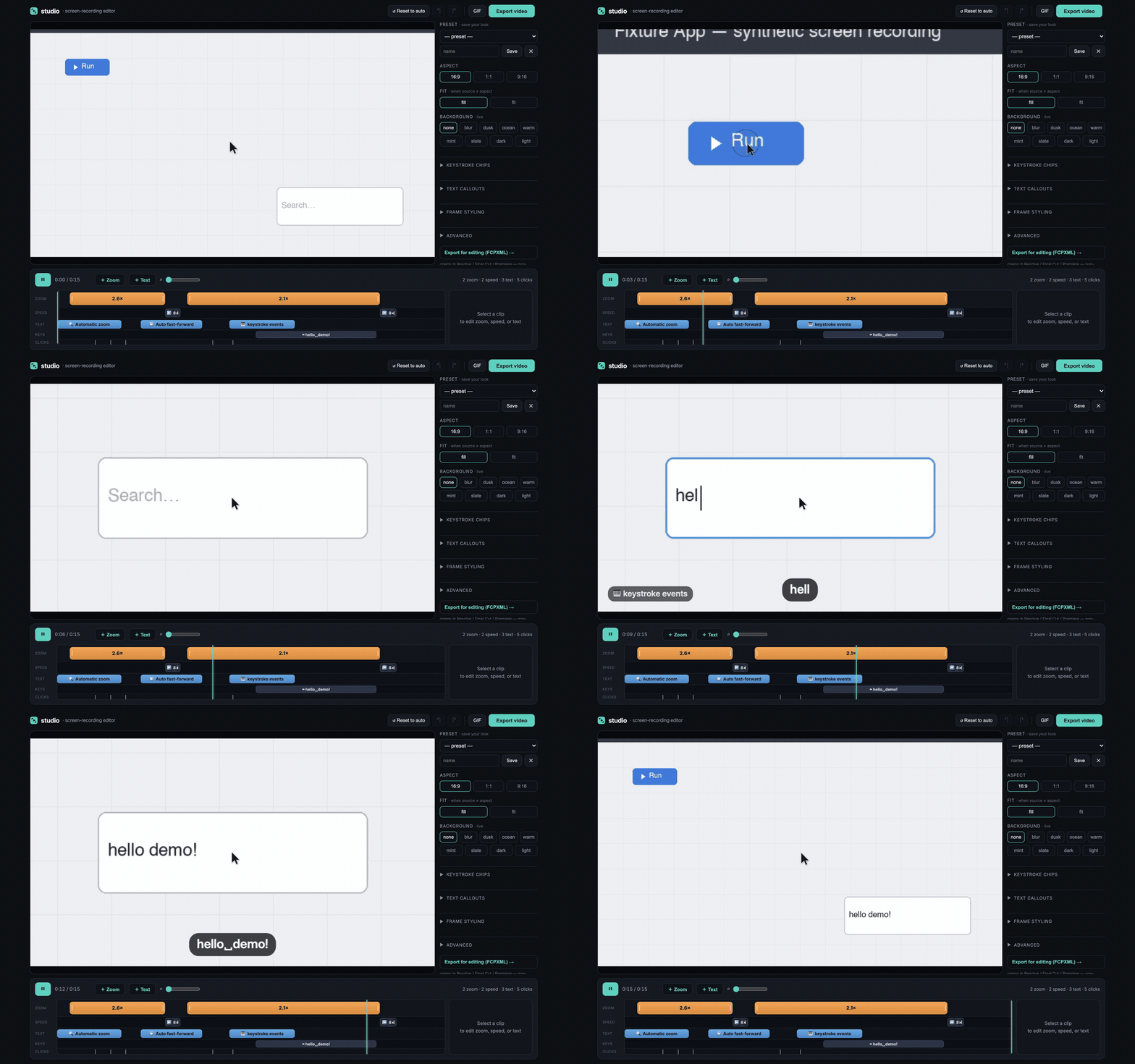
polish.py is the older ffmpeg-filter fallback.studio.py [recording.mp4] — local web UI, NLE-style fixed-ruler timeline (bar =
source duration, never rescales → upstream always planted): zoom regions are draggable
blocks (move / retime edges / click to add / double-click delete). Selecting a zoom
shows a draggable crop-rect overlay on the preview (reframe where the zoom looks:
drag body = move cx/cy, corner handle = zoom level). + pan adds a second END
keyframe → a two-keyframe camera move: start rect (solid) + end rect (dashed) + a path
arrow on the preview, a [ Start | End ] toggle picks which the drag edits, and
scrubbing interpolates the pan live (same ease_traj as the export). Idle spans are
speed blocks with rate-only editing — source range locked, rate set via inspector
slider on select or right-edge rate-stretch drag (FCP retime / Premiere Rate
Stretch); rate changes ripple downstream only. Camera easing is smootherstep
ease-in-out by default (full ease, no constant-velocity middle — cinematic
slow-start/smooth-middle/gentle-stop on zoom AND pan); Advanced section exposes an
easing curve selector (Smooth · Snappy · Linear) + smoothness/ramp slider
(--curve/--ramp, persisted in session.json, preview == export). Tunable default zoom,
aspect, frame styling. Always-smooth synthetic cursor + click ripple + real recorded
click sound (CC0 #735771). Export uses render.py. Free port, local. (Keystroke overlay
exists in the engine but is off by default.)
Easy path
screencast.sh --demo (screencast skill) does the whole chain: starts the event
logger, records, then polishes + emits the 9:16 vertical automatically. Vertical
is the DEFAULT for social-facing demos.
Gotchas (learned the hard way, kept here so they're not relearned)
- ffmpeg CANNOT do animated
scale=eval=frame → crop (link reinit wedges crop's
per-frame exprs). That's why zoom uses zoompan (no t var there — use on/FPS).
- This machine's ffmpeg lacks
drawtext; all text/cursor overlays are PIL-rendered
PNGs + overlay.
- Test rig:
make-fixture.py synthesizes a fake screen recording + ground-truth
events.jsonl — validate any change against it before trusting real footage.
- Do NOT use Playwright
recordVideo to capture the studio demo — its VFR→CFR
conversion judders on the auto-zoom (a frozen frame wedged mid-motion); use
test/record-demo.js instead.
Recording the demo
test/record-demo.js is the canonical smooth demo recorder: it steps the studio's
logical timeline frame-by-frame against the live page (not recordVideo), so every
output frame is captured exactly once → perfect CFR, no judder. See
docs/ARCHITECTURE.md for mechanism + usage.
Text callouts / keystroke chips — NEVER overlap or crowd
Callouts are read one at a time. Two text callouts must never overlap in output time, and
must not be closely spaced — only one on screen at a time, with a clear gap (~0.3s+) between
them so each is legible before the next appears. Rules:
- Anchor callouts CLEAR of the content they describe — don't park them on top of the search
bar, nav, or the result/image being shown. A callout covering the thing it points at is worse
than none.
- On long enough to read — ≥~1s of output time at the playback rate. Over a sped-up span,
extend the callout's window so it survives the compression (a callout inside a 5× block is
gone in a blink otherwise).
- Time the callout to lead or coincide with the moment it labels, never trail it.
(Burn 2026-06-18: five callouts set with overlapping windows, sitting on top of the results, too
brief over a sped-up idle — read as clutter; the features didn't register.)
Get an objective critique — send the rendered demo to a VIDEO model (don't iterate blind)
Before handing a demo over, stop judging it from stills — send the actual rendered mp4 to a
video-understanding model and act on its critique. Repeatedly, demos shipped with broken
framing/pacing/loop because they were judged frame-by-frame, not as motion. Standing practice:
- Render the cut (
render.py).
- Pick the model dynamically — do NOT hardcode one. At this moment, list the current
video-understanding (video-to-text) models with
fal search_models category="video-to-text"
(use this, NOT recommend_model — that one is popularity-ranked and returns video generators
for a "video" task), look at what's actually available right now, and choose the
strongest one for this job (a critique needs temporal/motion reasoning, so prefer a
reasoning-capable VLM; e.g. openrouter/router/video pointed at the latest Gemini, or a
native reasoning VLM like nvidia/nemotron-3-nano-omni/video). The right model changes over
time — decide from the live list, not from a name written here. Bias slightly toward SOTA:
when options are close, prefer the newest-generation / most-capable model (cost here is pennies,
so favor capability over the cheap/older pick).
- Upload the mp4 and run the chosen model with a harsh-critique
prompt that states the
demo's PURPOSE + the 4 features + the region/speed/callout spec and asks for a blunt,
timestamped, prioritized fix list covering: each zoom's framing (on the right thing? on dead
UI?), pan smoothness (eased vs hard-cut), speed-up legibility (feature vs glitch), callout
placement/timing/overlap, overall pacing, and clean loop (last frame ≈ first). A stills-only
fallback (image VQA on a labeled contact sheet) cannot judge motion, so it's a weak
substitute, not the check.
This loop catches what self-review misses (e.g. Gemini flagged a broken loop + a hard-cut "pan" +
a zoom landing on the Search button, all of which had passed self-inspection). Don't skip it for a
demo that's going public.
1---2name: screenstudio-alt-23description: Screen-Studio-style post-production for screen recordings, headless — auto speed-up of idle, auto-zoom on click clusters, keystroke overlay chips, smoothed synthetic cursor, and 9:16 vertical export that follows the action. Use when polishing a screen recording / demo video for sharing, when the user mentions Screen Studio, auto-zoom, idle speed-up, or vertical/social video from a screen capture, and for any social-facing demo (vertical output is the default for those).4---56# screenstudio-alt78The skill's code lives in this directory (`polish.py`, `render.py`, `studio.py`,9`events-log.swift`, test fixtures, etc.). Published publicly as10`connerkward/screenstudio-alternative-skill`.1112Two components:1314- `events-log` (Swift) — capture-side input logger (cursor 60Hz, clicks, keys;15 drops keys during macOS secure input). Runs ONLY while recording. Needs16 Accessibility/Input Monitoring for the terminal. **Auto-zoom/keys/cursor need17 this data at capture time — it cannot be recovered from pixels later.**18- `polish.py` (Python, ffmpeg + PIL) — the post-production pass:1920```bash21python3 src/polish.py in.mp4 --events in.events.jsonl \22 --speedup # compress idle (input-gap ∩ frozen-pixels; animations stay 1x)23 --zoom # eased auto-zoom on click clusters (zoompan)24 --keys # accumulating keystroke chips (PIL overlays, no drawtext dep)25 --smooth-cursor # synthetic eased cursor (best with sck-record --no-cursor)26 --vertical # ALSO emit 1080x1920 following the action27```2829`--speedup` works WITHOUT events (freezedetect only) — usable on the whole30existing dailies corpus.3132- `render.py` — **high-quality non-destructive renderer** (preferred): single-pass33 spring-physics camera over the original high-res frames, LANCZOS into a smaller34 target (crisp zoom, ~1.3× sharper than the ffmpeg upscale path), 60fps, H + 9:16 V.35 Tunable `--freq`/`--zeta` (spring), `--fps`, `--target-w`. Takes explicit36 `--regions [{t0,t1,z,cx,cy}]` — plus optional `cx1,cy1,z1` end-keyframe per region:37 when present the camera **pans** (eases start→end across the held span, `ease_traj`).38 `polish.py` is the older ffmpeg-filter fallback.39- `studio.py [recording.mp4]` — local web UI, **NLE-style fixed-ruler timeline** (bar =40 source duration, never rescales → upstream always planted): zoom regions are draggable41 blocks (move / retime edges / click to add / double-click delete). Selecting a zoom42 shows a **draggable crop-rect overlay on the preview** (reframe where the zoom looks:43 drag body = move cx/cy, corner handle = zoom level). **+ pan** adds a second END44 keyframe → a two-keyframe camera move: start rect (solid) + end rect (dashed) + a path45 arrow on the preview, a `[ Start | End ]` toggle picks which the drag edits, and46 scrubbing interpolates the pan live (same `ease_traj` as the export). Idle spans are47 **speed blocks with rate-only editing** — source range locked, rate set via inspector48 slider on select or right-edge **rate-stretch** drag (FCP retime / Premiere Rate49 Stretch); rate changes ripple downstream only. Camera easing is **smootherstep50 ease-in-out by default** (full ease, no constant-velocity middle — cinematic51 slow-start/smooth-middle/gentle-stop on zoom AND pan); Advanced section exposes an52 **easing curve** selector (Smooth · Snappy · Linear) + smoothness/ramp slider53 (`--curve`/`--ramp`, persisted in session.json, preview == export). Tunable default zoom,54 aspect, frame styling. Always-smooth synthetic cursor + click ripple + real recorded55 click sound (CC0 #735771). Export uses render.py. Free port, local. (Keystroke overlay56 exists in the engine but is off by default.)5758## Easy path5960`screencast.sh --demo` (screencast skill) does the whole chain: starts the event61logger, records, then polishes + emits the 9:16 vertical automatically. Vertical62is the DEFAULT for social-facing demos.6364## Gotchas (learned the hard way, kept here so they're not relearned)6566- ffmpeg CANNOT do animated `scale=eval=frame` → `crop` (link reinit wedges crop's67 per-frame exprs). That's why zoom uses `zoompan` (no `t` var there — use `on/FPS`).68- This machine's ffmpeg lacks `drawtext`; all text/cursor overlays are PIL-rendered69 PNGs + `overlay`.70- Test rig: `make-fixture.py` synthesizes a fake screen recording + ground-truth71 events.jsonl — validate any change against it before trusting real footage.72- Do NOT use Playwright `recordVideo` to capture the studio demo — its VFR→CFR73 conversion judders on the auto-zoom (a frozen frame wedged mid-motion); use74 `test/record-demo.js` instead.7576## Recording the demo7778- `test/record-demo.js` is the canonical smooth demo recorder: it steps the studio's79 logical timeline frame-by-frame against the live page (not `recordVideo`), so every80 output frame is captured exactly once → perfect CFR, no judder. See81 [docs/ARCHITECTURE.md](docs/ARCHITECTURE.md) for mechanism + usage.8283## Text callouts / keystroke chips — NEVER overlap or crowd8485Callouts are read one at a time. **Two text callouts must never overlap in output time, and86must not be closely spaced** — only one on screen at a time, with a clear gap (~0.3s+) between87them so each is legible before the next appears. Rules:8889- **Anchor callouts CLEAR of the content they describe** — don't park them on top of the search90 bar, nav, or the result/image being shown. A callout covering the thing it points at is worse91 than none.92- **On long enough to read** — ≥~1s of *output* time at the playback rate. Over a sped-up span,93 **extend the callout's window** so it survives the compression (a callout inside a 5× block is94 gone in a blink otherwise).95- Time the callout to **lead or coincide with** the moment it labels, never trail it.9697(Burn 2026-06-18: five callouts set with overlapping windows, sitting on top of the results, too98brief over a sped-up idle — read as clutter; the features didn't register.)99100## Get an objective critique — send the rendered demo to a VIDEO model (don't iterate blind)101102Before handing a demo over, **stop judging it from stills — send the actual rendered mp4 to a103video-understanding model and act on its critique.** Repeatedly, demos shipped with broken104framing/pacing/loop because they were judged frame-by-frame, not as motion. Standing practice:1051061. Render the cut (`render.py`).1072. **Pick the model dynamically — do NOT hardcode one.** At this moment, list the current108 video-understanding (video-to-text) models with `fal search_models category="video-to-text"`109 (use this, NOT `recommend_model` — that one is popularity-ranked and returns video *generators*110 for a "video" task), look at what's actually available right now, and choose the111 strongest one for *this* job (a critique needs temporal/motion reasoning, so prefer a112 reasoning-capable VLM; e.g. `openrouter/router/video` pointed at the latest Gemini, or a113 native reasoning VLM like `nvidia/nemotron-3-nano-omni/video`). The right model changes over114 time — decide from the live list, not from a name written here. **Bias slightly toward SOTA:**115 when options are close, prefer the newest-generation / most-capable model (cost here is pennies,116 so favor capability over the cheap/older pick).1173. Upload the mp4 and run the chosen model with a **harsh-critique `prompt`** that states the118 demo's PURPOSE + the 4 features + the region/speed/callout spec and asks for a **blunt,119 timestamped, prioritized fix list** covering: each zoom's framing (on the right thing? on dead120 UI?), pan smoothness (eased vs hard-cut), speed-up legibility (feature vs glitch), callout121 placement/timing/overlap, overall pacing, and **clean loop (last frame ≈ first)**. A stills-only122 fallback (image VQA on a labeled contact sheet) **cannot judge motion**, so it's a weak123 substitute, not the check.124125This loop catches what self-review misses (e.g. Gemini flagged a broken loop + a hard-cut "pan" +126a zoom landing on the Search button, all of which had passed self-inspection). Don't skip it for a127demo that's going public.