
/overnight — Kaggle Overnight
Two steps for the user. Everything else is automatic.
Step 1 — Install (once ever)
pip install researchforge
Before Phase 1, run researchforge --version. If the command is missing or the
version is below 0.4.0 (for example when these skills came from the Claude Code
plugin), ask the user to run pip install -U researchforge first.
Step 2 — Run
researchforge kaggle overnight https://www.kaggle.com/competitions/<slug>
Without the editor open: if the user wants the loop to run headless, it needs a driver
signed in or an API key (Anthropic, Gemini or OpenAI — set on the dashboard's Keys & accounts
page, or researchforge kaggle keys set <name> in their own terminal) or a local Ollama model
(ollama pull qwen3:14b, then export RESEARCHFORGE_LLM=ollama/qwen3:14b; set
OLLAMA_HOST if Ollama runs on another machine). Then researchforge kaggle run <slug>.
In every mode the machine running the loop must stay on.
What you (Claude) do — THE FULL LOOP
Phase 0: Resume an existing project first
A new chat may be picking up work an earlier chat started. Everything the loop knows is on disk (rounds, DAG, hypothesis pool, answers), so check before asking anything:
researchforge kaggle status <slug> --json
No slug given? Look for .overnight_<slug>/overnight_setup.json in the current
directory and use that slug.
If set_up is true, skip Phases 1 and 2 — do not re-ask the questions or
re-run setup. Tell the user in two lines where it stands (rounds so far, best
result, untested ideas, open questions), then go straight to the loop at
next_command (prepare-round). If paused is true, say so and wait for the
user to resume. If repo_project.experiments is above zero, a
repo project beside the competition holds earlier work: run
researchforge kaggle merge-history <slug> so it joins this competition's one
history (the Kaggle loop is the only engine; the repo engine's scores are shown,
never compared). Only start over with researchforge kaggle overnight <slug> --refresh
when the user asks for it.
If kaggle status says there is no setup, check for a setup draft — a setup started on
the dashboard's New competition page (or saved from an earlier chat):
researchforge kaggle draft <slug> --json
If it exists, its facts replace gather-facts and its form holds the answers given so far:
show them in a few lines, ask only what is missing or what the user wants to change (save
changes with kaggle draft <slug> --form-json '{"compute": "colab", "colab": {"gpu": "L4"}}'),
handle missing_keys as in Accounts and keys below, then run kaggle draft <slug> --run —
the same setup commands the dashboard runs. Skip Phases 1 and 2.
Phase 1: Gather facts before asking anything
researchforge kaggle gather-facts <slug>
If it fails because Kaggle credentials are missing, handle the kaggle key as in Accounts
and keys (Phase 2) and run it again.
Read the JSON output carefully. Key fields:
is_code_competition→ affects execution modedata_size_gbvslocal.free_disk_gb→ determines if Kaggle GPU is neededkaggle_gpu.viable+quota_hours_remaining→ Kaggle GPU availabilitytop_kernel+starter_notebooks→ baseline to build fromrecommended_compute+recommended_reason→ the recommendation for Q1 (still ask)
Phase 2: Present findings + ask 5 questions
The user may rather answer on the dashboard: if they say so (or ask for "the UI"), run
researchforge kaggle draft <slug> --start, give them http://localhost:7842/#/new, and stop —
the New competition page shows the same facts and questions and runs the same setup. If
they come back here later, Phase 0 picks the draft up.
Show a 4-line summary first, then ask. The summary always states the metric and which way it
improves — "score, lower is better (from the leaderboard order)". metric_direction_source
says how it was found: leaderboard (rank order, reliable), ai (read from the evaluation
text), keyword (a known metric name such as RMSE), guess (nothing to go on). When it is
guess or keyword, ask "Is lower or higher better here?" with the rest of the questions; if
setup ends up with the wrong way, fix it with kaggle settings <slug> --metric-direction <maximize|minimize> rather than making the benchmark print a flipped score.
Q1: Compute — always ask, even when one option is obvious. List every option with what
gather-facts found, mark recommended_compute as the recommendation with recommended_reason,
and let the user pick. Say up front where each one sends the data and what it costs.
| Option | --gpu |
Show from the facts |
|---|---|---|
| This machine | local |
local.gpu_name (CUDA / Apple MPS) or "CPU only", local.free_disk_gb vs data_size_gb |
| Kaggle free GPU | kaggle |
kaggle_gpu.quota_hours_remaining this week; data stays on Kaggle |
| Google Colab | colab |
colab.reason — unattended through Google's Colab CLI once installed and signed in; otherwise the user runs each notebook |
| Your own server | ssh |
ssh.reason — configured host, or "needs host + key" |
| Paid cloud GPU | cloud |
cloud_gpu.reason — RunPod, Lambda, vast.ai or AWS, billed per hour |
- Code competition: experiments must run as Kaggle notebooks, so say Kaggle GPU is the only option that can submit, and still ask before using it.
- Kaggle GPU: the accelerator is Kaggle's default for the notebook (T4 or P100); it can't
be picked per round. Mention the weekly quota and
kaggle settings --kaggle-gpu-daily-cap. sshpicked andssh.viableis not true: ask for the host (user@server) and key path, then runresearchforge kaggle ssh-setup <slug> --host <host> --key <path>before setup.colabpicked: ask which Colab plan they have (Free, Pro, Pro+, Pay as you go, or Colab Enterprise — not supported yet), which GPU (Free: T4 only; paid plans: T4, L4, G4, A100, H100 — A100/H100 spend compute units fastest) and, on Pro/Pro+, whether they want a high-RAM machine. Ifcolab.reasonsays the CLI is not installed, ask before installing it, then runresearchforge kaggle colab-setup <slug> --plan <plan> --gpu <GPU> [--high-mem] --install. Signing in is theirs: the dashboard's Run configs has a Sign in button, or they runresearchforge kaggle driver-login colabin their own terminal. They can change all of it later in Run configs.cloudpicked andcloud_gpu.viableis not true: ask which provider and which GPU. The provider's API key is set on the dashboard's Keys & accounts page (see Accounts and keys below; AWS uses the AWS CLI's own credentials,aws configure) — the user sets it, never you. Runresearchforge kaggle cloud-gpu-setup <slug> --provider <p> --list-gpus, show the types and prices, ask which one, then run it again with--gpu-type "<type>"before setup. vast.ai also takes--max-price <usd/h>; AWS needs--region,--image <AMI>,--ssh-key-nameand--security-group-id(see Compute-specific notes below).- Pass exactly the
--gpuvalue from the table. Setup refuses an unknown value, and refusesssh/clouduntil they are configured, rather than running somewhere else.
Q2: Time budget — "How many hours? [8h]"
Q3: Background sensors — "Which background sensors should run? [all on]" List them with one line each, all enabled by default:
kernel_watcher_sensor— new public notebooks → ideas into the pool, alert if one beats your baselinesubmission_status_sensor— records your Kaggle submissions, alerts when one resolveshypothesis_pool_sensor— alerts when 3+ new ideas arriveexperiment_heartbeat_sensor— alerts if a running round looks hung or crashedarxiv_scanner_sensor— daily arXiv scan → technique ideasmorning_briefing_sensor— daily summary pushauto_run_sensor— off unless they say yes below: runs rounds on untested ideas unattended Then ask aboutauto_run_sensor, which is off by default. gather-facts already picked the driver that matches how the user works —auto_run_driverwithauto_run_reason: the agent they are using right now, orbyokwhen setup will run on their API key — so name it: "Run experiments automatically with whenever new ideas arrive, with no chat open? [no] — up to N rounds per cycle and M per day; it stops for pauses and open questions and never submits." Only a clear yes turns it on: runresearchforge kaggle auto-run <slug> --driver auto --rounds <N> --daily-max <M> --onafter setup, and show its readiness line. Ifauto_run_readyis false, the driver needs a key: handle it as in Accounts and keys below (claudefor the Claude Code driver,cursorfor Cursor,anthropic/gemini/openaifor the API-key driver). Auto-run starts on the next monitor cycle once the driver is ready. The same driver also does the sensors' AI work (notebook ideas, arXiv scans, re-synthesis) unless they say--no-sensors. They can switch drivers at any time with/overnight driver <driver>. Also ask: "Install them as a background service so they run every N hours even when Claude Code is closed? [yes, 6h]" (launchd on macOS, a systemd user timer on Linux, Task Scheduler on Windows) and whether they want any custom check (any shell command; exit 0 = healthy).
Q4: Domain knowledge — "Anything you already know about this competition?" This is the most valuable question. Examples: "CoAtNet is the winning backbone", "patient age is leakage", "external data NOT allowed"
Q5: Notification — "ntfy topic for push notification? (free: install ntfy app, pick any unguessable name) [skip]"
Note: topics on ntfy.sh are unauthenticated — anyone who knows the topic can read it. Pick something unguessable.
Save the topic as a setting, not only as an answer: after setup run
researchforge kaggle settings <slug> --ntfy-topic <topic> (or researchforge notify setup --topic <topic> for every project on this machine). The dashboard's Run configs →
Notifications shows where alerts go, how to subscribe, and sends a test alert.
Accounts and keys — the user's, never yours. Once the answers say which accounts setup needs (always Kaggle; Colab, a cloud provider or the auto-run driver if they picked one), check them — this prints names and places, never values:
researchforge kaggle keys status --json
For each one that is not set (or whose test.ok is false), ask with options rather than
asking for the key: "Your RunPod key is not set. Paste it on the dashboard's Keys page (I'll
open it), type it into your own terminal, or skip RunPod?" Never ask for a key, token or
password in this chat, and never read one back — anything typed here is stored in the
conversation. Then:
- Dashboard:
researchforge kaggle keys open <name>(opens their browser at that key), thenresearchforge kaggle keys wait <name>until it is set and its test passes. - Their own terminal: they run
researchforge kaggle keys set <name>(a hidden prompt), orresearchforge kaggle driver-login <driver>for a sign-in; thenkeys wait <name>. - Colab and AWS are sign-ins, not pasted keys: Colab from the Keys page's Sign in to Google,
AWS with
aws configurein their terminal.
They can set or replace keys later the same ways; nothing here is one-time.
Then run setup:
researchforge kaggle overnight <slug> --gpu <choice> --time-hours <N> \
  --answers-json '{"known_approaches": "...", "external_data": "..."}'
Then apply the Q3 answers (sensor config lives in .overnight_<slug>/scheduler_config.json;
the dashboard's Automation view edits the same file):
researchforge kaggle sensors <slug> --disable arxiv_scanner_sensor        # only those they turned off
researchforge kaggle sensors <slug> --add <name> --command "<shell cmd>"  # optional custom sensor
researchforge kaggle scheduler-install <slug> --interval-hours <N>        # if they said yes
Setup also starts the live dashboard and prints its URL (📊 Dashboard: http://localhost:7842).
Tell the user — it shows every competition and repo project on this machine, live: runs, the
experiment DAG, hypotheses, sensors, submissions and a timeline. Stop/start it with
researchforge kaggle dashboard --stop / --daemon.
Phase 3: The DAG loop — YOU ARE THE RESEARCHER
This is NOT a linear queue. It is a living DAG with branching, merging, and re-synthesis. Always ask the engine before proposing. Never invent from scratch.
Each round:
Step A — Get context from engine:
researchforge kaggle prepare-round <slug>
Read ALL fields carefully:
compute— where the round's code runs (runs_on), how long it may take (time_limit_minutes) and itsrules. Write the round for that compute. On Colab the whole experiment runs on the Colab VM: never push or wait on a Kaggle notebook from a round (execute-roundrefuses it).data_path_for_experiments— use THIS path in ALL experiment code (never hardcode)internet_available_in_experiments— if false, no pip install or API calls in codedag_state— what's been tried, what improved, best round so farrecommended_next— engine's suggestion for next hypothesisdirections— what the user told the loop to do, from the dashboard's Steer page orkaggle steer:standingones apply to every round,nextones to this round. They come before the idea ranking. For each withreply_needed, answer once withresearchforge kaggle steer <slug> --reply <id> "<what you will do>"— the user reads it on the dashboard. If one cannot be followed (it needs data you do not have, say), reply why.person_notes— the directions again, then the user's own comments on their answers and on repo plans, newest first. Follow them: they outrank the idea ranking (e.g. "stop trying LoRA, the adapter is broken").earlier_repo_experiments— what the repo engine tried before this loop was the only engine (title, outcome, its score). Its scores come from another benchmark: use them to avoid repeating failures, never as numbers a round must beat.hypothesis_pool— the top 10 untested ideas (watcher notebooks, arXiv, resynthesize, user), ranked best-first. Notebook ideas carrykernel_ref,claimed_scoreandclaim_vs_our_best(the gap to our best public-LB submission,our_best_lb). A claim is the author's word: a big gap is a strong lead worth pulling the notebook for, not a result.public_notebooks_ahead— public notebooks claiming a better LB than our best submission (gap), best first, from the hourly notebook board (kernel_board.json; the dashboard's Hypotheses page shows all of it).triedlists our rounds that ran each one. When our local score keeps rising and the LB does not, the local benchmark does not predict the LB: run the leading notebook as a round (kaggle propose-from-kernel).merge_opportunity— if set, THIS IS THE HIGHEST PRIORITY MOVEresynthesize_due— if true, run resynthesize BEFORE proposingresynthesize_note— read this if resynthesize_due is true
Step B — If resynthesize_due is true, run it first:
researchforge kaggle resynthesize <slug>
The command outputs a synthesis_request JSON with:
results: all experiment outcomeswrite_response_to: path to write your synthesisresponse_schema: the exact JSON format
YOU synthesise. Write the response to the path shown, then call resynthesize again:
# After writing your synthesis to the path:
researchforge kaggle resynthesize <slug>
# Now it reads your response and updates the hypothesis pool
After resynthesize completes, read the output: what we learned, new hypotheses added, contract target. Then go back to Step A.
Step C — Write the proposal:
Create .overnight_<slug>/proposal.json:
{
  "title": "<specific technique, max 60 chars>",
  "description": "<what this does and why>",
  "code_changes": "<COMPLETE runnable Python — use data_path_for_experiments for data loading>",
  "rationale": "<cite which kernel/paper this draws from>",
  "expected_impact": "<e.g. +1-3% AUC based on kernel X>",
  "source_credit": "<kernel title or arXiv paper>",
  "parent_round_num": <best_round_num from dag_state, or null for baseline>,
  "branch_tag": "<features|model|cv|ensemble|augmentation|merge>",
  "hypothesis": "<the exact `idea` text from hypothesis_pool this tests, or \"\">"
}
Always fill hypothesis when the proposal comes from the pool: execute-round marks that pool
entry tested (with the round number and outcome), which is what links hypotheses to DAG nodes
in the dashboard and keeps the same idea from being re-proposed.
If merge_opportunity is set: This is the highest-priority move.
- Read both parent rounds' code from the DB (round A and round B)
- Combine both code changes into one experiment
- Set
parent_round_numto the best-performing parent - Set
branch_tagto "merge"
For data loading in experiment code, always use:
data_dir = "<value of data_path_for_experiments from prepare-round>"
Never hardcode /kaggle/input/... or ./data/ — get the path from the engine.
Step D — Execute (single or parallel):
Single experiment:
researchforge kaggle execute-round <slug>
Parallel experiments (when you have two good ideas to test simultaneously):
# Write two proposals as proposal_a.json and proposal_b.json, then:
researchforge kaggle run-parallel <slug>
# Runs both concurrently, reports all results + merge opportunity if both improve
Read the result JSON:
improved: true→ tell the user, this becomes the new best parentimproved: false, full_passed: true→ note the reason, try a different directionfull_passed: false→ check error message, may be a code bugmerge_opportunityin run-parallel output → immediately propose a merge experiment
Step E — Add your own hypotheses (optional but powerful)
After seeing results, if YOU (Claude) observe a promising direction not yet in the pool — add it yourself before the next round. Don't wait for a resynthesize cycle.
# Single hypothesis from Claude's own reasoning:
researchforge kaggle propose-hypothesis <slug> \
    --idea "Try w_mid=1.5 — local MRR grew monotonically, real LB at 1.0 shows headroom" \
    --rationale "exp-010 hit +0.37% local at w_mid=1.0; gain was still rising at w_mid=3.0" \
    --source "claude_observation" \
    --priority 2

# Multiple ideas at once:
researchforge kaggle propose-hypothesis <slug> \
    --bulk '[{"idea": "w_mid=1.5", "rationale": "...", "priority": 2},
             {"idea": "w_mid=3.0", "rationale": "...", "priority": 3}]'
The ideas land in pending_hypotheses.json and appear in the next prepare-round output.
When to self-hypothesize:
- You see a parameter sweep that should continue (e.g., w_mid scan stopped at 1.0, local gain still rising)
- You observe a pattern in failures/successes that suggests a new direction
- User mentions a domain insight ("the COCONUT fallback needs tuning too")
resynthesize_dueis false but you have a strong idea from the current round
Step F — Repeat from Step A
Continue until experiments_remaining reaches 0 or user says stop.
Phase 4: Finish and morning report
researchforge kaggle finish <slug>
Generates overnight_summary.json and sends push notification.
Present to user:
- Total experiments tried, how many improved
- Best result: metric improvement %, what technique, the exact code change
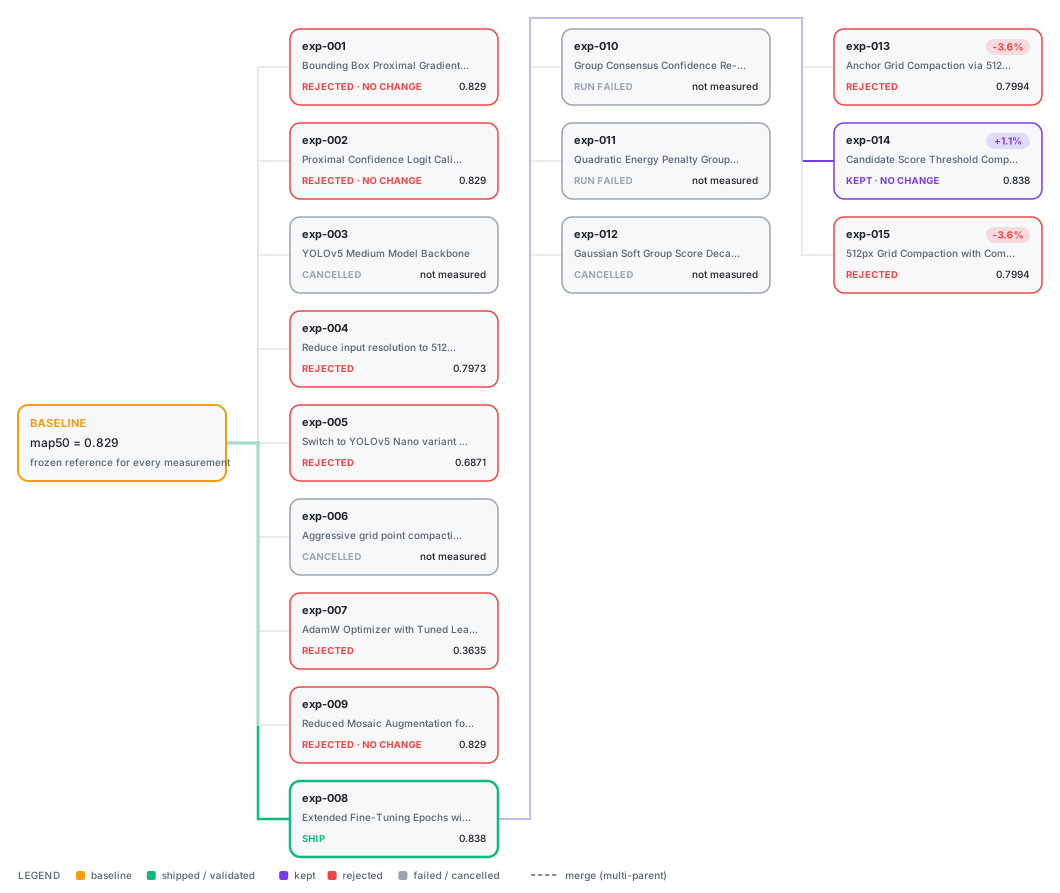
- Experiment DAG: what branched from what
- What we learned (from resynthesize_summary.json)
- Failures + reasons (honest)
- "Submit best to Kaggle? [requires your approval]"
The user can steer the loop at any time
When the user says one of these (as /overnight <word> or in plain words), run the matching
command and show its output. None of them interrupt a round that is already running. The
dashboard has the same controls — Steer (directions, pause/resume, re-synthesize, add an
idea), Run configs, Automation and Keys & accounts — so the user can steer from
there without a chat; their directions reach you through prepare-round.
| The user says | You run |
|---|---|
/overnight status |
researchforge kaggle status <slug> |
/overnight submit |
researchforge experiment submission-candidates (repo projects) or researchforge kaggle status <slug> — then follow Submission below |
/overnight add "<idea>" |
researchforge kaggle add-hypothesis <slug> "<idea>" |
/overnight steer "<direction>" — or any "focus on…", "stop doing…", "try … next" |
researchforge kaggle steer <slug> "<their words>" (--standing when it should hold for every round); list with kaggle steer <slug>, drop one with --remove <id>. The dashboard's Steer page does the same |
/overnight pause |
researchforge kaggle pause <slug> --reason "<their reason>" |
/overnight resume |
researchforge kaggle resume <slug> |
/overnight resynthesize |
researchforge kaggle resynthesize <slug> now, instead of waiting for round 5 |
| you need the user's decision mid-loop | researchforge kaggle ask <slug> "<question>" --options "<a>,<b>", plus --blocks "<exact pool idea>" for each idea that must wait (others keep running) or --hold if nothing should run until they answer. It reaches their phone and the dashboard's 🔔; keep going with unblocked ideas instead of waiting. When an answer means a settings change (compute, budget, Colab GPU, …), add --action "<answer> => compute:kaggle, max_experiments:40" so picking it changes Run configs |
| read a public notebook the pool points at | researchforge kaggle pull-kernel <slug> <owner/notebook> — source + outputs into reference_kernels/, and the datasets to attach via dataset_sources |
| run a public notebook as a round | researchforge kaggle propose-from-kernel <slug> <owner/notebook> --title "…" [--append score.py] [--parent R3] writes proposal.json (code cells as one script, datasets attached); then execute-round |
| an idea needs something you cannot do here | never ask the user to run commands or scripts on their computer: researchforge kaggle skip-idea <slug> "<exact pool idea>" --reason "…" and move on |
/overnight archive R<n> — hide a bad round (reversible) |
researchforge kaggle archive <slug> R<n> (--restore to undo). Deleting for good is kaggle delete-round — only on the user's explicit request |
| change a setting mid-run | the user can edit everything in the dashboard's Run configs view; from chat use kaggle compute, kaggle settings, kaggle driver, kaggle auto-run (--rounds, --daily-max) |
/overnight respond |
researchforge kaggle respond <slug> to list open questions, then researchforge kaggle respond <slug> <id> "<their answer>"; --dismiss closes one they say no longer matters |
/overnight compute <target> |
researchforge kaggle compute <slug> <target> (kaggle, local, colab, ssh, cloud) |
| change how much they hear | `researchforge kaggle settings --notify-level verbose |
| change when to offer submissions | `researchforge kaggle settings --submission-policy aggressive |
| cap Kaggle GPU use | researchforge kaggle settings <slug> --kaggle-gpu-daily-cap <N> |
| run new ideas with no chat open | researchforge kaggle auto-run <slug> --driver <driver> --on |
/overnight driver <driver> — switch who runs rounds and sensors unattended |
researchforge kaggle driver <slug> <driver> (add --no-sensors to keep sensors on an API key); show its setup steps, and remind them a running launch finishes first |
| stop the auto-run launch that is running | researchforge kaggle auto-run <slug> --stop |
| metric runs the other way | researchforge kaggle settings <slug> --metric-direction <maximize|minimize> |
How these affect your loop:
prepare-roundprints"paused": true→ stop. Write no proposal, run nothing, and tell the user it resumes withresearchforge kaggle resume <slug>.execute-roundrefuses too.open_questionsinprepare-roundoutput → the loop does not wait for them. Keep going with the hypotheses inhypothesis_pool(ideas a question blocks are already left out), and tell the user once that a question is waiting. Only the user answers them — never callkaggle respondwith an answer they did not give you in this conversation.kaggle_gpu_cap_reached: true→execute-roundwill refuse on Kaggle GPU today. Tell the user, and suggestkaggle compute <slug> <target>or raising the cap; do not switch for them.- A submission question appears (
kind: submission_approval) after an improved round when the submission policy says so (the default,balanced, asks whenever the round left something Kaggle takes — its Kaggle notebook or a submission file — wherever it ran; the monitor also asks about the best round if its question was missed). Only the user answers it: their "yes" (the dashboard's Approve & submit, orkaggle respond <slug> <id> yestyped by them) submits that round's output to Kaggle. Never answer it for them, and never in an unattended run. - A round with no score but a submission (a public notebook for a hidden test set prints
none) is recorded unscored, keeps its file or notebook, and is offered for submission like
an improved round: Kaggle's score is the only measure of it. To ask about a round yourself,
use
researchforge kaggle offer-submission <slug> <round> --note "<why>", notkaggle ask: only a submission question submits on the user's yes. - A round's submission file is
./submission.*in its working directory, or the path the round prints asSUBMISSION_FILE: <path>on its own line. A round writing elsewhere must print that line, or there is nothing to approve. - A Kaggle kernel that outlives execute-round's wait is recorded as still running, not as a failure: the monitor collects its score and submission file when it finishes (every 15 minutes) and asks about submitting it if it improved. Do not re-run such a round.
Submission (NEVER without the user's yes)
The normal path is the user approving the round's submission question, which submits it. To submit by hand when they ask in this conversation:
For data competitions:
kaggle competitions submit -f submission.csv -m "RF: AUC 0.853"
For code competitions:
# -f = output filename FROM the kernel, not a local file
kaggle competitions submit -k <user>/<kernel-slug> -v <version> -f submission.csv -m "..."
Always require explicit user approval. Show remaining submissions for today first.
Rules
- The Python engine is the boundary: never work around a validation error, a compute-policy violation, a lock, or an approval gate — fix the artifact or ask the user.
- Approvals belong to the user: never pass
--yesor type a confirmation, and never submit to Kaggle, unless the user explicitly approved that step in this conversation. - Ground every summary in stored data: quote only numbers from command output,
experiment_log.dbor files under.overnight_<slug>/— never invent metrics.
- Always use
data_path_for_experimentsfromprepare-roundoutput — never hardcode paths - Never download competition data locally when compute_policy says data_location ≠ local_disk
- Run
resynthesizeevery 5 rounds — this is what makes the loop actually learn - Check for merge opportunity in every
prepare-roundoutput — merges often give the biggest gains - Never submit without explicit user approval
- Always show failures — rejected experiments are knowledge
- Never repeat an experiment similar to one that already failed — check dag_state first
Compute-specific notes
Kaggle GPU (internet ON): Experiments run as Kaggle kernels. Each round takes ~30min (kernel startup + run). Data at /kaggle/input/<slug>/ — attached automatically, never downloaded.
Kaggle GPU (internet OFF): Pre-plan N experiments, embed in one notebook, push once. All experiments in the batch run without internet or AI calls.
Colab: Generate notebook → user clicks Run All → save results to Drive. Keys from Colab Secrets, never in code. Warn: "Save to Drive before session expires (~12h)."
SSH own server: Configure once, then use --gpu ssh.
# One-time setup (tests connection, saves ssh_config.json)
researchforge kaggle ssh-setup <slug> --host user@myserver.com --key ~/.ssh/id_rsa

# If you want competition data copied to server:
researchforge kaggle ssh-setup <slug> --host user@myserver.com --rsync-data

# Run overnight targeting the SSH server
researchforge kaggle overnight <slug> --gpu ssh
Code is rsync'd per-experiment; output is parsed locally. Data stays on server (or is rsync'd if --rsync-data was set).
Cloud GPU (RunPod / Lambda Labs / vast.ai / AWS EC2): Each execute-round provisions a fresh instance, runs the experiment, and terminates it automatically.
# One-time setup
export RUNPOD_API_KEY=your_key          # or LAMBDA_API_KEY for Lambda Labs
researchforge kaggle cloud-gpu-setup <slug> --provider runpod

# Optional: see available GPU types and prices
researchforge kaggle cloud-gpu-setup <slug> --provider runpod --list-gpus

# Pick a specific GPU type (defaults to cheapest)
researchforge kaggle cloud-gpu-setup <slug> --provider runpod --gpu-type "NVIDIA RTX A4000"

# vast.ai (VAST_API_KEY) — cheapest matching offer, optional price cap
researchforge kaggle cloud-gpu-setup <slug> --provider vast --gpu-type "RTX 4090" --max-price 0.5

# AWS EC2 — uses your aws CLI credentials; needs a GPU AMI, key pair and an SSH security group
researchforge kaggle cloud-gpu-setup <slug> --provider aws --region us-east-1 \
    --image <ami-id> --ssh-key-name <key> --security-group-id <sg-id>

# Run overnight on cloud GPU (auto-provisions + terminates per experiment)
researchforge kaggle overnight <slug> --gpu cloud
Cost: typically $0.15–$0.50/experiment on RunPod. Instance is always terminated after each round.
Troubleshooting
| Symptom | Fix |
|---|---|
Kaggle credentials not found |
Follow interactive setup — kaggle.com/settings → API → Create New Token |
POLICY VIOLATION: download locally |
Compute policy forbids local download for this target. Use the path from data_path_for_experiments. |
No experiments improved |
Trigger resynthesize — it may suggest a completely new direction |
resynthesize_due: true but I skipped it |
Always run resynthesize when the engine asks. The hypothesis pool goes stale without it. |
Merge opportunity ignored |
Merges are the highest-priority move. Don't skip them. |