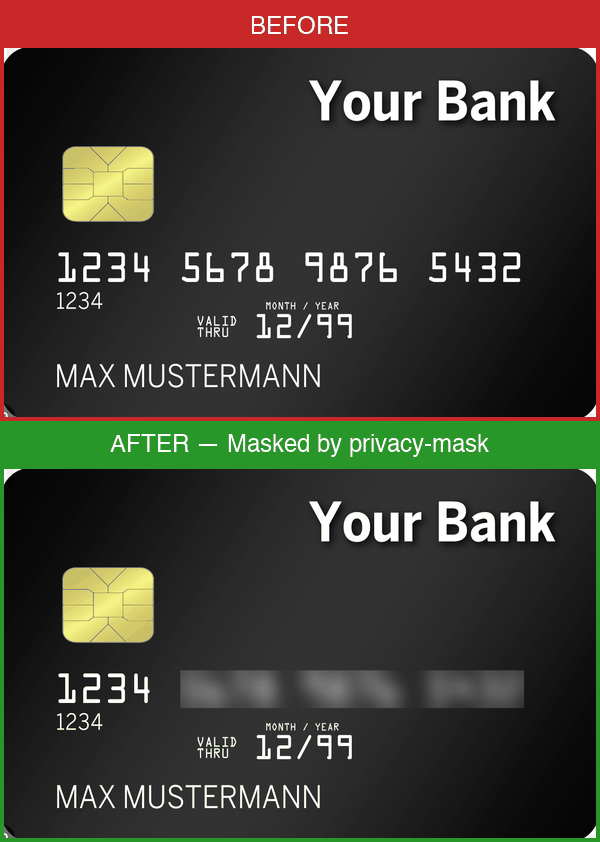
Privacy Mask
Detect and mask sensitive information in images locally before they leave your machine.
Prerequisites
This skill requires the privacy-mask CLI to be pre-installed on the system.
If it is not available, inform the user that they need to install it first:
- Install via pip:
pip install privacy-mask
- Ensure Tesseract OCR is installed:
brew install tesseract (macOS) or apt install tesseract-ocr (Linux)
- Verify installation:
privacy-mask --version
- (Optional) Install NER support:
pip install privacy-mask[ner]
When to use
- User sends a screenshot or image file (
.png, .jpg, .jpeg, .bmp, .tiff) that may contain private data
- User mentions privacy, masking, redacting, or anonymizing
- You need to analyze an image but want to redact sensitive info first
- IF the user shares a screenshot for debugging, THEN run
privacy-mask mask <path> --dry-run first to check for PII
- IF detections are found, THEN mask the image before proceeding with analysis
Usage
Mask an image:
privacy-mask mask /path/to/screenshot.png
privacy-mask mask /path/to/screenshot.png --in-place
privacy-mask mask /path/to/screenshot.png --dry-run   # detect only, no masking
privacy-mask mask /path/to/screenshot.png --detection-engine regex  # regex only, skip NER
privacy-mask mask /path/to/screenshot.png --config /path/to/custom-config.json
Output is JSON:
{
  "status": "success",
  "detections": [{"label": "PHONE_CN", "text": "***", "bbox": [10, 20, 100, 30]}],
  "summary": "Masked 1 regions: 1 PHONE_CN"
}
Example workflow
- User provides a screenshot:
~/Desktop/error-screenshot.png
- Run detection:
privacy-mask mask ~/Desktop/error-screenshot.png --dry-run
- IF detections found, mask the image:
privacy-mask mask ~/Desktop/error-screenshot.png
- The masked output is saved as
~/Desktop/error-screenshot_masked.png
- Use the masked image for further analysis
What it detects
- IDs: Chinese ID card, passport, HK/TW ID, US SSN, UK NINO, Canadian SIN, Indian Aadhaar/PAN, Korean RRN, Singapore NRIC, Malaysian IC
- Phone: Chinese mobile/landline, US phone, international (+prefix)
- Financial: Bank card, Amex, IBAN, SWIFT/BIC
- Developer keys: AWS, GitHub, Slack, Google, Stripe tokens, JWT, connection strings, API keys, SSH/PEM keys
- Crypto: Bitcoin, Ethereum wallet addresses
- Other: Email, birthday, IP/IPv6, MAC, UUID, license plate, MRZ, URL auth tokens
- NER (optional): Person names, street addresses, organizations, dates of birth, medical conditions
Constraints
- Do NOT send unmasked images to any external API or cloud service
- Do NOT skip masking when detections are found — always mask before sharing
- Do NOT modify the original image unless
--in-place is explicitly requested
- Avoid running on very large images (>10MB) without warning the user about processing time
Anti-patterns
- Don't assume images are safe — always run detection even if the image "looks clean"
- Don't use
--in-place by default — preserve the original unless the user asks otherwise
- Don't ignore dry-run results — if
--dry-run finds PII, the image must be masked before use
- Don't hardcode config paths — use the bundled default or let the user specify
--config
Important
- All processing is local and offline — no data leaves the machine
- Configure rules in the bundled
config.json or pass --config for custom rules
Limitations
- Use this skill only when the task clearly matches its upstream source and local project context.
- Verify commands, generated code, dependencies, credentials, and external service behavior before applying changes.
- Do not treat examples as a substitute for environment-specific tests, security review, or user approval for destructive or costly actions.
1---
2name: privacy-mask
3description: "Mask, redact, anonymize and censor sensitive information (PII) in screenshots and images — phone numbers, emails, IDs, API keys, crypto wallets, credit cards, passwords, and more."
4risk: critical
5source: https://github.com/fullstackcrew-alpha/privacy-mask/tree/main/
6source_repo: fullstackcrew-alpha/privacy-mask
7source_type: community
8date_added: 2026-07-01
9license: MIT
10license_source: https://github.com/fullstackcrew-alpha/privacy-mask/blob/main/LICENSE
11metadata:
12 source: https://skillmd.com/skills/fullstackcrew-alpha/privacy-mask
13---
14
15# Privacy Mask
16
17Detect and mask sensitive information in images locally before they leave your machine.
18
19## Prerequisites
20
21This skill requires the `privacy-mask` CLI to be pre-installed on the system.
22If it is not available, inform the user that they need to install it first:
23
241. Install via pip: `pip install privacy-mask`
252. Ensure Tesseract OCR is installed: `brew install tesseract` (macOS) or `apt install tesseract-ocr` (Linux)
263. Verify installation: `privacy-mask --version`
274. (Optional) Install NER support: `pip install privacy-mask[ner]`
28
29## When to use
30
31- User sends a screenshot or image file (`.png`, `.jpg`, `.jpeg`, `.bmp`, `.tiff`) that may contain private data
32- User mentions privacy, masking, redacting, or anonymizing
33- You need to analyze an image but want to redact sensitive info first
34- IF the user shares a screenshot for debugging, THEN run `privacy-mask mask <path> --dry-run` first to check for PII
35- IF detections are found, THEN mask the image before proceeding with analysis
36
37## Usage
38
39Mask an image:
40```bash
41privacy-mask mask /path/to/screenshot.png
42privacy-mask mask /path/to/screenshot.png --in-place
43privacy-mask mask /path/to/screenshot.png --dry-run # detect only, no masking
44privacy-mask mask /path/to/screenshot.png --detection-engine regex # regex only, skip NER
45privacy-mask mask /path/to/screenshot.png --config /path/to/custom-config.json
46```
47
48Output is JSON:
49```json
50{
51 "status": "success",
52 "detections": [{"label": "PHONE_CN", "text": "***", "bbox": [10, 20, 100, 30]}],
53 "summary": "Masked 1 regions: 1 PHONE_CN"
54}
55```
56
57### Example workflow
58
591. User provides a screenshot: `~/Desktop/error-screenshot.png`
602. Run detection: `privacy-mask mask ~/Desktop/error-screenshot.png --dry-run`
613. IF detections found, mask the image: `privacy-mask mask ~/Desktop/error-screenshot.png`
624. The masked output is saved as `~/Desktop/error-screenshot_masked.png`
635. Use the masked image for further analysis
64
65## What it detects
66
67- **IDs**: Chinese ID card, passport, HK/TW ID, US SSN, UK NINO, Canadian SIN, Indian Aadhaar/PAN, Korean RRN, Singapore NRIC, Malaysian IC
68- **Phone**: Chinese mobile/landline, US phone, international (+prefix)
69- **Financial**: Bank card, Amex, IBAN, SWIFT/BIC
70- **Developer keys**: AWS, GitHub, Slack, Google, Stripe tokens, JWT, connection strings, API keys, SSH/PEM keys
71- **Crypto**: Bitcoin, Ethereum wallet addresses
72- **Other**: Email, birthday, IP/IPv6, MAC, UUID, license plate, MRZ, URL auth tokens
73- **NER** (optional): Person names, street addresses, organizations, dates of birth, medical conditions
74
75## Constraints
76
77- Do NOT send unmasked images to any external API or cloud service
78- Do NOT skip masking when detections are found — always mask before sharing
79- Do NOT modify the original image unless `--in-place` is explicitly requested
80- Avoid running on very large images (>10MB) without warning the user about processing time
81
82## Anti-patterns
83
84- **Don't assume images are safe** — always run detection even if the image "looks clean"
85- **Don't use `--in-place` by default** — preserve the original unless the user asks otherwise
86- **Don't ignore dry-run results** — if `--dry-run` finds PII, the image must be masked before use
87- **Don't hardcode config paths** — use the bundled default or let the user specify `--config`
88
89## Important
90
91- All processing is **local and offline** — no data leaves the machine
92- Configure rules in the bundled `config.json` or pass `--config` for custom rules
93
94## Limitations
95
96- Use this skill only when the task clearly matches its upstream source and local project context.
97- Verify commands, generated code, dependencies, credentials, and external service behavior before applying changes.
98- Do not treat examples as a substitute for environment-specific tests, security review, or user approval for destructive or costly actions.