/iblai-vibe-memory
Add the organization-wide Memory settings surface -- "Manage user global
memories and agent memories" for the whole workspace, in two tabs:
Global (a searchable org-users table; opening a row manages
that user's global memories, including their capture/personalization
toggles) and Agent (a searchable agents table; opening a row
hosts the same full memory manager the agent settings Memory tab
uses — user, category, and date filters with full CRUD). Admins
and RBAC-granted users manage other people's memories directly from
organization settings.
This is the org-wide counterpart of two existing surfaces: the
per-agent Memory tab (/iblai-vibe-agent-memory) and the user's own
profile Memory tab. Same data, admin-scoped.
Common setup (brand, conventions, env files, verification): see docs/skill-setup.md.
Related Memory surfaces
/iblai-vibe-agent-memory — the per-agent Memory tab in agent
settings (enable/disable memory + manage that one agent's memories).
The Agent tab here opens the same manager for any agent, without
leaving organization settings.- Profile Memory tab — a user managing their own global memories
(part of the profile surface). The Global tab here is the admin view
of the same data for any user.
/iblai-vibe-account — the Account settings page hosts this
surface as its Memory tab; that is also how it is mounted (see
Step 2).
Prerequisites
- Auth must be set up first (
/iblai-vibe-auth)
- MCP server + skills configured (
@iblai/mcp in .mcp.json)
- Memsearch must be enabled for the organization — the tab checks the
platform's memsearch status and shows a "feature disabled" notice
when it is off.
- The user lists and memory endpoints are RBAC-gated admin endpoints —
a caller without access sees a friendly denied panel per section.
Step 1: Check Environment
Before proceeding, check for an iblai.env in the project root. Look for
PLATFORM, DOMAIN, and TOKEN variables. If the file does not exist or
is missing these variables, tell the user:
"You need an iblai.env with your platform configuration. Download the
template and fill in your values:
curl -o iblai.env https://raw.githubusercontent.com/iblai/vibe/refs/heads/main/iblai.env"
Step 2: Mount it (via the Account page's Memory tab)
The org-wide Memory surface (MemoryAdminTab) is not exported as a
standalone component — unlike BillingTab, it currently ships only
as the Memory tab inside <Account>. Mount the Account page and
deep-link to the tab:
// app/(app)/settings/memory/page.tsx
"use client";

import { Account } from "@iblai/iblai-js/web-containers/next";

export default function TenantMemoryPage() {
  return (
    <div className="flex h-full flex-col bg-white">
      <Account {...accountProps} targetTab="memory" /* accountProps = your usual Account wiring */ />
    </div>
  );
}
See /iblai-vibe-account Step 2 for the full <Account> prop wiring
(tenant, username, RBAC, etc.) — this skill only adds the
targetTab="memory" entry point. If you need the surface standalone
(without the Account shell), build it from the data-layer hooks listed
below; the SDK source paths in the next section are the reference
implementation.
Step 3: Use MCP Tools for Customization
get_component_info("Account")
get_hook_info("useGetGlobalMemoriesQuery")
Component map (web-containers source)
Everything lives under
packages/web-containers/src/components/ in the SDK. These pieces are
internal to the tab (not exported individually) — listed with paths as
the reference for custom builds:
| Component |
Path |
Role |
MemoryAdminTab |
profile/memory-admin/index.tsx |
The surface: memsearch gate + Global / Agent sub-tabs |
GlobalMemoriesSection |
profile/memory-admin/global-memories-section.tsx |
Org users table (server-side search, 10/page) with an eye action per row |
UserMemoriesModal |
profile/memory-admin/user-memories-modal.tsx |
"Global Memories — {email}" popup: the user's two memory toggles, Add Memory, and the memories list (25/page) |
AgentMemoriesSection |
profile/memory-admin/agent-memories-section.tsx |
Agents table (10/page) with an agent autocomplete filter (same SearchSelect as the Billing tab's Agent Limits) |
AgentMemoriesModal |
profile/memory-admin/agent-memories-modal.tsx |
Popup titled with the agent's name, hosting ManageMemories |
ManageMemories |
modals/edit-mentor-modal/tabs/memory-tab/manage-memories.tsx |
The full per-agent memory manager (also used by the agent settings Memory tab): user search, date range, category tabs, Categories manager, Add Memory, per-memory kebab |
MemoriesList |
profile/memory/memories-list.tsx |
The global-memories list (also used by the profile Memory tab): per-memory rows with date, auto badge for AI-captured memories, edit/delete kebab |
AddMemoryDialog / EditMemoryDialog |
profile/memory/add-memory-dialog.tsx / profile/memory/edit-memory-dialog.tsx |
Create / edit dialogs for a global memory |
SearchSelect |
spend-caps/search-select.tsx |
Shared debounced autocomplete used by the Agent tab's filter |
What each tab renders
Global tab
- Search Users — debounced server-side search (terms under three
characters search as empty), 10 users per page.
- Table — Name / Username / Email with an eye action per row.
Users without a username are dropped (the memory endpoints can't
address them).
- Global Memories popup (eye) — for the picked user:
- "Allow AI to learn from our conversations" — the user's
memory-capture toggle.
- "Use my saved information in responses" — the user's
personalization toggle.
- Add Memory, plus the memories list — each row shows the text,
date, an
auto badge (robot icon) when the memory was captured
automatically from chats vs. added manually, and an edit/delete
kebab. 25 memories per page.
Agent tab
- Agent filter — debounced autocomplete (min 2 characters) over
the organization's agents; picking one narrows the table to it.
- Table — Agent / Description with an eye action per row,
10 per page.
- Agent memories popup (eye) — the same manager the agent
settings Memory tab renders, for that agent: "Search for User"
filter, Pick a Date Range, category tabs (All / Knowledge Gaps /
Learning Goals / Personal Context / Preferences / …), a
Categories manager (create/rename/delete categories), Add
Memory, and per-memory cards showing the time-ago, owning user's
email, and an actions kebab.
Related Exports
From @iblai/iblai-js/web-containers/next:
Account — the settings page hosting this surface as its Memory
tab (targetTab="memory").
From @iblai/iblai-js/data-layer — the RTK Query hooks the surface
uses, for custom UI on the same endpoints:
- Gate:
useGetMemsearchStatusQuery (organization memsearch on/off);
admins can flip it via useGetMemsearchConfigQuery /
useUpdateMemsearchConfigMutation
- Tables:
usePlatformUsersQuery (organization users),
useGetMentorsQuery (agents)
- Global memories:
useGetGlobalMemoriesQuery,
useCreateGlobalMemoryMutation, useUpdateGlobalMemoryMutation,
useDeleteGlobalMemoryMutation
- User toggles:
useGetUserMemorySettingsQuery,
useUpdateUserMemorySettingsMutation
- Agent memories:
useGetAllMentorMemoriesQuery,
useGetMentorMemoriesListQuery, useCreateMentorMemoryMutation,
useUpdateMentorMemoryMutation, useDeleteMentorMemoryMutation
- Categories:
useGetMemoryCategoriesAdminQuery,
useCreateMemoryCategoryMutation,
useUpdateMemoryCategoryMutation, useDeleteMemoryCategoryMutation
Step 4: Verify
Run /iblai-vibe-ops-test before telling the user the work is ready:
pnpm build -- must pass with zero errorspnpm test -- vitest must pass- Start dev server and touch test:
pnpm dev &
npx playwright screenshot http://localhost:3000/settings/memory /tmp/tenant-memory.png
Important Notes
- Redux store: Must include
mentorReducer and mentorMiddleware
initializeDataLayer(): 5 args (v1.2+)@reduxjs/toolkit: Deduplicated via webpack aliases in next.config.ts- Peer deps:
sonner and @iblai/iblai-web-mentor must be installed
(pnpm add sonner @iblai/iblai-web-mentor)
- Not standalone (yet):
MemoryAdminTab is internal to the SDK —
it is not in the package exports the way BillingTab is. Reach it
through <Account targetTab="memory">; for a bare-bones custom
page, rebuild from the data-layer hooks using the component map
above as the reference.
- Memsearch gate: with memsearch disabled for the organization, the tab
renders a "feature disabled" notice — same gate the profile Memory
tab applies. There is nothing to manage until it is on.
- Admin call shape: reads are made with the admin as the caller
path segment and the managed user passed as
user_id (the endpoint
accepts the email, which this UI leads with; username is the
fallback). Writes address the managed user's own path — the backend
resolves admin/RBAC callers. Mirror this split in custom UI.
- Per-section RBAC: the users list, the agents list, and the
memory endpoints 403 independently; each section renders its own
denied panel.
auto badge: global memories carry a flag distinguishing
AI-captured memories (robot icon + auto badge) from manually
added ones — both are editable and deletable by the admin.- Brand guidelines: BRAND.md
1---2name: iblai-vibe-memory3description: Add the organization-wide Memory settings surface (manage every user's global memories and every agent's memories from one place — Global and Agent tabs with per-user memory toggles and the full per-agent memory manager) to your Next.js app4---56# /iblai-vibe-memory78Add the organization-wide **Memory** settings surface -- "Manage user global9memories and agent memories" for the whole workspace, in two tabs:10**Global** (a searchable org-users table; opening a row manages11that user's global memories, including their capture/personalization12toggles) and **Agent** (a searchable agents table; opening a row13hosts the same full memory manager the agent settings Memory tab14uses — user, category, and date filters with full CRUD). Admins15and RBAC-granted users manage other people's memories directly from16organization settings.1718This is the org-wide counterpart of two existing surfaces: the19per-agent Memory tab (`/iblai-vibe-agent-memory`) and the user's own20profile Memory tab. Same data, admin-scoped.2122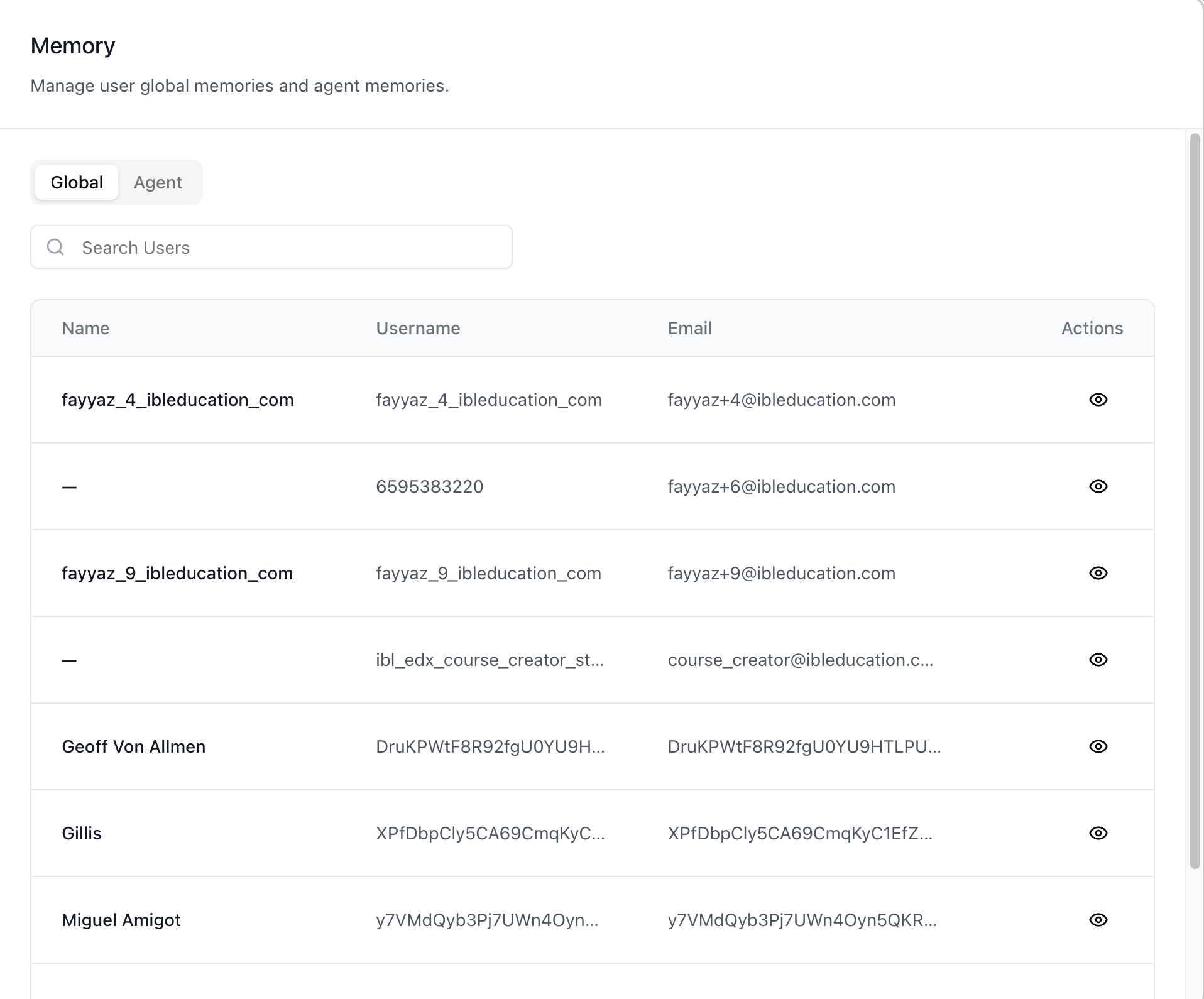2324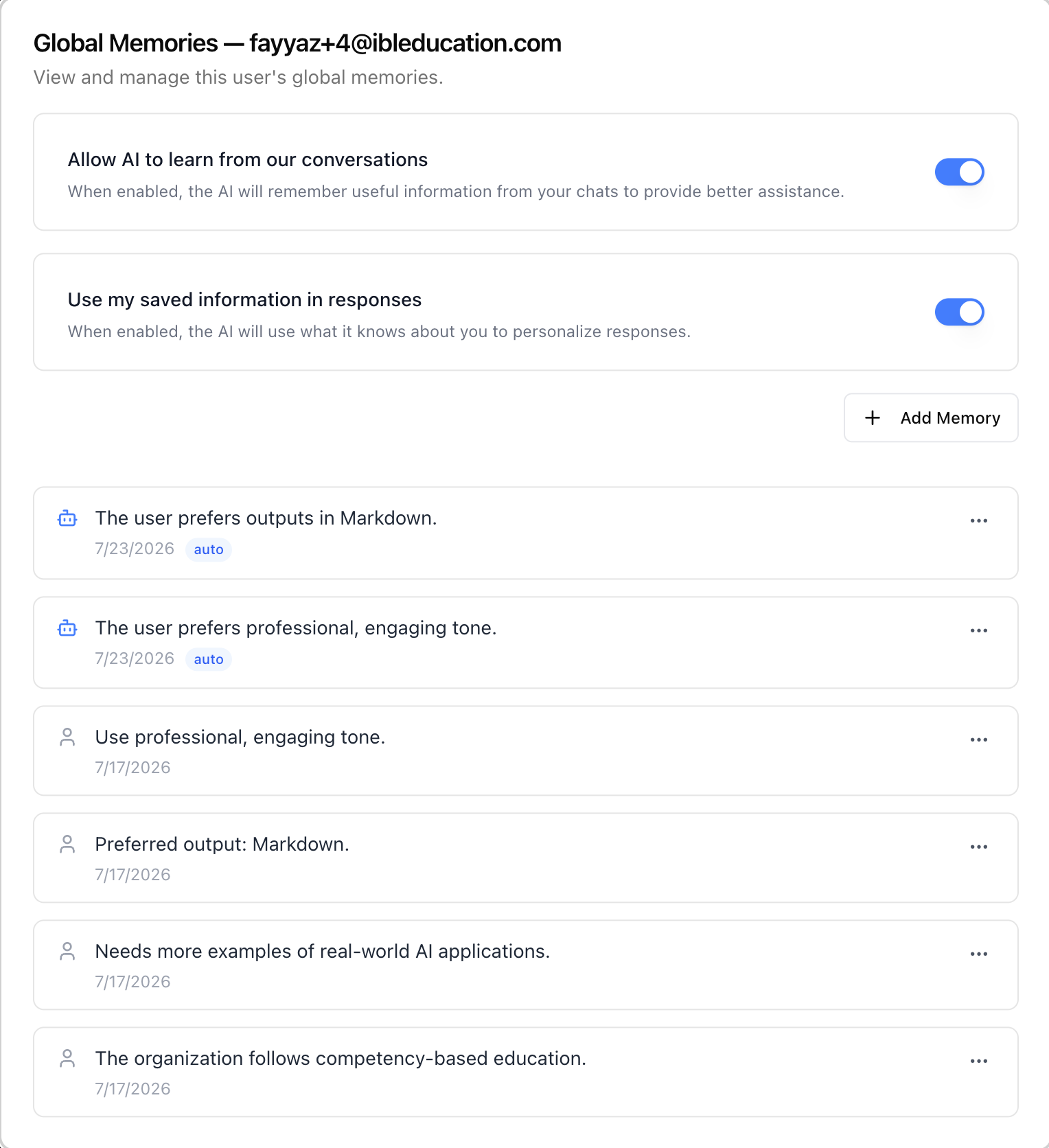2526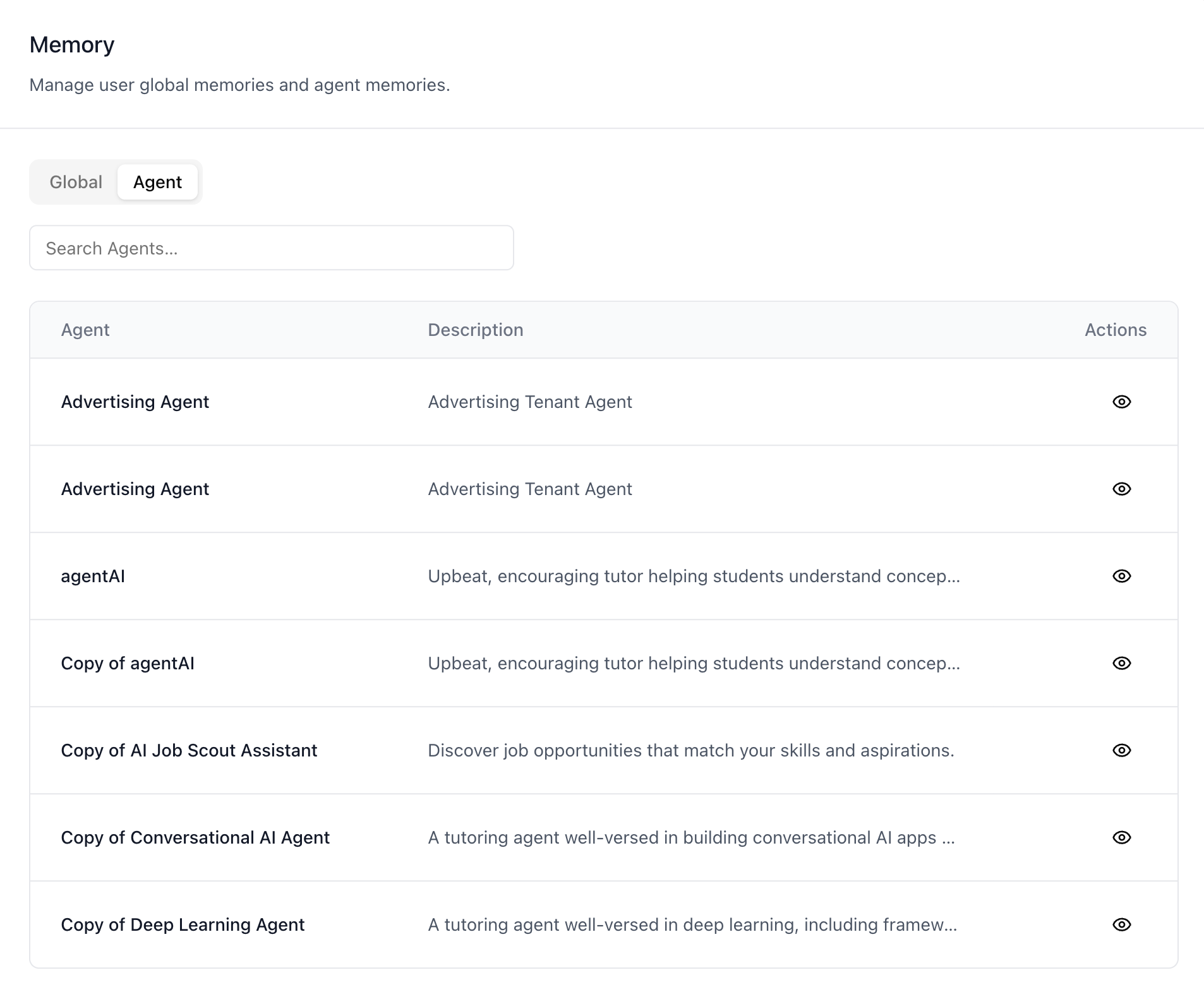2728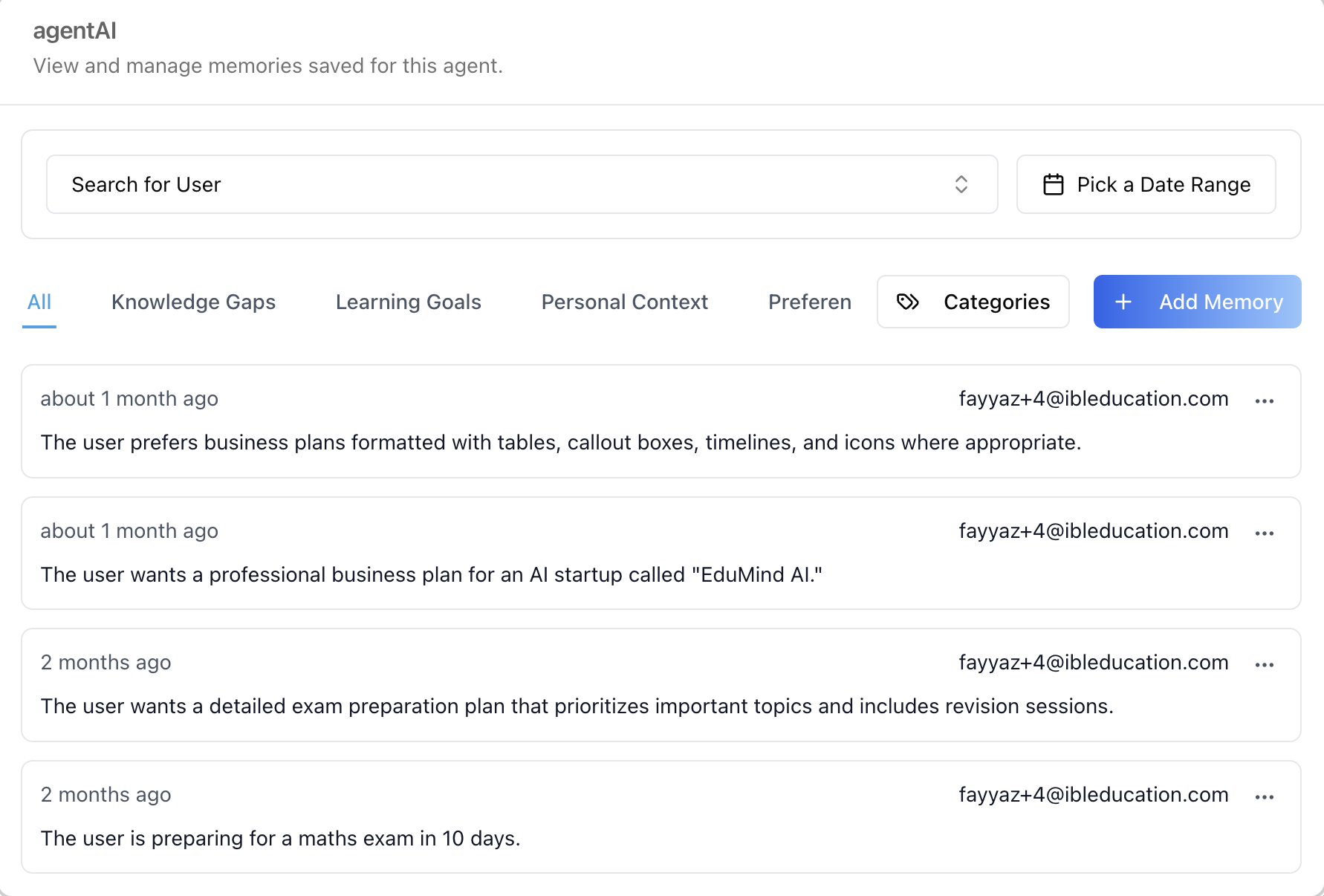2930> **Common setup (brand, conventions, env files, verification):** see [docs/skill-setup.md](https://raw.githubusercontent.com/iblai/vibe/refs/heads/main/docs/skill-setup.md).3132## Related Memory surfaces3334- **`/iblai-vibe-agent-memory`** — the per-agent Memory tab in agent35 settings (enable/disable memory + manage that one agent's memories).36 The Agent tab here opens the **same manager** for any agent, without37 leaving organization settings.38- **Profile Memory tab** — a user managing their *own* global memories39 (part of the profile surface). The Global tab here is the admin view40 of the same data for *any* user.41- **`/iblai-vibe-account`** — the Account settings page hosts this42 surface as its **Memory** tab; that is also how it is mounted (see43 Step 2).4445## Prerequisites4647- Auth must be set up first (`/iblai-vibe-auth`)48- MCP server + skills configured (`@iblai/mcp` in `.mcp.json`)49- **Memsearch must be enabled for the organization** — the tab checks the50 platform's memsearch status and shows a "feature disabled" notice51 when it is off.52- The user lists and memory endpoints are RBAC-gated admin endpoints —53 a caller without access sees a friendly denied panel per section.5455## Step 1: Check Environment5657Before proceeding, check for an `iblai.env` in the project root. Look for58`PLATFORM`, `DOMAIN`, and `TOKEN` variables. If the file does not exist or59is missing these variables, tell the user:60"You need an `iblai.env` with your platform configuration. Download the61template and fill in your values:62`curl -o iblai.env https://raw.githubusercontent.com/iblai/vibe/refs/heads/main/iblai.env`"6364## Step 2: Mount it (via the Account page's Memory tab)6566The org-wide Memory surface (`MemoryAdminTab`) is **not exported as a67standalone component** — unlike `BillingTab`, it currently ships only68as the **Memory** tab inside `<Account>`. Mount the Account page and69deep-link to the tab:7071```tsx72// app/(app)/settings/memory/page.tsx73"use client";7475import { Account } from "@iblai/iblai-js/web-containers/next";7677export default function TenantMemoryPage() {78 return (79 <div className="flex h-full flex-col bg-white">80 <Account {...accountProps} targetTab="memory" /* accountProps = your usual Account wiring */ />81 </div>82 );83}84```8586See `/iblai-vibe-account` Step 2 for the full `<Account>` prop wiring87(`tenant`, `username`, RBAC, etc.) — this skill only adds the88`targetTab="memory"` entry point. If you need the surface standalone89(without the Account shell), build it from the data-layer hooks listed90below; the SDK source paths in the next section are the reference91implementation.9293## Step 3: Use MCP Tools for Customization9495```96get_component_info("Account")97get_hook_info("useGetGlobalMemoriesQuery")98```99100## Component map (web-containers source)101102Everything lives under103`packages/web-containers/src/components/` in the SDK. These pieces are104internal to the tab (not exported individually) — listed with paths as105the reference for custom builds:106107| Component | Path | Role |108|---|---|---|109| `MemoryAdminTab` | `profile/memory-admin/index.tsx` | The surface: memsearch gate + **Global** / **Agent** sub-tabs |110| `GlobalMemoriesSection` | `profile/memory-admin/global-memories-section.tsx` | Org users table (server-side search, 10/page) with an eye action per row |111| `UserMemoriesModal` | `profile/memory-admin/user-memories-modal.tsx` | "Global Memories — {email}" popup: the user's two memory toggles, Add Memory, and the memories list (25/page) |112| `AgentMemoriesSection` | `profile/memory-admin/agent-memories-section.tsx` | Agents table (10/page) with an agent autocomplete filter (same `SearchSelect` as the Billing tab's Agent Limits) |113| `AgentMemoriesModal` | `profile/memory-admin/agent-memories-modal.tsx` | Popup titled with the agent's name, hosting `ManageMemories` |114| `ManageMemories` | `modals/edit-mentor-modal/tabs/memory-tab/manage-memories.tsx` | The full per-agent memory manager (also used by the agent settings Memory tab): user search, date range, category tabs, **Categories** manager, **Add Memory**, per-memory kebab |115| `MemoriesList` | `profile/memory/memories-list.tsx` | The global-memories list (also used by the profile Memory tab): per-memory rows with date, `auto` badge for AI-captured memories, edit/delete kebab |116| `AddMemoryDialog` / `EditMemoryDialog` | `profile/memory/add-memory-dialog.tsx` / `profile/memory/edit-memory-dialog.tsx` | Create / edit dialogs for a global memory |117| `SearchSelect` | `spend-caps/search-select.tsx` | Shared debounced autocomplete used by the Agent tab's filter |118119## What each tab renders120121### Global tab122123- **Search Users** — debounced server-side search (terms under three124 characters search as empty), 10 users per page.125- **Table** — Name / Username / Email with an **eye** action per row.126 Users without a username are dropped (the memory endpoints can't127 address them).128- **Global Memories popup** (eye) — for the picked user:129 - **"Allow AI to learn from our conversations"** — the user's130 memory-capture toggle.131 - **"Use my saved information in responses"** — the user's132 personalization toggle.133 - **Add Memory**, plus the memories list — each row shows the text,134 date, an `auto` badge (robot icon) when the memory was captured135 automatically from chats vs. added manually, and an edit/delete136 kebab. 25 memories per page.137138### Agent tab139140- **Agent filter** — debounced autocomplete (min 2 characters) over141 the organization's agents; picking one narrows the table to it.142- **Table** — Agent / Description with an **eye** action per row,143 10 per page.144- **Agent memories popup** (eye) — the same manager the agent145 settings Memory tab renders, for that agent: "Search for User"146 filter, **Pick a Date Range**, category tabs (All / Knowledge Gaps /147 Learning Goals / Personal Context / Preferences / …), a148 **Categories** manager (create/rename/delete categories), **Add149 Memory**, and per-memory cards showing the time-ago, owning user's150 email, and an actions kebab.151152## Related Exports153154From `@iblai/iblai-js/web-containers/next`:155156- `Account` — the settings page hosting this surface as its Memory157 tab (`targetTab="memory"`).158159From `@iblai/iblai-js/data-layer` — the RTK Query hooks the surface160uses, for custom UI on the same endpoints:161162- Gate: `useGetMemsearchStatusQuery` (organization memsearch on/off);163 admins can flip it via `useGetMemsearchConfigQuery` /164 `useUpdateMemsearchConfigMutation`165- Tables: `usePlatformUsersQuery` (organization users),166 `useGetMentorsQuery` (agents)167- Global memories: `useGetGlobalMemoriesQuery`,168 `useCreateGlobalMemoryMutation`, `useUpdateGlobalMemoryMutation`,169 `useDeleteGlobalMemoryMutation`170- User toggles: `useGetUserMemorySettingsQuery`,171 `useUpdateUserMemorySettingsMutation`172- Agent memories: `useGetAllMentorMemoriesQuery`,173 `useGetMentorMemoriesListQuery`, `useCreateMentorMemoryMutation`,174 `useUpdateMentorMemoryMutation`, `useDeleteMentorMemoryMutation`175- Categories: `useGetMemoryCategoriesAdminQuery`,176 `useCreateMemoryCategoryMutation`,177 `useUpdateMemoryCategoryMutation`, `useDeleteMemoryCategoryMutation`178179## Step 4: Verify180181Run `/iblai-vibe-ops-test` before telling the user the work is ready:1821831. `pnpm build` -- must pass with zero errors1842. `pnpm test` -- vitest must pass1853. Start dev server and touch test:186 ```bash187 pnpm dev &188 npx playwright screenshot http://localhost:3000/settings/memory /tmp/tenant-memory.png189 ```190191## Important Notes192193- **Redux store**: Must include `mentorReducer` and `mentorMiddleware`194- **`initializeDataLayer()`**: 5 args (v1.2+)195- **`@reduxjs/toolkit`**: Deduplicated via webpack aliases in `next.config.ts`196- **Peer deps**: `sonner` and `@iblai/iblai-web-mentor` must be installed197 (`pnpm add sonner @iblai/iblai-web-mentor`)198- **Not standalone (yet)**: `MemoryAdminTab` is internal to the SDK —199 it is not in the package exports the way `BillingTab` is. Reach it200 through `<Account targetTab="memory">`; for a bare-bones custom201 page, rebuild from the data-layer hooks using the component map202 above as the reference.203- **Memsearch gate**: with memsearch disabled for the organization, the tab204 renders a "feature disabled" notice — same gate the profile Memory205 tab applies. There is nothing to manage until it is on.206- **Admin call shape**: reads are made with the **admin as the caller**207 path segment and the managed user passed as `user_id` (the endpoint208 accepts the email, which this UI leads with; username is the209 fallback). Writes address the managed user's own path — the backend210 resolves admin/RBAC callers. Mirror this split in custom UI.211- **Per-section RBAC**: the users list, the agents list, and the212 memory endpoints 403 independently; each section renders its own213 denied panel.214- **`auto` badge**: global memories carry a flag distinguishing215 AI-captured memories (robot icon + `auto` badge) from manually216 added ones — both are editable and deletable by the admin.217- **Brand guidelines**: [BRAND.md](https://raw.githubusercontent.com/iblai/vibe/refs/heads/main/BRAND.md)
 iblai
iblai