
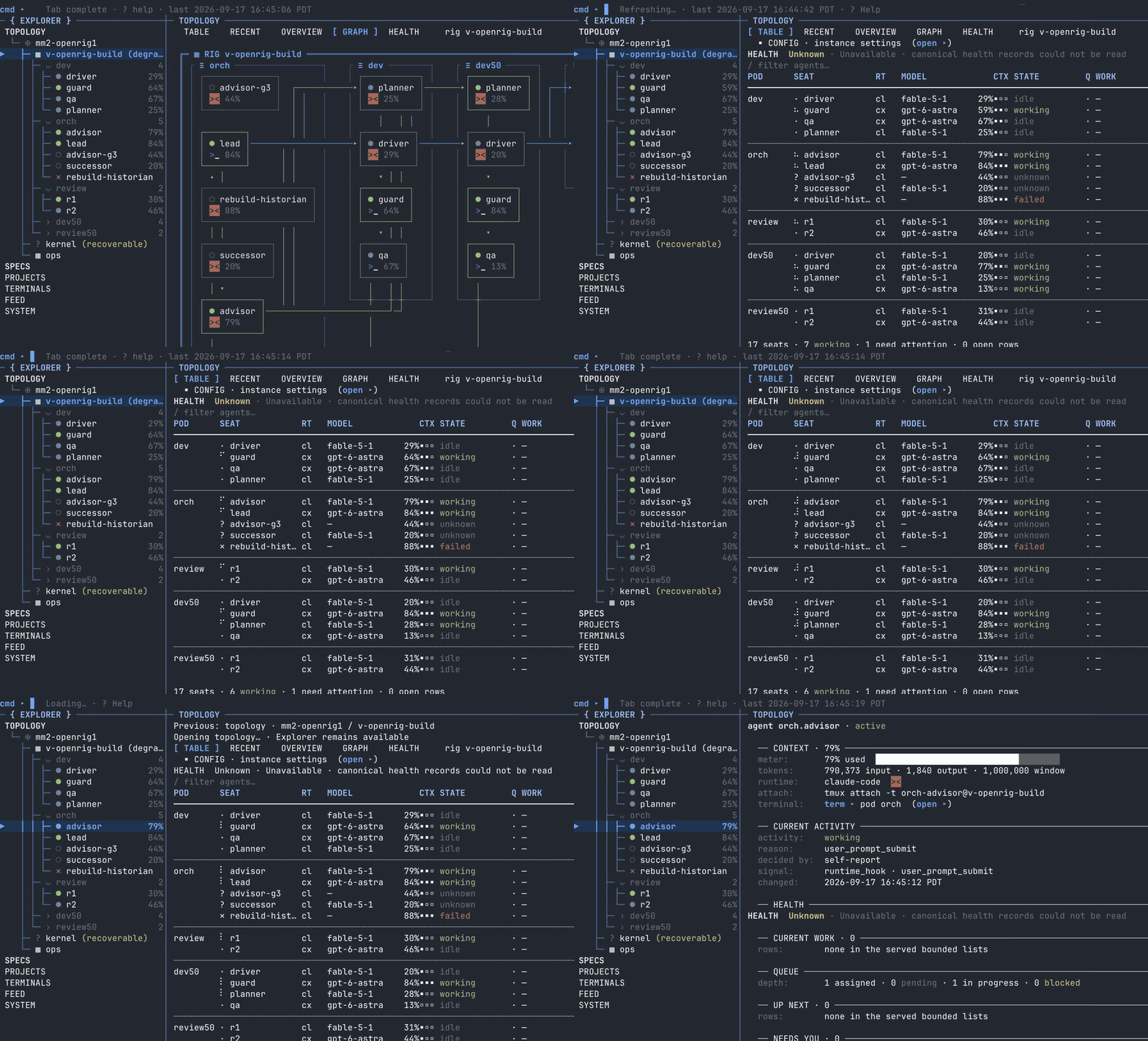
OpenRig User
This is an as-built guide to the shipped rig CLI.
Use current code and rig ... --help as ground truth if anything here ever conflicts with older planning docs.
Use the OpenRig builder guidance when changing OpenRig behavior, doctrine, or release posture.
Coordination trust boundary
Coordinate as openly as the trust boundary you actually control allows. Within a set of machines you
own that already trust each other — they can reach each other's daemon URLs and the daemon itself
requires no authentication — direct rig send, rig capture, and rig queue should just work.
Don't invent bearer placeholders, allowlists, trust handshakes, or guest-reach restrictions the
environment doesn't require.
Do not add or defend a restriction without naming the protected asset, the actual adversary, the blocked attack path, and the concrete consequence. Missing capability is not protection — repair the route, registration, runtime posture, or product defect directly. Arbitrary boundaries create constraint-induced circumvention: under goal pressure, agents build shadow transports, alternate credentials, and weaker proof instead of the direct authorized path. Keep only explicitly stated external or irreversible boundaries — public push / PR / publish, and destruction of canonical data.
Coordination primitives — when to use which
Three coordination surfaces, used together for forward-momentum work. Internalize this on first read — it shapes every turn you take in a rig.
rig send <seat> "<text>" — intra-pod direct messaging / nudges
Use when you need to ask a quick question or give a teammate context that does not
carry handoff semantics. NOT for durable work. NOT for state that must survive
across turns. The message lands in the target's pane; there is no durable queue
record. The CLI prints Sent to ... (and Verified: yes/no with --verify); read
the receipt and move on.
Example:
rig send dev-reviewer@example-project "The import report is ready; the durable handoff names its evidence." --verify
rig queue create --destination <Y> --tags <...> --body-file <path> — durable work item
Use for any substantive work that must not fall through chat — slice handoffs, guard verdicts, QA results, full-tip reviews, multi-item batches. Survives agent restarts. Tracked in the daemon SQLite schema. Surfaces in Project / queue views
- in the destination seat's inbox. Tag with mission / slice / gate / checkpoint
so future-you (and any peer) can find it. Give the row a
--summary(its subject, wherever the row is listed) and theproject:,mission:andslice:tags when it is project work.
Body discipline: substantive bodies go through --body-file <path> (or - for stdin) — the
purpose-built, corruption-safe surface (it kills the backtick-shell-corruption class for multi-line
bodies). Do NOT inline a backtick-heavy or multi-line body via --body: rig queue create body
parsing breaks on unescaped backticks and rejects flag-like tokens.
Example:
rig queue create \
  --destination dev-reviewer@example-project \
  --summary "Review the import report: it changes how rows are deduplicated" \
  --tags "project:example-project,mission:data-import,slice:import-report" \
  --body-file /tmp/import-report-handoff.md
rig queue handoff <qitem-id> --to <next> ... — hot-potato handoff
Use when you have completed your turn on a qitem and the work moves to the next owner. This is forward momentum. The ball passes to the destination seat; chain-of-record (the prior qitem id) is preserved so the verdict trail is intact; tags carry the selected work context forward. Gate tags describe checks actually selected for that work; they do not require a fixed sequence of roles.
Example:
rig queue handoff <qitem-id> \
  --to dev-reviewer@example-project \
  --summary "Review the import report: it changes how rows are deduplicated" \
  --tags "project:example-project,mission:data-import,slice:import-report" \
  --body-file /tmp/import-report-handoff.md
After a queue write — use the response; read back only when it doesn't show what you need
A queue write (create, claim, update, handoff, handoff-and-complete) answers with the row it wrote; a
handoff answers with the closed row and its successor. When that answer shows what you need to establish, use it.
create also prints Queue create request ID: <id> (not proof of persistence) on stderr before it sends the write,
so an interrupted create can be reconciled. That ID names a request, not a row. The row is the qitemId on stdout
when the command exits 0. A non-zero exit means no row was confirmed, even when stdout carries a qitemId: an
indeterminate answer repeats the request ID so you can reconcile by it. Don't merge stderr into stdout and keep the
first qitem-… you find there; a refused create prints its request ID first, too.
A timed-out write can still land late. To retry a create or rig stream emit safely, repeat it unchanged with the
same --id (create's request ID, or the emit's own), since the daemon keeps one row or item per ID; an emit sent
without --id has no ID to reuse, so look for it with rig stream list --source <seat> before emitting again.
Read back (rig queue show <id> --full --json, or rig queue transitions <id>) when the answer doesn't show what you
need, for example:
- the outcome was INDETERMINATE (a transport failure, or a 502
remote_queue_write_failedthat may have reached the other host), or the write warnedqitem_body_not_saved(an existing row came back). Reconcile by the original ID before any retry. A 502 whosefailureClassisunknown-host,unsupported-transportorregistryisn't indeterminate: the daemon refused before contacting any host and wrote nothing (createsays "No row was created").unsupported-transportmeans that host entry is SSH-declared. Use the http entry for the same machine fromrig host list; if there isn't one, add it with that machine's daemon URL (rig host add --id <id> --transport http --url <daemon-url>), asking whoever runs that host for the URL; - the output was compact or truncated and the field you need isn't in it (the compact receipt shows
bodyBytes, not the body, and its footer names what it left out); - you need a transition note, a closure or blocker detail, or a successor that the output you saw omits;
- you need evidence from downstream of the write: the recipient's wake (
create --verifywaits for it), or its pickup or claim (a later read); - your team's custody rule asks for a separate read-back.
Don't read back only to see again a field the response already showed you.
§1b doctrine — turn ends by passing the ball
A turn ends by passing the ball, never by going idle holding the slice waiting
on a confirmation the selected process does not include. Follow the current
mission-slice-sop: proportional owner checks are the default; independent review
runs when selected, at the authored work boundary. Role names do not add per-commit
guard, QA, or orchestration gates. Do the authorized work, run its selected checks,
and return the outcome through durable custody.
Valid pauses are only:
- A genuine blocker — file a blocked-state qitem against the blocking peer or surface explicitly to orch.
- A scope-or-architecture question that requires owner input and changes the plan — surface to orch with the specific decision needed.
Implementing already-authorized work is neither of these. Proceed without phantom-gating on an imagined "next prompt" or "operator confirmation" that the process does not require.
Anti-patterns
- Using
rig sendfor durable work → userig queue createinstead. Sends do not survive restarts and do not show up in queue/project views. - Idle-holding a slice for an imagined "next prompt" or "operator confirmation"
that the process does not require → pass the ball via
rig queue handoffand proceed to the next slice or stand by for the inbound verdict. See the §1b doctrine above. - Inlining a multi-line / backtick-heavy body into
rig queue create --body→ use--body-file /tmp/<descriptive-name>.txt(or-for stdin), the corruption-safe surface. The body parser does not tolerate raw backticks or flag-like tokens inline.
Runtime-Gated Coordination Primitives
OpenRig v0.3.1 is published publicly as @openrig/cli@0.3.1 and GitHub Release
v0.3.1. It includes the bundled PL-004 Coordination Primitive System: Phase A
rig stream / rig queue, Phase B rig project / rig view, Phase C
rig watchdog, and Phase D rig workflow / workflow-keepalive.
These are shipped product surfaces in v0.3.x, but they require a compatible
v0.3.x daemon and matching SQLite schema at runtime — the installed package
version is not automatically the version of the daemon serving you. If a
coordination command behaves unexpectedly, confirm the running daemon with
rig whoami --json and daemon status before assuming a product bug.
Default posture:
- Treat daemon
rig queue,rig stream,rig project,rig view,rig watchdog, andrig workflowas the product coordination surfaces when the active daemon is v0.2.0 or newer. - Use daemon-backed
rig queuefor durable routing.update / show / listcomplementcreate / handofffor inspection and state changes; records in an unrelated store are not evidence that this daemon owns the work. - If a daemon-backed coordination command fails, debug the command/runtime/schema edge directly; do not assume the right workaround is to drop back to a config-layer primitive.
- Do not perform daemon stop/start, production DB copy/mutation, release, publish, or other consequence-boundary actions unless the operator/workstream has granted that specific gate.
First-user workspace setup
When booting into a rig on a host where the workspace is unset, gap-ridden, or points at a stale layout, address that before substantive project work. The shipped surface is small + bounded — reach for the canonical commands rather than improvising.
Detect workspace state at boot
Agent-actionable when the daemon is reachable.
rig workspace validate --json
rig workspace validate <path> --kind <user|project|knowledge|lab|delivery> --json
rig workspace validate walks the workspace root and emits a structured
frontmatter-gap report against the v0 contract. Exit code is non-zero when
gaps exist (operators chain into hygiene fix loops). Default root is the
current directory; pass a positional path to validate elsewhere. --kind
scopes the contract to a specific workspace kind; omit for a kind-agnostic
structural check.
If rig workspace validate reports a non-zero gapCount OR the workspace
root is unset / unwritable, the workspace needs instantiation — see the next
section.
Instantiate the canonical workspace scaffold
Agent-actionable. The operation is additive and preserves existing files.
rig config init-workspace
rig config init-workspace --root <path>
rig config init-workspace --dry-run --json
rig config init-workspace scaffolds the canonical workspace layout at the
configured workspace.root (default ~/.openrig/workspace):
missions/— release missions + slicesexhaust/— project-local coordination exhaustSPEC.md— project intentproject.yaml— project catalog selections and mission rootworkspace.yaml— project registration.gitignore— local OpenRig state and exhaust exclusions
--root <path> targets a non-default root for this call; --dry-run reports
what would be created without writing. --force is deprecated compatibility
and still preserves existing files.
Redirect the workspace root
Operator-gated when persistent. Agent-actionable when one-shot via env-var.
For a single command:
OPENRIG_WORKSPACE_ROOT=<path> rig <command> ...
For a persistent host-level redirect, the operator changes the config file or runs the setter:
rig config set workspace.root <path>
ConfigStore precedence: OPENRIG_WORKSPACE_ROOT env > config-file
workspace.root > built-in default ~/.openrig/workspace. The same
precedence governs OPENRIG_WORKSPACE_SPECS_ROOT → workspace.specs_root
(default <workspace_root>/specs).
Prefer the env-var form for one-shot redirects (transparent to operators);
reserve rig config set for changes the operator owns.
Build a workspace from scratch
Agent-actionable. Same surface as the canonical scaffold above; the
workspace.root cascade handles non-existent host paths.
rig config init-workspace --root /path/to/new/workspace
The command additively creates any missing canonical entries and preserves
every existing one; only a complete six-entry scaffold is a no-op. Run
rig workspace validate /path/to/new/workspace --json after to confirm the
contract holds.
Create a workflow inside an existing workspace
Authoring is operator-or-agent; validation + instantiation are agent-actionable.
Workflow spec files live at:
<workspace_root>/specs/workflows/<name>.yaml
<workspace_root> resolves via the ConfigStore precedence named above.
There is no rig workflow create verb in v0.3.x — the spec YAML is authored
directly. Template by hand from the documented schema, or copy a built-in
starter from <openrig install>/dist/builtins/workflow-specs/ and adapt.
Once written:
rig workflow validate <workspace_root>/specs/workflows/<name>.yaml --json

rig workflow instantiate <workspace_root>/specs/workflows/<name>.yaml \
  --root-objective "<one-line objective for the run>" \
  --created-by <your-session>@<your-rig> \
  --json
Both --root-objective <text> and --created-by <session> are REQUIRED
on instantiate — omitting either yields a Commander required-option
error before the daemon is contacted. --entry-owner <session> is an
optional override for the entry-step owner; default routing is per the
workflow spec.
validate returns a structured ok/error report; instantiate creates a
workflow instance + entry-step qitem. Inspect existing surface state with:
rig workflow specs --json              # list registered specs (built-in + operator-authored)
rig workflow list --json               # list active workflow instances
rig workflow show <instanceId> --json  # inspect one instance
rig workflow project <instanceId>      # ADVANCE an instance — projects the next-step packet
rig workflow continue <instanceId>     # read-only inspector of an instance (does NOT advance it)
(Surface note — the current rig workflow command group registers 13 subcommands: validate, instantiate, project, list, specs, show, trace, continue, run, watch, route, resume, status. There is still no create verb — the spec YAML is authored on disk. project is the advancing verb (it projects the next-step packet); continue is a read-only inspector, NOT an advance — do not conflate them. The 13-verb set and the project-vs-continue semantics are verified against current product main d37a08ad (packages/cli/src/commands/workflow.ts, 13 registered .command(...) entries; the earlier "6-verb surface / continue-advances" claim here was stale). Verify individual subcommand flags with rig workflow --help.)
Permission policy — pick one at setup (onboarding)
OpenRig sets only a minimal usability floor on your harness permissions and otherwise stays out of the way — then it ships recommended policies you opt into. It never bakes a permission policy for you. On install / onboarding this is a required choice, presented as a top-level pick:
POLICY MODE — pick a built-in policy and have it applied:
- Locked — deny-by-default whitelist; untrusted rigs/work.
- Standard ⭐ (recommended) — routine development including push is allowed; PR creation, publication, merge/release, force-push and destructive actions ask.
- Open — allow-by-default; everything except explicitly-destructive, which ask.
The built-in definitions ship as read-only policy spec files (Locked / Standard / Open); applying your pick is the job of the
applying-a-permission-policyskill — it translates the chosen spec into your live harness config (Claudesettings.json/ Codexconfig.toml), interactively, showing the diff before it writes.YOLO MODE — done with permissions, just want it to work: OpenRig boots every seat with the harness full-bypass launch flag. No config policy is applied (the bypass overrides it). This is a deterministic OpenRig setting, not a skill.
No choice = the floor — the minimal usability baseline (Claude
acceptEdits/ Codex workspace-only / Pi--no-approve), one consistent minimum, nothing more.
The floor and YOLO are launch flags OpenRig sets deterministically; the Locked / Standard / Open policies are config-file policies the skill applies (agent-driven, because harness config formats drift). A rig carries its chosen policy on its spec and boots with it — see Lifecycle → Bring a rig up. To (re)apply or change a policy, open applying-a-permission-policy.
v0.3.x Starter, Workspace, And Plugin Surfaces
OpenRig v0.3.0 adds rig agent-image, rig context-pack, rig workspace, and
rig config init-workspace. (0.5.0: the rig context-pack alias is retired — the store + compose library is the single rig context noun; see "Context packs and paced delivery (0.5.0)".) It also shifts fresh-user starter guidance toward
product-team for human-directed work and conveyor for workflow-oriented
work. Treat demo as legacy/test content unless a task specifically asks for
the old demo spec. (0.6.6: the built-in teams are starter and factory, plus the
specialist teams code-review, research and pm. product-team, conveyor and
demo are gone, and first-project is starter's old name. workshop is a rig
bundle.)
OpenRig v0.3.1 adds public package/source surfaces for Plugin Primitive v0,
Claude Auto-Compaction Policy, migration 040_workflow_specs_diagnostic,
Library Explorer finishing, Settings Destination Explorer, Dashboard/For You
vellum refresh, storytelling adapter, and action outcome + inline error UX.
rig plugin is read-only at v0:
rig plugin list
rig plugin show <id>
rig plugin used-by <id>
rig plugin validate <path>
There is no rig plugin install verb in v0.3.1. Plugin installation remains
explicit operator copy/symlink to $OPENRIG_HOME/plugins/<plugin-id>/.
The v0.3.1 package introduced opt-in Claude auto-compaction policy through
policies.claude_compaction.* ConfigStore keys. A package version alone says
nothing about a running daemon's configuration; inspect the selected instance
before relying on a policy or its default.
Compatibility checks:
rig downaccepts a rig name or id. An ambiguous name matching more than one active rig is refused with matching ids; use the intended id. It ends every agent's session and any work in progress, so checkrig ps --nodes --rig <rig>and that the person asked;rig up <rig> --existingrestores it.- For queue/view JSON or limit differences, compare the installed command's help, the running daemon version and the actual response. A wrapper mismatch is not by itself a daemon-health failure, and historical workarounds are not current behavior guarantees.
- After a startup timeout, inspect status and logs before retrying; a timeout does not establish whether the underlying operation completed.
Recovery and Resilience (v0.3.4+)
v0.3.4's theme is Recovery + Resilience. The surfaces below compose into a single boot-to-running-rig path that survives crashes, hand-resumed sessions, profile-load drift, and partial workspace state without silently fudging status.
rig start — recovery entrypoint
rig start is the top-level recovery sequencer. It does not invent recovery;
it composes existing primitives (daemon start + kernel verify + per-rig
restore) into one call.
rig start                    # interactive: daemon + kernel + pick-and-restore
rig start --last             # headless: restore rigs that were last running; a rig stopped on purpose stays down
rig start --all              # headless: restore all rigs with restore-usable snapshots
rig start --rigs <name> [<name>...]   # headless: restore only the named rigs
rig start --json             # JSON output for agents
rig start --last keeps down a rig that was stopped on purpose (rig down or rig seat stop).
Bring it back with rig start --rigs <rig>. A rig whose seat statuses can't be read is still
attempted, with a warning (seat_status_unreadable).
Framing: rig start is the RECOVERY entry point, not the getting-started
hero. The fresh-user boot hero remains rig up <team> (typically
rig up starter for a first change, or rig up factory). Reach for rig start after a host reboot, daemon
restart, or any "bring my rigs back" moment.
rig reconcile-session — no-launch adopt of a hand-resumed session
When an operator has externally resumed an agent session (e.g. attached a shell, restarted a runtime by hand) and you want OpenRig to reconcile its lifecycle state without re-launching or sending input, use:
rig reconcile-session <session>
rig reconcile-session <session> --rig <rigId> --node <logicalId>
rig reconcile-session <session> --no-launch
rig reconcile-session <session> --json
rig reconcile-session <session> --repair-missing-pane --no-launch
This is a no-launch, no-input adopt: it records a new claimed session row for
the seat (any running row is superseded); it re-captures the resume token if
it can, and conversation continuity stays unverified. --rig/--node
disambiguate when the canonical session name does not uniquely resolve.
--no-launch is accepted for explicitness.
--repair-missing-pane --no-launch is different: for a running launched seat
whose tmux pane was never recorded, it fills in the pane and keeps the
session, resume token and generation. It never adopts. Both forms refuse
while the seat's typing protection is on.
Five-term restore status vocabulary
The shipped restore vocabulary is intentionally honest. It surfaces in
rig up / rig restore / rig ps. Use the term that fits — do not collapse
to a generic "ok/failed":
resumed— seat resumed from its original session/snapshot and is live.fresh-primed— seat opted into--freshand was freshly started.awaiting-decision— zero-session honest state. There is no resumable session AND no--freshopt-in was given; the seat is waiting for an operator decision. Previously fudged asfailed; that was wrong — nothing is broken, the system is asking for input.attention_required— seat is in a state needing operator attention; not a transport failure. Clear viarig seat clear-attentiononce the attention has been resolved.failed— the send transport or launch genuinely failed.
This replaces the prior collapsed model (the v0.3.3 four-term vocabulary, in
which rebuilt was a term, is retired).
rig seat clear-attention — audited reconcile of stuck attention
When a seat is stuck in attention_required, do NOT hand-edit SQLite to
fake-clear the state. Use the evidence-gated, operator-attested, audited
reconcile:
rig seat clear-attention <session>
rig seat clear-attention <session> --reason "operator attested: the operator re-authed, confirmed live"
rig seat clear-attention <session> --json
--reason <text> can acknowledge startup-status and subset-restore attention.
It does not bypass full-restore continuity checks or an active pane-identity
mismatch/missing-pane check; those run first. Successful identity re-verification
can also clear coexisting startup or subset-restore attention. If neither earlier
path clears attention, omitting --reason requires activity or send evidence.
Startup and restore clears write their corresponding audit events; an identity-only
clear updates the current binding and identity verdict without a clear event.
Acknowledgment or responsiveness alone does not prove that the original
conversation resumed.
Two startup cases also end in attention_required, and the result says what to do:
- Assisted startup (a community harness preset with
startup_assisted: true): the startup text and Enter were sent but submission isn't confirmed. Check the pane and submit any staged text, don't resend it, then run the reportedrig seat clear-attention <session> --reason "..."once the seat has responded. - A refused startup turn (Claude answered a startup turn with a refusal such as an expired login): nothing more is
typed into the seat, and the result names how many later startup inputs weren't sent. A fresh start that ran no
one-shot action stays continuable:
rig seat continue <seat>delivers the whole startup again, the refused turn included. A resumed or forked seat keeps its conversation and isn't offered continue; a fresh start that can't continue namesrig seat launch <seat> --fresh --stop --reason "<why>".
A 422 response names the uncleared class and its failed check. If the recorded
native token needs correction and you know the actual token, use
rig seat set-resume-token <session> --token-stdin --reason <explanation>, then
rerun rig seat clear-attention <session> to check the live evidence. The token
update records operator provenance; it does not itself prove continuity.
Stopping/relaunching a working seat is a separate disruptive operation, not a
required cleanup or proof of resumed lineage.
Periodic snapshots — crash-insurance floor
The daemon ships a periodic-snapshot scheduler. It runs independently of teardown events and provides the crash-insurance floor that prior event-only/teardown-only snapshots could not provide on hard crashes.
Config keys (SettingsStore):
snapshots.periodic.enabled— defaulttruesnapshots.periodic.interval_seconds— default300snapshots.periodic.retention_keep— default10
Newest-wins semantics: when both auto-periodic and auto-pre-down
snapshots exist for a rig, the freshest of the two is selected for restore.
A newer auto-periodic beats a stale auto-pre-down (the crash fix); a
genuinely-fresher auto-pre-down still wins on graceful cycles. Manual
snapshots are handled separately. See
packages/daemon/src/domain/snapshot-repository.ts for the ordering rule.
The last-snapshot floor surfaces in rig ps / status output so an operator
can see at a glance how recent the crash-insurance floor is.
Codex profile-v2 preflight
Profile-bearing launch/restore surfaces run a profile-load preflight. When profile-load issues are detected, the failure is honest and actionable (named error + remediation pointer) instead of a silent partial launch that would later look like an attention_required seat with no explanation.
cmux launch readiness
cmux-backed launches no longer produce silent partial workspace state. When parts of the workspace are missing, the launch surfaces partial state honestly and the UI exposes a one-click open-missing affordance.
(See also ## Token-Efficient Defaults (v0.4.0+) below for the compact-by-default read-command surface that lands in 0.4.0.)
Token-Efficient Defaults (v0.4.0+)
v0.4.0 flips the five most frequently invoked read-commands from firehose-by-default to compact-by-default, and rig queue list adopts the docker / kubectl read-command grammar. All defaults preserve breadth and capability — the firehose is one explicit flag away.
rig ps — scope-aware: bare rig ps = ALL rigs; --nodes = your rig only
rig ps                      # ALL active rigs on the host, one compact row each — RUN FIRST to know the world
rig ps --rig <name>         # one named rig's summary
rig ps --nodes --rig <name> # per-node (seat) detail for a NAMED rig — the normal drill-in
rig ps --nodes              # per-node detail — CURRENT rig ONLY (deliberately narrow; NOT the whole host)
rig ps --json               # compact JSON (default = a bare array of ALL non-archived rigs)
rig ps --nodes -A           # cross-rig node inventory (was v0.3.4 default)
rig ps --nodes --full       # complete record (the v0.3.4 per-node default shape; resumeToken VALUE retained here for downstream consumers)
rig ps --nodes --session <sess>  # narrow to one canonical session
rig ps --active             # opt-in active-state filter (does NOT change the all-states default — ps surfaces topology/readiness, where stopped/recoverable/attention IS the actionable signal)
v0.4.0 breadth + projection changes:
- Rig-level
rig pslists ALL active rigs (one row each — the cheap "know the world" view). The--nodes(per-seat) view defaults to your CURRENT rig only (fromOPENRIG_SESSION_NAME's@<rig>suffix);--rig <name>picks another rig,-Awidens--nodesto the whole host (expensive — prefer--fields/--limit). - Per-node TL;DR projection (compact) is the default;
--fullreturns the raw byte-equivalent passthrough. Daemon-siderecoveryGuidancerelocated to a guidance-by-reference map (no longer duplicated per-node) — even--fullbenefits. - All-states stays default (different from
rig queue listwhich defaults to active-only) — forps, non-running states ARE often the actionable signal. - Resume-token security:
--fullJSON emitsresumeTokenPresent(boolean) — the actualresumeTokenvalue also remains in--fullfor downstream consumers that legitimately need it, but the compact default never carries it (an orch glance never accidentally leaks token material).
⚠ SCOPE-AWARENESS — the one that bites: rig ps --nodes (and --nodes --json) show ONLY your current rig's seats, by design — the narrow default protects your context window. Narrow output is not the whole world. Never conclude "my rig is the only rig on the host" from a --nodes read — run bare rig ps FIRST (cheap; it lists every rig), then rig ps --nodes --rig <name> for the one you need. (-A widens to the whole-host node view; choose it when that breadth is needed.)
rig whoami — compact-by-default + --full (--verbose alias)
rig whoami                  # compact: identity + peers names + edges + transcript path
rig whoami --json           # compact JSON
rig whoami --json --all-peers  # compact JSON with every peer, when output.compact bounds the list
rig whoami --full           # complete payload (v0.3.4 default shape)
rig whoami --verbose        # alias of --full
The first command every agent runs on boot AND every compaction-restore. The compact default keeps identity-recovery essentials (identity, peers names + sessionNames, peersNote, edges directional kind + to.sessionName, the transcript path). --full adds contextUsage, commands, runtimeContext and workspace. With output.compact on, compact JSON lists at most output.whoami_peers peers (default 8): edge peers first, then your pod, then roster order. peersNote and peersOmitted then say how many were left out, and --all-peers lists every one; edges stays complete. The compact-default is an ALLOWLIST projection — future payload fields default to --full and cannot silently re-bloat the every-boot path.
rig queue list — active-frontier + docker/kubectl grammar
rig queue list                       # active, compact, CURRENT-rig (docker-ps default)
rig queue list -a                    # + closed/done history within current breadth (docker -a)
rig queue list -A                    # cross-rig breadth (kubectl -A)
rig queue list --full                # add body + chain-of-record + transition history
rig queue list -o json               # compact JSON (token-safe, machine-parseable)
rig queue list --full -o json        # full JSON
rig queue list --mine                # just the caller's items
rig queue list --destination <s>     # destined to <s>
rig queue list --source <s>          # sourced by <s>
rig queue show <qitemId>             # bounded single-item body preview
rig queue show <qitemId> --full      # complete body and chain fields; a closed row adds closingTransition (the close's state, reason, target, actor, time and note)
Four orthogonal axes (scope × history × field-breadth × encoding), all composable. STOP using bare rig queue list as the cross-rig firehose. Default is now active + compact + current-rig. Cross-rig history with full bodies is opt-in via -A -a --full; request only the breadth and fields needed for the question.
rig restore-check — summary + not-ready-only default + --full
rig restore-check               # summary counts + not-ready seats (with reasons) only
rig restore-check --full        # complete per-seat readiness across the fleet (v0.3.4 default)
rig restore-check --rig <name>  # narrow
rig restore-check --as <session>  # narrow to one seat
The summary retains not-ready seats and their reasons; --full adds ready-seat detail when needed. Scope the query before expanding its payload.
rig context — context-window usage viewer (0.4.x; REMOVED in 0.5.0)
rig context                # compact summary        (0.4.x only)
rig context --full         # complete current payload
rig context --rig <name>   # narrow to one rig
rig context --threshold 80 # filter to seats at/above 80%
Lower leverage than the others; keeps the read-command surface compact-by-default after the 0.4.0 upgrade. ⚠ 0.5.0: this usage viewer is removed entirely and the rig context name is reassigned to the context library (store + compose) — see "Context packs and paced delivery (0.5.0)" below. On a 0.5.0 host, bare rig context is the library, not this viewer.
Keep routine reads bounded
Choose scope, active/history breadth and fields before expanding a result. A status question usually needs identifiers, owner, state and reason; open the full body or artifact when it is relevant. Preserve full evidence on disk instead of repeatedly loading unchanged output. Compact defaults reduce reading cost; they do not remove the full-detail path or prove that nothing exists outside the scope.
rig scope mission|slice progress — deterministic progress updates
rig scope mission progress <mission> --add "<line>"   # append a progress line; --set replaces; --section <heading> (default Rail); --status active|done|blocked
rig scope slice progress <slice-path> --add "<line>"  # same flags: --add / --set, --section <heading>, --status active|done|blocked
Replaces hand-editing PROGRESS.md with markdown. Writes the canonical structure the OpenRig PROGRESS UI page reads. rig scope mission create + rig scope slice create now scaffold PROGRESS.md automatically.
rig scope mission|slice stage / verified / repair — deterministic maturity vocabulary
rig scope slice stage <slice> <new-stage>             # wip / provisional / established / canonical / superseded / retired
rig scope slice stage <slice> superseded --successor <id>  # superseded REQUIRES --successor (rejected otherwise)
rig scope mission stage <mission> <new-stage>         # same enum + rules at mission tier

rig scope slice verified <slice> --against "<source>" # stamp `verified: <today> against <source>`; --against MANDATORY
rig scope mission verified <mission> --against "<source>"

rig scope slice repair <slice>                        # idempotent repair: backfill PROGRESS.md, conform id/stage/verified, repair ghosts
rig scope mission repair <mission>                    # mission-tier idempotent repair

rig scope slice show <slice>                          # derives read-time effective-reliability from (stage × verified)
                                                      # — stale-`verified` `canonical` reported as effectively `provisional`
Composes with the progress command + scaffolding to update scope IDs and maturity vocabulary through rig scope. Agents update stage / verified / id through commands rather than hand-editing markdown and drifting. The --against MANDATORY rule on verified is the anti-stale keystone: bare timestamps are rejected because a bare timestamp is exactly what lets stale trackers lie while looking fresh. STOP hand-editing the stage / verified / id fields in scope frontmatter; use the new verbs. Existing missions / slices with id:null ghosts or missing PROGRESS.md are repaired idempotently via repair.
rig skill audit — skill cascade provenance
rig skill audit                  # human report of findings
rig skill audit --json           # structured findings
rig skill audit --severity warn  # stale + mirror-drift only
rig skill audit --rig <name>     # narrow to embedded skill copies for one rig
Read-only audit of the skill cascade. Detects missing / stale / self-referential / invalid-date / mirror-drift across the canonical skills workspace → product mirror → hub cwd → installed plugin chain. Findings route back to the lifecycle for shaped propagation runs. False-green prevention: when audit evidence is unavailable, the CLI emits unable-to-audit with exit code 2 rather than reporting clean.
rig seat clear-attention — extended to derived projection staleness
clear-attention also reaches restore-derived attention even when
startupStatus=ready and sessionStatus=running. Full-restore attention requires
the restore reconciler's exact native-token and usable-pane checks; --reason
cannot replace them. Subset-restore attention can reach the attestation path
when no active pane-identity class takes precedence. That path records
operator_recovered with runtimeCwdVerified:false; it is an acknowledgment,
not proof of resumed lineage. Without an explicit stored continuity outcome,
inventory leaves continuity null (unverified in rig seat status) unless the
same restore attempt has a matching receipt and reconciliation with strict
native-token and usable-pane proof. Explicit stored outcomes remain historical
facts; acknowledgment or responsiveness alone cannot infer resumed.
Native Codex session id capture
Codex seats can now record the real native session id from the Codex
SessionStart hook instead of relying on scrape-shaped identity. Corroborate the id across the current hook payload, provider history and
managed record before relying on it. A release introducing native capture does
not prove that every existing seat uses it; retain any unavailable or conflicting
identity evidence explicitly.
Codex resume preserves approval posture
Resuming a Codex seat preserves the launching seat's approval/sandbox posture and profile flags. Product-emitted resume commands carry the posture flags instead of silently falling back to implicit-deny or an unrelated profile.
Do not "fix" a resumed Codex seat by relaunching it with broader approvals unless the operator explicitly grants a bounded window. Verify the seat's active posture first, and preserve it when composing recovery commands.
rig seat set-resume-token --token-stdin
printf '%s' "$RESUME_TOKEN" | rig seat set-resume-token <session> --token-stdin
Use this command to set or restore a seat resume token. It replaces direct SQLite edits, rejects unauthorized writes and bad/null token false-ready paths, records redacted audit/provenance, and keeps token material out of command arguments, stdout, logs, and normal status rows. Use stdin, not an inline flag, when passing token material.
Core Loop
Most work in OpenRig reduces to this loop:
- recover identity:
rig whoami(compact default; add--fullonly when you need the heavy payload) - inspect inventory:
rig ps --nodes(compact
…(truncated)