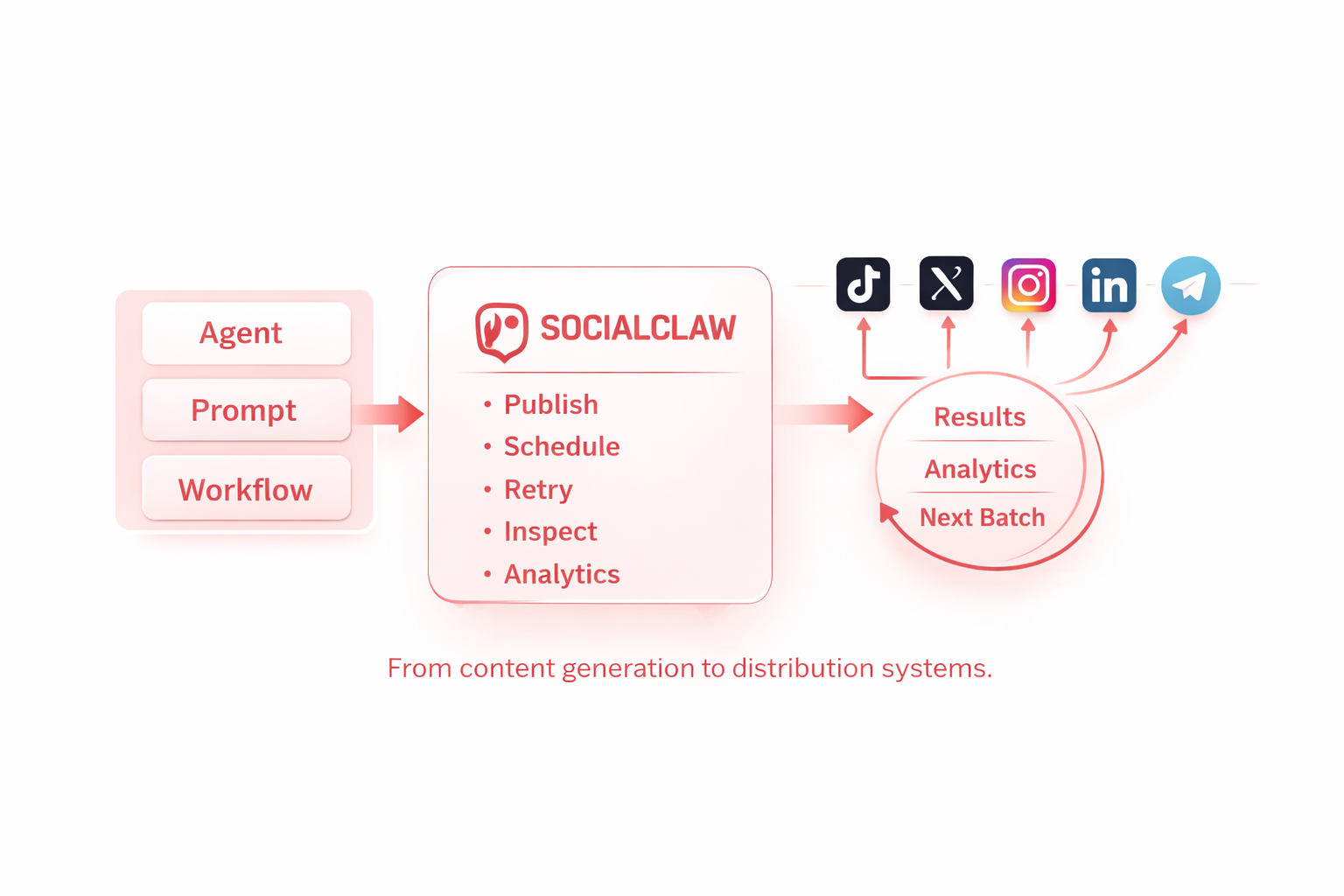
SocialClaw is a social media scheduling skill for AI agents posting to X, LinkedIn, Instagram, Facebook Pages, TikTok, Discord, Telegram, YouTube, Reddit, WordPress, and Pinterest
SocialClaw is a workspace-scoped social publishing service at https://getsocialclaw.com.
What this skill is
This skill is an instruction layer for the hosted SocialClaw service.
It does not contain the SocialClaw backend or the provider integrations themselves.
It teaches Codex how to:
- get or use a workspace API key
- call the SocialClaw HTTP API
- understand provider and account-type caveats
- optionally use the separate
socialclaw CLI if it is already installed
This skill can work without the CLI. The CLI is only an optional client for the same hosted service.
Use this skill when the user wants to:
- connect or disconnect social accounts in a SocialClaw workspace
- upload media and get SocialClaw-hosted delivery URLs
- validate, preview, apply, or inspect scheduled posts and campaigns
- inspect connected account capabilities, publish settings, actions, jobs, health, or analytics
Do not use this skill for editing the SocialClaw codebase itself. This bundle is for operating a deployed SocialClaw workspace.
Defaults
- Base URL:
https://getsocialclaw.com
- Auth: workspace API key in
Authorization: Bearer <key>
- Preferred interface:
socialclaw CLI when installed
- Fallback interface: SocialClaw HTTP API
Runtime requirements
- Required env:
SC_API_KEY
- Hosted base URL:
https://getsocialclaw.com
- Optional CLI:
socialclaw or social if already installed
- Workspace status: an active trial or paid plan is required for CLI/API execution through the workspace key
Optional CLI
SocialClaw also has a separate npm CLI package named socialclaw.
Prefer it when it is already installed or the user wants command-line examples. The CLI is a client for the hosted SocialClaw service. It can:
- store a workspace API key locally
- start connection flows
- upload assets
- validate, preview, and apply schedules
- inspect posts, runs, analytics, usage, and workspace health
- install the packaged Claude Code command with
socialclaw install --claude
If the user explicitly wants the CLI and it is not installed yet:
npm install -g socialclaw
For command details, read references/cli.md.
Quick start
If the user does not have a workspace API key yet:
open https://getsocialclaw.com/dashboard
Then tell them:
- sign in with Google
- open the API key section
- create or copy their workspace API key
Set:
export SC_API_KEY="<workspace-key>"
If the CLI is installed, log in with it:
socialclaw login --api-key <workspace-key>
Otherwise validate the key over HTTP:
curl -sS \
  -H "Authorization: Bearer $SC_API_KEY" \
  "https://getsocialclaw.com/v1/keys/validate"
If execution fails with plan_required, subscription_inactive, subscription_past_due, subscription_paused, or subscription_canceled, direct the user to:
https://getsocialclaw.com/pricinghttps://getsocialclaw.com/dashboard
Operating rules
- Start by confirming the user has a SocialClaw workspace API key.
- If the user does not have a key yet, send them to
https://getsocialclaw.com/dashboard to sign in with Google and create one.
- A workspace API key alone is not sufficient for execution. If billing-related errors appear, route the user to pricing or dashboard billing instead of retrying commands.
- Never ask the user for provider app secrets. End users connect accounts inside SocialClaw.
- Prefer explicit provider and account-type language:
- Facebook Pages, not Facebook personal profiles
- Instagram Business linked to a Facebook Page
- Instagram standalone professional accounts
- LinkedIn profile and LinkedIn page are separate providers
- Pinterest is board-centric; inspect capabilities and actions before assuming sections, catalogs, or advanced surfaces
- If a provider workflow is not supported, say so directly instead of inventing a workaround.
- Treat Pinterest product, collection, and idea surfaces as capability-gated or beta unless account capabilities or actions explicitly advertise them.
- Avoid echoing full API keys back into chat.
Main workflow
- Confirm the user has a workspace API key.
- If needed, direct the user to the dashboard to sign in with Google and create a key.
- Validate workspace access.
- List accounts or start a connection flow.
- Inspect capabilities and settings for the target account.
- Upload media if needed.
- Validate or preview the post or campaign.
- Apply it.
- Inspect posts, runs, analytics, or retry or reconcile if needed.
Read next
1---2name: socialclaw-43description: Use when a user wants social media scheduling and publishing for AI agents on X, LinkedIn, Instagram, Facebook Pages, TikTok, Discord, Telegram, YouTube, Reddit, WordPress, and Pinterest through SocialClaw.4---56# SocialClaw is a social media scheduling skill for AI agents posting to X, LinkedIn, Instagram, Facebook Pages, TikTok, Discord, Telegram, YouTube, Reddit, WordPress, and Pinterest78SocialClaw is a workspace-scoped social publishing service at `https://getsocialclaw.com`.910## What this skill is1112This skill is an instruction layer for the hosted SocialClaw service.1314It does not contain the SocialClaw backend or the provider integrations themselves.15It teaches Codex how to:16- get or use a workspace API key17- call the SocialClaw HTTP API18- understand provider and account-type caveats19- optionally use the separate `socialclaw` CLI if it is already installed2021This skill can work without the CLI. The CLI is only an optional client for the same hosted service.2223Use this skill when the user wants to:24- connect or disconnect social accounts in a SocialClaw workspace25- upload media and get SocialClaw-hosted delivery URLs26- validate, preview, apply, or inspect scheduled posts and campaigns27- inspect connected account capabilities, publish settings, actions, jobs, health, or analytics2829Do not use this skill for editing the SocialClaw codebase itself. This bundle is for operating a deployed SocialClaw workspace.3031## Defaults3233- Base URL: `https://getsocialclaw.com`34- Auth: workspace API key in `Authorization: Bearer <key>`35- Preferred interface: `socialclaw` CLI when installed36- Fallback interface: SocialClaw HTTP API3738## Runtime requirements3940- Required env: `SC_API_KEY`41- Hosted base URL: `https://getsocialclaw.com`42- Optional CLI: `socialclaw` or `social` if already installed43- Workspace status: an active trial or paid plan is required for CLI/API execution through the workspace key4445## Optional CLI4647SocialClaw also has a separate npm CLI package named `socialclaw`.4849Prefer it when it is already installed or the user wants command-line examples. The CLI is a client for the hosted SocialClaw service. It can:50- store a workspace API key locally51- start connection flows52- upload assets53- validate, preview, and apply schedules54- inspect posts, runs, analytics, usage, and workspace health55- install the packaged Claude Code command with `socialclaw install --claude`5657If the user explicitly wants the CLI and it is not installed yet:5859```bash60npm install -g socialclaw61```6263For command details, read [references/cli.md](./references/cli.md).6465## Quick start6667If the user does not have a workspace API key yet:6869```bash70open https://getsocialclaw.com/dashboard71```7273Then tell them:74- sign in with Google75- open the API key section76- create or copy their workspace API key7778Set:7980```bash81export SC_API_KEY="<workspace-key>"82```8384If the CLI is installed, log in with it:8586```bash87socialclaw login --api-key <workspace-key>88```8990Otherwise validate the key over HTTP:9192```bash93curl -sS \94 -H "Authorization: Bearer $SC_API_KEY" \95 "https://getsocialclaw.com/v1/keys/validate"96```9798If execution fails with `plan_required`, `subscription_inactive`, `subscription_past_due`, `subscription_paused`, or `subscription_canceled`, direct the user to:99100- `https://getsocialclaw.com/pricing`101- `https://getsocialclaw.com/dashboard`102103## Operating rules1041051. Start by confirming the user has a SocialClaw workspace API key.1062. If the user does not have a key yet, send them to `https://getsocialclaw.com/dashboard` to sign in with Google and create one.1073. A workspace API key alone is not sufficient for execution. If billing-related errors appear, route the user to pricing or dashboard billing instead of retrying commands.1084. Never ask the user for provider app secrets. End users connect accounts inside SocialClaw.1095. Prefer explicit provider and account-type language:110 - Facebook Pages, not Facebook personal profiles111 - Instagram Business linked to a Facebook Page112 - Instagram standalone professional accounts113 - LinkedIn profile and LinkedIn page are separate providers114 - Pinterest is board-centric; inspect capabilities and actions before assuming sections, catalogs, or advanced surfaces1156. If a provider workflow is not supported, say so directly instead of inventing a workaround.1167. Treat Pinterest product, collection, and idea surfaces as capability-gated or beta unless account capabilities or actions explicitly advertise them.1178. Avoid echoing full API keys back into chat.118119## Main workflow1201211. Confirm the user has a workspace API key.1222. If needed, direct the user to the dashboard to sign in with Google and create a key.1233. Validate workspace access.1244. List accounts or start a connection flow.1255. Inspect capabilities and settings for the target account.1266. Upload media if needed.1277. Validate or preview the post or campaign.1288. Apply it.1299. Inspect posts, runs, analytics, or retry or reconcile if needed.130131## Read next132133- CLI commands: [references/cli.md](./references/cli.md)134- Provider caveats: [references/providers.md](./references/providers.md)135- HTTP workflows and request examples: [references/workflows.md](./references/workflows.md)