
AlphaFold Database Visualize
Overview
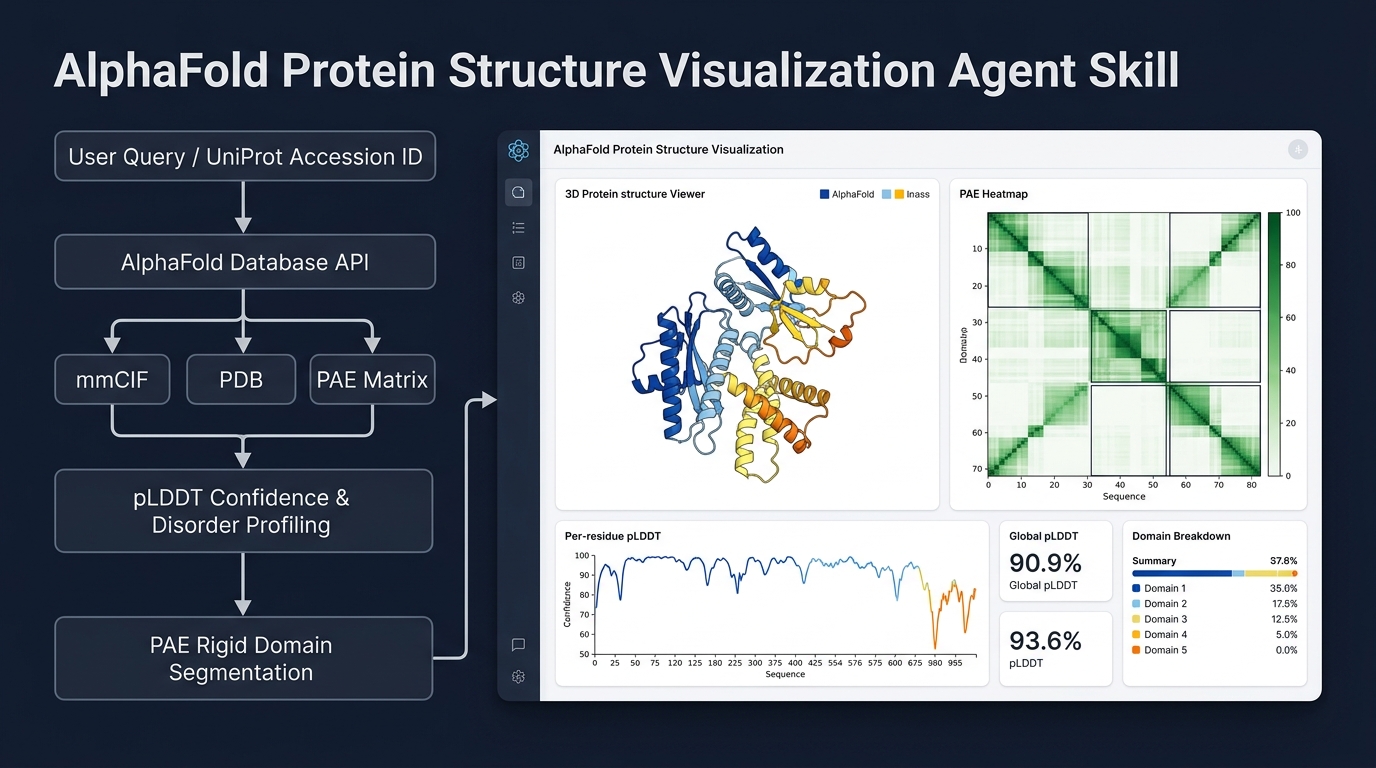
Downloads AlphaFold predicted structures (mmCIF and PDB), Predicted Aligned Error (PAE) matrices, and API metadata from the AlphaFold Protein Structure Database (AFDB) for a specified UniProt Accession ID. Performs heuristic analysis on structural confidence (pLDDT), intrinsically disordered regions (IDRs), rigid domain boundaries, and inter-domain flexibility, and synthesizes an interactive standalone Canvas UI dashboard with embedded 3D molecular visualization and PAE heatmaps.
Do NOT use when:
- The user only has a protein name, gene name, or amino acid sequence without a UniProt ID. Ask them to locate the accession on UniProt (https://www.uniprot.org).
- The user wants to search for structural homologs across databases (use Foldseek).
- The user wants to predict structures from an arbitrary de novo sequence (use ColabFold or AlphaFold Server).
- The user requires experimental, experimentally solved PDB coordinates (use RCSB PDB).
Core Rules
- Execute helper scripts: Always execute the provided Python scripts to query the database and perform analysis rather than querying the API or estimating domain boundaries manually.
- Standard Python environment: Execute scripts using standard
python3. Do not invokeuv. - Explicit output paths: Always provide an explicit
-odirectory path when running scripts. - Skill attribution: Mention in the final response that the AlphaFold Database Visualize skill was used.
- Canvas UI delivery: When the pipeline generates
dashboard.html, present this file as the interactive Canvas visual workspace artifact.
Utility Scripts and Workflows
1. Unified End-to-End Pipeline (Recommended)
Runs the complete workflow (fetch, pLDDT analysis, PAE analysis, and interactive Canvas dashboard generation) in a single step:
python3 scripts/run_pipeline.py P00520 -o ./output/P00520/
python3 scripts/run_pipeline.py P04637 -o ./output/P04637/
Offline synthetic mock mode (for automated testing without network access):
python3 scripts/run_pipeline.py SYNTH01 -o ./output/synth01/ --mock
2. Modular Step-by-Step Scripts
Step A: Fetch Structure Files
Downloads structure files (.cif, .pdb), PAE JSON, and metadata JSON:
python3 scripts/fetch_structure.py P00520 -o ./output/P00520/
Step B: Analyze pLDDT Confidence
Evaluates per-residue confidence scores, bin distributions, and intrinsically disordered regions:
python3 scripts/analyze_plddt.py ./output/P00520/AF-P00520-F1-metadata.json
Step C: Analyze PAE / Domain Boundaries
Calculates rigid domain boundaries and inter-domain flexibility from the PAE matrix:
python3 scripts/analyze_pae.py ./output/P00520/AF-P00520-F1-predicted_aligned_error.json
Step D: Generate Canvas Dashboard
Builds the standalone HTML dashboard containing the embedded 3Dmol WebGL viewer, PAE heatmap canvas, and pLDDT chart:
python3 scripts/generate_dashboard.py -m ./output/P00520/AF-P00520-F1-metadata.json -p ./output/P00520/AF-P00520-F1-predicted_aligned_error.json --pdb ./output/P00520/AF-P00520-F1-model.pdb -o ./output/P00520/dashboard.html
Interpreting and Synthesizing Results
When presenting findings to the user, synthesize the script output according to these rules:
- Isoform and Fragment Warnings: Check script output for
[!] WARNINGnotices. If the query resolved to an isoform or if the target is a large multi-fragment protein (>2700 residues), prominently highlight this status. - Structural Synthesis: Merge the pLDDT conclusion and PAE architecture summary into a cohesive overview. Clearly describe overall folding confidence, rigid domain organization, and flexible linker regions.
- Supporting Metrics:
- Global mean pLDDT and percentage breakdown across confidence tiers (Very High >90, Confident 70-90, Low 50-70, Very Low <50).
- Domain Boundary Table listing each detected domain, residue range, length, and mean intra-domain PAE.
- Inter-domain flexibility status (rigidly coupled vs independent dynamic domains).
- Explicit Disorder Warning: If the analysis indicates that the protein is highly disordered (high percentage of pLDDT < 50 or absence of rigid domains), issue a clear warning advising the user against whole-protein docking or global alignment. Advise restricting downstream work to verified folded domains if present.
- Canvas Dashboard: Provide the path to the generated
dashboard.htmlfile so the user can interactively rotate the 3D model, inspect pLDDT color coding, and explore the PAE matrix in Canvas.