PubChem Database Visualize
1. Prerequisites
uv Package Manager: Ensure uv is installed and accessible on PATH. Scripts use PEP 723 inline metadata for hermetic dependency execution.- License Acceptance: If
.licenses/pubchem_database_visualize_LICENSE.txt does not exist in the workspace root, verify acceptance of the PubChem Citation Guidelines (https://pubchem.ncbi.nlm.nih.gov/docs/citation-guidelines) and PUG-REST Usage Policy (https://pubchem.ncbi.nlm.nih.gov/docs/pug-rest), then record acceptance in that file.
2. Core Capabilities & Recommended Workflow
2.1 Unified End-to-End Pipeline (Recommended)
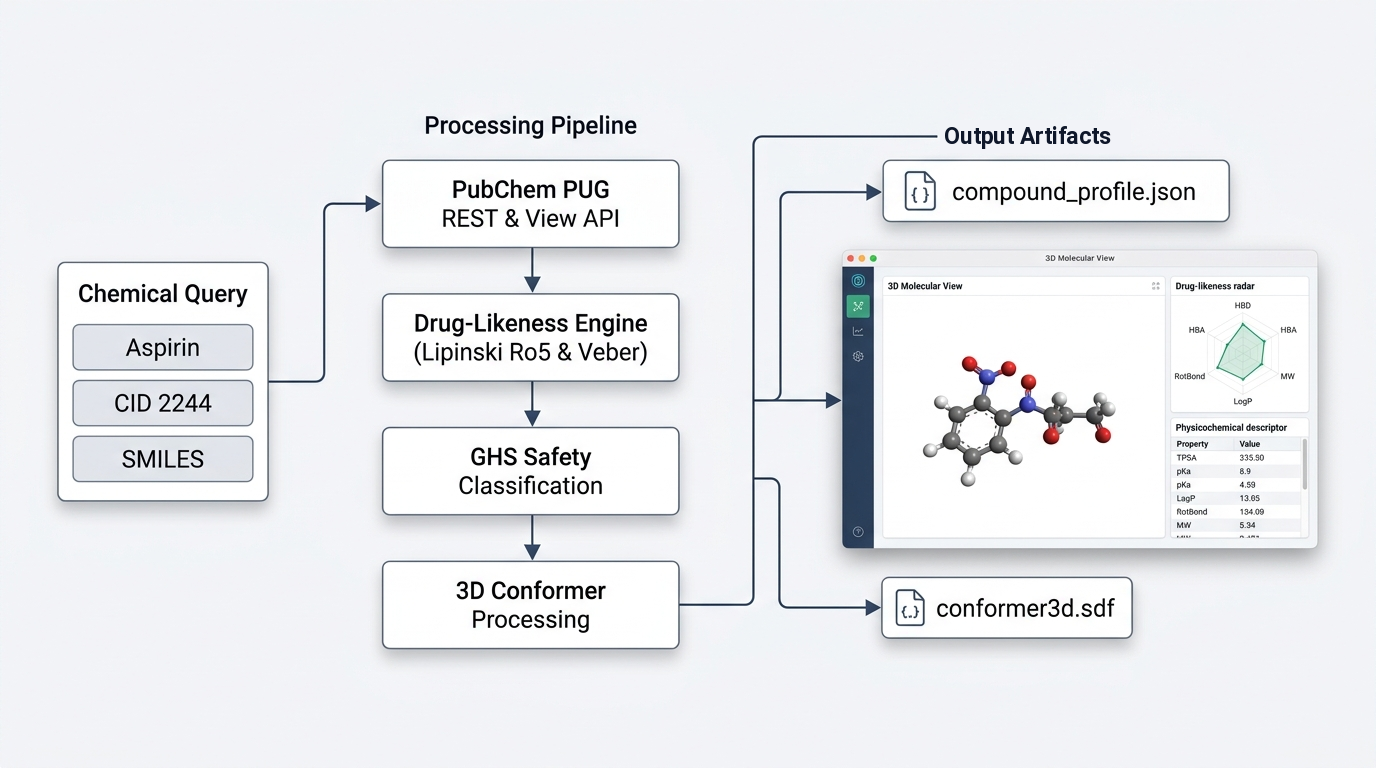
Executes compound resolution, property retrieval, Lipinski Rule of 5 and Veber drug-likeness scoring, GHS safety analysis, clinical pharmacology retrieval, 3D conformer acquisition, bioassay filtering, analog searching, and generates the self-contained UI dashboard (dashboard.html):
# Profile by common chemical or trade name
uv run scripts/run_pipeline.py --name "aspirin" -o ./output/aspirin/

# Profile by numerical Compound ID (CID)
uv run scripts/run_pipeline.py --cid 2244 -o ./output/aspirin/

# Profile by canonical or isomeric SMILES
uv run scripts/run_pipeline.py --smiles "CC(=O)OC1=CC=CC=C1C(=O)O" -o ./output/aspirin/

# Profile by InChI string
uv run scripts/run_pipeline.py --inchi "InChI=1S/C9H8O4/c1-6(10)13-8-5-3-2-4-7(8)9(11)12/h2-5H,1H3,(H,11,12)" -o ./output/aspirin/
2.2 Offline Synthetic Mock Mode (Testing & Sandboxed Environments)
Runs the complete profiling and visualization pipeline without internet access using the local 100% synthetic mock dataset:
uv run scripts/run_pipeline.py --name "aspirin" --mock -o ./output/aspirin_mock/
uv run scripts/run_pipeline.py --cid 5291 --mock -o ./output/imatinib_mock/
uv run scripts/run_pipeline.py --name "caffeine" --mock -o ./output/caffeine_mock/
2.3 Modular CLI Tools (scripts/pubchem_api.py)
For targeted lookups without running the full pipeline:
- Resolve Identifiers:
uv run scripts/pubchem_api.py resolve --name "imatinib" -o res.json
- Properties & Drug-Likeness:
uv run scripts/pubchem_api.py properties --cid 5291 -o props.json
- GHS Safety Classification:
uv run scripts/pubchem_api.py safety --cid 5291 -o safety.json
- Clinical Pharmacology:
uv run scripts/pubchem_api.py pharmacology --cid 5291 -o pharm.json
- 3D Conformer Coordinates (SDF):
uv run scripts/pubchem_api.py conformer3d --cid 5291 -o conformer3d.sdf
- Active BioAssays:
uv run scripts/pubchem_api.py assays --cid 5291 --active-only -o assays.json
- Similarity Analogs:
uv run scripts/pubchem_api.py similarity --cid 5291 --threshold 85 -o analogs.json
Add --mock to any modular command to execute against local synthetic fixtures.
3. Interactive UI Dashboard Architecture & Artifact Generation
The skill generates an interactive UI dashboard rendered in a web browser or iframe and executable locally via ./dashboard.html.
3.1 Visual Dashboard Features
- Light & Dark Theme Engine: Includes a dedicated theme toggle button in the header featuring clean SVG icons (Sun icon for switching to light, Moon icon for switching to dark) with zero textual clutter and persistent state.
- 3D Molecular View: Unified high-resolution 3D viewer featuring HiDPI Retina rendering, specular 3D CPK sphere lighting, 3D cylindrical bond shading with single/double/triple/aromatic geometry, representation modes (Ball & Stick, Stick, Spacefill, Wireframe, Translucent Surface), stable non-shifting controls, interactive distance measurement tool, hover Atom Inspector HUD tooltip, element/index label cycling, inertial orbit/pan/zoom navigation, and PNG export.
- Drug-Likeness Radar Chart: Geometric SVG radar chart mapping computed physicochemical properties against Lipinski Rule of 5 and Veber rule thresholds.
- GHS Safety Board: Prominent signal word indicator badge and hazard statement pills.
- Clipboard Helpers: One-click copy buttons next to SMILES, InChIKey, and Formula strings.
3.2 Artifact Generation
When generating or updating the interactive HTML dashboard, emit the standalone HTML file as a user-facing artifact named dashboard.html. This allows the dashboard to be inspected directly in an artifact viewer or browser without manual configuration.
In addition, the pipeline updates ./dashboard.html directly in the project root directory for standalone offline browser verification.
4. Synthesizing & Presenting Results to the User
When reporting chemical profiling results, structure the output using the following standard sections:
- Highlight Core Identifiers: State the PubChem CID, IUPAC Name, Molecular Formula, and Canonical SMILES.
- Drug-Likeness Evaluation: Clearly summarize Lipinski's Rule of 5 and Veber compliance. Specifically state violation counts and explicit violation reasons (e.g., molecular weight exceeding 500 Da or XLogP exceeding 5.0).
- Safety & Hazards: State the GHS Signal Word (
DANGER, WARNING, or NOT_CLASSIFIED) and enumerate primary hazard statements (H-codes).
- Mechanism & Indication: Summarize approved clinical indications and primary macromolecular targets (e.g., enzyme inhibition or receptor antagonism).
- UI Dashboard Artifact: Direct the user to the generated
dashboard.html file, which renders the 3D molecular view, drug-likeness radar chart, safety panel, and bioassay concordance.
5. Error Handling and Recovery
- Unresolvable Identifier: If a chemical name or SMILES string cannot be resolved, prompt the user for an alternative synonym, InChIKey, or numerical CID.
- Unavailable 3D Conformer: If PubChem has not computed 3D coordinates for a compound, the pipeline automatically writes 2D coordinates or placeholder structural indicators to
conformer3d.sdf, flags has_3d_conformer: false in compound_profile.json, and allows the user to explore the 3D molecular view.
- Service Rate Limiting: The client automatically throttles requests to 4.5 queries/sec and implements exponential backoff retry. If rate limiting persists in restricted environments, switch to
--mock mode.
1---2name: pubchem-database-visualize3description: >4 Query PubChem, resolve chemical names/SMILES/InChI to CIDs, analyze computed5 properties, evaluate Lipinski drug-likeness, inspect GHS safety data and pharmacology,6 and synthesize interactive 3D WebGL molecular conformer dashboards. Use when a user7 asks to look up, profile, analyze, or visualize a chemical, drug, ligand, or compound.8metadata:9 source: https://skillmd.com/skills/terravic/pubchem-database-visualize10---1112# PubChem Database Visualize1314## 1. Prerequisites15161. **`uv` Package Manager**: Ensure `uv` is installed and accessible on PATH. Scripts use PEP 723 inline metadata for hermetic dependency execution.172. **License Acceptance**: If `.licenses/pubchem_database_visualize_LICENSE.txt` does not exist in the workspace root, verify acceptance of the PubChem Citation Guidelines (https://pubchem.ncbi.nlm.nih.gov/docs/citation-guidelines) and PUG-REST Usage Policy (https://pubchem.ncbi.nlm.nih.gov/docs/pug-rest), then record acceptance in that file.1819---2021## 2. Core Capabilities & Recommended Workflow2223### 2.1 Unified End-to-End Pipeline (Recommended)24Executes compound resolution, property retrieval, Lipinski Rule of 5 and Veber drug-likeness scoring, GHS safety analysis, clinical pharmacology retrieval, 3D conformer acquisition, bioassay filtering, analog searching, and generates the self-contained UI dashboard (`dashboard.html`):2526```bash27# Profile by common chemical or trade name28uv run scripts/run_pipeline.py --name "aspirin" -o ./output/aspirin/2930# Profile by numerical Compound ID (CID)31uv run scripts/run_pipeline.py --cid 2244 -o ./output/aspirin/3233# Profile by canonical or isomeric SMILES34uv run scripts/run_pipeline.py --smiles "CC(=O)OC1=CC=CC=C1C(=O)O" -o ./output/aspirin/3536# Profile by InChI string37uv run scripts/run_pipeline.py --inchi "InChI=1S/C9H8O4/c1-6(10)13-8-5-3-2-4-7(8)9(11)12/h2-5H,1H3,(H,11,12)" -o ./output/aspirin/38```3940### 2.2 Offline Synthetic Mock Mode (Testing & Sandboxed Environments)41Runs the complete profiling and visualization pipeline without internet access using the local 100% synthetic mock dataset:4243```bash44uv run scripts/run_pipeline.py --name "aspirin" --mock -o ./output/aspirin_mock/45uv run scripts/run_pipeline.py --cid 5291 --mock -o ./output/imatinib_mock/46uv run scripts/run_pipeline.py --name "caffeine" --mock -o ./output/caffeine_mock/47```4849### 2.3 Modular CLI Tools (`scripts/pubchem_api.py`)50For targeted lookups without running the full pipeline:51- **Resolve Identifiers**:52 `uv run scripts/pubchem_api.py resolve --name "imatinib" -o res.json`53- **Properties & Drug-Likeness**:54 `uv run scripts/pubchem_api.py properties --cid 5291 -o props.json`55- **GHS Safety Classification**:56 `uv run scripts/pubchem_api.py safety --cid 5291 -o safety.json`57- **Clinical Pharmacology**:58 `uv run scripts/pubchem_api.py pharmacology --cid 5291 -o pharm.json`59- **3D Conformer Coordinates (SDF)**:60 `uv run scripts/pubchem_api.py conformer3d --cid 5291 -o conformer3d.sdf`61- **Active BioAssays**:62 `uv run scripts/pubchem_api.py assays --cid 5291 --active-only -o assays.json`63- **Similarity Analogs**:64 `uv run scripts/pubchem_api.py similarity --cid 5291 --threshold 85 -o analogs.json`6566Add `--mock` to any modular command to execute against local synthetic fixtures.6768---6970## 3. Interactive UI Dashboard Architecture & Artifact Generation7172The skill generates an interactive UI dashboard rendered in a web browser or iframe and executable locally via `./dashboard.html`.7374### 3.1 Visual Dashboard Features75- **Light & Dark Theme Engine**: Includes a dedicated theme toggle button in the header featuring clean SVG icons (Sun icon for switching to light, Moon icon for switching to dark) with zero textual clutter and persistent state.76- **3D Molecular View**: Unified high-resolution 3D viewer featuring HiDPI Retina rendering, specular 3D CPK sphere lighting, 3D cylindrical bond shading with single/double/triple/aromatic geometry, representation modes (Ball & Stick, Stick, Spacefill, Wireframe, Translucent Surface), stable non-shifting controls, interactive distance measurement tool, hover Atom Inspector HUD tooltip, element/index label cycling, inertial orbit/pan/zoom navigation, and PNG export.77- **Drug-Likeness Radar Chart**: Geometric SVG radar chart mapping computed physicochemical properties against Lipinski Rule of 5 and Veber rule thresholds.78- **GHS Safety Board**: Prominent signal word indicator badge and hazard statement pills.79- **Clipboard Helpers**: One-click copy buttons next to SMILES, InChIKey, and Formula strings.8081### 3.2 Artifact Generation82When generating or updating the interactive HTML dashboard, emit the standalone HTML file as a user-facing artifact named `dashboard.html`. This allows the dashboard to be inspected directly in an artifact viewer or browser without manual configuration.8384In addition, the pipeline updates `./dashboard.html` directly in the project root directory for standalone offline browser verification.8586---8788## 4. Synthesizing & Presenting Results to the User8990When reporting chemical profiling results, structure the output using the following standard sections:91921. **Highlight Core Identifiers**: State the PubChem CID, IUPAC Name, Molecular Formula, and Canonical SMILES.932. **Drug-Likeness Evaluation**: Clearly summarize Lipinski's Rule of 5 and Veber compliance. Specifically state violation counts and explicit violation reasons (e.g., molecular weight exceeding 500 Da or XLogP exceeding 5.0).943. **Safety & Hazards**: State the GHS Signal Word (`DANGER`, `WARNING`, or `NOT_CLASSIFIED`) and enumerate primary hazard statements (H-codes).954. **Mechanism & Indication**: Summarize approved clinical indications and primary macromolecular targets (e.g., enzyme inhibition or receptor antagonism).965. **UI Dashboard Artifact**: Direct the user to the generated `dashboard.html` file, which renders the 3D molecular view, drug-likeness radar chart, safety panel, and bioassay concordance.9798---99100## 5. Error Handling and Recovery101102- **Unresolvable Identifier**: If a chemical name or SMILES string cannot be resolved, prompt the user for an alternative synonym, InChIKey, or numerical CID.103- **Unavailable 3D Conformer**: If PubChem has not computed 3D coordinates for a compound, the pipeline automatically writes 2D coordinates or placeholder structural indicators to `conformer3d.sdf`, flags `has_3d_conformer: false` in `compound_profile.json`, and allows the user to explore the 3D molecular view.104- **Service Rate Limiting**: The client automatically throttles requests to 4.5 queries/sec and implements exponential backoff retry. If rate limiting persists in restricted environments, switch to `--mock` mode.