pymol-visualize: PyMOL Molecular Visualization Skill
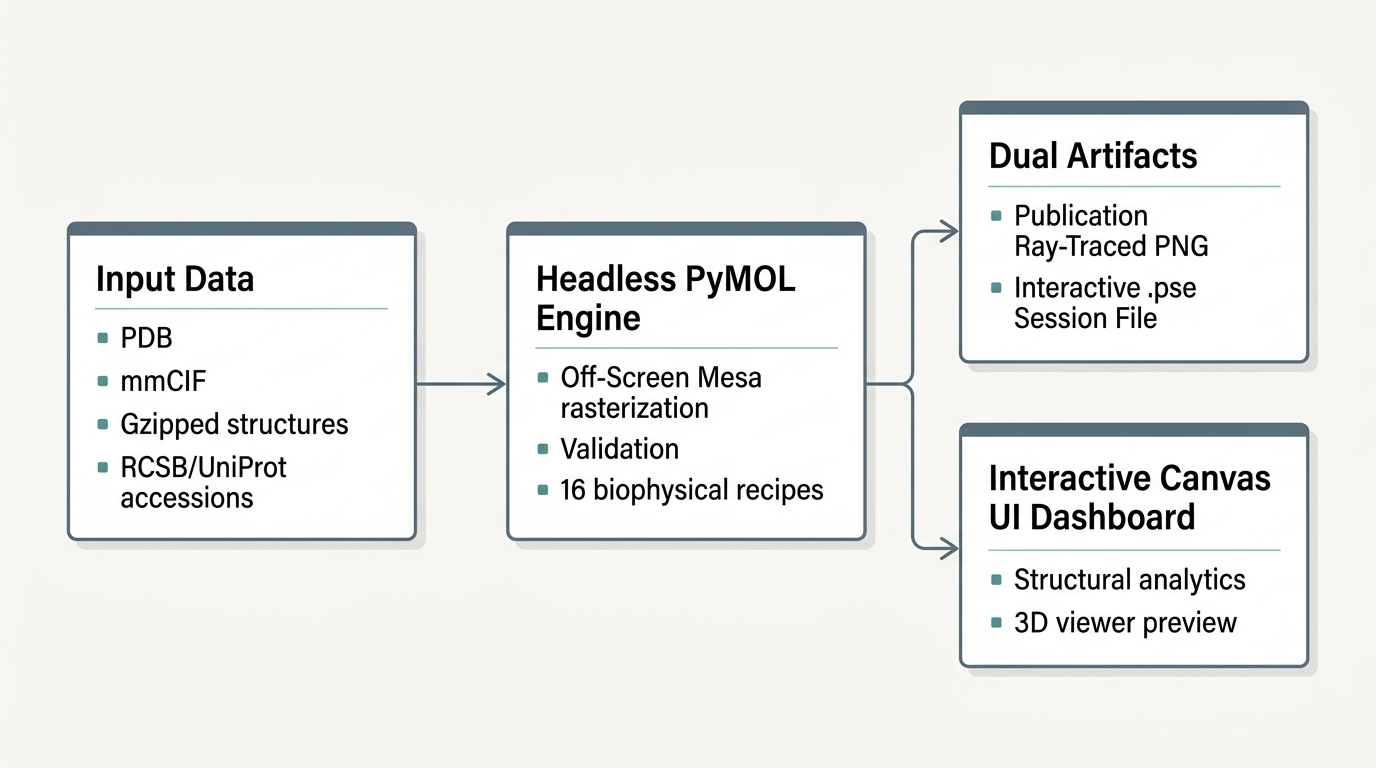
This pymol-visualize skill provides an automated execution framework for headless macromolecular visualization, structural alignment, and biophysical contact analysis using PyMOL. It generates PEP 723-compliant Python scripts executed via uv run in an isolated environment backed by Off-Screen Mesa (OSMesa) software rendering.
Section 1: Prerequisites and Compliance
1.1 Package Manager Requirement
Execution requires uv to be installed and accessible on PATH. The runtime environment utilizes uv run to manage Python versions and transient dependencies without polluting system environments.
1.2 License Notice Protocol
PyMOL is distributed under the PyMOL Open-Source License and related open-source licensing terms.
Before generating or executing any visualization scripts, verify that .licenses/pymol_LICENSE.txt exists in the workspace root. If the file is absent:
- Alert the user in the interaction log to review the license terms at
https://www.pymol.org/.
- Create the file
.licenses/pymol_LICENSE.txt recording the license notice, the official URL, and the current ISO 8601 UTC timestamp.
if [ ! -f .licenses/pymol_LICENSE.txt ]; then
    mkdir -p .licenses
    echo "PyMOL License Notice - Acknowledged at $(date -u +%Y-%m-%dT%H:%M:%SZ)" > .licenses/pymol_LICENSE.txt
    echo "Review licensing terms at https://www.pymol.org/" >> .licenses/pymol_LICENSE.txt
fi
Section 2: Architectural Principles and Execution Model
2.1 Headless Execution Engine
PyMOL executes without an active X11 or Wayland display server by binding to OSMesa (Off-Screen Mesa).
- Environment Variable:
PYOPENGL_PLATFORM=osmesa
- Launch flags:
-cq (-c disables GUI and command loop; -q enables quiet execution)
- Dependency package:
pymol-open-source-whl
2.2 On-the-Fly Script Generation
The agent does not execute raw, stateful PyMOL interactive shells. Instead, the agent writes a self-contained, idempotent Python script for each analytical or rendering task. Each script runs in an isolated subshell via uv run script_name.py.
2.3 Coordinate Data Sources
The pymol-visualize skill handles both user-supplied local files and remote accessions:
- Local files: The agent ingests local
.pdb, .cif, .mmcif, or gzip-compressed (.pdb.gz, .cif.gz) files.
- Accession codes: When given a PDB ID (e.g.,
1UBQ) or UniProt ID (e.g., P04637), the agent invokes scripts/fetch_structure.py to retrieve verified coordinates from RCSB PDB or the AlphaFold EBI Database.
- Raw coordinate text: When raw PDB text is provided in chat, the agent writes it to a temporary workspace file and validates it before proceeding.
- Offline isolation: PyMOL native
cmd.fetch() must never be called during rendering execution. All coordinates must be cached locally on disk prior to script launch.
Section 3: Core Runtime Invariants
Every generated PyMOL script must strictly obey seven invariants:
- Pre-flight File Verification: Verify that the input coordinate file exists on disk and is non-empty before initiating PyMOL initialization.
- PEP 723 Inline Metadata: Every script must begin with inline script metadata defining the Python version constraints and dependencies:
# /// script
# requires-python = ">=3.10, <3.13"
# dependencies = [
#     "pymol-open-source-whl",
# ]
# ///
- Execution Initialization Order: Set
os.environ["PYOPENGL_PLATFORM"] = "osmesa". Import pymol. Set pymol.pymol_argv = ["pymol", "-cq"]. Invoke pymol.finish_launching(). Only import from pymol import cmd, util after finish_launching() completes.
- Structure Validation: Immediately after
cmd.load(path, object_name), execute cmd.count_atoms(object_name). If the returned count is 0, emit an explicit error message to stderr and terminate with a non-zero exit code.
- Mandatory Process Teardown: Always call
cmd.quit() inside a finally block or at the end of the script to release software rendering buffers and prevent hanging processes.
- Dual Artifact Export: Always produce both a high-resolution PNG image (
cmd.png(filename, width=..., height=..., dpi=..., ray=1)) and a binary PyMOL session file (cmd.save(filename)). The PNG serves visual inspection in agent chats and reports; the .pse file enables interactive inspection in desktop PyMOL.
- Directory Hygiene: Ensure all destination directories exist using
os.makedirs(output_dir, exist_ok=True) prior to calling cmd.png or cmd.save.
Section 4: Minimal Starter Script
The following template illustrates compliance with all core runtime invariants:
# /// script
# requires-python = ">=3.10, <3.13"
# dependencies = [
#     "pymol-open-source-whl",
# ]
# ///

import os
import sys

def main():
    structure_path = "assets/synthetic_monomer.pdb"
    output_png = "outputs/render_monomer.png"
    output_pse = "outputs/session_monomer.pse"

    # Invariant 1: Pre-flight check
    if not os.path.exists(structure_path):
        sys.stderr.write(f"Error: Structure file not found: {structure_path}\n")
        sys.exit(1)

    # Invariant 7: Directory hygiene
    os.makedirs(os.path.dirname(output_png) or ".", exist_ok=True)
    os.makedirs(os.path.dirname(output_pse) or ".", exist_ok=True)

    # Invariant 3: Headless engine initialization
    os.environ["PYOPENGL_PLATFORM"] = "osmesa"
    import pymol
    pymol.pymol_argv = ["pymol", "-cq"]
    pymol.finish_launching()
    from pymol import cmd

    try:
        # Invariant 4: Load and validate structure
        obj_name = "target_structure"
        cmd.load(structure_path, obj_name)
        atom_count = cmd.count_atoms(obj_name)
        if atom_count == 0:
            sys.stderr.write(f"Error: Zero atoms parsed from {structure_path}\n")
            sys.exit(2)
        print(f"Loaded {atom_count} atoms from {structure_path}")

        # Representation and styling
        cmd.hide("everything", obj_name)
        cmd.show("cartoon", obj_name)
        cmd.color("gray70", f"{obj_name} and ss l+''")
        cmd.color("red", f"{obj_name} and ss h")
        cmd.color("yellow", f"{obj_name} and ss s")

        cmd.set("ray_opaque_background", 1)
        cmd.bg_color("white")
        cmd.orient(obj_name)
        cmd.zoom(obj_name, buffer=2.0)

        # Invariant 6: Dual artifact export
        cmd.png(output_png, width=1600, height=1200, dpi=300, ray=1)
        cmd.save(output_pse)
        print(f"Generated artifacts:\n - Image: {output_png}\n - Session: {output_pse}")

    finally:
        # Invariant 5: Mandatory teardown
        cmd.quit()

if __name__ == "__main__":
    main()
Section 5: Recipe Index and Output Interpretation
Consult the modular recipes in RECIPES.md when building specialized scripts:
| Recipe Index |
Recipe Identifier |
Primary Use Case |
| 1 |
Secondary Structure |
Standard cartoon rendering colored by alpha helix, beta sheet, and loop. |
| 2 |
B-Factor Spectrum |
Continuous gradient visualization of crystallographic thermal factors or pLDDT. |
| 3 |
AlphaFold pLDDT |
Strict 4-tier categorical coloring matching AlphaFold Database standards. |
| 4 |
Active Site Highlights |
Muted structural backbone with sticks on catalytic residues. |
| 5 |
Transparent Surface |
Molecular surface envelope superimposed over internal secondary structure. |
| 6 |
Electrostatic Surface |
Qualitative vacuum electrostatics potential mapping. |
| 7 |
Multi-Chain Palette |
Hetero-oligomer chain differentiation and stoichiometry auditing. |
| 8 |
B-Factor Putty |
Structural flexibility visualization via variable tube radius. |
| 9 |
Cavity Detection |
Binding pocket and solvent-inaccessible cavity calculation. |
| 10 |
Batch Rendering |
Multi-file directory iteration with atom count safeguards. |
| 11 |
Distance Measurement |
Precise interatomic Euclidean distance validation and label formatting. |
| 12 |
Pocket Zoom |
Framing ligand binding sites with surrounding residue context. |
| 13 |
Protein-Ligand Contacts |
Polar hydrogen bonds, water networks, and ligand stick styling. |
| 14 |
In Silico Mutagenesis |
Rotamer substitution and side-chain clash assessment. |
| 15 |
Adaptive Superposition |
Sequence alignment (cmd.align) with automatic cmd.cealign fallback. |
| 16 |
Session Modification |
Reloading, restyling, and updating existing .pse sessions. |
Output Reporting Standards
When reporting results back to the user or agent transcript:
- Structural Metrics: Report all extracted numerical metrics (atom counts, chains discovered, RMSD values, aligned atom pairs, Euclidean distances) in markdown tables or structured bullet lists.
- Artifact Delivery: Reference both the rendered PNG image path and the accompanying
.pse PyMOL session file. Inform the user that the session file allows them to rotate, slice, and interactively inspect the rendered scene within desktop PyMOL.
- Execution Diagnostics: If an alignment falls back from
align to cealign, explicitly state the reason (for example, sequence identity below threshold or divergent topology).
Section 6: Real-World Data Ingestion and Edge Cases
Real-world structural biology data contains irregularities and diversity that require defensive handling:
6.1 Ingestion Modalities
- Local File Paths: When the user provides a path (e.g.
data/my_protein.pdb, path/to/model.cif.gz), resolve user home expansion (~) and verify existence with scripts/validate_structure.py.
- Database Accessions: When the user mentions a PDB ID (4 alphanumeric characters like
1UBQ, 4HHB, 6M0J) or a UniProt accession (e.g. P04637), run python3 scripts/fetch_structure.py --pdb <ID> or --uniprot <ID> to download coordinates into data/structures/.
- Raw Coordinate Text: When the user pastes PDB text into chat, write the contents to
data/structures/user_input.pdb, run validation, and then proceed with rendering.
6.2 Defensive Edge-Case Rules
- Gzip-Compressed Files (
.pdb.gz, .cif.gz): PyMOL loads compressed files natively without manual decompression. scripts/validate_structure.py automatically handles decompression for pre-flight checking.
- Multi-Model NMR Ensembles: NMR entries contain multiple coordinate models (
MODEL 1, MODEL 2, ...). Loading without state filters renders all models simultaneously. Always select state 1 (e.g., cmd.show("cartoon", f"{obj} and state 1")) unless ensemble flexibility comparison is explicitly requested.
- Dynamic Chain Discovery: Never assume protein chains are named
A or B. Always execute chains = cmd.get_chains(obj_name) to discover actual chain IDs before applying chain-specific selections.
- Alternate Conformations (
altloc): Real crystallographic models often specify alternate sidechain positions (alt A, alt B). For surface calculations or clean stick views, use cmd.remove(f"{obj} and not alt ''+A") to keep the primary conformer.
- Non-Standard and Modified Residues: Selenomethionine (
MSE), phosphoserine (SEP), and phosphothreonine (TPO) are often labeled HETATM. PyMOL handles standard protein representations for these, but selection queries should use polymer.protein or explicit residue names rather than relying solely on ATOM record filters.
- Ligand Identification: Identify small molecule ligands dynamically using
cmd.get_model(f"{obj} and organic").atom rather than hardcoding residue names.
Section 7: Agent Harness Integration and Prompt Instructions
7.1 Agent System Prompt Instructions
Inject the following operational instructions into your agent harness or custom agent system prompt:
### Molecular Visualization and Structural Analysis Tooling
You have access to the `pymol-visualize` skill (PyMOL Molecular Visualization Skill). When the user asks to visualize, render, measure, superimpose, or analyze macromolecular structures:
1. Identify Coordinate Source:
   - If the user provides a local file path, verify it exists using `python3 scripts/validate_structure.py <path> --json`.
   - If the user provides a 4-letter PDB code (e.g. 1UBQ) or UniProt accession (e.g. P04637), fetch it first:
     `python3 scripts/fetch_structure.py --pdb <PDB_ID>` or `--uniprot <UNIPROT_ID>`.
   - If the user provides raw PDB text, save it to a `.pdb` file in `data/structures/`.
2. Select the Appropriate Recipe:
   - Check references/RECIPES.md for the appropriate recipe index (1 to 16).
3. Execute the Visualization:
   - Run the task via `python3 scripts/pymol_runner.py --recipe <recipe_name> --structure <file_path> --out-png <png_path> --out-pse <pse_path>`
   - Or generate a custom PEP 723 Python script following the 7 Core Invariants in SKILL.md and execute it using `uv run <script_path>`.
4. Output Delivery:
   - Always present the rendered image path.
   - Always present the `.pse` session file path for interactive inspection.
   - Report key numerical metrics (atom count, chains, RMSD, distances) in clean tables or lists.
7.2 Skill Activation Triggers
The agent must activate the pymol-visualize skill when encountering requests matching:
- "Visualize protein / complex..."
- "Render secondary structure / cartoon / surface..."
- "Color by AlphaFold pLDDT / B-factor..."
- "Show binding pocket / ligand interactions around..."
- "Superimpose structure A onto structure B..."
- "Measure distance between residue X and residue Y..."
- "Perform in silico mutation at position..."
7.3 Standard Multi-Turn Conversation Patterns
Pattern A: User supplies local structure file
User: "Can you render the active site of my protein at data/protease.pdb? Catalytic triad residues are 57, 102, and 195."
Agent:
1. Executes: python3 scripts/validate_structure.py data/protease.pdb --json
2. Generates/Executes: python3 scripts/pymol_runner.py --recipe highlight_residues --structure data/protease.pdb --active-residues 57+102+195 --out-png outputs/protease_active_site.png --out-pse outputs/protease_active_site.pse
3. Responds:
   - Summary of validation (atoms, chains).
   - Display rendered image `outputs/protease_active_site.png`.
   - Provide interactive PyMOL session `outputs/protease_active_site.pse`.
Pattern B: User supplies PDB accession code
User: "Please fetch PDB 4HHB and color each subunit with a distinct color."
Agent:
1. Executes: python3 scripts/fetch_structure.py --pdb 4HHB --output-dir data/structures
2. Executes: python3 scripts/pymol_runner.py --recipe multichain_palette --structure data/structures/4hhb.cif --out-png outputs/4hhb_chains.png --out-pse outputs/4hhb_chains.pse
3. Responds:
   - Report chains found (e.g. Chains A, B, C, D) and stoichiometry.
   - Display rendered image and session link.
7.4 Error Recovery Runbook
- Error: Structure file not found: Check if user input is a 4-letter PDB accession or UniProt ID. If so, invoke
scripts/fetch_structure.py. Otherwise, prompt the user for the correct file path.
- Error: Zero atoms parsed: The coordinate file may be empty or corrupted. Inspect the file header and verify ATOM/HETATM records using
scripts/validate_structure.py.
- Error: Sequence alignment fails in superposition: If
cmd.align() fails due to low sequence homology, automatically fall back to cmd.cealign(target=..., mobile=...).
- Error: NameError in protein_vacuum_esp: Open-source wheel lacks
_champ. Catch the exception and compute the Coulomb potential surface using cmd.map_new(..., "coulomb_local", ...) and cmd.ramp_new().
Section 8: Interactive Evaluation Dashboard
The pymol-visualize skill provides an interactive, responsive web dashboard (ui/dashboard.html) for multi-dimensional inspection of molecular coordinates, biophysical metrics, and rendered scenes.
8.1 Dashboard Architecture and Features
The generated ui/dashboard.html provides:
- Coordinate and Metric Summaries: Displays atom counts, chains, unique residues, detected ligands, multi-model NMR ensemble status, and AlphaFold pLDDT confidence tier distributions.
- Interactive 3D Molecular Viewport: Employs
3Dmol.js with mouse rotation, zooming, panning, and picking. Includes interactive style switchers (Cartoon Ribbon, Spacefill Spheres, Sticks, Surface Overlay) and color mapping switchers (AlphaFold pLDDT 4-bin scale, Secondary Structure, Rainbow B-factor spectrum, Multi-Chain Palette).
- Ray-Traced Image Inspection: Dedicated tab toggling to the high-resolution ray-traced render produced by PyMOL with embedded Base64 encoding for offline viewing.
- Theme Toggle: Light/Dark mode toggle button for display adaptability.
- Session Export and Reproducibility: Direct triggers to download the ray-traced render, PyMOL
.pse session file, and copy CLI commands to reproduce the visualization.
8.2 Dashboard Generation Command
To synthesize the dashboard after running a PyMOL recipe:
python3 scripts/generate_dashboard.py \
  --structure <path_to_structure> \
  --png <path_to_render_png> \
  --pse <path_to_session_pse> \
  --recipe <recipe_name> \
  --output ui/dashboard.html
Or pass --dashboard directly to scripts/pymol_runner.py (which defaults to ui/dashboard.html):
python3 scripts/pymol_runner.py \
  --recipe secondary_structure \
  --structure assets/synthetic_monomer.pdb \
  --out-png outputs/render.png \
  --out-pse outputs/session.pse \
  --dashboard
1---2name: pymol-visualize3description: Headless molecular visualization, rendering, and structural analysis engine. Automates cartoon and surface rendering, AlphaFold pLDDT and crystallographic B-factor coloring, structural alignment and superposition, ligand-protein contact analysis, interatomic distance measurements, and in silico mutagenesis. Do not use for molecular docking simulations, molecular dynamics trajectories, or sequence-only operations lacking 3D atomic coordinates.4metadata:5 source: https://skillmd.com/skills/terravic/pymol-visualize6---78# pymol-visualize: PyMOL Molecular Visualization Skill910This `pymol-visualize` skill provides an automated execution framework for headless macromolecular visualization, structural alignment, and biophysical contact analysis using PyMOL. It generates PEP 723-compliant Python scripts executed via `uv run` in an isolated environment backed by Off-Screen Mesa (OSMesa) software rendering.1112---1314## Section 1: Prerequisites and Compliance1516### 1.1 Package Manager Requirement17Execution requires `uv` to be installed and accessible on `PATH`. The runtime environment utilizes `uv run` to manage Python versions and transient dependencies without polluting system environments.1819### 1.2 License Notice Protocol20PyMOL is distributed under the PyMOL Open-Source License and related open-source licensing terms.21Before generating or executing any visualization scripts, verify that `.licenses/pymol_LICENSE.txt` exists in the workspace root. If the file is absent:221. Alert the user in the interaction log to review the license terms at `https://www.pymol.org/`.232. Create the file `.licenses/pymol_LICENSE.txt` recording the license notice, the official URL, and the current ISO 8601 UTC timestamp.2425```bash26if [ ! -f .licenses/pymol_LICENSE.txt ]; then27 mkdir -p .licenses28 echo "PyMOL License Notice - Acknowledged at $(date -u +%Y-%m-%dT%H:%M:%SZ)" > .licenses/pymol_LICENSE.txt29 echo "Review licensing terms at https://www.pymol.org/" >> .licenses/pymol_LICENSE.txt30fi31```3233---3435## Section 2: Architectural Principles and Execution Model3637### 2.1 Headless Execution Engine38PyMOL executes without an active X11 or Wayland display server by binding to OSMesa (Off-Screen Mesa).39- Environment Variable: `PYOPENGL_PLATFORM=osmesa`40- Launch flags: `-cq` (`-c` disables GUI and command loop; `-q` enables quiet execution)41- Dependency package: `pymol-open-source-whl`4243### 2.2 On-the-Fly Script Generation44The agent does not execute raw, stateful PyMOL interactive shells. Instead, the agent writes a self-contained, idempotent Python script for each analytical or rendering task. Each script runs in an isolated subshell via `uv run script_name.py`.4546### 2.3 Coordinate Data Sources47The `pymol-visualize` skill handles both user-supplied local files and remote accessions:48- **Local files**: The agent ingests local `.pdb`, `.cif`, `.mmcif`, or gzip-compressed (`.pdb.gz`, `.cif.gz`) files.49- **Accession codes**: When given a PDB ID (e.g., `1UBQ`) or UniProt ID (e.g., `P04637`), the agent invokes `scripts/fetch_structure.py` to retrieve verified coordinates from RCSB PDB or the AlphaFold EBI Database.50- **Raw coordinate text**: When raw PDB text is provided in chat, the agent writes it to a temporary workspace file and validates it before proceeding.51- **Offline isolation**: PyMOL native `cmd.fetch()` must never be called during rendering execution. All coordinates must be cached locally on disk prior to script launch.5253---5455## Section 3: Core Runtime Invariants5657Every generated PyMOL script must strictly obey seven invariants:58591. **Pre-flight File Verification**: Verify that the input coordinate file exists on disk and is non-empty before initiating PyMOL initialization.602. **PEP 723 Inline Metadata**: Every script must begin with inline script metadata defining the Python version constraints and dependencies:61 ```python62 # /// script63 # requires-python = ">=3.10, <3.13"64 # dependencies = [65 # "pymol-open-source-whl",66 # ]67 # ///68 ```693. **Execution Initialization Order**: Set `os.environ["PYOPENGL_PLATFORM"] = "osmesa"`. Import `pymol`. Set `pymol.pymol_argv = ["pymol", "-cq"]`. Invoke `pymol.finish_launching()`. Only import `from pymol import cmd, util` after `finish_launching()` completes.704. **Structure Validation**: Immediately after `cmd.load(path, object_name)`, execute `cmd.count_atoms(object_name)`. If the returned count is 0, emit an explicit error message to stderr and terminate with a non-zero exit code.715. **Mandatory Process Teardown**: Always call `cmd.quit()` inside a `finally` block or at the end of the script to release software rendering buffers and prevent hanging processes.726. **Dual Artifact Export**: Always produce both a high-resolution PNG image (`cmd.png(filename, width=..., height=..., dpi=..., ray=1)`) and a binary PyMOL session file (`cmd.save(filename)`). The PNG serves visual inspection in agent chats and reports; the `.pse` file enables interactive inspection in desktop PyMOL.737. **Directory Hygiene**: Ensure all destination directories exist using `os.makedirs(output_dir, exist_ok=True)` prior to calling `cmd.png` or `cmd.save`.7475---7677## Section 4: Minimal Starter Script7879The following template illustrates compliance with all core runtime invariants:8081```python82# /// script83# requires-python = ">=3.10, <3.13"84# dependencies = [85# "pymol-open-source-whl",86# ]87# ///8889import os90import sys9192def main():93 structure_path = "assets/synthetic_monomer.pdb"94 output_png = "outputs/render_monomer.png"95 output_pse = "outputs/session_monomer.pse"9697 # Invariant 1: Pre-flight check98 if not os.path.exists(structure_path):99 sys.stderr.write(f"Error: Structure file not found: {structure_path}\n")100 sys.exit(1)101102 # Invariant 7: Directory hygiene103 os.makedirs(os.path.dirname(output_png) or ".", exist_ok=True)104 os.makedirs(os.path.dirname(output_pse) or ".", exist_ok=True)105106 # Invariant 3: Headless engine initialization107 os.environ["PYOPENGL_PLATFORM"] = "osmesa"108 import pymol109 pymol.pymol_argv = ["pymol", "-cq"]110 pymol.finish_launching()111 from pymol import cmd112113 try:114 # Invariant 4: Load and validate structure115 obj_name = "target_structure"116 cmd.load(structure_path, obj_name)117 atom_count = cmd.count_atoms(obj_name)118 if atom_count == 0:119 sys.stderr.write(f"Error: Zero atoms parsed from {structure_path}\n")120 sys.exit(2)121 print(f"Loaded {atom_count} atoms from {structure_path}")122123 # Representation and styling124 cmd.hide("everything", obj_name)125 cmd.show("cartoon", obj_name)126 cmd.color("gray70", f"{obj_name} and ss l+''")127 cmd.color("red", f"{obj_name} and ss h")128 cmd.color("yellow", f"{obj_name} and ss s")129130 cmd.set("ray_opaque_background", 1)131 cmd.bg_color("white")132 cmd.orient(obj_name)133 cmd.zoom(obj_name, buffer=2.0)134135 # Invariant 6: Dual artifact export136 cmd.png(output_png, width=1600, height=1200, dpi=300, ray=1)137 cmd.save(output_pse)138 print(f"Generated artifacts:\n - Image: {output_png}\n - Session: {output_pse}")139140 finally:141 # Invariant 5: Mandatory teardown142 cmd.quit()143144if __name__ == "__main__":145 main()146```147148---149150## Section 5: Recipe Index and Output Interpretation151152Consult the modular recipes in [RECIPES.md](./references/RECIPES.md) when building specialized scripts:153154| Recipe Index | Recipe Identifier | Primary Use Case |155| :--- | :--- | :--- |156| 1 | Secondary Structure | Standard cartoon rendering colored by alpha helix, beta sheet, and loop. |157| 2 | B-Factor Spectrum | Continuous gradient visualization of crystallographic thermal factors or pLDDT. |158| 3 | AlphaFold pLDDT | Strict 4-tier categorical coloring matching AlphaFold Database standards. |159| 4 | Active Site Highlights | Muted structural backbone with sticks on catalytic residues. |160| 5 | Transparent Surface | Molecular surface envelope superimposed over internal secondary structure. |161| 6 | Electrostatic Surface | Qualitative vacuum electrostatics potential mapping. |162| 7 | Multi-Chain Palette | Hetero-oligomer chain differentiation and stoichiometry auditing. |163| 8 | B-Factor Putty | Structural flexibility visualization via variable tube radius. |164| 9 | Cavity Detection | Binding pocket and solvent-inaccessible cavity calculation. |165| 10 | Batch Rendering | Multi-file directory iteration with atom count safeguards. |166| 11 | Distance Measurement | Precise interatomic Euclidean distance validation and label formatting. |167| 12 | Pocket Zoom | Framing ligand binding sites with surrounding residue context. |168| 13 | Protein-Ligand Contacts | Polar hydrogen bonds, water networks, and ligand stick styling. |169| 14 | In Silico Mutagenesis | Rotamer substitution and side-chain clash assessment. |170| 15 | Adaptive Superposition | Sequence alignment (`cmd.align`) with automatic `cmd.cealign` fallback. |171| 16 | Session Modification | Reloading, restyling, and updating existing `.pse` sessions. |172173### Output Reporting Standards174When reporting results back to the user or agent transcript:1751. **Structural Metrics**: Report all extracted numerical metrics (atom counts, chains discovered, RMSD values, aligned atom pairs, Euclidean distances) in markdown tables or structured bullet lists.1762. **Artifact Delivery**: Reference both the rendered PNG image path and the accompanying `.pse` PyMOL session file. Inform the user that the session file allows them to rotate, slice, and interactively inspect the rendered scene within desktop PyMOL.1773. **Execution Diagnostics**: If an alignment falls back from `align` to `cealign`, explicitly state the reason (for example, sequence identity below threshold or divergent topology).178179---180181## Section 6: Real-World Data Ingestion and Edge Cases182183Real-world structural biology data contains irregularities and diversity that require defensive handling:184185### 6.1 Ingestion Modalities186- **Local File Paths**: When the user provides a path (e.g. `data/my_protein.pdb`, `path/to/model.cif.gz`), resolve user home expansion (`~`) and verify existence with `scripts/validate_structure.py`.187- **Database Accessions**: When the user mentions a PDB ID (4 alphanumeric characters like `1UBQ`, `4HHB`, `6M0J`) or a UniProt accession (e.g. `P04637`), run `python3 scripts/fetch_structure.py --pdb <ID>` or `--uniprot <ID>` to download coordinates into `data/structures/`.188- **Raw Coordinate Text**: When the user pastes PDB text into chat, write the contents to `data/structures/user_input.pdb`, run validation, and then proceed with rendering.189190### 6.2 Defensive Edge-Case Rules191- **Gzip-Compressed Files (`.pdb.gz`, `.cif.gz`)**: PyMOL loads compressed files natively without manual decompression. `scripts/validate_structure.py` automatically handles decompression for pre-flight checking.192- **Multi-Model NMR Ensembles**: NMR entries contain multiple coordinate models (`MODEL 1`, `MODEL 2`, ...). Loading without state filters renders all models simultaneously. Always select `state 1` (e.g., `cmd.show("cartoon", f"{obj} and state 1")`) unless ensemble flexibility comparison is explicitly requested.193- **Dynamic Chain Discovery**: Never assume protein chains are named `A` or `B`. Always execute `chains = cmd.get_chains(obj_name)` to discover actual chain IDs before applying chain-specific selections.194- **Alternate Conformations (`altloc`)**: Real crystallographic models often specify alternate sidechain positions (`alt A`, `alt B`). For surface calculations or clean stick views, use `cmd.remove(f"{obj} and not alt ''+A")` to keep the primary conformer.195- **Non-Standard and Modified Residues**: Selenomethionine (`MSE`), phosphoserine (`SEP`), and phosphothreonine (`TPO`) are often labeled `HETATM`. PyMOL handles standard protein representations for these, but selection queries should use `polymer.protein` or explicit residue names rather than relying solely on `ATOM` record filters.196- **Ligand Identification**: Identify small molecule ligands dynamically using `cmd.get_model(f"{obj} and organic").atom` rather than hardcoding residue names.197198---199200## Section 7: Agent Harness Integration and Prompt Instructions201202### 7.1 Agent System Prompt Instructions203Inject the following operational instructions into your agent harness or custom agent system prompt:204205```markdown206### Molecular Visualization and Structural Analysis Tooling207You have access to the `pymol-visualize` skill (PyMOL Molecular Visualization Skill). When the user asks to visualize, render, measure, superimpose, or analyze macromolecular structures:2081. Identify Coordinate Source:209 - If the user provides a local file path, verify it exists using `python3 scripts/validate_structure.py <path> --json`.210 - If the user provides a 4-letter PDB code (e.g. 1UBQ) or UniProt accession (e.g. P04637), fetch it first:211 `python3 scripts/fetch_structure.py --pdb <PDB_ID>` or `--uniprot <UNIPROT_ID>`.212 - If the user provides raw PDB text, save it to a `.pdb` file in `data/structures/`.2132. Select the Appropriate Recipe:214 - Check references/RECIPES.md for the appropriate recipe index (1 to 16).2153. Execute the Visualization:216 - Run the task via `python3 scripts/pymol_runner.py --recipe <recipe_name> --structure <file_path> --out-png <png_path> --out-pse <pse_path>`217 - Or generate a custom PEP 723 Python script following the 7 Core Invariants in SKILL.md and execute it using `uv run <script_path>`.2184. Output Delivery:219 - Always present the rendered image path.220 - Always present the `.pse` session file path for interactive inspection.221 - Report key numerical metrics (atom count, chains, RMSD, distances) in clean tables or lists.222```223224### 7.2 Skill Activation Triggers225The agent must activate the `pymol-visualize` skill when encountering requests matching:226- "Visualize protein / complex..."227- "Render secondary structure / cartoon / surface..."228- "Color by AlphaFold pLDDT / B-factor..."229- "Show binding pocket / ligand interactions around..."230- "Superimpose structure A onto structure B..."231- "Measure distance between residue X and residue Y..."232- "Perform in silico mutation at position..."233234### 7.3 Standard Multi-Turn Conversation Patterns235236#### Pattern A: User supplies local structure file237```238User: "Can you render the active site of my protein at data/protease.pdb? Catalytic triad residues are 57, 102, and 195."239Agent:2401. Executes: python3 scripts/validate_structure.py data/protease.pdb --json2412. Generates/Executes: python3 scripts/pymol_runner.py --recipe highlight_residues --structure data/protease.pdb --active-residues 57+102+195 --out-png outputs/protease_active_site.png --out-pse outputs/protease_active_site.pse2423. Responds:243 - Summary of validation (atoms, chains).244 - Display rendered image `outputs/protease_active_site.png`.245 - Provide interactive PyMOL session `outputs/protease_active_site.pse`.246```247248#### Pattern B: User supplies PDB accession code249```250User: "Please fetch PDB 4HHB and color each subunit with a distinct color."251Agent:2521. Executes: python3 scripts/fetch_structure.py --pdb 4HHB --output-dir data/structures2532. Executes: python3 scripts/pymol_runner.py --recipe multichain_palette --structure data/structures/4hhb.cif --out-png outputs/4hhb_chains.png --out-pse outputs/4hhb_chains.pse2543. Responds:255 - Report chains found (e.g. Chains A, B, C, D) and stoichiometry.256 - Display rendered image and session link.257```258259### 7.4 Error Recovery Runbook260- **Error: Structure file not found**: Check if user input is a 4-letter PDB accession or UniProt ID. If so, invoke `scripts/fetch_structure.py`. Otherwise, prompt the user for the correct file path.261- **Error: Zero atoms parsed**: The coordinate file may be empty or corrupted. Inspect the file header and verify ATOM/HETATM records using `scripts/validate_structure.py`.262- **Error: Sequence alignment fails in superposition**: If `cmd.align()` fails due to low sequence homology, automatically fall back to `cmd.cealign(target=..., mobile=...)`.263- **Error: NameError in protein_vacuum_esp**: Open-source wheel lacks `_champ`. Catch the exception and compute the Coulomb potential surface using `cmd.map_new(..., "coulomb_local", ...)` and `cmd.ramp_new()`.264265---266267## Section 8: Interactive Evaluation Dashboard268269The `pymol-visualize` skill provides an interactive, responsive web dashboard (`ui/dashboard.html`) for multi-dimensional inspection of molecular coordinates, biophysical metrics, and rendered scenes.270271### 8.1 Dashboard Architecture and Features272The generated `ui/dashboard.html` provides:2731. **Coordinate and Metric Summaries**: Displays atom counts, chains, unique residues, detected ligands, multi-model NMR ensemble status, and AlphaFold pLDDT confidence tier distributions.2742. **Interactive 3D Molecular Viewport**: Employs `3Dmol.js` with mouse rotation, zooming, panning, and picking. Includes interactive style switchers (Cartoon Ribbon, Spacefill Spheres, Sticks, Surface Overlay) and color mapping switchers (AlphaFold pLDDT 4-bin scale, Secondary Structure, Rainbow B-factor spectrum, Multi-Chain Palette).2753. **Ray-Traced Image Inspection**: Dedicated tab toggling to the high-resolution ray-traced render produced by PyMOL with embedded Base64 encoding for offline viewing.2764. **Theme Toggle**: Light/Dark mode toggle button for display adaptability.2775. **Session Export and Reproducibility**: Direct triggers to download the ray-traced render, PyMOL `.pse` session file, and copy CLI commands to reproduce the visualization.278279### 8.2 Dashboard Generation Command280To synthesize the dashboard after running a PyMOL recipe:281```bash282python3 scripts/generate_dashboard.py \283 --structure <path_to_structure> \284 --png <path_to_render_png> \285 --pse <path_to_session_pse> \286 --recipe <recipe_name> \287 --output ui/dashboard.html288```289290Or pass `--dashboard` directly to `scripts/pymol_runner.py` (which defaults to `ui/dashboard.html`):291```bash292python3 scripts/pymol_runner.py \293 --recipe secondary_structure \294 --structure assets/synthetic_monomer.pdb \295 --out-png outputs/render.png \296 --out-pse outputs/session.pse \297 --dashboard298```299