
Mirobody
Mirobody reads a person's health data from any source (lab PDFs, report
photos, spreadsheets, device exports, genotype files, a typed sentence),
settles every value onto one standard code, and answers questions over that
record with each number traced to the file it came from. It runs in Docker on
the user's machine, on a model key they choose, or with every model on that
machine through llama.cpp (llama-server), its local model runtime. With a
key, questions and documents go to that vendor; with the local models they
stay on the machine. Either way the record stays in the user's own Postgres,
and a wearable vendor is called only once one is linked.
This skill gets a stack running and connects an agent to it. The sibling
standardize-health-data skill covers the library without Docker: it turns raw
files into coded rows and explains a report only from resolved evidence.
Agent contract
- The model key comes from the user. Ask for it, or for which provider they
use, or whether they want every model on this machine instead (llama.cpp:
the default small pair needs 16 GB of memory and no GPU, and on a CPU alone
a first answer takes minutes: 2–3 on an Apple-silicon laptop's cores, up to about 15 on a 4-vCPU x86 server; the large size needs about 20 GB;
docs/local-models.md). Never invent a key, never print one back, never paste it into a chat reply. Write it into.envand nowhere else, or leave it to the first-run page./deploy.shlinks. - Ask before anything that deletes data:
docker compose down -v,docker volume rm, removing the checkout.docker compose downwithout-vkeeps the database and uploads, and needs no confirmation. - Do not expose port 18060 beyond the machine without reading
SECURITY.mdwith the user first. The default deployment answers on this machine only;MIROBODY_BIND=0.0.0.0offers it to the network, where the demo code is public. - Never commit
.env.deploy.shcreates it with mode 0600 and the repository ignores it; leave both as they are. - One stack per name. Compose names a stack after its folder, so a second
checkout called
mirobodywould take over the first one's containers and database. Rundocker compose lsbefore cloning: if amirobodyproject already runs from another directory, operate that one, or give the new checkout its ownCOMPOSE_PROJECT_NAMEand ports in.env(deploy.shrefuses otherwise, and says so). - Ports come from
.envand nowhere else.deploy.shnever picks one; if the stack answers on another port, say which variable set it. - Do not skip a verification step because the previous one printed nothing alarming. Each step below checks a different thing.
Preflight
docker --version && docker compose version    # Docker 24+ with Compose v2
git --version
The download is about 390 MB (the app image about 230 MB, Postgres about
160 MB), and the stack uses ports 18060 (app) and 18062 (Postgres), both
bound to localhost only. If either port is taken, set MIROBODY_HOST_PORT or
PG_HOST_PORT in .env before step 2; deploy.sh checks both and names the
one to change. No Python, Node.js, GPU or Git LFS is needed on the host, and
no Git either: the release tarball
(curl -L https://github.com/thetahealth/mirobody/archive/refs/heads/main.tar.gz | tar xz)
is the same checkout.
Install: two commands
git clone --depth 1 https://github.com/thetahealth/mirobody.git && cd mirobody
OPENROUTER_API_KEY=sk-or-... ./deploy.sh
What deploy.sh does, so you can explain it: writes the five secrets the
stack needs into .env (generated with openssl rand), and the model key
given in its environment too; pulls the published image
thetahealth4mirobody/mirobody; starts Postgres, the server and the worker
with docker compose up -d --wait; and prints the demo sign-in. If Docker Hub
is unreachable from the daemon it switches to a mirror on its own; if the
image cannot be pulled at all it builds one from the checkout, which takes
several minutes and needs git lfs pull first. It stops before starting
anything when a port is taken or another stack runs under the same name.
The key is the only thing that needs the user: run ./deploy.sh without it
if they have not chosen one yet, and put it in .env later (then
docker compose up -d). Any ONE of these keys runs every surface (chat,
vision, text extraction):
| Provider | Variable |
|---|---|
| OpenRouter | OPENROUTER_API_KEY |
| OpenAI | OPENAI_API_KEY |
| Google Gemini | GOOGLE_API_KEY |
| Anthropic | ANTHROPIC_API_KEY |
| DeepSeek | DEEPSEEK_API_KEY |
| DashScope | DASHSCOPE_API_KEY |
Any OpenAI-compatible gateway works through <PROVIDER>_BASE_URL beside its
key (OPENAI_API_KEY → OPENAI_BASE_URL). Each config.llm.yaml entry names
the variable that replaces its model (model_env: OPENAI_CHAT_MODEL for
chat, OPENAI_UTILS_MODEL for documents), and the utilities model must be
multimodal, because report photos go to it.
After editing .env, run docker compose up -d, not restart. Compose
reads the env file when it creates a container; restart keeps the old
environment and the key is silently ignored.
Verify, in this order
docker compose ps
Expected: pg healthy, mirobody healthy, mirobody_worker running,
mirobody_init exited with code 0 (it runs once to hand the upload volume to
the app's user).
curl -fsS http://localhost:18060/api/health
Expected: JSON with "service":"mirobody" and the version. Anything else
means the server is not up; read docker compose logs mirobody.
docker compose exec mirobody mirobody doctor
Prints one row per surface (chat, vision, text) with the provider each one
selected. Exit status 1 with no key set is expected until the key is in
and means "no provider anywhere"; after the key is in and up -d has run, it
exits 0 and every row names a provider. A row left blank with a key present
means that key's provider cannot serve that surface; the table says which.
First use
Open http://localhost:18060. The sign-in page offers the demo account
(Use it fills the Email code tab): you@mirobody.ai with code 111111.
SEED_DEMO_DATA is on by default, so two accounts already hold data: this
one, and mom@mirobody.ai, who shares her record view-only. Set
SEED_DEMO_DATA=false in .env before the first start for an empty
deployment.
- Data page: drop a file.
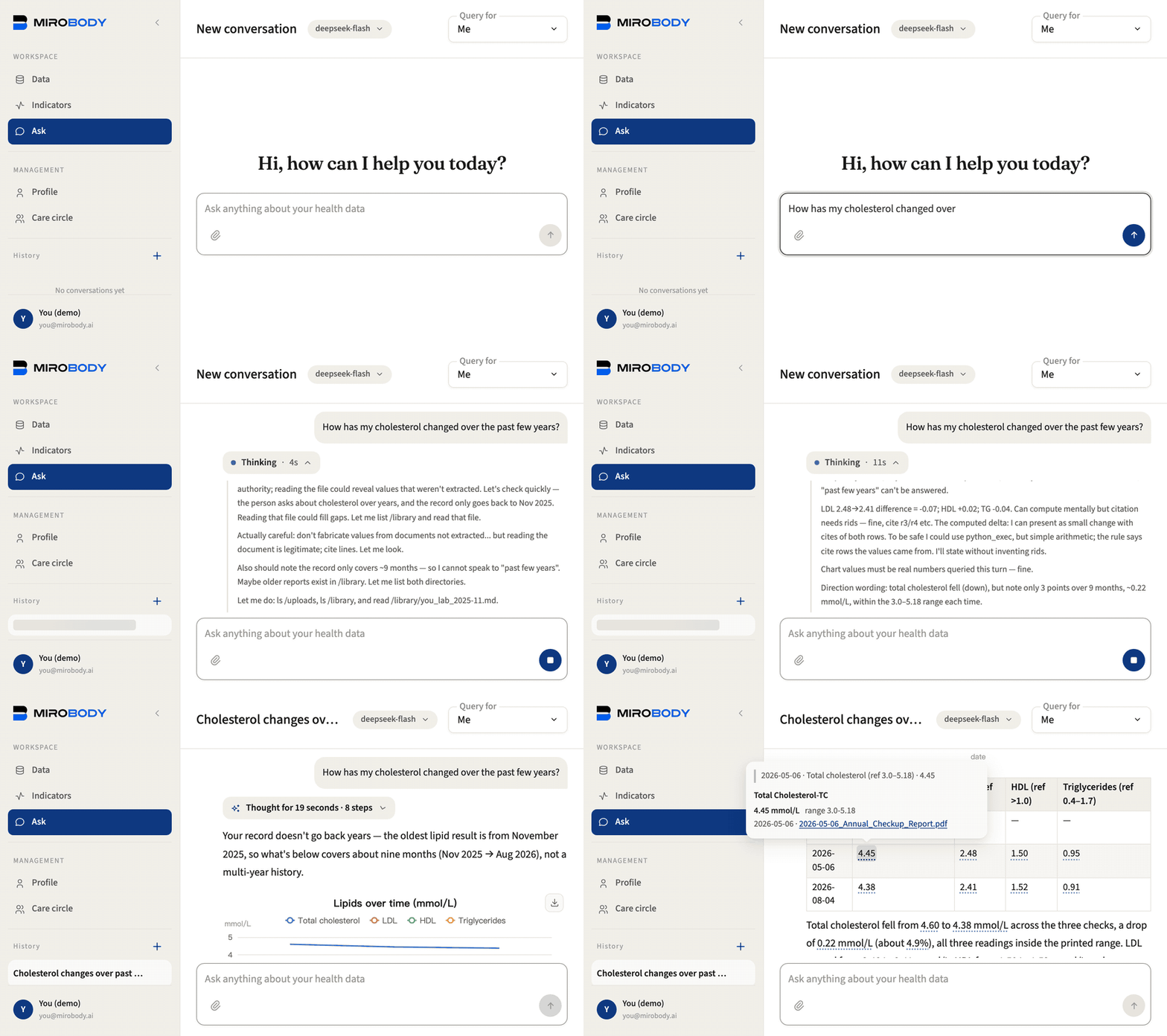
demo/upload/in the checkout holds seven the seed leaves out: the 2026 lab PDF and the CSV areyou's, the 2026 report photo and spreadsheet aremom's (upload those signed in as her), and three more areyou's earlier years, two in Chinese and two in mg/dL, printing LDL cholesterol under three names (demo/README.md). Each analyte comes out with a value, a unit and a code, linked to the page it was read from. A genotype export goes on the Genomics tab, not here. - Ask page: a question such as "How has my cholesterol moved?" finds every file that carries it, whatever the lab called it, and names the file behind each number.
- Journal: a typed sentence (
headache since last night, BP 150/95) is split by the model and coded from the vocabulary.
Connect an agent over MCP
Every tool the built-in agent has is also served at /mcp, gated per user.
In the web app, Settings issues a personal MCP link. The tool list is
data-gated: an account with no lab data does not see the lab-query tool, so
an empty list is a signal to upload something, not a fault. The link goes to
a client on the same computer:
| Client | Setup |
|---|---|
| Claude Code | claude mcp add --transport http mirobody <link> |
| Codex | codex mcp add mirobody --url <link> |
| Cursor | ~/.cursor/mcp.json: {"mcpServers": {"mirobody": {"url": "<link>"}}} |
| Gemini CLI | gemini mcp add --transport http mirobody <link> |
| Claude Desktop | claude_desktop_config.json: {"mcpServers": {"mirobody": {"command": "npx", "args": ["-y", "mcp-remote", "<link>"]}}} |
Do not tell the user to paste the link into Claude Desktop's "Add custom
connector", ChatGPT or claude.ai: those connect from their vendor's cloud,
which cannot reach localhost. They need the stack behind an HTTPS address,
which is a server deployment (SECURITY.md first), not this one.
The library's offline tools also run without the server, over stdio. Five
need no key (resolve_indicator, normalize_unit, convert_unit,
standardize_reading, standardize_complaint); standardize_report reads a
whole document with a model, so it needs the [parse] extra and one model
key, and says so when either is missing:
uvx --python 3.12 mirobody mcp
uvx --python 3.12 --from 'mirobody[parse]' mirobody mcp    # with standardize_report
Operate
| Task | Command |
|---|---|
| Follow the server log | docker compose logs -f mirobody |
| Follow the extraction worker | docker compose logs -f mirobody_worker |
| Stop, keep all data | docker compose down |
| Start again | docker compose up -d |
| Upgrade to a new release | git pull && ./deploy.sh |
| Change the app port | MIROBODY_HOST_PORT=8080 in .env, then docker compose up -d |
| Back up and restore | docs/backup-restore.md in the checkout |
Wearables connect from inside the app. Garmin, Oura and WHOOP are OAuth
clients of their vendor, so each needs credentials from that vendor's
developer programme; docs/provider-setup.md walks through it. Apple has no
API to pull from: an export.zip from the Health app is read on the host by
mirobody import apple, and a phone app pushes into a running stack through
POST /apple/health (docs/apple-health.md). The Data page does not take a
Health export.
When something is wrong
| Symptom | Cause and fix |
|---|---|
deploy.sh says a port is in use |
Set the variable it names (MIROBODY_HOST_PORT or PG_HOST_PORT) in .env, run it again |
deploy.sh says a Mirobody stack of that name already runs from another folder |
A second checkout under the same Compose name. Operate the first one, or set COMPOSE_PROJECT_NAME and both ports in this checkout's .env |
uvx mirobody … says the package provides no executables, or cannot resolve it |
The default Python is older than 3.12, so uv picked an old release. Use uvx --python 3.12 mirobody … |
doctor exits 1 after the key was added |
.env was edited but docker compose up -d was not run, or the line has a typo; grep -o '^[A-Z_]*_API_KEY=' .env shows the name without printing the value |
The server log says config.localdb.yaml is a directory |
Docker Desktop mounted the overlay from a path it does not share as a file (a checkout under /tmp on macOS does this); the stack runs on defaults. Move the checkout under the home directory and run ./deploy.sh again |
deploy.sh says compose.override.yaml is from 1.5.2 |
The message names the two commands; it is an upgrade from an older layout |
| Pull fails and the build says the bundle is an LFS pointer | git lfs install && git lfs pull, then ./deploy.sh again |
| A report photo is not extracted | The selected model is not multimodal; doctor shows which model extraction chose |
Privacy, stated once
The record lives in the stack's own Postgres volume. The only outbound calls
are to the model behind the key in .env and to a wearable vendor the user
linked. Name to code and unit normalization run offline inside the image.
Encryption at rest does not yet cover every field; SECURITY.md says what
that means before the stack reaches a network the user does not control.