File contents Run Benchmark
运行 benchmark 跑分,对数据集中的用例批量执行评测并生成报告。
Usage
当用户要求运行 benchmark 跑分时使用此 skill。
Commands
# 语法: python -m benchmark.basic_runner <benchmark> <dataset> --target-type <type> --target-model <model> [options]

# HealthBench
python -m benchmark.basic_runner healthbench sample --target-type llm_api --target-model gpt-5.4-mini
python -m benchmark.basic_runner healthbench hard --target-type llm_api --target-model gpt-5.4-mini -p 5

# MedCalc-Bench
python -m benchmark.basic_runner medcalc sample --target-type llm_api --target-model gpt-5.4-mini
python -m benchmark.basic_runner medcalc full --target-type llm_api --target-model gpt-5.4-mini --limit 50

# ESL-Bench(需先跑 generator.eslbench.prepare_data 下载数据)
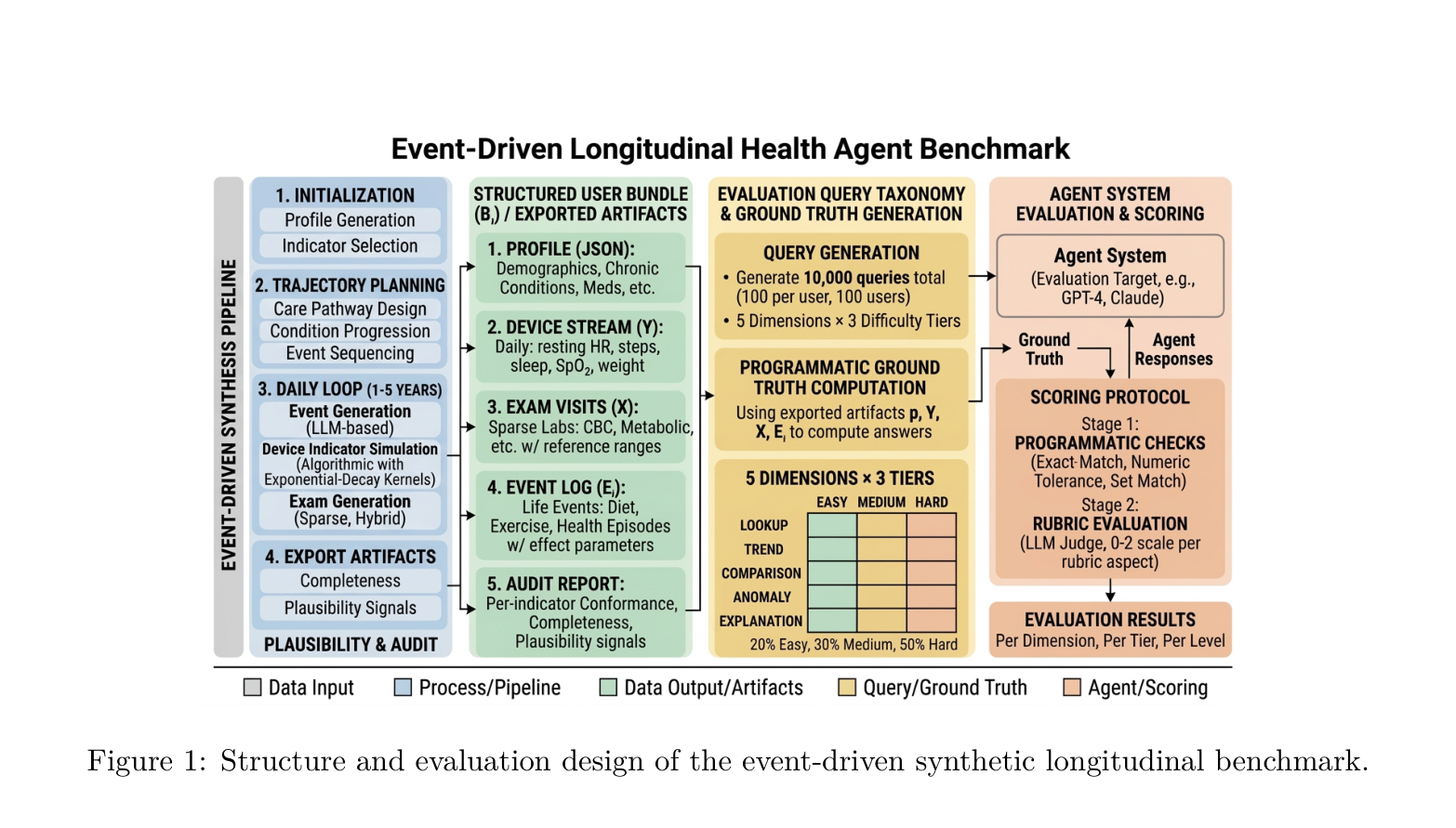
python -m benchmark.basic_runner eslbench sample50-20260331 --target-type llm_api --target-model gpt-5.4-mini

# 组合选项
python -m benchmark.basic_runner healthbench sample --target-type llm_api --target-model gpt-5.4-mini --limit 10 -p 3 -v
Options
选项
说明
--target-type被测系统类型(llm_api / hermes / evermem / mem0_rag_api / naive_rag_api / hippo_rag_api / dyg_rag_api)。可省略——省略时取 metadata.json 里的第一个 target(顺序变了会静默换目标)
--target-model模型名称(如 gpt-5.4-mini、gemini-3-pro-preview)
--limit N只跑前 N 条用例
--ids x,y,z指定用例 ID
-p N并发数(默认 0 = 不限制)
-v详细日志
Directories
Benchmark 数据集: benchmark/data/<benchmark>/<dataset>.jsonl
评测报告: benchmark/report/<benchmark>/<dataset>_<target>_<timestamp>.json
Available Datasets
评测套件
数据集
数量
评估器
healthbench
sample / hard / consensus / full
100 ~ 5,000
healthbench
medcalc
sample / full
50 ~ 1,100
medcalc
virtual_user
round1 / round2
15 ~ 60
engagement
eslbench
sample50-* / sample500-* / full-*
50 ~ 4,500
kg_qa
eslbench_distractor
sample / distractor-*
60 ~ 400
kg_qa
Web UI Alternative
也可通过 Web UI 执行跑分,支持实时进度查看:
python -m web
# 访问 http://localhost:8000/tasks 创建任务
Output
命令输出:
每条用例的执行进度
汇总统计(通过率、平均分、成本)
报告文件保存到 benchmark/report/ 目录
1 --- 2 name: run-benchmark 3 description: Run all benchmark test cases or a filtered subset. 4 --- 5 6 # Run Benchmark 7 8 运行 benchmark 跑分,对数据集中的用例批量执行评测并生成报告。 9 10 ## Usage 11 12 当用户要求运行 benchmark 跑分时使用此 skill。 13 14 ## Commands 15 16 ```bash 17 # 语法: python -m benchmark.basic_runner <benchmark> <dataset> --target-type <type> --target-model <model> [options] 18 19 # HealthBench 20 python -m benchmark.basic_runner healthbench sample --target-type llm_api --target-model gpt-5.4-mini 21 python -m benchmark.basic_runner healthbench hard --target-type llm_api --target-model gpt-5.4-mini -p 5 22 23 # MedCalc-Bench 24 python -m benchmark.basic_runner medcalc sample --target-type llm_api --target-model gpt-5.4-mini 25 python -m benchmark.basic_runner medcalc full --target-type llm_api --target-model gpt-5.4-mini --limit 50 26 27 # ESL-Bench(需先跑 generator.eslbench.prepare_data 下载数据) 28 python -m benchmark.basic_runner eslbench sample50-20260331 --target-type llm_api --target-model gpt-5.4-mini 29 30 # 组合选项 31 python -m benchmark.basic_runner healthbench sample --target-type llm_api --target-model gpt-5.4-mini --limit 10 -p 3 -v 32 ``` 33 34 ## Options 35 36 | 选项 | 说明 | 37 |------|------| 38 | `--target-type` | 被测系统类型(`llm_api` / `hermes` / `evermem` / `mem0_rag_api` / `naive_rag_api` / `hippo_rag_api` / `dyg_rag_api`)。可省略——省略时取 metadata.json 里的**第一个** target(顺序变了会静默换目标)| 39 | `--target-model` | 模型名称(如 `gpt-5.4-mini`、`gemini-3-pro-preview`) | 40 | `--limit N` | 只跑前 N 条用例 | 41 | `--ids x,y,z` | 指定用例 ID | 42 | `-p N` | 并发数(默认 0 = 不限制) | 43 | `-v` | 详细日志 | 44 45 ## Directories 46 47 - Benchmark 数据集: `benchmark/data/<benchmark>/<dataset>.jsonl` 48 - 评测报告: `benchmark/report/<benchmark>/<dataset>_<target>_<timestamp>.json` 49 50 ## Available Datasets 51 52 | 评测套件 | 数据集 | 数量 | 评估器 | 53 |----------|--------|------|--------| 54 | healthbench | sample / hard / consensus / full | 100 ~ 5,000 | healthbench | 55 | medcalc | sample / full | 50 ~ 1,100 | medcalc | 56 | virtual_user | round1 / round2 | 15 ~ 60 | engagement | 57 | eslbench | sample50-* / sample500-* / full-* | 50 ~ 4,500 | kg_qa | 58 | eslbench_distractor | sample / distractor-* | 60 ~ 400 | kg_qa | 59 60 ## Web UI Alternative 61 62 也可通过 Web UI 执行跑分,支持实时进度查看: 63 64 ```bash 65 python -m web 66 # 访问 http://localhost:8000/tasks 创建任务 67 ``` 68 69 ## Output 70 71 命令输出: 72 1. 每条用例的执行进度 73 2. 汇总统计(通过率、平均分、成本) 74 3. 报告文件保存到 `benchmark/report/` 目录
thetahealth/mirobody-eval commit b6d855d530
Frequently asked questions How do I install the Run Benchmark skill? Run npx get-skill add thetahealth/run-benchmark in your terminal (requires Node.js), paste this page's agent-chat prompt into Claude, Cursor, or any MCP-connected agent, or download the SKILL.md file and copy it into your agent's skills directory.
What does the Run Benchmark skill do? Run all benchmark test cases or a filtered subset. It is listed under Coding & Dev Tools on SkillMD.
Is Run Benchmark safe to use? This skill has not completed SkillMD's automated safety review yet. Independent scanners report: SkillSpector: PASS, Skill Scanner: PASS. SkillMD never runs a skill's scripts for you; review the SKILL.md before installing.
Which AI agents work with Run Benchmark? This skill is tagged as working with Claude Code, Claude.ai, OpenAI Codex. SKILL.md is an open format, so most agents that read a skills directory can load it too.
Is Run Benchmark free to use? Yes. Installing skills from SkillMD is free, and the skill stays under its author's original license.
Who published Run Benchmark? thetahealth (@thetahealth) published this skill. Their other Agent Skills are listed on their SkillMD profile.