agent-desktop
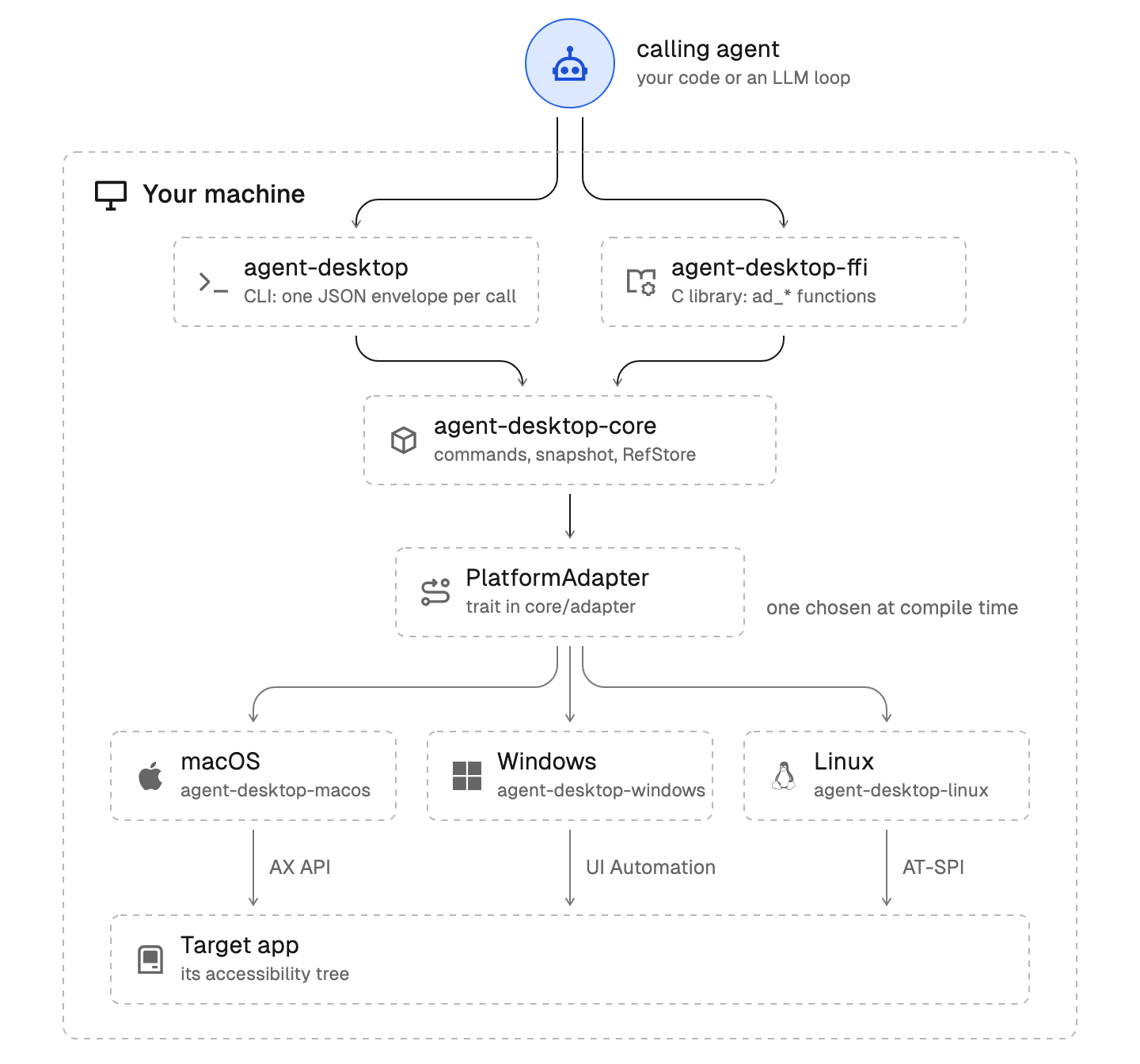
agent-desktop is a CLI that reads and operates desktop apps through the OS accessibility tree. Every command prints one JSON envelope (ok, data or error). It is a tool, not an agent: the observe, act and verify loop runs in you.
Shell syntax
Examples use a POSIX shell. In PowerShell, quote every ref ('@s8f3k2p9:e1'), because a bare @token is the splatting operator. Use $env:NAME = 'value' instead of export, and | ConvertFrom-Json instead of $(...) and jq. The Windows skill has the PowerShell forms.
First run
- Run
agent-desktop status. It reports the platform, permissions and supported_surfaces.
- Run
agent-desktop skills get platform. It loads the skill for the OS the binary runs on (macOS, Windows or Linux).
- For flags and syntax, run
agent-desktop <command> --help. This skill does not repeat flag lists.
The loop
Use find when you know the role or exact name. Otherwise map the app first and drill into one region.
agent-desktop snapshot --skeleton --app "Notes" -i --compact   # shallow map, children_count on cut branches
agent-desktop snapshot --root @s8f3k2p9:e3 -i --compact        # drill into one region
agent-desktop click @s8f3k2p9:e12                              # act on a qualified ref
agent-desktop snapshot --root @s8f3k2p9:e3 -i --compact        # verify: re-read the same region
- A small app needs no skeleton. Take a full
snapshot -i.
-i keeps interactive nodes only, so a row's static-text label is dropped. To tell which row a repeated button belongs to, drill that row's container with --root and leave out -i. On Windows and Linux that reads the row but does not make its button actionable: a button repeated in other rows is a twin in the window and its ref is refused (see Refs).- A
--root drill adds its refs to the same snapshot id. Refs outside the drilled subtree, and the drilled root itself, stay valid; refs that were already inside it are replaced, so an old ref there returns STALE_REF.
- Never skeleton a surface (
--surface menu, sheet, alert). A surface is already focused.
- An action that opens a menu, sheet or alert lists it in
data.surfaces. Target that overlay next.
- After an async step, use
wait (see commands-system.md). A fixed sleep is a race.
Refs
- Output refs are qualified:
@<snapshot_id>:e<N>, for example @s8f3k2p9:e1. Pass them to later commands as they are.
- Refs are valid for one snapshot. After any UI change, re-drill the affected region or take a new snapshot.
- Only addressable elements get refs. Static text and inert containers do not.
- A command re-identifies the element before it acts. On macOS the ref carries the element's own address, so identical twins each keep their ref. On Windows and Linux a ref resolves only when it was the only element in the window its snapshot captured with its role, native id, name and description, counted even below a skeleton or depth cut, and exactly one live element still matches. Identical twins there have no ref path: only
--headed mouse-click --xy X,Y can choose one, it takes the foreground, and a Linux Wayland session refuses it.
STALE_REF: the element is gone or no longer matches. details.kind is saved_ref_absent, or retained_object_stale on macOS. Take a fresh snapshot and use the new ref.AMBIGUOUS_TARGET: an identical element appeared (saved_ref_ambiguous), or the ref was not proven unique at capture (identity_not_unique). Repeating the ref or re-snapshotting identical twins gives the same refusal; act on a control that is unique in the window. identity_not_unique also follows a snapshot that could not read the whole window in time: retake it with a larger --timeout-ms.TIMEOUT with details.kind: resolution_identity_unknown: a live read did not answer, so identity is unproven. Nothing was sent; retry.SNAPSHOT_NOT_FOUND: the snapshot id expired. Snapshot again.
Delivery and retry
Action results carry data.disposition and errors carry error.disposition, each with delivery and retry. Observation commands such as snapshot have none on success; their errors, and every INVALID_ARGS refusal, carry not_delivered and retry: safe.
- Retry or substitute an action only when
disposition.retry is safe. Only not_delivered is safe.
- Any other delivery value means the action may have landed. A repeat can click, type or submit twice, and
toggle can undo itself.
- On a result that is not safe, read the live state (
get, is, or a fresh snapshot) and decide from that. details.post_state helps when present.
- Branch on
error.code and error.disposition. Message and suggestion text can change.
details.retryable: false means waiting cannot change the outcome. Try a different approach.
Headless and headed
Ref actions are headless by default. They use semantic accessibility calls and do not take focus, move the cursor, synthesize keys or use the clipboard. If no semantic path exists, the action fails closed. Use the global --headed flag only when the user explicitly permits physical input, such as double-click, hover, drag, or focus. Never switch to headed mode to recover from a headless failure. Raw coordinates (--xy) never imply focus. Which actions need --headed differs by OS: read the platform skill.
Sandboxes
A sandbox is a desktop a provider manages on your machine. The provider is macos: a macOS VM on an Apple Silicon Mac running macOS 13 or later. Linux and Windows have no provider; to run agent-desktop in a container you manage yourself there, follow agent-browser.dev/desktop/guides/docker-container.
agent-desktop sandbox install                          # report the provider's state
agent-desktop sandbox install macos                    # compile and sign the VM host, then report ready
agent-desktop sandbox create demo --provider macos --set from=base   # clone a set-up sandbox; or --set ipsw=latest to install
agent-desktop sandbox start demo                       # start it headless; add --window to show its desktop
agent-desktop sandbox status demo                      # state, message and next command
agent-desktop sandbox list                             # every sandbox and its state
agent-desktop sandbox exec demo -- status              # run a command in the guest
agent-desktop sandbox stop demo                        # stop the sandbox
agent-desktop sandbox rm demo                          # remove it
Names are 1–32 lowercase letters, digits or hyphens, starting with a letter or digit. exec returns the guest's envelope and exit status; a provider failure returns a host error. rm refuses a sandbox reported as running; stop it first. create needs exactly one source: --set from=<sandbox>, --set ipsw=latest or --set ipsw=<path>. start answers working until the guest answers; wait for status to report running before exec.
Read state, message and optional next; ok: true alone does not mean the sandbox is ready.
unavailable: satisfy the host requirements in message and next.missing: install the provider.ready: create a sandbox.working: repeat the command in next until the work finishes.needs_setup: have a person complete guest setup, then check status.running: run guest commands, or stop before removal.stopped: start the sandbox to use it, or remove it.broken: follow next; a broken sandbox may need removal.
A sandbox separates the desktop, not the network or the host. Sandboxes on one host share a virtual network, and a guest can reach the host's network services; keep one trust level per host. Each sandbox has its own pinned SSH host key, so a guest cannot answer for another sandbox. The SSH key under <state root>/sandboxes/<name>/ is the guest credential, and in the guest Accessibility belongs to sshd-keygen-wrapper for the whole user session.
Cloning a configured macOS VM has been tested end to end. Installing the first VM from a macOS image is experimental and has not been verified end to end. Provider setup steps and limits are in the docs: agent-browser.dev/desktop/sandboxes/macos.
References
Load one only when you need it: agent-desktop skills get desktop <reference>.
| Reference |
Open it when |
commands-observation |
You need snapshot, find, get, is, screenshot, list-surfaces semantics, partial trees, or the --root rules |
commands-interaction |
You choose between click, type, set-value, select, toggle, scroll, press and mouse commands, or you debug an action error |
commands-system |
You launch or close apps, manage windows, use the clipboard, wait, batch, sessions, multi-agent cursors, tracing, or load skills |
workflows |
You want worked patterns (forms, menus, dialogs, waiting for a new window, scroll-find, drag) and the anti-patterns list |
1---2name: agent-desktop3tags: computer-use, desktop-automation, accessibility, ai-agent, gui-automation, cli4requirements:5 - agent-desktop6description: >7 Operate desktop applications on macOS, Windows and Linux through native accessibility trees,8 using the agent-desktop CLI. Use when an AI agent must see or act on a desktop GUI:9 click buttons, fill forms, read UI state, navigate menus, toggle checkboxes, scroll,10 drag, type text, press shortcuts, take screenshots, manage windows, use the clipboard,11 launch or close apps, read notifications.12 Triggers on: "click button", "fill form", "open app", "read UI", "computer use",13 "operate desktop", "accessibility tree", "snapshot app", "type into field", "navigate menu",14 "toggle checkbox", "take screenshot", "desktop automation", "agent-desktop",15 or any desktop GUI task on macOS, Windows or Linux.16metadata:17 source: https://skillmd.com/skills/vercel-labs/agent-desktop18---1920# agent-desktop2122agent-desktop is a CLI that reads and operates desktop apps through the OS accessibility tree. Every command prints one JSON envelope (`ok`, `data` or `error`). It is a tool, not an agent: the observe, act and verify loop runs in you.2324## Shell syntax2526Examples use a POSIX shell. In PowerShell, quote every ref (`'@s8f3k2p9:e1'`), because a bare `@token` is the splatting operator. Use `$env:NAME = 'value'` instead of `export`, and `| ConvertFrom-Json` instead of `$(...)` and `jq`. The Windows skill has the PowerShell forms.2728## First run29301. Run `agent-desktop status`. It reports the platform, permissions and `supported_surfaces`.312. Run `agent-desktop skills get platform`. It loads the skill for the OS the binary runs on (macOS, Windows or Linux).323. For flags and syntax, run `agent-desktop <command> --help`. This skill does not repeat flag lists.3334## The loop3536Use `find` when you know the role or exact name. Otherwise map the app first and drill into one region.3738```39agent-desktop snapshot --skeleton --app "Notes" -i --compact # shallow map, children_count on cut branches40agent-desktop snapshot --root @s8f3k2p9:e3 -i --compact # drill into one region41agent-desktop click @s8f3k2p9:e12 # act on a qualified ref42agent-desktop snapshot --root @s8f3k2p9:e3 -i --compact # verify: re-read the same region43```4445- A small app needs no skeleton. Take a full `snapshot -i`.46- `-i` keeps interactive nodes only, so a row's static-text label is dropped. To tell which row a repeated button belongs to, drill that row's container with `--root` and leave out `-i`. On Windows and Linux that reads the row but does not make its button actionable: a button repeated in other rows is a twin in the window and its ref is refused (see Refs).47- A `--root` drill adds its refs to the same snapshot id. Refs outside the drilled subtree, and the drilled root itself, stay valid; refs that were already inside it are replaced, so an old ref there returns `STALE_REF`.48- Never skeleton a surface (`--surface menu`, `sheet`, `alert`). A surface is already focused.49- An action that opens a menu, sheet or alert lists it in `data.surfaces`. Target that overlay next.50- After an async step, use `wait` (see `commands-system.md`). A fixed sleep is a race.5152## Refs5354- Output refs are qualified: `@<snapshot_id>:e<N>`, for example `@s8f3k2p9:e1`. Pass them to later commands as they are.55- Refs are valid for one snapshot. After any UI change, re-drill the affected region or take a new snapshot.56- Only addressable elements get refs. Static text and inert containers do not.57- A command re-identifies the element before it acts. On macOS the ref carries the element's own address, so identical twins each keep their ref. On Windows and Linux a ref resolves only when it was the only element in the window its snapshot captured with its role, native id, name and description, counted even below a skeleton or depth cut, and exactly one live element still matches. Identical twins there have no ref path: only `--headed mouse-click --xy X,Y` can choose one, it takes the foreground, and a Linux Wayland session refuses it.58- `STALE_REF`: the element is gone or no longer matches. `details.kind` is `saved_ref_absent`, or `retained_object_stale` on macOS. Take a fresh snapshot and use the new ref.59- `AMBIGUOUS_TARGET`: an identical element appeared (`saved_ref_ambiguous`), or the ref was not proven unique at capture (`identity_not_unique`). Repeating the ref or re-snapshotting identical twins gives the same refusal; act on a control that is unique in the window. `identity_not_unique` also follows a snapshot that could not read the whole window in time: retake it with a larger `--timeout-ms`.60- `TIMEOUT` with `details.kind: resolution_identity_unknown`: a live read did not answer, so identity is unproven. Nothing was sent; retry.61- `SNAPSHOT_NOT_FOUND`: the snapshot id expired. Snapshot again.6263## Delivery and retry6465Action results carry `data.disposition` and errors carry `error.disposition`, each with `delivery` and `retry`. Observation commands such as `snapshot` have none on success; their errors, and every `INVALID_ARGS` refusal, carry `not_delivered` and `retry: safe`.6667- Retry or substitute an action only when `disposition.retry` is `safe`. Only `not_delivered` is safe.68- Any other delivery value means the action may have landed. A repeat can click, type or submit twice, and `toggle` can undo itself.69- On a result that is not safe, read the live state (`get`, `is`, or a fresh snapshot) and decide from that. `details.post_state` helps when present.70- Branch on `error.code` and `error.disposition`. Message and suggestion text can change.71- `details.retryable: false` means waiting cannot change the outcome. Try a different approach.7273## Headless and headed7475Ref actions are headless by default. They use semantic accessibility calls and do not take focus, move the cursor, synthesize keys or use the clipboard. If no semantic path exists, the action fails closed. Use the global `--headed` flag only when the user explicitly permits physical input, such as double-click, hover, drag, or focus. Never switch to headed mode to recover from a headless failure. Raw coordinates (`--xy`) never imply focus. Which actions need `--headed` differs by OS: read the platform skill.7677## Sandboxes7879A sandbox is a desktop a provider manages on your machine. The provider is `macos`: a macOS VM on an Apple Silicon Mac running macOS 13 or later. Linux and Windows have no provider; to run agent-desktop in a container you manage yourself there, follow `agent-browser.dev/desktop/guides/docker-container`.8081```sh82agent-desktop sandbox install # report the provider's state83agent-desktop sandbox install macos # compile and sign the VM host, then report ready84```8586```sh87agent-desktop sandbox create demo --provider macos --set from=base # clone a set-up sandbox; or --set ipsw=latest to install88agent-desktop sandbox start demo # start it headless; add --window to show its desktop89agent-desktop sandbox status demo # state, message and next command90agent-desktop sandbox list # every sandbox and its state91agent-desktop sandbox exec demo -- status # run a command in the guest92agent-desktop sandbox stop demo # stop the sandbox93agent-desktop sandbox rm demo # remove it94```9596Names are 1–32 lowercase letters, digits or hyphens, starting with a letter or digit. `exec` returns the guest's envelope and exit status; a provider failure returns a host error. `rm` refuses a sandbox reported as `running`; stop it first. `create` needs exactly one source: `--set from=<sandbox>`, `--set ipsw=latest` or `--set ipsw=<path>`. `start` answers `working` until the guest answers; wait for `status` to report `running` before `exec`.9798Read `state`, `message` and optional `next`; `ok: true` alone does not mean the sandbox is ready.99100- `unavailable`: satisfy the host requirements in `message` and `next`.101- `missing`: install the provider.102- `ready`: create a sandbox.103- `working`: repeat the command in `next` until the work finishes.104- `needs_setup`: have a person complete guest setup, then check status.105- `running`: run guest commands, or stop before removal.106- `stopped`: start the sandbox to use it, or remove it.107- `broken`: follow `next`; a broken sandbox may need removal.108109A sandbox separates the desktop, not the network or the host. Sandboxes on one host share a virtual network, and a guest can reach the host's network services; keep one trust level per host. Each sandbox has its own pinned SSH host key, so a guest cannot answer for another sandbox. The SSH key under `<state root>/sandboxes/<name>/` is the guest credential, and in the guest Accessibility belongs to `sshd-keygen-wrapper` for the whole user session.110111Cloning a configured macOS VM has been tested end to end. Installing the first VM from a macOS image is experimental and has not been verified end to end. Provider setup steps and limits are in the docs: `agent-browser.dev/desktop/sandboxes/macos`.112113## References114115Load one only when you need it: `agent-desktop skills get desktop <reference>`.116117| Reference | Open it when |118|-----------|--------------|119| `commands-observation` | You need `snapshot`, `find`, `get`, `is`, `screenshot`, `list-surfaces` semantics, partial trees, or the `--root` rules |120| `commands-interaction` | You choose between click, type, set-value, select, toggle, scroll, press and mouse commands, or you debug an action error |121| `commands-system` | You launch or close apps, manage windows, use the clipboard, `wait`, `batch`, sessions, multi-agent cursors, tracing, or load skills |122| `workflows` | You want worked patterns (forms, menus, dialogs, waiting for a new window, scroll-find, drag) and the anti-patterns list |