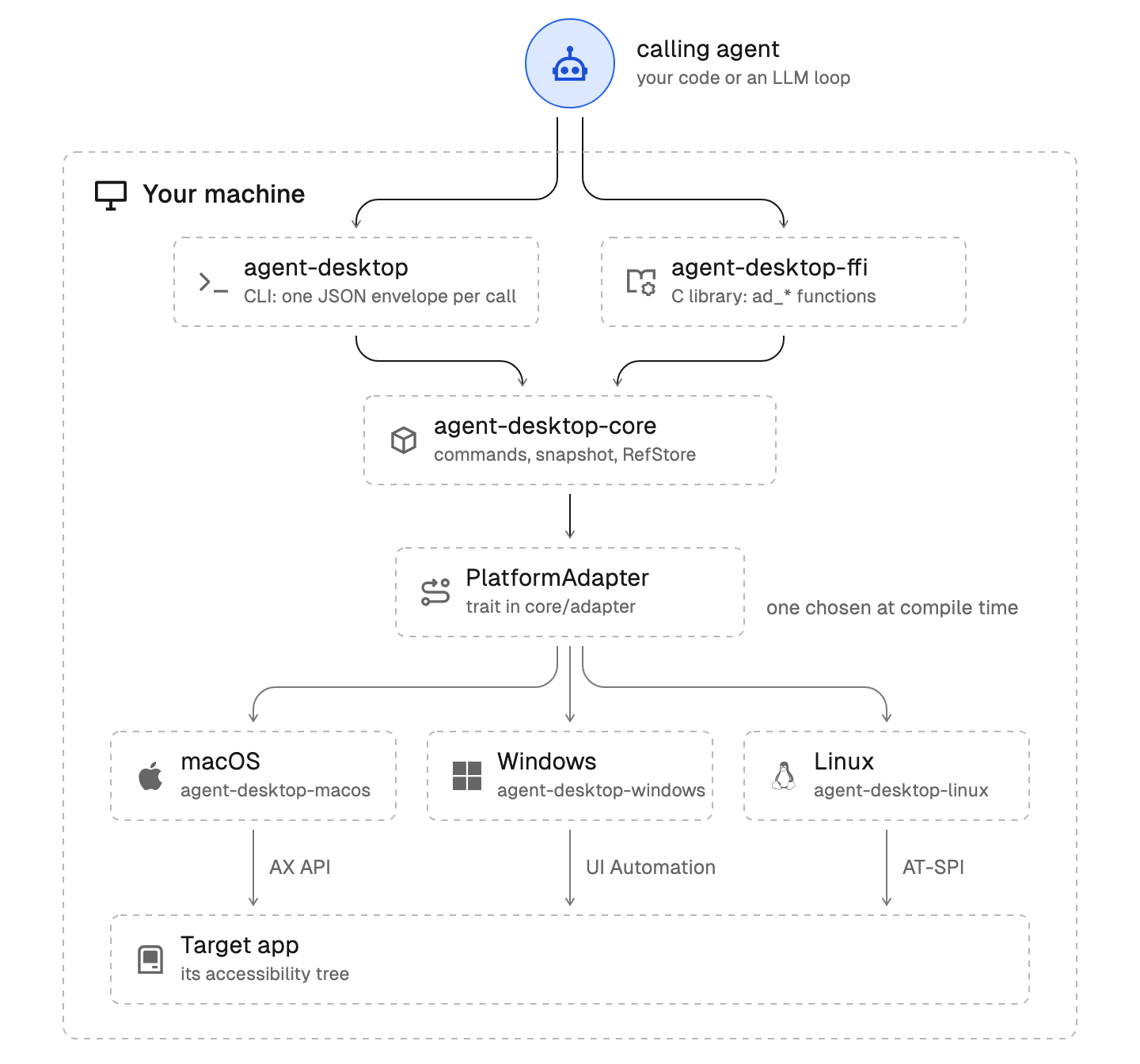
Architecture diagram
Diagrams are standalone HTML files that the docs embed with the Diagram component. Follow the technical-writer skill for any prose.
Folder convention
- One folder per diagram:
apps/docs/public/desktop/diagrams/<name>/index.html, served at /desktop/diagrams/<name>/index.html. <name> is a short kebab-case slug. Keep it under /desktop: agent-browser.dev routes only /desktop paths to this app.
apps/docs/proxy.ts returns 404 for /desktop paths that are not docs pages, so its matcher must exclude desktop/diagrams/, as it does for desktop/favicon.ico.- The file is standalone: inline CSS, one inline SVG, no external requests. Start from references/template.html.
- The visual tokens are in references/style.md. Reuse them so every diagram looks the same.
- The theme comes from
?theme=light or ?theme=dark. Without the parameter the diagram follows prefers-color-scheme and defaults to dark.
- Give the SVG a
<title> and a <desc> that states the whole flow in words.
Draw the real mechanism
- Read the code before drawing. For observation and refs, read
crates/core/src/snapshot/, crates/core/src/refs/, and the command in crates/core/src/commands/. For platforms, read the PlatformAdapter trait in crates/core/src/adapter/ and the platform crate. Draw only components, names, and directions you can point to in source.
- Use the identifiers from the code as labels (
PlatformAdapter, RefStore) and put the mechanism in the gray second line (AX API, UI Automation).
- Draw one arrow per real data path. Label arrows that cross a boundary with the command, flag, or call (
snapshot --root).
- Group components by where they run: an outer dashed container for a machine, a nested panel for a process. Put the calling agent outside.
- Lay the flow out top to bottom: the entry point at the top, then each layer or step on its own row below the one that calls it, so arrows point down. Put branches side by side on one row (the three platform crates, the error outcomes of a step) and route loops back up along the right side. Use left-to-right only for a before-and-after comparison of state, such as the re-drill panels.
- Mark the entry point of the flow with the highlighted circle node, at the top. Use it once, and give it the icon of what starts the flow (
robot for the calling agent, link for a ref, refresh-counter-clockwise for a re-drill), never a generic globe.
- Give every node and container header an icon that names what it is. Use the Geist icon set and the OS marks listed in references/style.md. Do not draw your own icons or reuse one icon for unrelated nodes.
- Lay it out for the 720px docs column at 1:1 scale (see style.md) and keep it to 12 nodes or fewer. Move detail to the page text.
Embed it
<Diagram name="snapshot-drill-down" title="Skeleton snapshot and drill-down" aspectRatio="720 / 448" />
aspectRatio is the SVG viewBox width and height. The component passes the site theme to the iframe.
If apps/docs has no Diagram component yet, add components/geistdocs/diagram.tsx: a client component that renders the file in a lazy iframe from /desktop/diagrams/<name>/index.html and appends ?theme= from next-themes. Register it in components/geistdocs/mdx-components.tsx.
Text version
Keep a text version of the flow next to the diagram on the page, such as a short list or code block with the same components and order. Readers of the .md route, agents, and screen readers depend on it.
Check it
- In
apps/docs, run pnpm dev and, in a second terminal, pnpm exec microfrontends proxy microfrontends.json --local-apps agent-desktop.
- Open
http://localhost:3024/desktop/diagrams/<name>/index.html and the same URL with ?theme=light at 1440x900. Look for clipped text, labels that run past their node, overlapping labels, arrows that miss their node, icons that do not match their node, and unreadable gray text. Labels that fit in Geist can overflow in a fallback font, so leave at least 20 of room after the longest label.
- Open the docs page and check the diagram in both site themes.
- Run
pnpm build in apps/docs.
- Stop the dev server and the proxy, and close the browser session.
1---2name: architecture-diagram3description: Create or update architecture and flow diagrams for agent-desktop's docs site in apps/docs. Use when a docs page needs a diagram of components, data flow, or a command pipeline, or when an existing diagram in apps/docs/public/desktop/diagrams changes.4metadata:5 source: https://skillmd.com/skills/vercel-labs/architecture-diagram6 internal: true7---89# Architecture diagram1011Diagrams are standalone HTML files that the docs embed with the `Diagram` component. Follow the technical-writer skill for any prose.1213## Folder convention1415- One folder per diagram: `apps/docs/public/desktop/diagrams/<name>/index.html`, served at `/desktop/diagrams/<name>/index.html`. `<name>` is a short kebab-case slug. Keep it under `/desktop`: agent-browser.dev routes only `/desktop` paths to this app.16- `apps/docs/proxy.ts` returns 404 for `/desktop` paths that are not docs pages, so its matcher must exclude `desktop/diagrams/`, as it does for `desktop/favicon.ico`.17- The file is standalone: inline CSS, one inline SVG, no external requests. Start from [references/template.html](references/template.html).18- The visual tokens are in [references/style.md](references/style.md). Reuse them so every diagram looks the same.19- The theme comes from `?theme=light` or `?theme=dark`. Without the parameter the diagram follows `prefers-color-scheme` and defaults to dark.20- Give the SVG a `<title>` and a `<desc>` that states the whole flow in words.2122## Draw the real mechanism23241. Read the code before drawing. For observation and refs, read `crates/core/src/snapshot/`, `crates/core/src/refs/`, and the command in `crates/core/src/commands/`. For platforms, read the `PlatformAdapter` trait in `crates/core/src/adapter/` and the platform crate. Draw only components, names, and directions you can point to in source.252. Use the identifiers from the code as labels (`PlatformAdapter`, `RefStore`) and put the mechanism in the gray second line (`AX API`, `UI Automation`).263. Draw one arrow per real data path. Label arrows that cross a boundary with the command, flag, or call (`snapshot --root`).274. Group components by where they run: an outer dashed container for a machine, a nested panel for a process. Put the calling agent outside.285. Lay the flow out top to bottom: the entry point at the top, then each layer or step on its own row below the one that calls it, so arrows point down. Put branches side by side on one row (the three platform crates, the error outcomes of a step) and route loops back up along the right side. Use left-to-right only for a before-and-after comparison of state, such as the re-drill panels.296. Mark the entry point of the flow with the highlighted circle node, at the top. Use it once, and give it the icon of what starts the flow (`robot` for the calling agent, `link` for a ref, `refresh-counter-clockwise` for a re-drill), never a generic globe.307. Give every node and container header an icon that names what it is. Use the Geist icon set and the OS marks listed in [references/style.md](references/style.md#icons). Do not draw your own icons or reuse one icon for unrelated nodes.318. Lay it out for the 720px docs column at 1:1 scale (see style.md) and keep it to 12 nodes or fewer. Move detail to the page text.3233## Embed it3435```mdx36<Diagram name="snapshot-drill-down" title="Skeleton snapshot and drill-down" aspectRatio="720 / 448" />37```3839`aspectRatio` is the SVG `viewBox` width and height. The component passes the site theme to the iframe.4041If `apps/docs` has no `Diagram` component yet, add `components/geistdocs/diagram.tsx`: a client component that renders the file in a lazy iframe from `/desktop/diagrams/<name>/index.html` and appends `?theme=` from `next-themes`. Register it in `components/geistdocs/mdx-components.tsx`.4243## Text version4445Keep a text version of the flow next to the diagram on the page, such as a short list or code block with the same components and order. Readers of the `.md` route, agents, and screen readers depend on it.4647## Check it48491. In `apps/docs`, run `pnpm dev` and, in a second terminal, `pnpm exec microfrontends proxy microfrontends.json --local-apps agent-desktop`.502. Open `http://localhost:3024/desktop/diagrams/<name>/index.html` and the same URL with `?theme=light` at 1440x900. Look for clipped text, labels that run past their node, overlapping labels, arrows that miss their node, icons that do not match their node, and unreadable gray text. Labels that fit in Geist can overflow in a fallback font, so leave at least 20 of room after the longest label.513. Open the docs page and check the diagram in both site themes.524. Run `pnpm build` in `apps/docs`.535. Stop the dev server and the proxy, and close the browser session.