
Overview
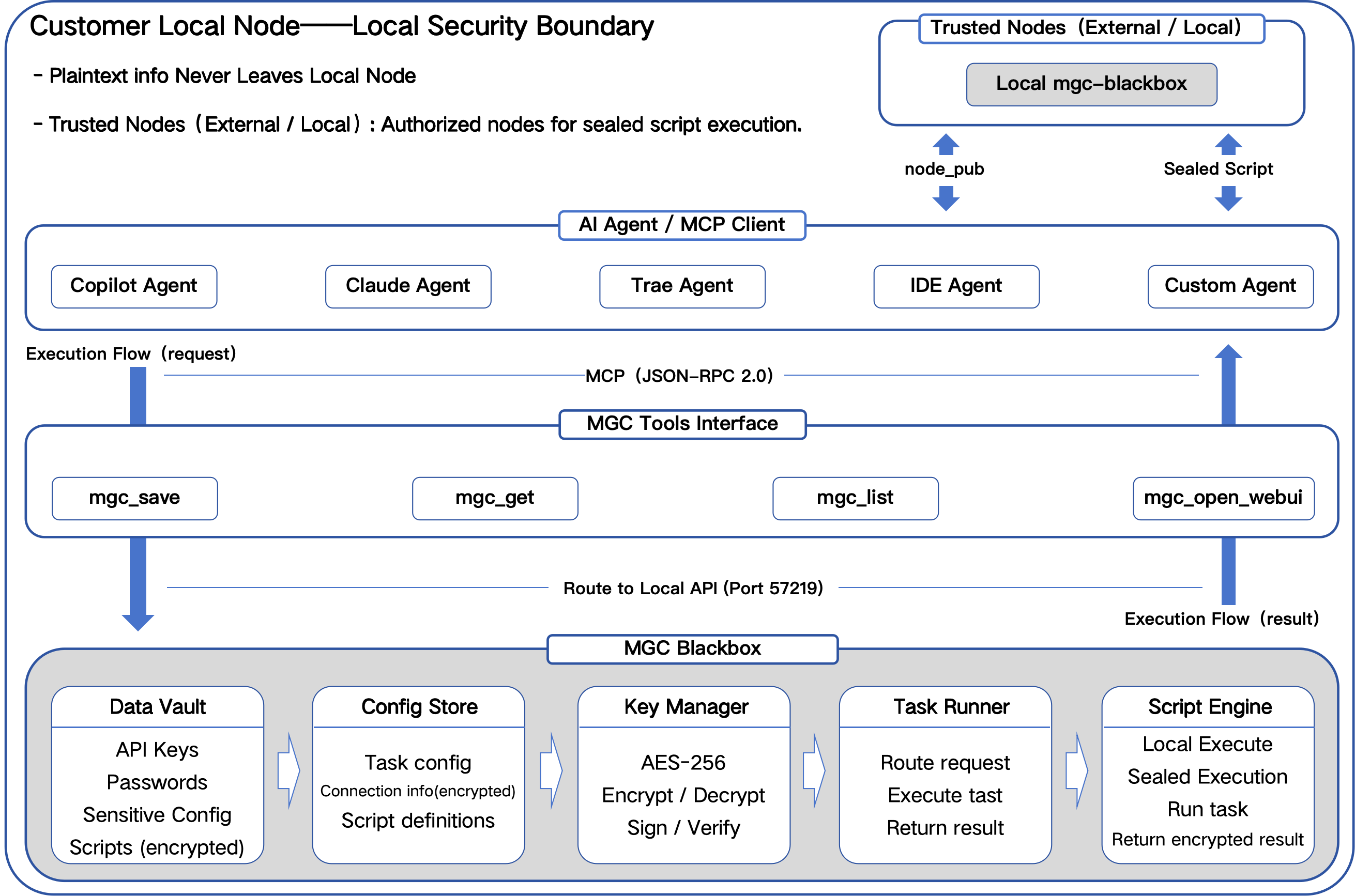
Database Credential Security is a documentation skill that teaches how to manage database credentials securely using MGC Blackbox 1.4.10. Supports MySQL, PostgreSQL, SQLite, MariaDB, SQL Server and other databases. Credentials are encrypted at rest; local scripts retrieve them via HTTP API at runtime; AI agents never touch credential plaintext (true zero‑exposure via mgc_run blackbox execution).
This skill contains no executable code and is safe for automatic approval.
⚠️ Critical: True Zero‑Exposure Means AI Never Sees Credentials
The wrong way (breaks zero‑exposure):
AI → mgc_get(config) → returns plaintext JSON (incl. password) → AI uses password
The right way (1.4.10 true zero‑exposure):
User → mgc_save(config with credentials)
User / Script Agent → mgc_save(script that reads config via HTTP API)
Executor Agent → mgc_run(script) → MGC blackbox executes
                              └─ script reads credentials via HTTP API
                              └─ script connects to DB and runs SQL
                              └─ script writes result to file
                              └─ MGC returns only {pid, status}
AI → reads result file → only sees SQL output, NEVER password
Never call
mgc_getfrom AI.mgc_getreturns plaintext and breaks zero‑exposure. Usemgc_runfor blackbox execution instead.
What This Skill Enables
After reading this documentation, an AI agent will understand how to:
- Store database credentials encrypted in MGC Blackbox (via WebUI or
mgc_save) - Write local database scripts that retrieve credentials via HTTP API at runtime
- Execute database scripts via
mgc_run(1.4.7+ blackbox); AI never sees credentials - Manage multiple database connections safely
- Rotate credentials without code changes (
update_if_exists=true) - Seal database scripts for multi‑node execution with
mgc_seal
When to Use This Skill
Must Use Cases
- Production environments — any database access in production requires secure credential management
- Automation tasks — scheduled scripts that need database access (CI/CD, cron jobs)
- Multi‑node collaboration — Node A creates a database script, Node B executes it via
mgc_seal - AI needs database access but must not see passwords — AI provides SQL only; scripts handle the rest
Example Triggers
- "Connect to MySQL database securely"
- "Execute a SQL query without exposing the password"
- "Create a scheduled backup script for PostgreSQL"
- "Run database migrations safely"
- "Share a database script with another node securely"
When NOT to Use This Skill
- Public databases with no authentication — no credential needed
- Local development with no sensitive data — disposable test DBs
- Interactive manual access — DBeaver / MySQL Workbench etc.
Capability Boundary
What This Skill Does
- Credential storage pattern (encrypted, in MGC)
- Local-script pattern (HTTP API for credential retrieval)
- Multi‑node sealing pattern (
mgc_seal) - Anti-pattern and security guidance
What This Skill Does NOT Do
- Is NOT a database client
- Does NOT run SQL directly from AI
- Does NOT handle schema migrations or backups (those are local scripts)
Prerequisites
- Install MGC Blackbox 1.4.10+:
pip install mgc-blackbox>=1.4.9 - Start MGC service:
mgc(API at http://127.0.0.1:57219, WebUI at 57218) - Token file:
~/.mgc/database/mgc_black_box/.mgc_token - Database driver installed:
mysql-connector-python/psycopg2/pymysql/ etc.
Sandbox mode (1.4.9+): When running inside a sandbox Agent (Trae Work / Workbuddy), install MGC in the system environment; otherwise MCP operations may be limited — in that case, call FastAPI directly at
/api/mgc/sensitive/run.
Complete Example: Zero‑Exposure Database Workflow
Step 1: Store Database Credentials (user, via WebUI or mgc_save)
Credentials should be stored by the user via WebUI (browser or
mgc_open_webui) or by AI on explicit user instruction. AI must never read them back viamgc_get.
MySQL
Tool: mgc_save
Parameters:
  info_type:   "config"
  info_owner:  "my_mysql_prod"
  content:     "{
    \"host\": \"db.example.com\",
    \"port\": 3306,
    \"database\": \"production_db\",
    \"user\": \"app_user\",
    \"password\": \"your_secure_password\"
  }"
PostgreSQL
Tool: mgc_save
Parameters:
  info_type:   "config"
  info_owner:  "my_postgres_prod"
  content:     "{
    \"host\": \"db.example.com\",
    \"port\": 5432,
    \"database\": \"production_db\",
    \"user\": \"app_user\",
    \"password\": \"your_secure_password\",
    \"sslmode\": \"require\"
  }"
SQL Server
Tool: mgc_save
Parameters:
  info_type:   "config"
  info_owner:  "my_sqlserver_prod"
  content:     "{
    \"host\": \"db.example.com\",
    \"port\": 1433,
    \"database\": \"production_db\",
    \"user\": \"app_user\",
    \"password\": \"your_secure_password\"
  }"
Rotating credentials: call
mgc_saveagain with the sameinfo_type/info_ownerANDupdate_if_exists=true. The old entry is replaced; scripts using the same reference will pick up the new credentials automatically.
Step 2: Reference Credentials in Your Script
# In your database script (stored as MGC script):
MGC_CREDENTIAL_REF = "my_mysql_prod"   # info_owner only; no password here
Step 3: Local Script Retrieves Credentials via HTTP API
import os
import requests
import json

MGC_BASE_URL = "http://127.0.0.1:57219"
TOKEN_FILE = os.path.expanduser("~/.mgc/database/mgc_black_box/.mgc_token")

def get_credentials(info_owner, info_type="config"):
    """Read credentials via HTTP API. Script-internal only; AI never calls this."""
    if not os.path.exists(TOKEN_FILE):
        raise RuntimeError("MGC token file missing")
    with open(TOKEN_FILE, "r") as f:
        token = f.read().strip()

    url = f"{MGC_BASE_URL}/api/mgc/sensitive/get"
    headers = {"X-MGC-Token": token, "Content-Type": "application/json"}
    data = {"info_type": info_type, "info_owner": info_owner, "action": "run"}
    resp = requests.post(url, json=data, headers=headers, timeout=10)
    resp.raise_for_status()
    result = resp.json()
    if isinstance(result, str):
        return json.loads(result)
    return result.get("data", {}).get("data_field", {})
Step 4: Local Script Connects and Executes SQL
import argparse
import mysql.connector

def main():
    parser = argparse.ArgumentParser()
    parser.add_argument("--credential_ref", default="my_mysql_prod")
    parser.add_argument("--sql", required=True)
    args, _ = parser.parse_known_args()

    creds = get_credentials(args.credential_ref)

    conn = mysql.connector.connect(
        host=creds["host"],
        port=creds["port"],
        database=creds["database"],
        user=creds["user"],
        password=creds["password"],
    )
    cursor = conn.cursor()
    cursor.execute(args.sql)
    rows = cursor.fetchall()
    cursor.close()
    conn.close()

    # Write results to file so AI can read them via mgc_run output path
    import datetime
    out = os.path.expanduser(f"~/mgc_outputs/db_{datetime.datetime.now().strftime('%Y%m%d_%H%M%S')}.txt")
    os.makedirs(os.path.dirname(out), exist_ok=True)
    with open(out, "w", encoding="utf-8") as f:
        for row in rows:
            f.write(str(row) + "\n")
    print(f"RESULT_FILE:{out}")  # mgc_run returns this stdout
Step 5: Store the Script and Execute
# 5a. Script Agent stores the script in MGC
mgc_save(
    info_type="script",
    info_owner="mysql_query_v1",
    ext01="python",
    content="<script body from steps 3-4>",
    update_if_exists=True
)
# MGC 1.4.10 auto-parses argparse literal defaults into ext02

# 5b. Executor Agent runs the script (1.4.7+ blackbox)
result = mgc_run(
    info_type="script",
    info_owner="mysql_query_v1",
    diff_1="v1",                  # schema-required differentiation field; any non-empty string works for a single entry
    ext02='["--sql", "SELECT 1"]' # JSON array string, NOT dict
)
# Returns: {"pid": 12345, "status": "started"}
# Read the result file printed on stdout (if mgc returned it via the file output convention).
# AI never sees the password.
Multi‑Node Example: Sealing Database Scripts (1.4.10)
Node A: Seal the database script
# Get Node B's public key (multi-line PEM, real \n)
node_pub = mgc_get(info_type="__NODE_PUB__", info_owner="__NODE_PUB__")

# Store original script first
mgc_save(
    info_type="script",
    info_owner="mysql_backup_v1",
    ext01="python",
    content="<script body>"
)
# 1.4.10 auto-fills ext02 from argparse literal defaults

# Seal with Node B's public key
sealed = mgc_seal(
    info_owner="mysql_backup_v1",
    ext04=node_pub
)
# sealed = {content, ext_01, ext_02, ext_03}
# ⚠️ ext04 MUST be multi-line PEM with real newlines
Node B: Store and execute the sealed capsule
# Store the sealed capsule (must include ext02 from source)
mgc_save(
    info_type="script",
    info_owner="mysql_backup_v1",
    ext01=sealed["ext_01"],
    ext02=sealed["ext_02"],            # default args from source argparse
    content=sealed["content"],
    ext03=sealed["ext_03"],            # RSA-encrypted AES key (only Node B can decrypt)
    update_if_exists=True
)

# Execute via mgc_run (1.4.7+)
mgc_run(
    info_type="script",
    info_owner="mysql_backup_v1",
    diff_1="v1",                       # schema-required; any non-empty string works for a single entry
    ext02='["--output-dir", "/backup"]'
)
# Node B executes with its own private key; credentials are read from Node B's local MGC.
Credential consistency: Node B must also store the DB credential with the same
info_type/info_owneras Node A. Otherwise the sealed script will fail to find credentials.
MCP Tools Reference
| Tool | Purpose | Notes |
|---|---|---|
mgc_save |
Store credentials / scripts | info_type="config" for credentials, "script" for scripts |
mgc_run |
Blackbox script execution (1.4.7+) | ext02 MUST be a JSON array string; diff_1 is schema-required (any non-empty string for a single entry) |
mgc_list |
List entries (exact match) | metadata only, no plaintext |
mgc_find |
Fuzzy search (1.4.10) | match_mode: substring/prefix/suffix/exact |
mgc_seal |
Seal script for target node | ext04 MUST be multi-line PEM with real newlines |
mgc_open_webui |
Open WebUI for user to store credentials | browser opens automatically |
mgc_get |
Returns plaintext — breaks zero‑exposure |
Quick Reference: AI Behaviour Rules
When this skill is active, the AI MUST:
- ✅ Use
mgc_runto execute database scripts; AI never touches plaintext - ✅ Use
mgc_findto locate available database scripts (match_mode="substring") - ✅ Use
mgc_open_webuito help user store credentials - ✅ Reference scripts by
info_owner/diff_1only; never include credentials in prompts - ❌ Never call
mgc_get— returns plaintext - ❌ Never embed credentials in SKILL.md, prompts, or AI context
- ❌ Never ask the user to paste the password in chat
FAQ
MGC Related
Q: What if MGC is not installed?
A: pip install mgc-blackbox>=1.4.9. Requires Python 3.10+.
Q: What if MGC is not running?
A: Start with mgc. WebUI at http://127.0.0.1:57218, API at http://127.0.0.1:57219.
Q: Port 57219 is already in use? A: Stop other apps on that port, or run MGC with a different port.
Q: How do I check MGC version?
A: mgc --status (1.4.9+). Also shown in WebUI's Settings panel.
Credential Management
Q: How do I update database credentials?
A: Call mgc_save with the same info_type/info_owner AND update_if_exists=true. The old entry is replaced.
Q: How do I manage multiple databases?
A: Use different info_owner per database: my_mysql_prod, my_postgres_dev, etc.
Q: How do I rotate database credentials?
A: 1) Update in DB; 2) mgc_save(..., update_if_exists=true) with new credentials; 3) Scripts auto-pick up on next run.
Q: What if credentials are not found?
A: 1) Verify info_owner exactly (case-sensitive); 2) mgc_list to check; 3) mgc_find for fuzzy lookup.
Security
Q: Can AI read credentials from MGC?
A: No — never call mgc_get from AI. mgc_get returns plaintext and breaks zero‑exposure. Credentials must be read by local scripts via HTTP API inside MGC blackbox execution.
Q: What if AI accidentally logs credentials?
A: Local scripts must: never print/log password values; only log non-sensitive info (host, query, row count).
Q: Is HTTP API access to credentials safe?
A: Yes — HTTP API is bound to localhost (127.0.0.1), requires the MGC token from ~/.mgc/database/mgc_black_box/.mgc_token. The script is inside MGC blackbox and the AI never sees the response.
Multi‑Node
Q: How to share a database script across nodes?
A: 1) Node A stores script; 2) mgc_seal(info_owner=..., ext04=node_b_pubkey); 3) Node B stores capsule with ext02/ext03; 4) Node B calls mgc_run.
Q: Can I seal for multiple nodes?
A: Not in one call — seal separately for each node. Use mgc_find to track which nodes have copies.
Anti‑Patterns
❌ AI calling mgc_get to retrieve credentials
# WRONG — breaks zero‑exposure, password enters AI context
creds = mgc_get(info_type="config", info_owner="my_mysql_prod")
print(creds["password"])  # NEVER
Correct: AI only calls mgc_run; the script internally uses HTTP API.
❌ Hardcoding password in script
# WRONG
def connect():
    return pymysql.connect(password="secret_password")
Correct: Read from MGC via HTTP API; password is never in source code.
❌ Embedding connection string in SKILL.md
# WRONG
- Host: db.example.com
- Password: my_secret_password
Correct:
Reference: info_owner="my_mysql_prod"
Credentials stored encrypted; AI never sees them.
❌ Passing password as mgc_run parameter
# WRONG
mgc_run(info_owner="query", ext02=json.dumps({"password": "..."}))
Correct: Password is info_type="config" stored separately; script reads it via HTTP API inside blackbox.
❌ Logging credentials
# WRONG
logger.info(f"Connecting with password: {creds['password']}")
Correct:
logger.info(f"Connecting to {creds['host']}:{creds['port']}") # No password
❌ Writing credentials to disk
# WRONG
echo "password=secret" > db_credentials.txt
Correct: Store in MGC; never write credentials to plain files.
Troubleshooting
Error: "Credential not found"
- Verify
info_ownermatches exactly (case-sensitive) mgc_find(info_owner="...", match_mode="substring")to locatemgc_list()to enumerate all entries
Error: "Update not allowed" / "Entry exists"
mgc_save requires update_if_exists=true to overwrite by default (1.4.10 strictness).
Error: "Database connection failed"
- Verify credentials are correct (test locally outside MGC)
- Check DB server running
- Verify network/firewall to DB host
- Verify port (MySQL: 3306, PostgreSQL: 5432, SQL Server: 1433)
Error: "Invalid PEM format" (during mgc_seal)
ext04 must be multi-line PEM with real newlines. Copy verbatim from mgc_get(info_type='__NODE_PUB__').
Error: "dynamic_args_detected" (when saving script)
Script uses dynamic argparse defaults (datetime.now(), os.path.expanduser()). Switch to literal defaults or pass ext02 manually when calling mgc_run.
Error: "args_not_recognized" (during mgc_run)
Source script's argparse did not recognize the args passed via ext02. Check add_argument definitions and the ext02 JSON array.
Error: "MGC not running"
mgcin a terminal- Check http://127.0.0.1:57219 responds
- Verify token file:
~/.mgc/database/mgc_black_box/.mgc_token
Error: "MCP tool call failed"
- Confirm MGC ≥ 1.4.9; upgrade via WebUI Settings or
pip install --upgrade mgc-blackbox - Verify MCP server config has
PYTHONIOENCODING=utf-8env (Windows)
Advanced Scenarios
Multi‑Database Credential Management
Use distinct info_owner per database; use mgc_find(info_owner="my_", match_mode="prefix") to enumerate.
Credential Rotation
- Generate new credentials in the DB
mgc_save(info_type="config", info_owner="...", update_if_exists=true, content="<new>")- No code change — scripts auto-pick up new credentials
Credential Versioning
Use info_owner suffixes (my_mysql_prod_v1, my_mysql_prod_v2) if you need rollback. Switch scripts' info_owner reference atomically.
Cross-Node Script + Credential Consistency
When sealing scripts across nodes, both the script capsule AND the credential entry must be present on the target node. Use the same info_type/info_owner for credentials on both nodes.
Security Best Practices
- AI never calls
mgc_get; credentials stay in MGC. - Use MGC for all credential storage.
- Rotate credentials regularly.
- Use separate credentials per environment (dev/staging/prod).
- Enable SSL/TLS for database connections (
sslmode=requirefor PostgreSQL). - Limit DB user permissions to minimum required.
- Never log credentials; only log host/query/row count.
- Use
mgc_sealfor cross-node script distribution; keep credentials local to each node.
Example Directory Structure
database_skill/
  manifest.json
  SKILL.md
  README.md
  examples/
    mysql_query.py        # local script template
    postgres_backup.py    # backup template
    connection_pool.py    # pooling template
Template: Local Database Script (1.4.10)
"""Database script template. Store as MGC script; execute via mgc_run."""

import os
import json
import argparse
import requests
import datetime

MGC_BASE_URL = "http://127.0.0.1:57219"
TOKEN_FILE = os.path.expanduser("~/.mgc/database/mgc_black_box/.mgc_token")


def get_credentials(info_owner, info_type="config"):
    """Read credentials from MGC via HTTP API. Script-internal only."""
    if not os.path.exists(TOKEN_FILE):
        raise RuntimeError("MGC token file missing")
    with open(TOKEN_FILE, "r") as f:
        token = f.read().strip()
    url = f"{MGC_BASE_URL}/api/mgc/sensitive/get"
    headers = {"X-MGC-Token": token, "Content-Type": "application/json"}
    resp = requests.post(
        url,
        json={"info_type": info_type, "info_owner": info_owner, "action": "run"},
        headers=headers,
        timeout=10,
    )
    resp.raise_for_status()
    result = resp.json()
    if isinstance(result, str):
        return json.loads(result)
    return result.get("data", {}).get("data_field", {})


def main():
    # ✅ Literal defaults only — MGC 1.4.10 auto-parses into ext02
    parser = argparse.ArgumentParser()
    parser.add_argument("--credential_ref", default="my_mysql_prod")
    parser.add_argument("--sql", default="SELECT 1")
    args, _ = parser.parse_known_args()  # ✅ parse_known_args avoids exit on unknown params

    creds = get_credentials(args.credential_ref)

    import mysql.connector  # pip install mysql-connector-python
    conn = mysql.connector.connect(
        host=creds["host"],
        port=creds["port"],
        database=creds["database"],
        user=creds["user"],
        password=creds["password"],
    )
    try:
        cursor = conn.cursor()
        cursor.execute(args.sql)
        rows = cursor.fetchall()
        cursor.close()
    finally:
        conn.close()

    out_dir = os.path.expanduser("~/mgc_outputs")
    os.makedirs(out_dir, exist_ok=True)
    out_path = os.path.join(
        out_dir, f"db_{datetime.datetime.now().strftime('%Y%m%d_%H%M%S')}.txt"
    )
    with open(out_path, "w", encoding="utf-8") as f:
        for row in rows:
            f.write(str(row) + "\n")
    print(f"RESULT_FILE:{out_path}")


if __name__ == "__main__":
    main()
This template is meant to be stored in MGC as a script (
mgc_save) and executed by AI viamgc_run. The AI provides--sqlviaext02JSON array string; credentials are read inside MGC blackbox; AI only sees the result file.
Template: SKILL.md for a new database skill
---

spec: usk/3.0
id: your_db_skill_id
version: 1.0.0
name: Your Database Skill
description: Brief description
author: Your Name
license: MIT
tags: database, mgc, zero-exposure
platform_compatibility: windows, macos, linux

---

# Overview

What this skill does.

# Prerequisites

- MGC Blackbox ≥ 1.4.9
- Store database credentials in MGC (info_owner: "your_reference")
- Install database driver

# Usage

How to use this skill.

# Database Credentials

- info_type: "config"
- info_owner: "your_reference"
- Required fields: host, port, database, user, password

# Security

This skill uses Zero‑Exposure design.
Credentials are stored in MGC and read by local scripts; AI never sees plaintext.

# Entrypoint

Describe how to use this skill.
License
MIT